
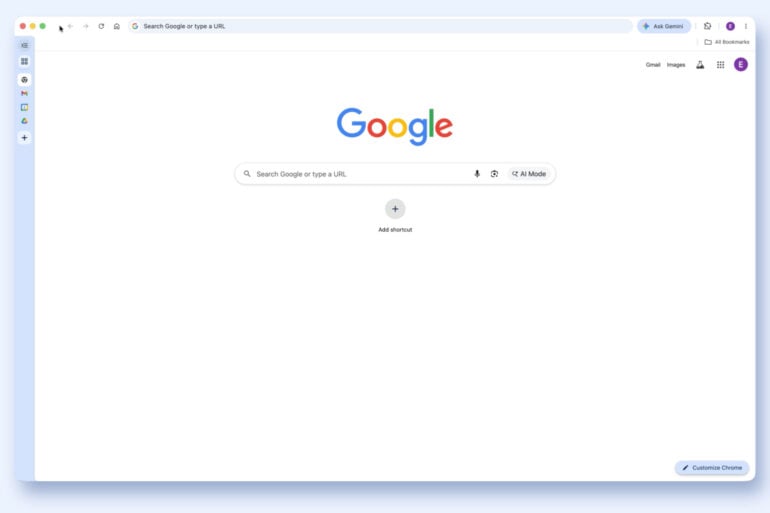
Sick of organising your web browser tabs the old-fashioned way? Google’s latest Chrome update now includes the option to turn on vertical tabs, changing where you see your many open Wikipedia pages.
As announced in a recent Google blog post, vertical tabs move open web pages from the top horizontal bar to a vertically-aligned column on the left-hand side of Chrome. You still see the URL at the top, along with other tools, but it frees up a bit of space.
Google is rolling out the feature now, so it’s not yet available to everyone. When it lands, you can enable vertical tabs by right-clicking the top of the Chrome window and then clicking ‘Show Tabs Vertically’.
Google is far from the first to implement the orientation change; other browsers have had similar functionality for years. As pointed out over at ZDNET, Microsoft Edge got vertical tabs in 2021, while Firefox, Arc, and other browsers are recent converts.
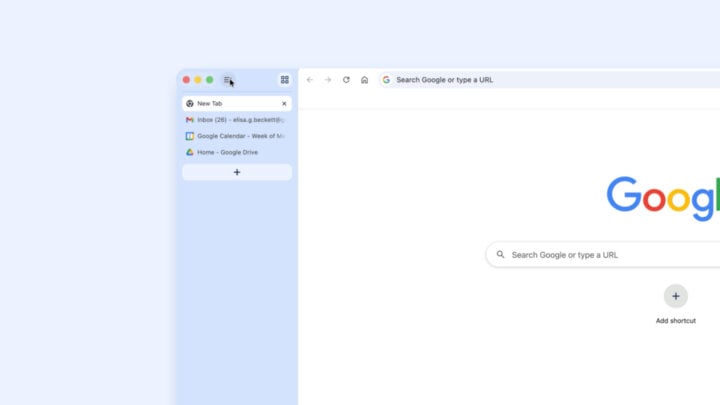
But Chrome getting vertical tabs, albeit later than most others, is a big deal. Various web analytics tools estimate Chrome usage to be roughly between 60 and 70 per cent. That adoption rate eclipses its nearest competitor, Apple’s Safari, which hovers somewhere around 20 per cent. In other words, plenty of people are about to experience vertical tabs for the first time.
For productivity sickos (affectionate), vertical tabs are seen as an easier way to manage dozens of webpages. But, as with anything, change is scary, and individual preference will ultimately determine the feature’s usefulness.
The other main update from Google is an update to Chrome’s reading mode. Described as having a “new full-page interface”, the updated reading mode brings a webpage’s text into focus, removing any visual distractions.
The post Google Chrome catches up to other browsers with handy feature appeared first on GadgetGuy.


0 comments:
Post a Comment