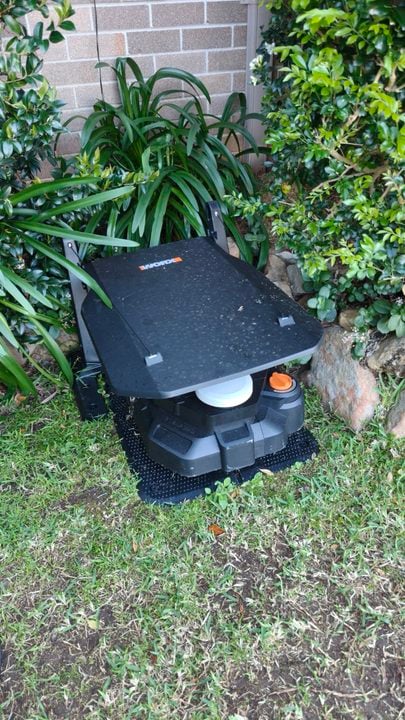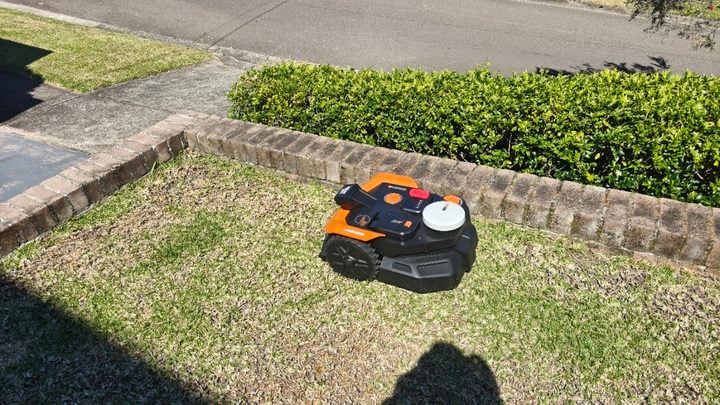
Australian yards, especially in regional areas, tend to be bigger than those in other parts of the world. Among other reasons, it’s partly why we see outdoor tech arrive here later than other regions. Roborock even rolled out a local trial late last year to test its robot mowers in Australian conditions. Now, it’s ready to bring its tech here, officially launching the RockMow and RockNeo range in Australia.
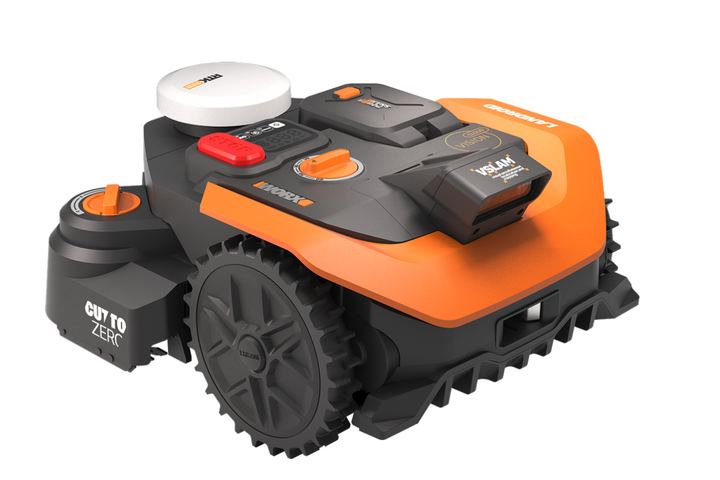
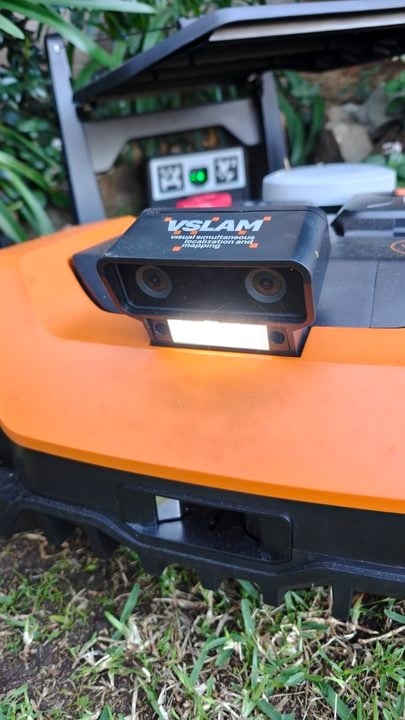
Starting at $1,409 for the cheapest model, Roborock’s robotic mowers start arriving on 1 September. Most models use a combination of navigation technologies, including visual simultaneous localisation and mapping (VSLAM) and real-time kinematic positioning (RTK) GPS tech, to manoeuvre around garden obstacles and keep your lawn looking tidy.
Previously announced at IFA last year, Roborock’s robotic lawnmowers come in three different tiers. At the entry-level is the ‘Q Series’, designed for smaller yards, starting at $1,409 for the RockNeo Q105 model. This specific robot covers 500m², while the $1,899 Q110 model covers up to 1,000m².
Next up is the ‘S Series’, consisting of the $1,999 RockMow S108 and $2,499 S115 models. These mowers cover yards up to 800m² and 1,500m², respectively. Roborock’s RockMow S robots also include a more powerful motor and electric height adjustment, among several other features.
RockMow Z series in action. Image: Roborock.
At the top of the tree is the RockMow Z series. The $3,499 RockMow Z120 is the only model with LiDAR navigation technology, covering lawns up to 2,000m². Roborock’s flagship device is the $4,999 RockMow Z150, which steps up the coverage to 5,000m². Both RockMows are 4WD models, able to navigate steeper 80% slopes.
Aussies keen to try Roborock’s mowers can find the range at Bunnings from next month.
Fridge whiteboards might once have been organised families’ tool of choice, but digital planners might be taking over. Local brand Laser wants to take it up to the overseas companies dominating the family planner niche, debuting a digital calendar without the dangling carrot of subscription-exclusive features.
Taking the form of a 15.6-inch 1080p touchscreen, the Laser digital calendar acts as a one-stop shop for managing a family’s activities. It can sync with multiple devices, displaying Google, Outlook, and iCloud calendar items together. In addition to the core calendar features, Laser’s device also offers task management, meal planning, and list features to help households run smoothly.
Launching at a discounted $179 price in Australia until 2 September, Laser’s digital calendar will then cost $229.95. For comparison, US company Skylight — popular for its digital planning devices — charges $529 for its 15-inch model, then $124.99 per year for the brand’s ‘Plus’ subscription service required for additional features.
With a built-in kickstand, the Laser digital calendar can be placed horizontally or vertically. Image: Laser.
“Families are looking for ways to streamline their busy daily lives, but we also believe that the last thing they need is another monthly bill to worry about,” said Chris Lau, Managing Director of Laser. “Unlike other alternatives on the market, the Laser Digital Calendar does not require an ongoing subscription, it’s a one-off purchase for ultimate family communication.”
When not used as a digital planner, the Laser calendar also doubles as a photo frame. Families can share images remotely from mobile devices, adding a personal touch to the calendar.
Laser’s digital calendar is now available via Big W, Amazon, and the company’s online store. For families keen to avoid yet another subscription, it could be a handy household planning tool.
Giving your old ride a high-tech overhaul, the DDPAI N5 Pro Dashcam keeps an eye on things – both in front and behind – when you’re behind the wheel.
Third-party dashcams have become a lot more sophisticated in the last few years, expanding their features far beyond simply keeping watch for accidents. This has been driven not just by tough competition, but also increasing consumer expectations when people see what’s available in the latest cars.
Case in point, now that my daughter drives to work and plays in a band, we recently bought a 10-year-old Mazda 6 to sit in the driveway alongside our 2023 Tesla Model Y. Sadly, the budget doesn’t stretch to two EVs.
While it’s fine to drive, the Mazda 6’s high-tech limitations are difficult to overlook when we’ve grown accustomed to the Tesla’s advanced remote access features such as dashcam, GPS tracking and sentry mode alerts if the alarm is triggered.
The ability to check if someone arrived safely at their destination, and an ETA on their arrival home, is both useful and reassuring.
That’s where the DDPAI N5 Pro Dashcam comes in, granting an old car a wide range of new high-tech features.
Some dashcams double as GPS navigation screens and are designed to sit on the dashboard, but the DDPAI N5 Pro Dashcam doesn’t feature a screen. It sits up high on the windscreen, behind the rear vision mirror, so it has a clear view of the road ahead.
Attaching the camera to the windscreen first requires cleaning the glass and attaching an electrostatic sticker. Then you peel the backing off the camera mount’s 3M sticky pad and stick it to the electrostatic sticker. This attaches much more firmly than relying on a suction cup.
You might run into issues if, like my Mazda 6, there is a large sensor cluster behind the rear vision mirror. I ended up placing the front dashcam to the left of the mirror, on the passenger side, so it still has a good view of the road without blocking the driver’s view.
The DDPAI N5 Pro Dashcam (right) and optional 4G module (left), installed to the left of the sensor cluster in a Mazda 6. Image: Adam Turner.The first close-up photo makes the camera look huge, but this shot gives better perspective. Image: Adam Turner.
The camera is powered via USB-C, with DDPAI providing long cables and a trim tool to neatly run the power cable out of sight around the window and down to the dashboard.
The basic $289 includes the front and rear camera, cables and a standard 12V car cigarette lighter USB power charger. There’s an optional $35 hardware kit to wire the cameras directly into the car.
When hardwired, IPS power management monitors vehicle battery voltage in real-time to prevent battery drain, automatically cutting power to the camera if the car’s battery drops below a preset threshold.
The dashcam features a supercapacitor, rather than a lithium battery, to provide short-term backup power if required.
As mentioned, the DDPAI N5 Pro also comes with a thumb-sized secondary camera for looking out the rear window. It’s not a real-time reversing camera, just a second set of eyes to capture anything that might happen behind you.
Once again, you can use the trim tool to neatly run the rear USB-C cable around the ceiling trim, connecting the rear camera to the main front camera. Once mounted, you can tilt both cameras to get a good view of the road.
The thumb-sized DDPAI N5 Pro rear camera. Once again, the photo makes it look much larger than it actually is. Image: Adam Turner.
There’s an optional $85 low-power radar parking monitor, which attaches to the front windscreen alongside the main camera. It actively watches your car while parked, looking both forward and back, to wake the camera from a low-power sleep state if it detects motion or impact.
Don’t be confused by the name; it’s not designed to warn you when the police are pointing a radar speed gun at your car.
There’s also an optional $129 4G ‘cloud box’ module, which is particularly tempting, as it adds the remote access, status and monitoring features that we’ve come to expect from new cars. The included 4G SIM comes with 30 days free trial, after which it costs $113.79 per year if you auto-renew. You can also pay for 30, 180 or 730 days.
That ongoing expense might be tough for those suffering from subscription overload. I begrudgingly pay Tesla $10 a month for 4G access, which offers a few extra features compared to this, so I guess $113.79 for a year isn’t too bad.
The camera mount features three USB-C plugs, plus the 4G module features USB-C passthrough so it can share the power port. Image: Adam Turner.
DDPAI N5 Pro Dashcam specifications and price
Video resolution
Front: 4K at 25/30 fps with HDR, 3K at 60 fps Rear: 2K at 25/30 fps
Lens
F1.8, 143° field of view
Video
MP4 AI.265 & H.264
Storage
64GB eMMC + optional MicroSD card up to 512GB
Connectivity
5.8GHz Wi-Fi 6 Bluetooth BLE 5.4 4G (optional)
Satellite
GPS, BDS, GLONASS, GALILEO, QZSS
Inertial Measurement Unit
Three axis
Radar module
Optional
Power
Standard car charger + 3.5m power cable Optional hardwire kit with IPS Power Management
With a 4K front camera and a 2K rear camera, the DDPAI N5 Pro Dashcam is designed to give you a crisp and clear view of exactly what happened out on the road.
The 143-degree wide field lens offers a slightly fish-eyed view of the world, which allows you to look off to the sides and not just straight ahead.
Meanwhile, the large f/1.8 aperture lens lets in a lot of light to help in low-light conditions. After dark, the cameras also take advantage of HDR and Night Vision 2.0 technology so you can still make out plenty of detail.
The front camera and 4G module, looking through the front windscreen. Image: Adam Turner.
The DDPAI mobile app lets you review videos or watch the live feed. You can access the camera locally via Bluetooth or Wi-Fi, with 5GHz Wi-Fi 6 for fast file transfers. There’s also remote access if you opt for the 4G module.
All of this means it’s easy to download videos and still images to your phone for sharing. The 4G module also lets you automatically upload to the cloud for safe-keeping.
As you’d expect with the high-quality camera, the resulting video clips are very impressive, even on an overcast day or after dark. The camera handles bright lights well, so you can still see plenty of detail elsewhere in the scene.
The view from the 4K front camera on an overcast day. Image: Adam Turner.The view from the 4K front camera at night. Image: Adam Turner.
Along with the time-stamped video, you can also turn your phone to see a dashboard of the car’s current status, or else the location of the car on the map.
These details are saved alongside the video, so you can view them during replays and not just the live feed. You can also see the car’s travel history on the map.
Screenshots: Adam Turner.
Looking at the app, the camera switch button at the top right lets you alternative been the front and rear camera, for a more complete view of what’s happening. There’s no picture-in-picture option.
While the video quality is very impressive, one surprise is that the DDPAI app doesn’t let you pinch to zoom in and make the most of that 4K resolution. To see fine details like a license plate number, you might need to export the video or a screenshot to your phone.
The front 4K camera offers plenty of detail when you take a screenshot and zoom in. Image: Adam Turner
The app lets you scroll back and forward through the video of entire journeys. To make it easier to find events of interest, it automatically takes a photo and marks the video timeline when it detects a collision or sudden braking. It also saves the 10 seconds before and after that event as a separate video file.
This is extremely handy, although, by default, I found the impact detection a little too sensitive – constantly triggered by the nasty speed humps in my suburb (admittedly not helped by the Mazda’s dodgy suspension). Thankfully, you can adjust the sensitivity in the advanced settings.
More than just a passive dashcam, the DDPAI N5 Pro also supports GPS geo-fencing to automatically notify you when the car enters or exits a certain area. Of course, this requires the 4G module.
Plus, the dashcam features Advanced Driver Assistance Systems (ADAS), which monitors road conditions in real-time and provides voice alerts.
These include a ‘driver fatigue’ alert, plus a ‘vehicle front start alert’ if you fail to notice the car in front of you has started moving. The latter can become annoying when stuck in traffic, plus it’s easily confused – piping up when I backed out of a car park because the car in front appeared to move forward.
You can disable the vehicle front start alert, but unfortunately you can’t replace it with a simple ‘bing’ similar to how my Tesla behaves.
Surprisingly, you don’t get forward collision warnings if the camera thinks you’re approaching a vehicle too quickly. You also miss out on lane drift alerts and speed warnings if you’re going faster than the signs on the roadside, which many modern cars support.
When you’re parked, the optional Radar Parking Monitoring mode stands guard in low-power mode, actively watching the surroundings. If it detects motion or an impact, it wakes the cameras to capture 10 seconds of video – which is where cloud storage comes in handy, in the event your car is stolen.
Who is the DDPAI N5 Pro Dashcam for?
The inclusion of both front and rear cameras makes the DDPAI N5 Pro Dashcam an impressive upgrade for old cars. The sharp resolution and great low-light performance ensure that you’ll be able to make out plenty of detail in the event of an incident.
It’s the 4G and radar options that make the N5 Pro Dashcam particularly attractive if you’re looking to bring modem smart features to your old ride, although you’ll need to keep paying for 4G access. Advanced Driver Assistance Systems features might be limited, but the ability to know where your car is and what’s happening around it certainly offers peace of mind.
DDPAI N5 Pro Dashcam
From and front and rear cameras to GPS tracking, the DDPAI N5 Pro Dashcam gives your old car some handy new features.
Features
9
Value for money
9
Performance
9
Ease of use
8.5
Design
9
Positives
Front and rear cameras
4K front resolution
Remote access if you're prepared to pay for ongoing 4G
Great range of optional extras
Negatives
Limited Advanced Driver Assistance Systems warnings
Samsung shook up its foldable phone range this year, introducing the smaller Galaxy Z Fold 8 form factor and bestowing the ‘Ultra’ label on its larger book-like handset. So far, it looks like the segmented approach has paid off, with Samsung claiming “double-digit growth” for foldable pre-orders compared to last year.
After the new Galaxy Z Fold 8 reviewed strongly, it arrived on Australian shelves last week, alongside the Galaxy Z Fold 8 Ultra. According to Nathan Rigger, Head of Product, Mobile Experience at Samsung Electronics Australia, the launch has seen a sizable uptake.
“This year’s Galaxy Z Fold range has grown by nearly 50% versus the previous generation,” Rigger said. “In fact, around 6 in 10 Galaxy Z Series purchases have come from customers upgrading from traditional candybar form factors, highlighting the growing appeal of foldables among a broader range of consumers.”
As first reported by EFTM‘s Trevor Long, Australian sales of Samsung’s Galaxy Z Fold 8 Ultra and Fold 8 phones are neck-and-neck. Of the two, the smaller Fold 8 is reportedly outselling the Ultra by the slimmest of margins.
“Galaxy Z Fold 8 has been a standout performer, accounting for 51% of the Z Fold 8 and Z Fold 8 Ultra mix with customer demand exceeding our expectations both in Australia and globally,” Rigger said.
This ratio might even come as a surprise to Samsung. Before launch, Rigger told GadgetGuy that the company expected the Z Fold 8 Ultra to “still be the number one selling foldable device”, while the Fold 8’s role was seen as “opening up appeal of foldable (phones) to a broader audience”.
On the future of foldable phones
Part of the equation might be price. Positioned as more of a content consumption phone, the $2,699 Z Fold 8 has a 7.6-inch inner display that minimises the unused space of widescreen media, while 4:3 content takes up the whole screen. Meanwhile, the newly rebranded $2,999 Z Fold 8 Ultra brandishes a bigger 8-inch main screen alongside a more powerful camera stack, including a telephoto lens.
According to Rigger, Galaxy S and Galaxy Z users mainly use the wide and ultra-wide cameras, hence the decision to include only two rear cameras on the Z Fold 8. By comparison, the Z Fold 8 Ultra’s camera array is almost on par with Samsung’s flagship Galaxy S26 Ultra handset.
“We could have added another camera, but that may have meant that the device may have had to be bigger, or that the battery would have been smaller,” Rigger said. “So what we’ve tried to do is find the right balance.”
The Galaxy Z Fold 8’s smaller form factor has helped drive more foldable phone sales. Image: Samsung.
One major feature Samsung’s new foldables didn’t inherit from the S26 Ultra, however, was the brand’s new privacy display technology. Built into the screen, the tech prevents onlookers from peeking over your shoulder to snoop on personal information or confidential work files.
Although 2026’s Galaxy Z phones don’t have the feature, it hasn’t been ruled out for future models.
“It comes down to an overall balance in terms of what is that experience that we’re trying to deliver,” Rigger said. “So, it could be possible that [the Galaxy Z range] had (a) privacy display, but that might have meant that we had to have compromised on portability or other areas or elements of the device.”
Seeing the launch sales of the Galaxy Z range will likely be music to the ears of the Samsung team, who see a lot of repeat buyers across its premium range.
“It’s funny because the more people are willing to pay for premium devices, the more frequently they’re willing to upgrade,” said Eric Chou, Vice President of Mobile Experience at Samsung Electronics Australia. “And so foldable being our most premium, we actually have a much shorter life cycle compared to the norm.”
“Once you have that experience with a foldable… you just want to get the next best thing. So that naturally shortens the upgrade cycle.”
It’s all but confirmed that Apple will announce its debut foldable iPhone soon. But precisely when, and what its launch will look like, remains a mystery. Recent reports suggest that Apple will reveal the foldable iPhone, dubbed the ‘iPhone Ultra’ by some, during its traditional September showcase. However, supply chain challenges could mean either limited availability at launch or a delayed launch entirely.
However, retail availability could be a separate issue. Several reports, including those from prominent tech leakers, suggest that the foldable iPhone will be in limited supply at launch. There’s also talk of a staggered rollout, where some regions, including Australia, might only receive stock months after a US launch. If correct, it would follow Apple’s approach with the Vision Pro headset, where it launched locally half a year later.
First look at the iPhone Fold dummy unit. It doesn't look like Apple will offer multiple colors, with white currently appearing to be the only option. What do you think? pic.twitter.com/olMzm6t6Ts
As reported as early as last year, this September will likely only see the announcements of Apple’s ‘Pro’ range of devices. The company is expected to announce the iPhone 18 Pro range, in addition to the foldable, while the base iPhone 18 reportedly won’t launch until 2027.
With September just around the corner, Apple is set to put an end to the rampant speculation, once and for all.
Australia’s highly competitive smart home market is getting even bigger, with Ezviz the latest major overseas brand to launch a new range on local shores. The brand’s latest gear includes security cameras, video doorbells, smart locks, and an all-in-one hub display.
Ezviz’s flagship model is the $549.95 HB90 Dual Kit outdoor camera, which has two 3K cameras with pan and tilt functionality. It also ships with a solar panel to support ongoing operation, provided it gets a good bit of sun.
Image: Ezviz.
Also joining the new local Ezviz range is the EP8 Ultra Interactive Video Doorbell. A bit different from most video doorbells, the $399.95 EP8 wields two cameras: one front-facing 3K lens for spotting visitors, and a 1080p downward-facing camera for monitoring your doorstep for packages.
Also unique to Ezviz’s doorbell is a built-in screen that shows interactive AI characters, like a panda or a dog, to greet visitors. You can also video call visitors if you can’t make it to the door. Ezviz also advertises an AI voice-changing feature, which could be useful when trying not to give away your identity to unwanted visitors.
Image: Ezviz.
The new range also includes several combinations of smart home devices in one. Chief among them is the $379.95 S10 Indoor Smart Video Camera, which functions as an indoor security camera, a Bluetooth speaker, and a four-inch touch-based digital frame. Separately, there’s also the $249.95 SD7 Smart Home Control Screen, a seven-inch touchscreen that manages and accesses the feeds of each Ezviz device from one location.
Ezviz’s S10 camera takes all-in-one to a new level. Image: Ezviz.
Headquartered in the US, Ezviz is a subsidiary of Chinese security giant Hikvision, with the sub-brand the reigning top smart home camera seller according to analyst firm IDC. Many of its devices support a combination of local storage, via microSD cards, and cloud storage, so you’re not locked into one option or the other.
Midea’s push into Australian homes is continuing full speed ahead, this time with the local launch of the 210 Front Load Washer and 210 Heat Pump Dryer.
Both laundry appliances aim to reduce the cost of washing and drying your dirty clothes, while taking out the guesswork of which settings to use. Midea’s MF210 washing machine, which supports up to 10kg laundry loads, carries a 4.5-star water efficiency rating, while the MD210 dryer, also a 10kg capacity appliance, boasts a 10-star energy rating.
When paired together, both appliances can sync operation cycles via Midea’s AutoLink technology. For example, after washing your clothes, the dryer can then automatically set a drying mode to match the washer’s mode.
Like many modern washing machines, the Midea 210 washer automatically includes a detergent dosage that matches the size and type of the clothes. It means all you need to do is fill the compartment with detergent, and the machine will do the rest. A built-in sensor for detecting laundry weight takes any rough estimations out of the equation.
Image: Midea.
Midea claims that the 210 dryer can dry a 3kg load of laundry in less than an hour. It uses a dual inverter heat pump, which the brand says provides quieter and more efficient drying performance. Handily, the dryer’s door has a reversible opening, so you can set it to open to either the right or the left depending on what fits your laundry.
Both appliances are out now in Australia via Bing Lee; Midea lists the RRP at $1,099 for the washer and $1,449 for the dryer. However, Bing Lee currently sells them for $899 and $1,199, respectively.
It feels like everything is so expensive these days, so anywhere you can save a few bucks is worth pursuing. With any ongoing utility plan — phone plans, internet plans, and energy plans — the worst thing you can do is blindly stick with the same provider, expecting some reward for loyalty. In fact, the opposite is true: the best way to save money on your utilities is to sign up with another provider.
Electricity isn’t cheap, so you stand to gain the most by tackling your energy bills every year. It doesn’t take long to compare your options and make the switch, either. With so much of the process available online, you could slash hundreds of dollars off your annual bills by the end of your lunch break.
But how much can you actually save by changing energy providers? It depends on a few different factors, like which plan you’re currently on and where you live. With a bit of guidance, it doesn’t take long to make the switch and keep more money in your bank account.
Dollars saved by changing energy providers
Some of the most recent data comes from the Australian Competition and Consumer Commission’s (ACCC) regular Electricity Market Inquiry reports. According to the ACCC’s December 2025 report, Australian households with average electricity usage could save between $100 and $250 per year by moving to a cheaper energy plan.
To drive home just how much misguided loyalty costs Aussies, the report also found that households on the same plan for three or more years pay $221 more on average each year than those on new plans.
“Loyalty penalties are alive and well in the retail electricity market, so the very best thing people can do to save money is to switch plans – either moving to a cheaper plan offered by their existing retailer or changing retailers,” said Anna Brakey, ACCC Commissioner, at the time of the report’s publication.
Savings differ between states, too. New South Wales households can potentially save $300 per year by swapping to a retailer’s cheapest plan, according to the report.
Perhaps most damningly, nearly 2.5 million Australian households were found to pay either equal to or more than a retailer’s default offer. Also known as the ‘Default Market Offer’, the default offer refers to the price cap energy providers can charge for electricity, as regulated by the Australian Government.
Default Market Offers aren’t necessarily the cheapest, which is why the Australian Energy Regulator encourages people to shop around for the best deal. When signing an initial contract with an energy provider, it’s usually on a temporarily discounted ‘market retail’ plan. Once this discounted period ends, you often start paying a higher price.
The long and short of it is that you should review your electricity plan every 12 months and either change plans or providers to save the most money.
How to switch your energy provider
One of the best starting points is the Australian Government-run Energy Made Easy website. It provides a quick comparison of electricity plans available in your area, and a checklist of information you need.
When comparing energy providers, it’s worth having one of your previous electricity bills on hand. Mainly so you have easy access to your National Metering Identifier (NMI), a number linked to your current connection that can be used to provide precise comparisons based on your energy usage.
Comparing energy providers is the best way to save on your power bills. Image: Tim Foster on Unsplash
The only main drawback to Energy Made Easy is that you can’t lock in a plan switch directly from the site. Once you’ve done your research, various third-party comparison sites, like Econnex, can help lock in a plan change.
If you want to save money, don’t get complacent. Retailers rely on customers not shopping around, thinking it’s too hard to change. In reality, it’s easy to do a quick market check to ensure you’re not getting ripped off.
If you find out that you’re already paying a competitive price, then at least you know for certain. But if that’s not the case, it’s time for change.
GadgetGuy occasionally uses affiliate links and may receive a small commission from purchased products.
You may no longer be able to charge a gadget on an aircraft using a power bank, but you can carry one with up to 100Wh (roughly 27,000 mAh) capacity in your hand luggage without needing airline approval. This will be ready to use on your travels as soon as you land. I recently tested the D-Link DPP-201, a 20,000mAh power bank capable of delivering up to 65W of power, enough to charge and power a laptop.
Box contents. Image: Angus Jones.
Weighing in at just over 400 grams and filling your hand (14 x 7 x 3 cm) when you hold it, this product is at the extreme end of pocketable. That said, it will recharge a smartphone up to five times and give you a couple of extra hours on your laptop, depending on the model.
Image: Angus Jones
I have sat here debating whether to take this power bank on an overseas trip, and, to be honest, I decided to take another model with half the capacity. This decision is the power bank’s weight versus how much power you think you might need beyond your gadgets’ built-in batteries. My reasoning is that I just want to ensure I can use my phone. However, if you want a laptop backup or multi-day power, then this is your power bank.
On the top of the bank are three USB sockets (two USB-C, one USB-A) which can charge three devices at once, but you cannot exceed 65W in total. You could use one of the USB-C sockets to get 65W out, but if you plugged in a second socket, the first would drop to 35W, and the second (and third) would each supply only 18W total. 18W is enough to charge a phone, though. You can also charge the power bank from one socket and output power to two gadgets at the same time, which is handy for charging the bank and gadgets simultaneously.
Power specifications Image: Angus Jones
With fast 65W charging, assuming you have a charger of that wattage or more, you will be fully recharged in approximately two hours. To keep track of capacity, an LED display on the front of the unit shows a percentage, activated by a button on the side.
For those who need extra power on the go that still fits in your pocket, the D-Link DPP-201 power bank is available online for $99.95 and stocked by selected resellers.
Choosing a new television in 2026 feels like a minefield of confusing acronyms. From OLED and RGB to QD Mini LED, it’s tough to know which television is best for your lounge room.
Beyond how much screen real estate you can get for your buck, there’s a lot to consider when buying a new television. The right size and display technology for your room, along with the best smart TV apps for your household, can make all the difference.
Which size TV should you get?
Big screens are breathtaking, but it’s possible to go overboard, so think twice before going beyond 65 inches. Vast screens can dominate a small room, although that’s become less objectionable these days.
Opting for a super-slim television to hang on the wall lets you go larger without making the room feel cramped.
Price-wise, the sweet spot for new televisions is 55 to 65 inches, beyond which you’re paying a premium for those extra inches. If you have an eye for detail but are on a tight budget, consider dropping a screen size so you can afford a better screen technology.
When it comes to resolution, at 55 inches and beyond you definitely want a 4K (3840 × 2160-pixel) panel. It’s tough to justify stepping up to 8K at this point. Also look for High Dynamic Range (HDR) to support the best colour and contrast from streaming services, preferably Dolby Vision or HDR 10+.
Opinions vary as to how close you should sit for the perfect viewing experience. The sharper the picture, the closer you might get: you want to be close enough to see the fine detail, but not so close you can see the individual pixels.
You might aim for 40 per cent (2.28m) for a more cinema-like experience, although the suggestion of 62 per cent (1.38m) for truly immersive IMAX-style viewing seems like overkill.
TV technologies explained
All modern television screens are made up of millions of pixels, which quickly change colour to create a moving picture. While there are plenty of acronyms to choose from, they are divided into two main camps: those with a backlight and those without.
The various kinds of Liquid Crystal Display (LCD) televisions feature a white backlight. This light shines through a grid of tiny LCD pixels to create an image.
These days, most LCD televisions have a bright but energy-efficient Light-Emitting Diode (LED) backlight, which is why they’re often called LED televisions.
Each LCD pixel is actually made up of a red, green and blue sub-pixel. These coloured sub-pixels filter the white backlight, so adjusting their transparency changes the brightness of their colour.
Combining the light from the three sub-pixels allows the pixel to appear as any colour.
Of course, every sub-pixel needs to completely block the backlight in order to create deep black. This is a big challenge for LCD screens and, if any light leaks through, the blacks look washed out.
It’s important to know what technology a TV uses so you can choose the right one for your needs. Image: Hisense.
Meanwhile, Organic Light-Emitting Diode (OLED) televisions don’t rely on a backlight. Instead, every individual self-illuminating OLED pixel produces its own white light.
This is why traditional OLEDs, from the likes of LG, are technically known as WOLEDs (we’ll get to Samsung’s rival “QD-OLED” in a minute).
Each OLED pixel shines its white light through red, green and blue filters to create colours, plus some OLEDs add a fourth white filter to boost the brightness.
Turn off an OLED pixel, and it’s perfectly black, even if the pixel beside it is brightly lit. This is why OLED produces such deep blacks.
OLED
OLED is considered the gold standard by many television aficionados. The downside is that it’s typically more expensive than all but the very best LED televisions.
OLED’s lack of a backlight lets it produce really deep blacks to deliver great contrast, plenty of detail in the shadows and accurate colours. It is also less prone to motion blur than the budget end of LED.
All of this makes OLED perfect for making the most of HDR content like Dolby Vision, which is often used with blockbuster 4K content. OLED also offers excellent viewing angles, so the picture doesn’t look washed out for people sitting off to the side.
OLED is popular among TV enthusiasts, but it’s usually more expensive. Image: Sony.
To be fair, newer screens like LG’s OLED evo and Samsung’s S90 range are brighter and feature anti-glare technology. Today’s OLEDs are also more resistant to the burn-in issues that plagued earlier models.
Basic LED screens are typically used in entry-level televisions. Budget options rely on a 50Hz refresh rate, but stepping up to 100 or 200Hz smooths out fast-moving action, like live sport.
The price and picture quality of an LED television mostly depend on the backlighting configuration that shines through the grid of LCD pixels.
Many thin LED televisions are “Edge-lit”, meaning the backlights shine in from the sides. Thicker LED televisions tend to be “Matrix-lit” or “Full-array backlit”, with an array of independent backlights sitting directly behind the pixels.
Full-array backlit LED breaks the backlight into independently controlled zones, which is known as “local dimming”. The ability to vary the backlight across the screen provides much better picture quality with greater contrast. The more zones, the better the picture.
You usually find basic LED in budget-level TVs, like LG’s older Nanocell series. Image: LG.
Imagine a zombie movie set in a graveyard, with a bright full moon above. A single-zone backlight is forced to strike a compromise when setting the brightness.
As a result, everything looks a bit grey: the moon isn’t super bright, while details are lost in the shadows. You might also notice an unwanted halo around the moon, as the backlight bleeds through into the dark sky.
Meanwhile, a full-array backlit LED screen can boost the brightness behind the moon but remain dim elsewhere. This ensures the moon looks brilliant while the shadows retain a deep black with plenty of detail, so you can still see stars in the sky and zombies lurking in wait.
These are some of the LED TVs you can get in Australia currently:
As the name suggests, a Mini-LED television improves the picture by breaking the full-array backlight into hundreds or even thousands of miniature LED lights.
This more granular backlighting allows Mini-LED to be super-precise when varying the brightness across the screen. Mini-LED also provides higher peak brightness, which improves contrast for HDR content.
The result is a very bright, vivid image without compromising too much on the blacks. You retain plenty of contrast and detail in the shadows, while the picture still looks good in a brightly lit room.
Keep in mind, those tiny LED backlights aren’t completely independent; they’re still grouped into zones. The number of zones varies considerably between brands and models, having a big impact on price and picture quality, so shop with care.
There’s more to a great LED television than a great backlight, with Quantum Dot technology taking colours to the next level.
Placing a Quantum Dot filter in front of the LCD pixels boosts brightness, while producing more accurate and vibrant colours. This allows the screen to display finer colour shades which would be lost on some televisions.
Some of LG’s older QNED TVs (like the pictured 2023 model) didn’t use Mini LEDs. Now, the entire range uses them. Image: Chris Button.
The technology is often referred to as QLED, while LG’s QNED televisions add a NanoCell filter in front of the Quantum Dots to absorb unwanted light wavelengths and purify colours.
Quantum Dots can be applied to LCD panels with all kinds of backlight technologies. It has even been applied to basic “edge-lit” LED televisions, which is why you’ll see a lot of variation in Quantum Dot prices and quality.
As the name suggests, a QD Mini LED television combines the benefits of a Mini LED backlight behind the pixels with a Quantum Dot layer in front.
As Mini LED becomes more commonplace, it’s becoming rare to find Quantum Dot televisions without it.
TCL’s SQD Mini LED takes things up a notch by using smaller “Super” Quantum Dots and advanced micro-lenses to deliver purer colours, while also boosting the number of local dimming zones in the backlight. It’s the brand’s alternative to RGB LED technology, which we’ll get to soon.
TCL’s new SQD-Mini LED technology is the brand’s answer to RGB LED. Image: TCL.
Aiming to offer the best of both worlds, television makers like Samsung and Sony add a Quantum Dot layer to their high-end OLED panels.
LG’s WOLED panels shine a white light through red, green, blue and white filters. Meanwhile, QD-OLED shines a blue light through red, green and blue filters with a Quantum Dot layer on top.
Depending on the size, some Samsung OLED TVs use QD-OLED technology. Image: Samsung.
The difference allows QD-OLED to boost brightness and increase the range of vibrant colours compared to traditional WOLED. To be fair, the very best WOLEDs have also improved when it comes to brightness and colours.
Samsung’s use of QD-OLED varies even within models. For example, the 55, 65 and 77-inch Samsung S95H use Samsung’s QD-OLED panels, while the 83-inch model actually uses LG’s advanced RGB Tandem WOLED panels.
One of the newest TV technologies, RGB LED televisions go one step beyond Mini-LED by swapping out the small white LED backlights for tiny clusters of red, green and blue LED lights.
This allows the backlight to produce any colour, not just white. This coloured light is still shone through a grid of LCD pixels, each with their own coloured sub-pixels. Together, this allows RGB LEDs to produce 95 to 100 per cent of the BT.2020 colour spectrum used with HDR content, to create a more vivid and lifelike picture.
RGB LED TVs promise deeper colours than traditional LED technology. Image: Samsung.
In comparison, most traditional LED and OLED televisions can only produce around 80 to 85 per cent of the BT.2020 colour spectrum.
The upside is that RGB LED doesn’t require a Quantum Dot layer to boost the colours. The downside is that some RGB LED televisions can experience colour bleed, when different coloured backlights spill into adjacent areas of the screen, but the best models retain clear colour separation and precision.
Combining the best of OLED and LED in one display, up-and-coming Micro-LED screens are considered by some the holy grail of televisions.
Micro-LED does away with the traditional LED backlight and the LCD pixels. Instead of filtering the backlight to create colours, Micro-LED relies on individual self-illuminating red, green and blue sub-pixels to create colour.
True Micro-LED technology is still a while away from entering the mainstream. Image: Hisense.
All of this allows Micro-LED to produce the very bright, vibrant and varied colours of LED, while still displaying the perfect blacks of OLED.
So far, only a handful of Micro-LED televisions have emerged, from the likes of Samsung, Sony and Hisense. As you’d expect, they’re painfully expensive, not for mainstream sale and are still out of reach for most lounge rooms.
Software and connectivity
Check out the smart TV features for streaming content
In the early days of streaming video, the best strategy was to focus on a television’s picture quality and then let your set-top boxes do the heavy lifting in terms of content.
These days, a premium Smart TV experience with all the streaming usual suspects is pretty standard if you stick with a premium brand television running Google TV, Android TV or Web OS. It’s a bit more hit-and-miss with budget models and lesser-known brands, so make sure you read the fine print.
Along with subscription and catch-up streaming services, Smart TV apps often include DLNA and Plex for streaming video around your home. This is more convenient than playing files from a USB stick.
Many televisions also support Apple AirPlay, Google Cast and Wi-Fi Direct for flinging content directly from your computer, smartphone or tablet. This is useful if your smart TV’s app library doesn’t support some of your niche tastes.
Before buying a new TV, check that it supports the streaming apps you want to use. Image: LG.
It’s worth checking how many years of software updates a television will receive. Samsung and LG recently started promising multiple years of updates, similar to phones, which means you’re more likely to get support for new apps, services and standards over time.
Keep in mind, many modern smart televisions collect a lot of data about your viewing habits, such as Automatic Content Recognition (ACR). Like Shazam for video, ACR monitors everything on your screen – even coming from external devices – in order to deliver more targeted advertising.
To disable this kind of tracking, dive into the advanced settings and look for features like Viewing Information Services, Live Plus, Home Promotion and Content Recommendation.
Consider what you want to plug into the TV
While smart TVs have become a one-stop shop for home entertainment, it’s still important to check the HDMI digital video inputs. Especially if you wish to plug in disc players, game consoles, streaming dongles or other set-top boxes.
If you don’t want to rely on AirPlay and/or Google Cast to stream from your handheld devices, you might want to plug a Google TV Streamer 4K, Apple TV, Amazon Fire TV or Fetch TV recorder into the television’s HDMI port, so you can access a wider range of services.
Meanwhile, gamers should look for HDMI 2.1 ports that support 4K resolution and 120Hz refresh rate. Also look for “Game Mode” Variable Refresh Rate (VVR) and AMD FreeSync, which can adjust the refresh rate on the fly to optimise the picture, plus Auto Low-Latency Mode (ALLM) to reduce input lag.
You only need to worry about old analogue video inputs on your new television, such as composite and component video, if you’re looking to connect older devices like a classic Nintendo Wii. Alternatively, you could buy an analogue-to-HDMI adapter.
Of course, a great picture needs to be supported by great sound. If you want to hook up a soundbar or home cinema surround sound, look for a television which matches the capabilities of your audio gear.
HDMI ARC (Audio Return Channel) eliminates the need for a separate audio cable when sending sound and video between devices. HDMI eARC is a more “enhanced” HDMI 2.1 feature which can handle the high-resolution uncompressed audio used by some high-end audio standards.
Once again, you only need to worry about older audio ports, like coax and optical digital, if you’re looking to connect older audio gear that doesn’t support HDMI.
GadgetGuy occasionally uses affiliate links and may receive a small commission from purchased products.