This is default featured slide 1 title

Go to Blogger edit html and find these sentences.Now replace these sentences with your own descriptions.

This is default featured slide 2 title

Go to Blogger edit html and find these sentences.Now replace these sentences with your own descriptions.

This is default featured slide 3 title

Go to Blogger edit html and find these sentences.Now replace these sentences with your own descriptions.

This is default featured slide 4 title

Go to Blogger edit html and find these sentences.Now replace these sentences with your own descriptions.

This is default featured slide 5 title

Go to Blogger edit html and find these sentences.Now replace these sentences with your own descriptions.

Sunday, 6 February 2022

PNY XLR8 SSD – high performance storage for your PlayStation

8.5

Games are getting pretty huge these days. And not just in popularity, we mean their actual size on disk. My copy of Far Cry 6, for example is a massive 104 gigabytes. Then, I need another 105GB for Read Dead Redemption 2, Destiny 2 wants 90 and Cyber Punk 2077 is content to occupy just 57 gigabytes. With most new consoles equipped with only 1 terabyte of storage, you’ll need to think adding some more space to house more than 7 or 8 games at one time.

With the Xbox Series X and S consoles, you can buy a specialised external memory module that plugs into the back that will do the trick. However, with the Playstation 5, it’s a bit more complicated. While you can connect an external hard drive to copy games to and from Sony’s internal M.2 type storage, these are not fast enough to actually run games from. (You can run some PS4 games from an external drive, however, but not native PS5 games).

To expand your internal storage, you’ll need specialised M.2 memory that’s fast enough to handle the latest generation of games. Not all M.2 memory will work either. Enter the world of PNY, a leading supplier of flash memory cards since 1985. We tested out its 2 terabyte XLR8 CS3140 model ($499) and matching heatsink ($30) to see how they performed.

Ultra fast storage

First off, the XLR8 CS3140 is a M.2 NVMe Gen 4×4 solid state drive. PNY has designed it to tick all of the PS5’s memory requirements. For those with PCs, the XLR8 CS3140 supports the NVMe Gen 4.0 protocol so it can work on them too, with sequential speeds rated up to 7,500MB/s Read and 6,850MB/s Write. (A NVMe PCIe Gen 4×4 host device is required to attain these speeds.)

There’s also a matching heatsink cover, which is used to draw heat away from the SSD and transfer it towards the PS5’s outer case. This is called the ‘XLR8 PS5 SSD Cover with Integrated Heatsink’.

Oh, did we mention that you’ll need to open up your PS5 to upgrade your storage? Yes, that’s right, there are no external plug-in slot like the XBox, so prepare to use a screwdriver.

XLR8 CS3140 M.2 SSD features:

  • M.2 NVMe Gen 4×4 Solid State Drive
  • Designed for gamers
  • Comes in 1, 2 and 4 terabytes
  • 13 times faster than SATA based SSDs
  • Transfer speed up to 7,500 MB/s
  • Faster boot-up and quicker application launch
  • Low power consumption, cool and quiet operation
  • Backed by a 5-year warranty
  • Price: $289 (1TB), $499 (2TB), $TBA (4TB)

Installation

Installing the XLR8 CS3140 isn’t too difficult, and takes about 10 minutes. The first trick is to figure out how to remove the PS5’s case without breaking anything. You’ll need to get the right angle and pop it off. Once inside, there is a dedicated space for memory expansion by the way of a M.2 memory slot. This is covered by a metal blanking plate, with one screw to remove.

The next part is to install the XLR8 drive by inserting it into the connector socket at one end of the slot. Hopefully you’ll feel a ‘click’ as this slides into place. The last step is to add the PNY heatsink cover on top of the drive but you’ll need to apply the thermal-conduction pad first by peeling off its plastic film. Then, it will stick on top of the memory and fill up the entire space where the blanking plate was. Since there’s no room for the cover plate, you just use the supplied, longer screw to fix everything in place. Then put the PS5’s outer cover back on, boot up and you’re good to go. No additional software or updates are needed for your PS5, assuming that you are running the latest software.

With it all installed, you can then go to your PS5’s storage menu and copy games to and from your PNY XLR8 drive. This is labelled ‘M.2 SSD Storage’, and you’ll also see ‘Console Storage’ and ‘USB Extended Storage’ as copy destinations. There’s also an Installation Location selector so you can set the M.2 SSD (XLR8) as your default destination when new games are installed.

Performance

In order to be worth the money, the PNY XLR8 must be at least as fast as the Sony’s own internal M.2 SSD. Otherwise, games won’t open as quickly, you won’t be able to load in new parts of gaming worlds without stuttering, etc. Thankfully, it was quite difficult to discern any major difference between games running from the PS5’s original memory versus the PNY’s SSD. We tried booting up a number of games on both drives such as Returnal, Marvel’s Spider-Man and Skyrim. We found them to be about 1 second faster to load on the PNY’s M.2 SSD.

Transfer speeds

In terms of copying from drive to drive, the story wasn’t quite as straightforward. Copying to the PNY M.2 SSD was very fast. Transferring to Sony’s internal SSD was considerably slower. For example, Returnal, which is 58.8GB, transferred from internal storage to the PNY’s M.2 in just 44 seconds. However, copying it back to the Sony drive storage took much, much longer at 4 minutes and 27 seconds. This was similar to other transfers between drives with Marvel’s Spider-Man and Skyrim. See the table below for a summary:

Game Size Transfer to Sony Transfer to PNY Boot up Sony Boot up PNY
Returnal (Native PS5) 58.8GB 4m 27s 44 sec 22 sec 21 sec
Skyrim (PS5 version) 15.6GB 1m 10s 12 sec 10 sec 10 sec
Marvel’s Spider-Man (PS4) 67GB 5m 12s 45 sec 32 sec 31 sec

With a quoted sequential read speed of 7,500MB/s and write speed up to 6,850MB/s, the PNY M.2 SSD is very fast, particularly so compared to the 5,500MB/s read and write speeds of Sony’s SSD. This could be why transfers to the Sony SSD took longer, however, one would think that its write speed would throttle the transfers to the faster PNY drive.

Keeping cool, looking good

SSD memory will perform its best when kept cool, and the PNY XLR8 PS5 SSD cover with integrated heatsink is designed to do just that. It has 45 internal cooling fins inside, which have a black anodised surface to dissipate heat. The fins rest on a 6mm aluminium block and beneath this is a conductive thermal pad. PNY claims that the heat dissipation is more than 40 percent, which in turn prevents the SSD from reaching a throttling threshold that would add lag to your games. This all sounds good, and hey, the cover looks pretty cool with its black and sliver stripes. We certainly didn’t experience any overheating issues during the month of testing where all of our PS5 games were running from our 2TB test unit.
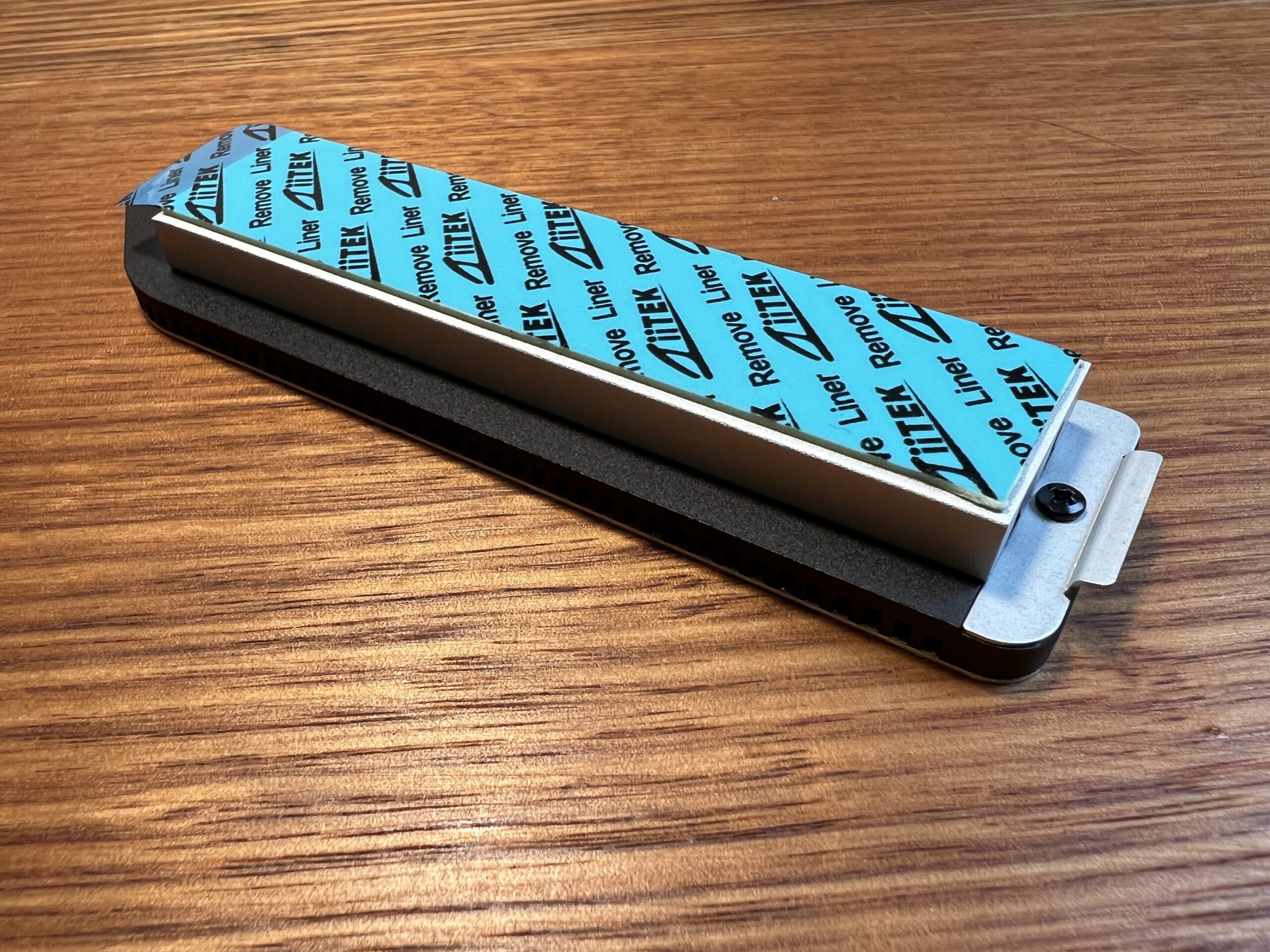
You can buy the PS5 SSD Cover with Integrated Heatsink separately, however, it’s recommended to be used with the XLR8 CS3140 SSD.

GadgetGuy’s take

If you need to expand your PS5’s storage, then the XLR8 is a fast, reliable option. You should 100% include the PNY PS5 SSD Cover with integrated heatsink to optimise performance and extend the life of the SSD. Performance as at least as good as Sony’s internal drive, if not better, so you won’t be left wanting in terms of quick boots, in game performance or game transfers.

PLY XLR8 CS3140 M.2 NVMe Gen 4 SSD
A high-performance memory upgrade for your PlayStation 5 that also features a cool-looking and heatsink for optimum performance.
Features
8
Value for money
8
Performance
8.8
Ease of use
8.5
Design
9
Positives
Very fast 7,500MB/sec read performance, faster than PS5's SSD
Built for PS5s so it ticks all the compatibility boxes
Well designed heatsink, with quality materials for keeping cool
Can be used on PCs too
5 year warranty (on SSD and Heatsink)
Negatives
SSD and heatsink are separate kits and should be sold in a pack
8.5

The post PNY XLR8 SSD – high performance storage for your PlayStation appeared first on GadgetGuy.


Thursday, 3 February 2022

Twitter Articles hidden feature points to long-form tweets

Twitter users with a lot on their mind might soon have the chance to cram much more into their tweets via the new Twitter Articles feature.

Brevity is the soul of wit, and it has also been the soul of Twitter since the micro-blogging service launched in 2007 with a 140-character limit. The maximum length of tweets doubled to 280 characters in 2018. Even this still forces Twitter users to make their tweets short and sweet, which is both a blessing and a curse.

Twitter users may soon be able to wax lyrical thanks to a currently hidden Twitter Articles feature, uncovered by serial Twitter tipster Jane Manchun Wong.

Details are still sketchy, but Wong uncovered a new Twitter Articles tab, similar to the Spaces and Explore tabs. It appears to provide the ability to write longer blog posts within the Twitter app and then share them, in some form, via a tweet.

Twitter Articles could offer users an alternative to writing long tweetstorms and threads, posting links to longer articles hosted elsewhere or posting images of passages of text. Currently, similar functionality is provided by third-party services such as TwitLonger.

Twitter declined to confirm or deny the existence of Twitter Articles, with a spokesperson only saying: “We’re always looking into new ways to help people start and engage in conversations on Twitter. We’ll share more about our work here soon.”

The news comes as eagle-eyed Twitter uses recently uncovered details of several new features. Twitter Flocks will allow users to limit the visibility of their tweets to a small group of people, similar to Instagram’s Close Friends feature. Twitter is also testing a new search bar in the Home tab, as well as “Quote Tweet with reaction” videos on iOS.

It’s possible that Twitter Articles and other new features could only be available to some users, such as Twitter Blue subscribers.

The post Twitter Articles hidden feature points to long-form tweets appeared first on GadgetGuy.


Wednesday, 2 February 2022

The MoeBot S5 Robotic Lawn Mower Video

GadgetGuy’s Valens Quinn is here to show you the latest in lawn mowing tech, the MoeBot S5! Get rid of those old whipper snippers and join the electrical revolution of gardening by watching our latest video below:

Transcript

Hi there, Val Quinn from GadgetGuy. Summer is all about enjoying time outside with family and friends and of course we want our lawns to look great too, but who’s got the time for all that work? Well, I might just have a gadget that could make mowing the lawn a thing of the past!

When it comes to mowing our lawns the old way of thinking was to let the grass grow long and then cut it. However, it’s much healthier for your lawn to cut it more often, even weekly, plus it helps reduce the spread of weeds and the result a much greener lawn. But who has the time for weekly mowing? Well did you know that robotic lawnmowers can cut your lawn regularly, completely automatically and keep it much healthier and looking better. So how do they work and is it time to scrap the old grass basher?

Robotic lawn mowers like the MoeBot S5 need two main things; the first is a boundary wire and the second is a charging station. The boundary wire defines the area to be cut and what to avoid such as garden beds and planters. The MoeBot then moves in a specialized pattern within the wires which is more efficient and saves battery life. The blades and cutting mechanism are different too, instead of steel blades that whack the grass at speed creating the illusion of a cut the MoeBot uses double-sided razor blades that cut grass into a fine mulch. This fertilizes your lawn making it greener and there’s no grass to pick up. As it’s electric, the charging station tops up the lithium-ion battery between mowing sessions and if the battery is getting low the MoeBot will simply return to its charger automatically and continue mowing your lawn until it’s finished. You can schedule automatic mowing using the MoeBot app or start a mowing session manually. As the MoeBot is much lighter than a conventional lawnmower, it doesn’t leave tracks and even works well in the wet.

I have MoeBot’s latest model here to unbox so let’s take a look inside and get it set up. In the box you’ll find the MoeBot S5 itself, as well as the charging station. Along with this you’ll have 100 meters of boundary wire which is wrapped up in a spool. To secure the boundary wire you’ll also get a bag full of pegs and there’s a cable splicing kit in case you need to reconnect the boundary wire. In addition to that you’ll find some tools to help you secure the charging station into the earth as well as some instructions. Lastly there’s a handy 35 centimetre ruler which is cut out of cardboard which will help you secure the boundary wire to the edges of your property.

And there you have it, the MoeBot is easy to set up and get rolling! There’s detailed instructions in the box and on the Robot My Life website. For more complex lawn, MoeBot’s team of professionals can also come out and help you install and give you a hand. I’ve also put together a few answers to some commonly asked questions about the MoeBot S5.

How easy is it to set a schedule?

You can set up a mowing schedule quite easily. All you have to do is either open the app, or you can do it directly from the LCD panel on the MoeBot itself. You’ll see seven days and then from there you can schedule the amount of time each day and when you’d like it to start and finish mowing. So you can do that just once and then have this repeat each week as you go.

What happens if it bumps into something?

The MoeBot has both collision sensors as well as lift sensors and a large stop button right on the top of the device, but it’s really designed not to bump into things or if it does, it will switch the sensor and it will turn off the mower immediately.

Is it noisy? Can you mow at night?

Compared to conventional mowers the MoeBot is incredibly quiet. It’s actually only about 65 decibels, which is about the sound of an average conversation. This means you can mow at night without disturbing your neighbours, and it doesn’t need to see either because it just senses where it’s going so you can wake up the next morning and have a freshly cut lawn.

Will it cut my front and back yard?

You don’t need two MoeBots if you have a front yard and a backyard. You can create an isolated cutting zone where the MoeBot will use your boundary wire to move to a second zone. Otherwise you can have another base station if you want to buy that separate accessory, and have it run from two separate base stations.

The MoeBot S5 is a great way to free yourself from the toils of weekly mowing, while delivering a healthy and immaculate looking lawn all the time. And this will cost you less than a thousand dollars! So no more petrol, no pull cords, lawn clipping clean-up, so you can get back to doing the things you love instead.

More lawn care news and reviews on GadgetGuy

The post The MoeBot S5 Robotic Lawn Mower Video appeared first on GadgetGuy.


Tuesday, 1 February 2022

NuraTrue earbuds – tuned for how you hear (review)

8.3

Aussie company Nura has built a strong reputation for its personalised sound technology. Now, with the release of NuraTrue, the company applying its special sauce to its first true wireless earbuds. The question is, can Nura’s signature personalised sound technology give it a leg up over more established buds like Apple’s AirPods Pro and Sony’s WF-1000XM4s?  

Design: Stellar fit 

With a large flat disc design, NuraTrue is distinctive enough to set the buds apart from rivals. The large circular housing also serves a practical purpose in that it is entirely touch sensitive, allowing you to execute playback commands with the tap of a finger.  The touch controls are highly responsive and I had no issues with accidental touches, which isn’t something I can say about other wireless buds. 

What’s more, they are fully customisable so I can finally set them up for my preferences. Like every person should, I assigned the double tap of the left earbud to play the previous track, while double tapping the right skips to the next song. 

In terms of colour options, NuraTrue doesn’t deviate from the matte black colour scheme. However if you’re after a bit more personality, there is a striking ‘Fool’s Gold’ version that Nura is selling for a limited time. This is the model I reviewed. 

NuraTrue’s large plate design means the earbuds will cover most of your ears. Thankfully, their relatively narrow profile means they won’t stick out of your ears as much as some other wireless buds. Included in the box is a generous array of eartips and wingtips including 5 different sizes of eartips plus 2 wings. This as opposed to the standard set of 3 you normally get with other buds making it easier to find your perfect fit. 

NuraTrue mightn’t be the most comfortable pair of in-ear buds I’ve tried but they are easily one of the most secure, staying firmly in place during strenuous exercise. If you’re like me and have issues with earbuds actually falling out, then NuraTrue won’t disappoint in this department. 

Man wearing NuraTrue earbuds showing side of face and ears
NuraTrue offers a distinct design with a stellar fit

Features: Highly personalised

NuraTrue ticks all the boxes you would expect for a $300 pair of wireless earbuds including active noise cancellation (ANC), touch controls, and transparency mode for hearing your surrounds without removing your earbuds. They are IPX4 water resistant and have a 24 hour battery life. (You get 6 hours from the buds themselves with a further 18 hours provided by the charging case). 

The buds do lack support for more advanced codecs, namely aptx HD/LL or LDAC, which means high resolution audio streaming is off the menu. Wireless charging is also curiously absent, unlike other brands in this price range. Being able to wirelessly charge Bluetooth buds from my smartphone has saved me on more than a few occasions so its absence here is definitely felt. 

The lack of hi-res audio certification is somewhat forgivable given the buds are tailoring sound specifically for your personal hearing requirements, which I’d argue has more of an impact on the listening experience. 

Close up of Nura earbuds showing details

Sound quality: Your mileage may vary 

For the uninitiated, Nura’s personalised sound technology uses a combination of soundwaves and ultra-sensitive microphones to analyse how your eardrums respond to incoming sound. It then uses this data to create a bespoke EQ profile, tuned to your ears. 

The first time you connect to the Nura app, the buds will undergo a minute long hearing test that consists of playing a series of frequencies and sounds to measure your ears’ sonic responses. After which, a sample song is played to demonstrate the differences between the default neutral profile and the custom-tuned and personalised version. The difference can really be night and day.

The point is that we all have different sensitivities to high, medium and low tones, which is why two people can listen to the same song but hear different elements. The nice thing is that the Nura app will generate a visual reference of your unique hearing profile, showing where your musical black spots are. For example, if you’re particularly sensitive to low-end frequencies but lack sensitivity to the mids and highs, the bass will be dialled back while mid and high frequencies will be elevated to compensate. The objective is to give you a better, more balanced sound overall. 

I ran the test multiple times and the results were always consistent, but they are also influenced by how well sound is being isolated by the eartips. This means that you will need to make sure you generate a fresh profile if and when you change eartips – but otherwise it’s set and forget.  

Due to the unique nature of the sound profiles that NuraTrue creates, everyone is going to experience music differently when using them. Nura clearly acknowledges this by offering a 30-day satisfaction guarantee, allowing you to try them for yourself to see whether the personalised profile works for you.

In my case, the personalised profile was a noticeable improvement over the default neutral profile and mostly matched the sound quality of my Samsung Galaxy Buds Pro and Sony WF-1000XM4’s, but didn’t trump them. The vocals never sounded too harsh, but they were a bit too tame for my tastes and lacked a bit of sparkle. Similarly, while the bass was a little flat,  you can give it a boost with an ‘immersion mode’ slider. 

Call quality was decent without being exceptional, which is par for the course for wireless earbuds. 

NuraTrue earbuds in their charging case
NuraTrue offers a level of personalised sound that is unmatched by rivals but the results can be mixed

GadgetGuy’s take 

In a market crowded with options, you have to do something truly unique to stand out. The NuraTrue wireless earbuds certainly have enough going for it to warrant your interest. While the personalised hearing profile has the potential to elevate the sound quality above its more established rivals, your experience may vary. Nura does at least allow you to try them for yourself with its generous return policy, so you can at least see if they work for you. 

For me, the bigger selling point turned out to be the rock solid fit and fully customisable touch controls, which are areas that most wireless earbuds fail to deliver on.

More headphone and earbud news and reviews on GadgetGuy

NuraTrue wireless earbuds
A great fit and custom tuned to the unique traits of your ear are two great reasons to give the NuraTrue wireless earbuds a go.
Features
8
Value for money
8
Performance
7.8
Ease of use
9
Design
8.5
Positives
Rock solid fit
Fully customisable touch controls
Unique personalised sound technology
Generous selection of tips included
Negatives
Sound quality matches but doesn't exceed its more established rivals
Lacks support for aptx HD or LDAC
No wireless charging
8.3

The post NuraTrue earbuds – tuned for how you hear (review) appeared first on GadgetGuy.


HTC Vive Flow – VR meets sunglasses (review)

6.5

The HTC Vive Flow is a new standalone VR headset aimed at people who want a small and lightweight device that can provide an immersive ‘virtual reality’ viewing experience. They can use it for consuming media, socialising with friends and colleagues. They can even use it to relax and calm the mind with specialised VR apps. The HTC Vive Flow is not aimed at gamers or meant to be a competitor to the Oculus Quest 2. 

HTC is hoping that the Vive Flow will find a new market in VR and in some ways fill the gap left open by the now defunct Oculus Go and Google Daydream platforms. So how does it fare? 

Lady sitting up wearing Vive Flow VR headset, holding smartphone
The ‘sunglasses’ design make the Vive Flow lighter and more portable than other VR headsets

Light by design

At just 189 grams, the Vive Flow is by far the lightest VR headset on the market. They weigh significantly less than the 571 grams of the Oculus Quest 2. Part of the reason HTC was able to get the size and weight down is the lack of an onboard battery, which means you will need to keep the Flow tethered to a portable power bank. For reference, HTC estimates five hours of continuous use with a 10,000mAh power bank. 

The Flow worked with pretty much every power bank I had laying around, and even worked fine in my car’s USB port. HTC says it should also work when connected to a USB port on an airline seat armrest.

Fit and comfort

The Flow’s ‘sunglasses’ form factor doesn’t require a top head strap. This means you can use the Vive Flow while wearing a cap, and it won’t mess up your hair.

The side arms are designed to press against your head above your ears rather than rest on your ears like a traditional pair of glasses. This design can place an uncomfortable amount of pressure on larger head sizes. I found that the pressure mostly subsided after a few days as the arms stretched and adapted to my head.  

With no other supporting straps, I also found that the slightest of head movements would cause the arms to slide down. The is compounded by the small sweet spot of the Flow’s displays, meaning I had to regularly adjust the headset to maintain a clear picture. 

A really nice feature of the Flow is that you don’t need to wear glasses. The built in diopter allows you to adjust each lens to match that of your prescription. 

Included in the box are some fabric eye shields that slap on magnetically and are designed to help block out light. If you want to be more aware of what’s going on around you there’s the option of removing the eye shields and just using the nose insert. (It wasn’t included with our review unit so I wasn’t able to test how this looked).

Hardware features

The Flow is powered by Qualcomm’s XR1 chipset which is a last generation chip found on the original Oculus Quest. It has a respectable 64GB of onboard storage with no support for expansion. To keep everything running cool, there’s a fan on board that was rather loud in our review unit. 

The arms of the Flow also house the audio speakers, which were largely comparable to the ones found on the Quest 2 in terms of volume and spatial audio support. The Vive Flow also connects to Bluetooth headphones, which is a must for when you’re out in public. 

Vive Flow VR headset - rear view
The arms of the Vive Flow can be folded away just like a pair of regular sunglasses. Those who wear prescription glasses needn’t fret thanks to the built-in diopter adjustment

Viewing experience 

The Vive Flow uses pancake lenses as opposed to the thick and bulkier fresnel lenses normally found in most VR headsets today. Underneath the lenses is a 3.2K resolution LCD display (1600×1600 pixels per eye). This is technically lower resolution than the Quest 2, with text in particular looking noticeably less sharp. The field of view is also narrower at 100 degrees and the display runs slower at 75Hz. 

Clearly, HTC had to make some tradeoffs on the display front to accommodate the pancake lenses and to keep battery consumption to a minimum. Given the Vive’s mostly passive content focus, the paired back display does an adequate enough job. 

Double tapping a button on the headset switches to passthrough mode, but as with the Quest 2, the ‘outside’ view is in black and white and in low resolution. Admittedly, it’s less of an issue on the Vive Flow since the glasses form factor makes it quick and easy to physically flip them up and interact with the real world. 

Man relaxing in Vive headset.
The lightweight design means you can lie down in bed and enjoy your own personal cinema-sized VR screen

Clunky controls

For navigating in VR, the Vive Flow doesn’t come with any external controllers and instead relies on your smartphone as a virtual pointer. The smartphone interface is cordoned off into four sections, each representing a different virtual button. But since you can’t feel the virtual buttons, I regularly found myself pressing the wrong thing. The pointer tracking can also drift relative to the actual position of your phone, forcing an awkward wrist bend to make a selection.

The phone-control approach is downright cumbersome and it makes interacting with the Vive Flow a chore. HTC says that controller-free hand tracking is coming at some point in the future but wouldn’t provide a timeframe. (Customers should be wary of buying a tech product based on the promise of future software updates). 

Vive Flow VR smartphone control.
The Vive Flow uses your smartphone as the controller and as a means to mirror content from streaming services like Netflix

Lacking content

The Vive Flow has an onboard app store. HTC claims there are more than 100 supported games and apps but most feel like Oculus Go or Google Cardboard-level content from years ago. Some apps don’t work properly on the Flow due to controller tracking issues, so the collection needs better curation.

The exception is the handful of guided meditation apps such as Tripp and Cosmic Flow. These do a convincing job of transporting you to a more tranquil environment with serene music while following along to breathing exercises.  

Headsets like the Quest 2 are becoming an increasingly popular and fun way to stay in shape. There are a number of fitness-focused VR apps hitting the market and the Vive Flow’s lighter and more streamlined form factor would’ve made it ideal for this purpose. Unfortunately, the limited input scheme and the loose fitting design means the Vive Flow is ill equipped to handle more rigorous applications. This seems like a missed opportunity given the Flow’s focus on health and wellness. 

Entertainment and movies

There are apps for streaming 360 video content but the heavy hitters of the streaming world such as Netflix, YouTube and Amazon Prime aren’t available natively on the platform. 

HTC’s solution is to mirror your phone’s screen to the Flow via Miracast. The feature works surprisingly well. Regardless of whether I was beaming Netflix, YouTube, Kayo, Disney Plus or Prime Video, the audio always remained in sync and the quality of the video looked sharp enough on the cinema-sized VR screen. 

However, you will need to have an Android phone that supports Miracast for this feature to work (iPhones aren’t supported). HTC maintains a list of compatible smartphone models on its website.  

Lady meditating in headset.
Health and wellness is the main focus for the Vive Flow and apps like Tripp and Cosmic Flow do a nice job transporting you to a more tranquil environment for guided mediation in VR

GadgetGuy’s take

Modeled after a pair of sunglasses, the Vive Flow represents the start of an exciting new breed of VR hardware that does away with a lot of the bulk and heft that comes with traditional headsets. Outside of a few ergonomic issues with the fit, the Vive Flow largely nails it when it comes to form factor, delivering a headset that is easy to carry around and wear as needed. 

However, there’s no getting around the fact that the $479 Oculus Quest 2 does everything the Flow can do and much more, albeit with a more traditional in design. 

The Flow lacks proper motion tracked controllers or any form of hand tracking, has limited apps and provides an underpowered VR experience. With this in mind, the Vive Flow needs to do more to justify its lofty price tag of $749. 

More HTC news and reviews on Gadgetguy

HTC Vive Flow
The Vive Flow needs to do more to justify its lofty price tag of $749. 
Features
5.5
Value for money
4.5
Performance
6.4
Ease of use
6.5
Design
7.5
Positives
Lightweight sunglasses design
Built-in diopter means you won't need to worry about wearing prescription glasses
Makes a decent portable cinema
Negatives
Underpowered VR experience
Cumbersome input scheme
Limited use cases
High price tag
Requires external powerbank
Displays have a smaller sweet spot than other VR headsets
6.5

The post HTC Vive Flow – VR meets sunglasses (review) appeared first on GadgetGuy.