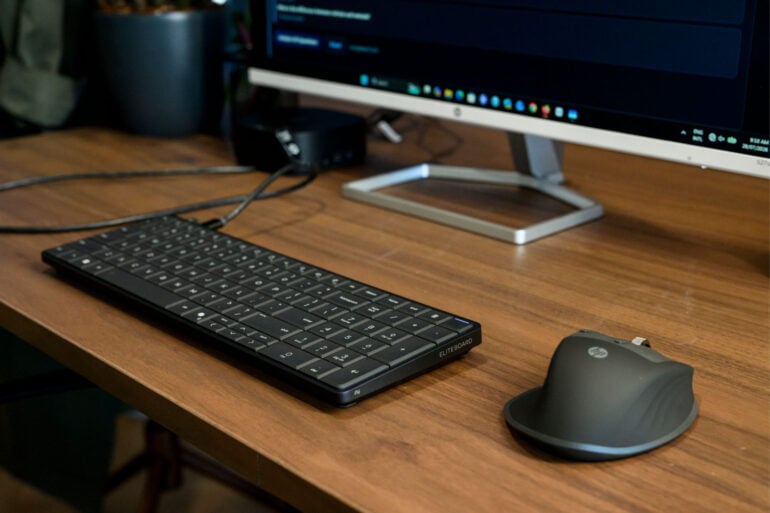
PCs come in all shapes and sizes, with engineers able to squeeze more into smaller designs. HP took that a step further when it launched the HP EliteBoard G1a, a desktop PC housed entirely within a keyboard.
What’s most interesting about this PC is who it’s aimed at. Laptops are already highly portable, plus they have a built-in screen. So, the HP EliteBoard G1a is for workspaces where you want a fixed machine that takes up as little space as possible.
With an AMD Ryzen AI chipset inside, it’s a powerful little machine that only needs one USB-C cable to extend to two 4K monitors. Compared to the chunky PC towers of old, the EliteBoard barely takes up any desk space. It’s even small enough to be locked away in a drawer at the end of a workday.
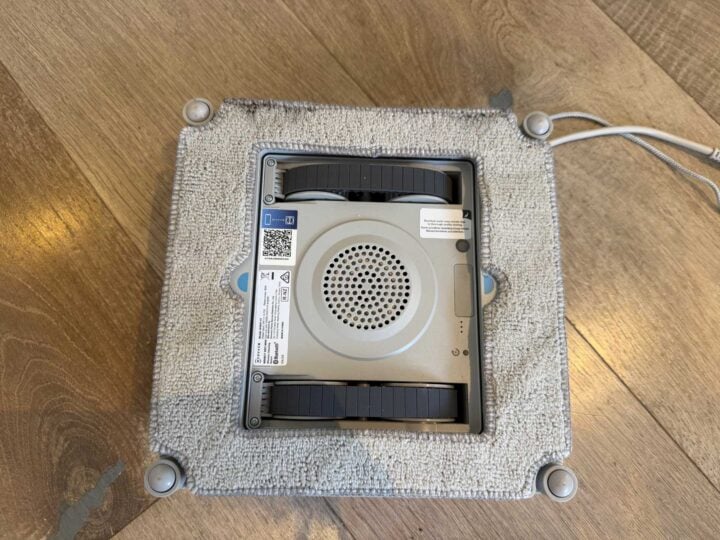
I hate washing windows, so I love robot window washers. Most robot window washers are very simple: you strap a special cloth to a little robot that sticks to the window using a vacuum seal, and it drives around while periodically spitting out some cleaning solution. What separates the various models is how thick they are, if they have a base that cleans or organises, how they tether, how they navigate, and how far they can spray cleaning solution. I have yet to find meaningful differences between the end cleaning result of any of these robots.
That’s why it’s so exciting that Ecovacs has now introduced a $249 Winbot Neo Mini model at Aldi. It’s small, and it doesn’t have the latest tech. But, unlike robot vacuum cleaners where price correlates with performance (to a point), this is a device where the clean is almost identical, and you just pay for extras.
That said, is the Winbot Neo Mini worth picking up from the Aldi Special Buys aisle?
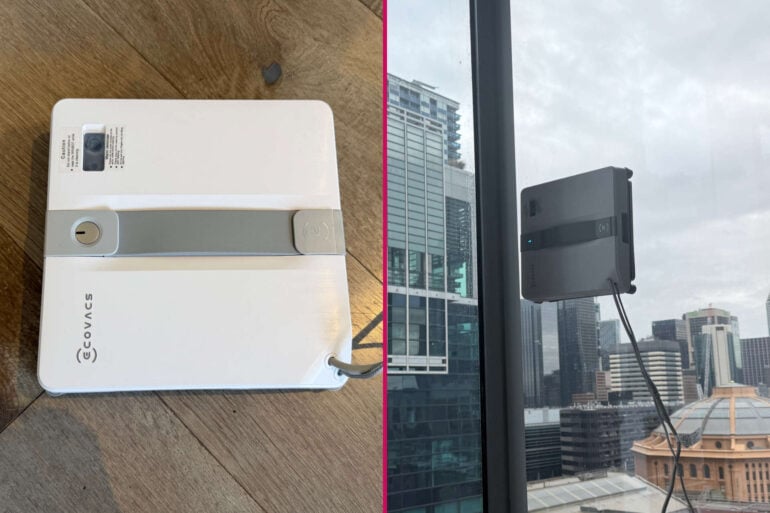
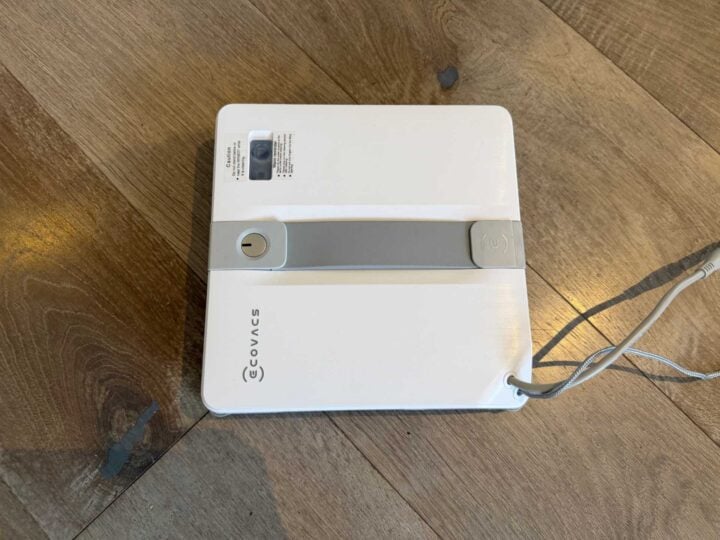
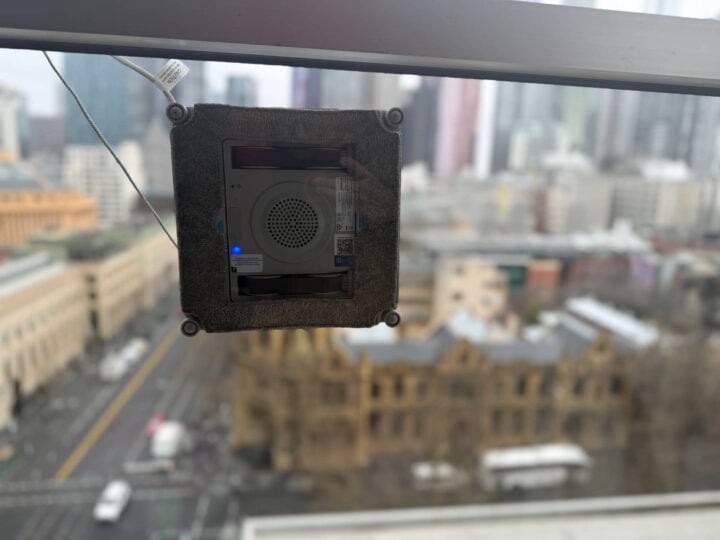
My first impression of the Ecovacs Winbot Neo Mini was that it reminded me of the original Winbot, just smaller and cuter. It’s just a small, square robot with a long tether and an even longer power cord. Super simple to set up: just put the included cleaning solution in the robot, plug it in, turn it on, put it on a window and then walk away.
Images: Alice Clarke.
Ecovacs Winbot Neo Mini specifications and price
Robot size (mm) LxWxH
215x215x55
Suction power while moving (to stay attached to window)
The limitation with almost every window cleaning robot I’ve used is that it doesn’t scrub; it just wipes a cloth around the window, which is great for smudges and dust, but does bugger all for windows that are actually dirty.
A good example is my window near the dining table. I have a toddler, so everything in my world has honey and pasta sauce on it somewhere. Because the Winbot Neo Mini is essentially an autonomous damp rag, of course it’s just going to spread wet pasta sauce, and it doesn’t have the scrubbing power to remove honey or candle wax.
What I love the Window Neo Mini for is its ability to remove smudges, fingerprints, and that fine layer of grime that you get from opening your windows near a busy road.
Ecovacs Winbot Neo Mini (left) and the Winbot W3 Omni (right). Image: Alice Clarke.
Because the Winbot Neo Mini is (as the name suggests) quite small, it does take a long time to clean my giant windows. However, given it is cleaning the window and not me, it’s welcome to take as long as it wants.
The only big issue is that it’s very loud, and because it doesn’t moisten its cloth as much as the bigger, splashier Winbots, it occasionally makes that unpleasant dragging sound that can be a bit like nails on a chalkboard. That’s standard across cheaper window-washing robots, but because it’s smaller and takes longer, the noise goes on longer. It’s not a dealbreaker, because it doesn’t require constant supervision on an indoor window. Rather, it’s just something to be aware of.
My other, smaller issue is that when it finishes its clean and I take it off the window, it leaves a wet mark from where it’s been sitting. I wish there was a way to mitigate that footprint somehow, and there has to be a clever design feature that could be implemented. Expensive robots do this too, so maybe they just haven’t found a solution yet.
Cleaning outdoor windows
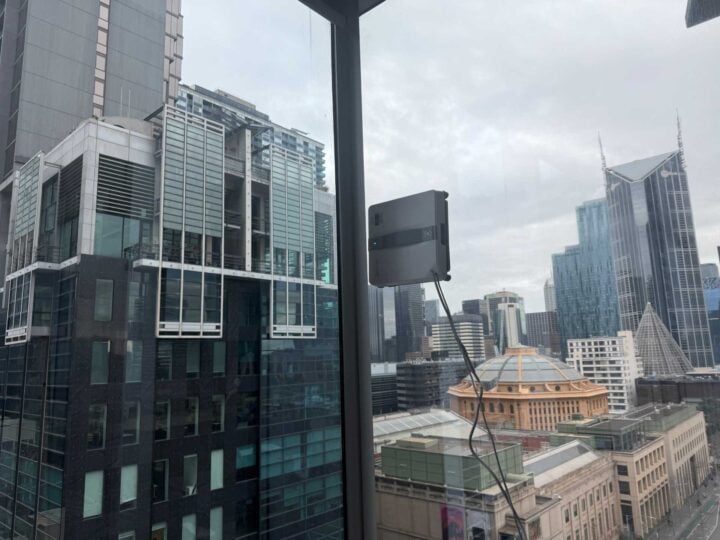
I live in a high-rise apartment building on a floor that is a long way off the ground. Every time I test one of these window-washing robots on my outside windows, I hold my breath and await the screaming. So far, though, everything seems to be fine.
The process was the same as doing the indoor windows; it held securely, cleaned well, and let me know when it was done so I could remove it.
Image: Alice Clarke.
I did have to send it around a few times on the particularly dirty windows that I could reach, and the clean was noticeably not as good as the fancier, $1,300 Winbot W3 Omni on the first go. However, if the W3 did a 7.5/10 clean, the Winbot Neo Mini did a 6/10 clean. For a saving of more than $1,000, I can live with that, and it’s a better clean than the nothing I would have done otherwise.
Cleaning awkwardly shaped windows
The problem with houses and apartments is that they’re generally designed by people who don’t have to clean them. My apartment is one of those ones that has floor-to-ceiling windows for all my external walls. In my corner apartment, that’s 21 floor-to-ceiling windows, some with weird angles at the corners and (for some reason) a sliding balcony door to nowhere with a short glass wall in front of it. Coupled with all the hallways, I think someone needs to have a word with the architect.
Image: Alice Clarke.
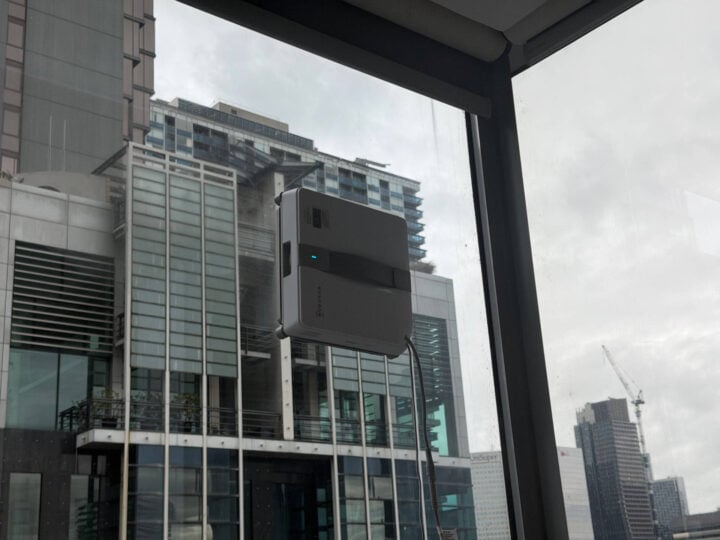
These tight corners have meant that the original Winbot and the W2 Winbot model would occasionally get stuck in the corners and I’d have to use a lot of force to remove them. Because the Winbot Neo Mini is so thin and has bumpers that don’t compress as much, it didn’t get stuck there even once, including in an area the W3 Omni got stuck.
Larger window-washing robots get stuck here. Not the Winbot Neo Mini. Image: Alice Clarke.
Sadly, it’s still not thin enough to clean my dirtiest sliding door (RIP), but it was thin enough to do an excellent job of cleaning the other hard-to-reach areas.
Storage
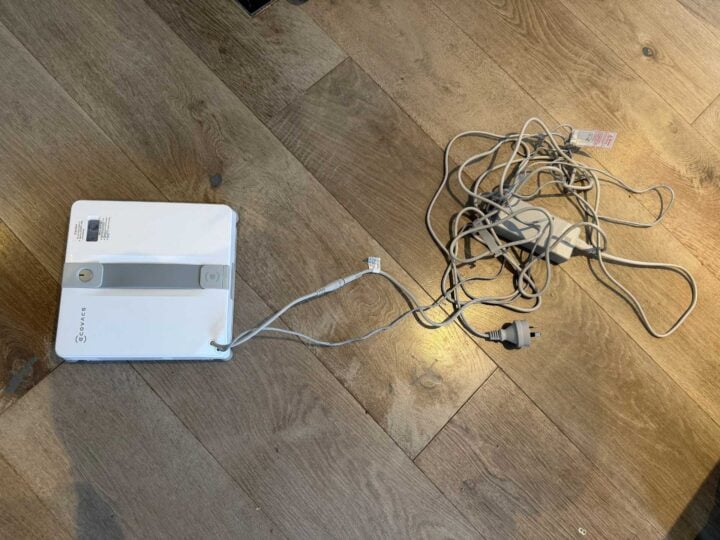
This is where being small is both a blessing and a curse. Where other Winbots have had large cases to store, this is small enough to unobtrusively fit on a shelf. Unfortunately, because it’s so small, there’s nowhere for its cables to coil up in its tiny body, so storing them can get a little messy unless you’re excellent at cable organisation. I wish it had a little case or something to make it a bit neater. For a $249 device, though, you can just grab a tote bag.
Storing the cables neatly is tricky. Image: Alice Clarke.
Who is the Ecovacs Winbot Neo Mini for?
This is the perfect window-washing robot for the vast majority of people considering a window-washing robot. The Ecovacs Winbot Neo Mini cleans almost as well as the Winbot W3 Omni for less than a 5th of the cost (during the Aldi promotion).
While it’s perhaps not the right choice for huge properties, people who want to clean outdoor windows away from power (like a pool fence), or places with a lot of large windows, it is the right choice for everywhere else. It’s small, it gets into places bigger robots cannot, and it’s priced in a way that it’s less of a risk if you just want to give it a go. It’s the one I would buy.
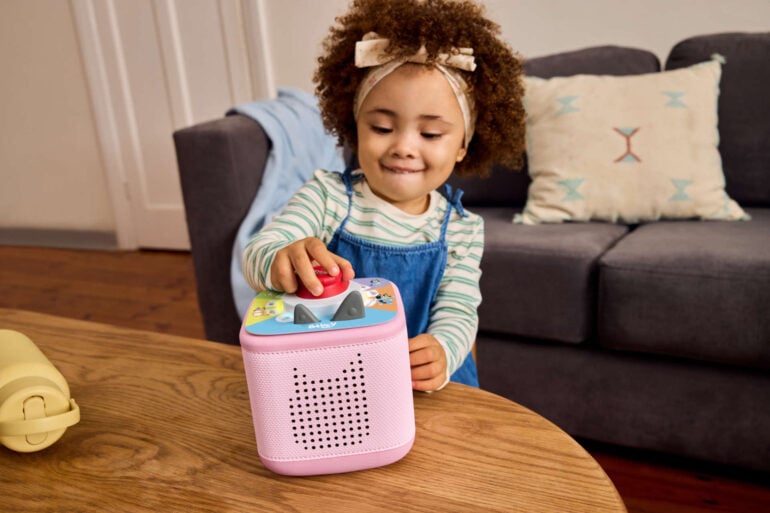
Tonies, the company behind the extremely popular Toniebox, has launched the inevitable collection that every toddler parent has been waiting for: Bluey.
Overseas, there’s also a pack of three Tonies featuring Bluey, Bingo and Muffin, but that’s not coming to Australia until 2027 due to licensing difficulties.
Playing with the Bluey Tonies
My toddler and I have been playing with the Bluey: Play All Day Tonieplay game for the last month, and I’m a big fan. It’s certainly going to be better for kids aged 3+, but I really enjoy how interactive it is, without the pitfalls of introducing screen time before we’re ready.
The game takes kids through eight different episodes, and from what I can gather (without having seen the show, but having read the Baby Race and Magic Xylophone books around 1,000 times), it’s just a faithful retelling of the episode, including original dialogue. But occasionally kids have to press the button or turn the dial to make something happen.
My two-year-old really enjoyed hearing the stories, but hasn’t quite grasped what “press this button repeatedly” entails, which made it a fun family activity with my wife and me trying to explain the concept to her as we listened.
Image: Tonies.
Existing Bluey fans, particularly ones in the correct age group, will absolutely love it. It’s not overly complicated, but it gives them a sense of being included in the activity, and it means they can take their favourite TV show beyond screen time and into an interactive activity, which I love.
For younger children, it really depends on the kid. As I said, my daughter hasn’t seen the show and has only had the books read to her, so this was the first time she’s gotten to hear what Bluey sounds like, which blew her mind. She’s asked to hear it a few more times since, though I think the regular Tonies will be a better fit for this age group when they do eventually hit Australian shores.
What else is included?
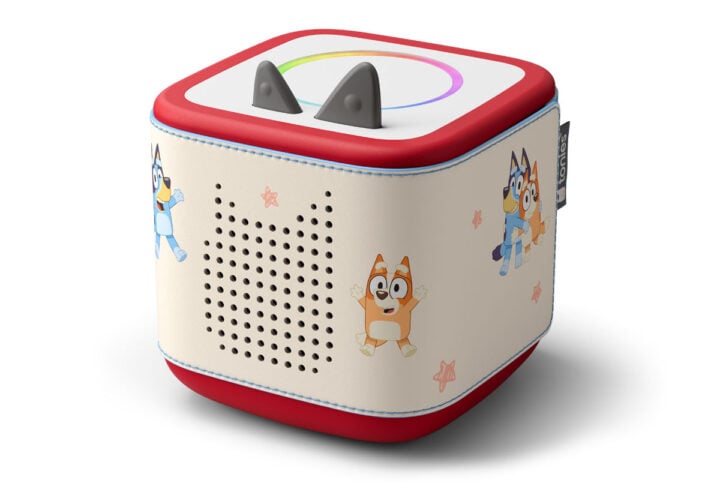
As for the other accessories in the range, the sleeve fits the Toniebox 2 really nicely. I like the idea of the Tonieboxes being neutral, plain colours, with the option of character sleeves so the expensive part can stick with the child through multiple interest cycles. It was a little fiddly to put on neatly, but once it was on, it was a perfect fit.
Image: Tonies.
The bag is the most useful item for my family. It holds the Toniebox, a good number of Tonies, and the included headphones, making it a must-have for any long journey or weekend away. We’ve used it a bunch of times now, and I really like how organised everything is without feeling like an effort. The pattern, like that of the sleeve, is fun and understated, clearly showing the Bluey family without ruining the curated aesthetics of a lounge room.
The Bluey Tonie collection is available now in all good retailers across Australia and New Zealand, with the Bluey Tonies coming to Australia early next year. They join the recently launched Pokémon Tonies range, appealing to millennial parents who want to spread the good word of Pikachu to younger generations.
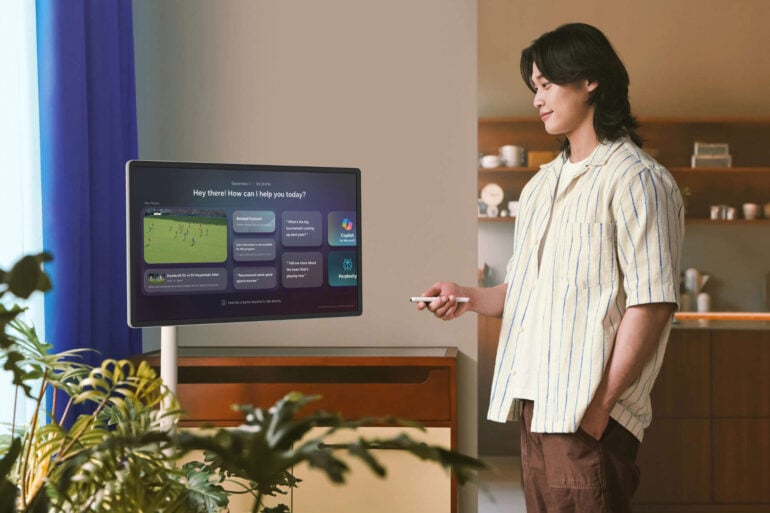
Nearly everything has a screen today, so a TV isn’t necessarily the living room centrepiece it once was. Phones, tablets, laptops, and even smart glasses provide more viewing options than ever, providing more ways to watch videos than a fixed screen. In response to this growing trend, Samsung wants to meet people halfway with its recently launched ‘Movingstyle’, a smart TV on wheels.
At 27 inches with a 2560 x 1440 resolution, the $1,999 Movingstyle is like a computer monitor. Standing at around 1.2m tall when mounted to its stand, the display can also be used as a standalone touchscreen, propped up by a built-in kickstand. There’s also the option of battery-powered operation (via its included 69.3Wh battery) or mains power.
‘Movingstyle kid’ might not take off quite like ‘iPad kid’, but the functionality is similar. Image: Samsung.
This experimentation with portable screens stems from TVs becoming a less prominent medium for watching videos. According to Samsung’s research, 26 per cent of Aussies watch “major broadcast events” on either a laptop, tablet or phone. Samsung’s interpretation is that more people want screens that follow them, rather than going to a dedicated viewing room.
In the same breath, Samsung asserted that traditional TVs still have a place in Australian homes. The company claimed that 24 per cent of Australians listen to podcasts and music on TVs, while 16 per cent turn on TVs for workout sessions.
Whether more people gravitate towards portable screens, like the Movingstyle, remains to be seen. It’s an interesting approach to an ever-changing media consumption environment, one where some people watch movies in piecemeal clips uploaded to TikTok.
Ahead of Apple’s upcoming September iPhone event, many might be fixated on how the new CEO, John Ternus, marks his fresh tenure. Tim Cook led the company for 15 years, a long time for any tech company, so seeing a fresh face at the helm will be a big change. So big, in fact, that Pikachu himself visited Apple HQ to meet Ternus.
In a video posted to the Hello Apple Instagram account, Cook and Ternus were joined by a Pikachu mascot and Tsunekazu Ishihara, CEO of The Pokémon Company, at Apple Park. According to Cook’s socials, the agenda included introducing Ternus to the Pokémon team, discussing gaming, and politely asking Pikachu to stay out of the pond. “Two out of three were accomplished,” Cook quipped.
With the visit timed so close to the new iPhone reveal event on 10 September, could it mean a Pokémon-related announcement to coincide with the franchise’s 30th anniversary? Or was it just a chance for Pikachu to remind Ternus who’s really in charge?
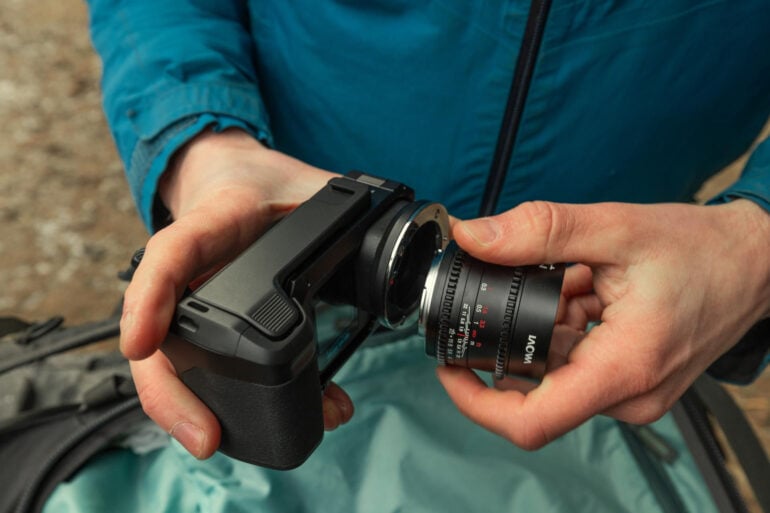
GoPro wants to be more than just an action camera brand. That was the message that came across when it announced its Mission 1 range of cinema-style cameras earlier this year. Now the third piece of GoPro’s puzzle is here, with the Mission 1 Pro ILS launching in Australia in September.
Its biggest point of difference is a Micro Four Thirds (MFT) mount, supporting a wide range of interchangeable lenses. With most cameras this size, you’d normally have to stick with a built-in lens. Conversely, GoPro’s latest camera can swap between zoom, prime, and all sorts of other lenses, provided they fit the MFT format.
On the inside, the GoPro Mission 1 Pro ILS uses a one-inch 50MP sensor that supports up to 8K video recordings. In 8K, it can capture up to 60fps, and up to 240fps in 4K. If you want to shoot something in extreme slo-mo, the camera supports 960fps at 1080p in 10-second bursts.
Like the rest of the Mission 1 series, the Pro ILS can shoot in open gate, doing away with sensor cropping and fitting more into the frame. Consistent with other open gate cameras, the idea is that you can shoot more of your surroundings and then edit them into the aspect ratio you need later.
Other features include 10-bit Log recording, built-in video stabilisation, and upwards of three hours’ battery life when recording in 4K at 30fps. Currently up for pre-order in Australia on GoPro’s website, the Mission 1 Pro ILS costs $1,099.95.
It looks like a fascinating camera that changes up GoPro’s approach to filming. Setting up and changing lenses requires a bit more planning and effort than pointing and shooting, but it will be interesting to see how budding cinematographers take to the novel form factor.
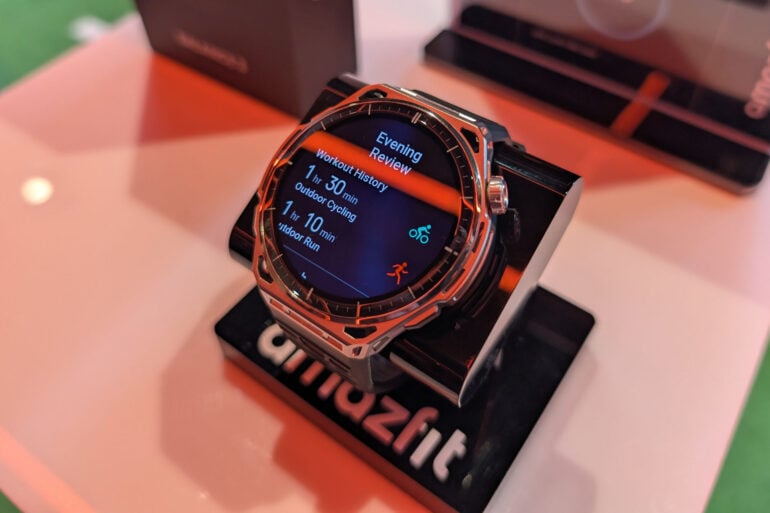
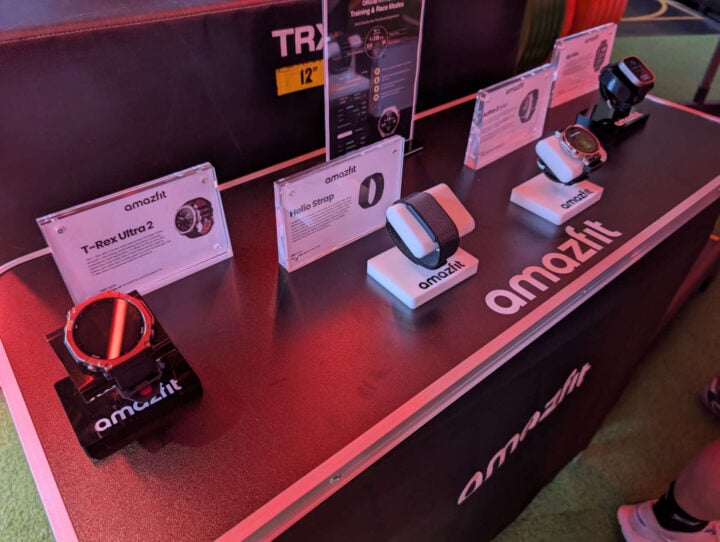
The days of single-purpose fitness watches appear to be long gone. These days, a wearable seemingly has to factor in your daily activity, track your sleep, and function as an extension of your phone. Amazfit, which recently launched in Australia, is leaning heavily into the all-in-one ethos with its flagship Balance 3 model.
A stainless steel smart fitness watch with a 1.5-inch AMOLED screen, the Balance 3 does everything that’s expected of wrist-based wearables. It has built-in biometric sensors, GPS positioning for outdoor exercise, and up to a 21-day battery.
Notably, the Balance 3 costs less than other brands’ flagship wearables. At $519 in Australia, it’s cheaper than many of the Apple Watches, Samsung Galaxy Watches, and Garmin wearables of the world.
Image: Jay Marshall.
But where Amazfit claims it stands apart from competitors is through its “HybridCharge” feature. Like the ‘wellness’ scores that are becoming increasingly common in smart wearables, it provides a score out of 100 to indicate when you can push harder or when it’s time to rest.
According to Amazfit, HybridCharge brings together readings from three separate categories. One is your body’s energy levels, another looks at your stress and fatigue levels, and the other factors in your exercise training load. The resultant score provides a quantifiable method of planning your daily and weekly activities.
“Australians aren’t just training one way anymore,” said Robbie Wu, Amazfit’s APAC General Manager. “It’s strength one day, a long run the next and recovery wedged in around work and life.”
“That’s exactly what the Balance 3 is purpose-made for: one watch that monitors strength, endurance and recovery, rather than forcing people into a single mode of training.”
Compatible with Android and iOS devices, the Amazfit Balance 3 is now available in Australia via Amazfit’s online store and Amazon.
At the top of most people’s priorities when buying a new phone is a long-lasting battery. Xiaomi might have that well and truly covered with the new Redmi Note 17 Pro range.
9,210mAh is the battery capacity that comes with the $799 Redmi Note 17 Pro Max 5G, an astounding number to type. Xiaomi’s slightly cheaper $599 Redmi Note 17 Pro is no slouch, packing an 8,340mAh battery into its chassis.
Naturally, how long those batteries last depends on individual use. According to Xiaomi, its phones can last up to three days on a single charge, which is bonkers to think about. It wasn’t that long ago that 5,000mAh was considered the base standard for phones. Now, with silicon-carbon technology more common, bigger battery capacities of 6,000mAh and upwards are more common. Seeing a phone with a battery approaching 10,000mAh is nuts.
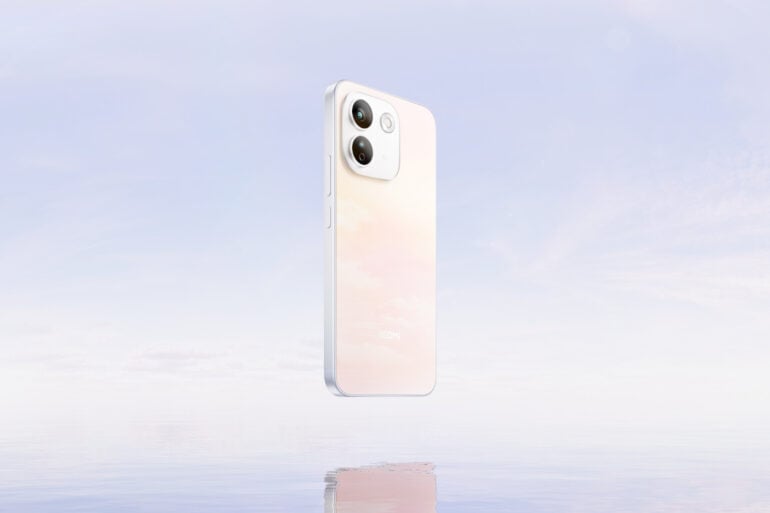
Getting wet shouldn’t be a problem, with both phones getting IP66 + IP68 ratings. Image: Xiaomi.
Both Redmi phones charge quickly, too. With a compatible charger, the 17 Pro supports 67W wired charging, while the 17 Pro Max model supports 100W.
Under the hood, the 17 Pro Max uses a Snapdragon 6 Gen 5 chipset and 8GB of LPDDR5X memory. Meanwhile, the 17 Pro relies on the slightly less powerful Snapdragon 6s Gen 4 chip and 6GB of LPDDR4X memory.
Both phones sport 6.83-inch AMOLED 2772 x 1280 screens with 120Hz refresh rates. Each model also includes a two-camera rear array, albeit with some slight differences. Xiaomi gave the 17 Pro Max a 50MP main camera with a bigger sensor and wider aperture, plus a 32MP front camera. An 8MP ultra-wide lens is on both phones, but the non-Max model has a 16MP front camera.
Redmi Note 17 Pro price and release date
On sale now via the Redmi website, the new phones from Xiaomi’s affordable sub-brand launch with a $200 discount until 17 September, priced as follows:
Redmi Note 17 Pro Max 5G launch price
256GB: $599 (down from $799)
512GB: $799 (down from $999)
Redmi Note 17 Pro 5G launch price
128GB: $399 (down from $599)
256GB: $499 (down from $699)
Colours include Sky Blue, Purple and Black for the 17 Pro, and Cloud Blush, Green and Black for the Max model.
On the software front, the Redmi Note 17 Pro range is supported for “up to” four years of operating system updates and six years of security updates. While it’s not quite the seven years of updates that come with similarly priced Samsung phones, it’s much better than the two years of OS upgrades the $1,499 Honor 600 Pro gets.
Joining the phones is a range of smart devices, including the Xiaomi Smart Band 11 Active, Redmi Watch 6 (Lite and Active models), and the Xiaomi Sound Play Bluetooth speaker.
It’s been a long time coming: Rockstar Games finally showed gameplay footage of GTA 6 this morning, giving gamers a look at what’s expected to be one of the best-selling video games of all time. Recent leaks threatened to derail Rockstar’s well-laid plans, but its unusual presentation went off without a hitch.
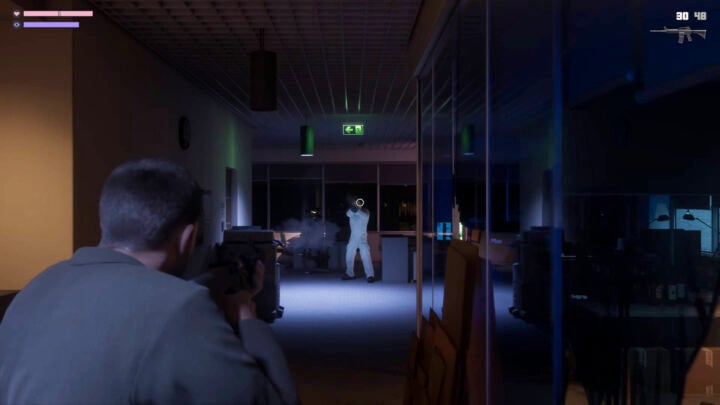
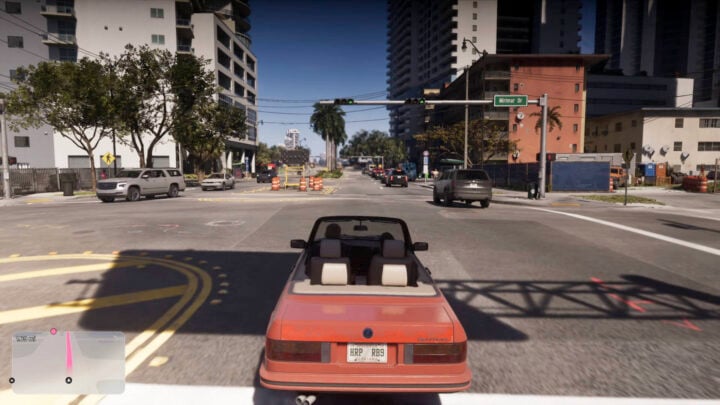
It was unusual in the sense that the 27-minute gameplay showcase debuted on Netflix, of all places, before uploading the footage to YouTube hours later. Using footage captured on a PS5, GTA 6 looked a lot like the Grand Theft Auto entries before it, albeit with much sharper and more realistic graphics.
Starting with a drug deal gone wrong (when do they ever go right?), the presentation jumped between different encounters starring GTA 6‘s dual protagonists, Lucia and Jason. Shooting, driving, and copious side activities occupied plenty of airtime, as did conversations between characters.
In these latter moments, highly detailed character models stood out. Minor facial expressions looked a big jump from 2013’s GTA 5, and even an improvement over Rockstar’s last standalone game, Red Dead Redemption 2, released in 2018.
GTA 6 gameplay reveal: More of the same but prettier
For the most part, however, GTA 6‘s gameplay looked eerily similar to its predecessor, just with several coats of high-fidelity paint. Similar to GTA 5‘s triple-protagonist system, GTA 6 lets you freely swap between Lucia and Jason during missions and while exploring the aptly-named Vice City.
Outside of drug deals, heist getaways, and miscellaneous criminal pursuits, GTA 6 appears set to continue the series’ tradition of countless side activities. Base jumping, hovercraft racing, and — importantly — petting dogs all featured throughout the gameplay footage.
Images: Rockstar Games.
Most people tend to spend more time playing GTA‘s optional activities than the scripted story missions, and it looks like GTA 6 will be no different, with a smorgasbord of things to do. Undoubtedly, the gym workout mini-games will see plenty of folks sculpting Lucia into the muscle-mommy of their dreams.
There’s no denying that GTA 6 looks stunning. Rockstar is known for including meticulous details in its games — including dynamically animated horse testicles — which the gameplay footage showed in spades. Light reflects off skin and clothes hug characters’ figures more realistically than most games could ever hope to achieve.
Images: Rockstar Games.
But the GTA 6 gameplay reveal confirmed one thing: despite all the hype, development time, and resources pumped into this game, it isn’t fundamentally different from its predecessors.
Perhaps apt for debuting on Netflix, GTA 6‘s filmic quality could set it apart. Lucia and Jason’s Bonnie-and-Clyde-esque relationship feels grounded in reality. They come across as more fleshed-out characters than the disaster-man caricatures of GTA 5‘s (still enjoyable) protagonists.
For many, who just want a new current-gen GTA sandbox and a single-player narrative to enjoy, GTA 6 will be more than enough.
GTA 6 still on track for November
Any concerns about further delays were put to rest at the presentation’s conclusion, with a title card reconfirming GTA 6‘s 19 November release date.
Combining Gemini’s latest smarts with iterative hardware upgrades that add AI grunt, the plus-sized Google Pixel 11 Pro XL continues to hone a winning formula.
After eleven generations, Google’s Pixel range understandably delivers few surprises these days when it comes to hardware – it’s identical to last year’s Pixel 10 Pro in many ways.
Set in its ways, Google has even resisted the introduction of genuinely useful additions like Action or Camera Control buttons, although I’m sure the Pixel faithful would argue they’re not necessarily.
Instead, the new Google Pixel 11 Pro XL is primarily a shiny new lamp playing home to Google’s AI genie Gemini. If you’re all-in on AI and on Team Google, then the Pixel range is hard to beat.
Starting at a hefty $2,099, the Pixel 11 Pro XL has seen a $100 price jump on its predecessor, with the entry-level model now getting less precious RAM than the others, to help keep down the price tag.
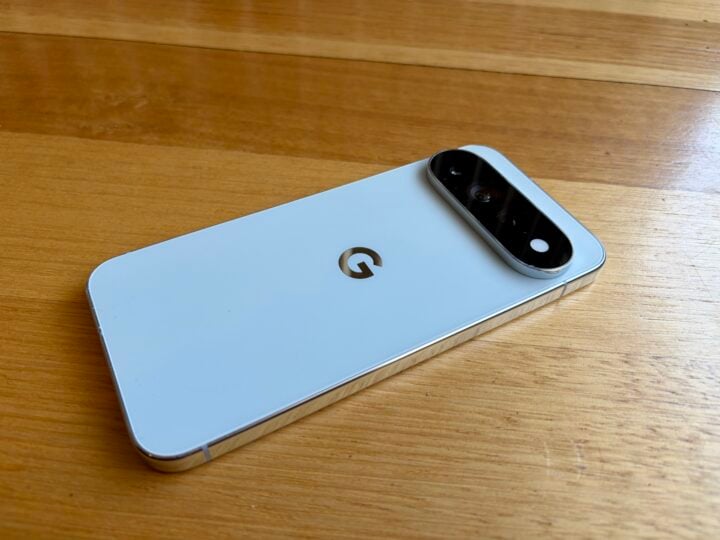
At first glance, very little has changed with the Google Pixel 11 Pro XL compared to its predecessors. It retains the utilitarian design adopted back with the Pixel 9 Pro, with tweaks to the rear camera array betraying that it’s this year’s model.
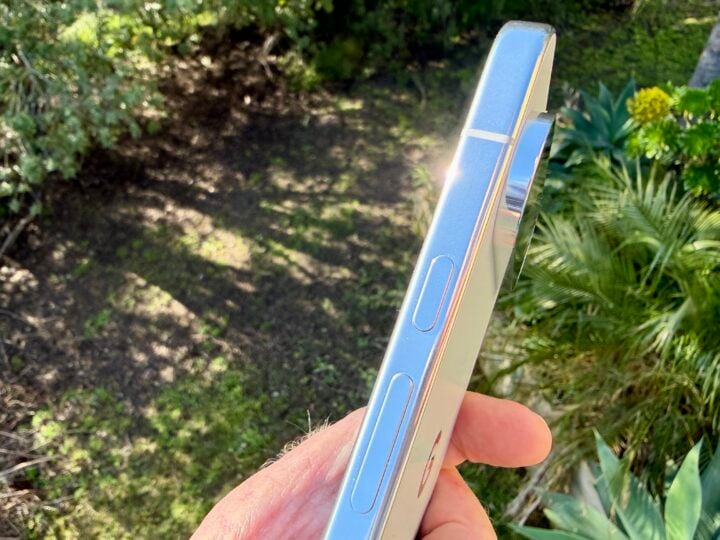
Sticking with old-school straight edges and curved corners, Pixel 11 Pro XL retains understated style. The polished aluminium frame still catches the eye, accompanied by a premium glass front and back.
The Google Pixel 11 Pro XL’s polished aluminium frame catches the light. Image: Adam Turner.
Despite the generous 6.8-inch display, the slimming 20:9 aspect ratio ensures that the phone is not too cumbersome to hold. It’s a smidgen smaller and lighter than the Pixel 10 Pro XL, while the camera bump is a fraction larger.
Bucking the Android trend, the Pixel range continues to place the power button above the volume buttons rather than below. Double-tapping the power button still launches the camera, but it seems we can give up hope of seeing an additional Action or Camera Control button, as found on iPhones and many Android rivals.
The fingerprint reader is built into the display, still higher up the screen than most Android handsets, so it’s not too difficult to reach with your thumb.
Down below, you’ve still got speakers on either side of the USB-C 3.2 port, while the SIM card tray remains at the top, supporting single nanoSIM and eSIM.
A tweak to the rear camera display is all that distinguishes the Google Pixel 11 Pro XL from its predecessor. Image: Adam Turner.
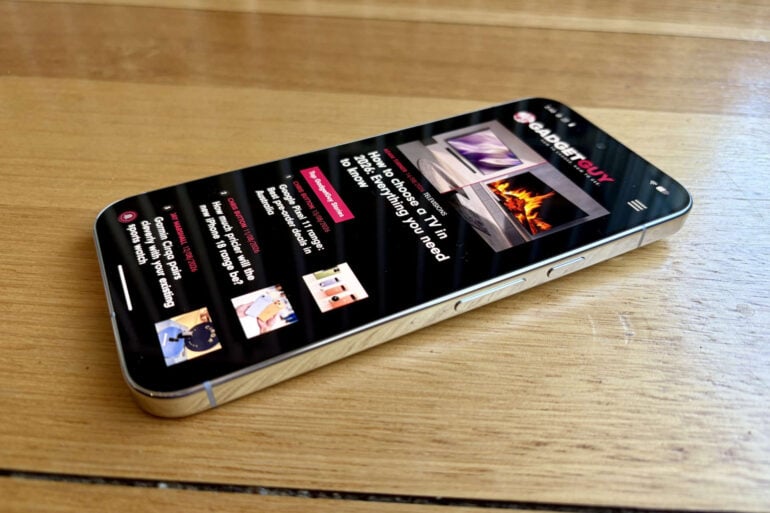
Fire up the Pixel 11 Pro XL, and it retains that stunning 2,992 x 1,344-pixel LTPO OLED Super Actua screen, offering an impressively crisp 486 pixels per inch. There’s still the benefit of a 1 to 120 Hz adaptive refresh rate to ensure silky smooth scrolling.
As you expect with LTPO OLED, the contrast ratio remains at an impressive 2,000,000:1. The only change in the display is another boost in brightness – bumping it up to 2,400 nits for HDR content and 3,600 nits peak brightness for outdoor viewing. You’ve got the advantage of HDR10+ at your disposal when watching the likes of Netflix, but not Dolby Vision.
The Pixel 11 Pro XL’s screen coating is now twice as scratch-resistant. Google says you “throw your phone in your bag with your keys and not worry about it”, but I don’t think I’d be that brave after spending this much money on a phone.
Google Pixel 11 Pro XL specifications and price
Display size
6.8-inch, 20:9 aspect ratio
Display resolution
2,992 x 1,344 pixels, 486 ppi
Display technology
Super Actua LTPO OLED Up to 2,400 nits (HDR) and up to 3,600 nits (peak brightness) 2,000,000:1 contrast ratio 1-120Hz Variable Refresh Rate
Bands
2G GSM, 3G UMTS, 4G LTE, 5G Sub-6
Chipset
Google Tensor G6 Titan M3 security coprocessor
Rear cameras
50 MP Octa PD wide camera ƒ/1.68 aperture 82° field of view 1/1.3″ image sensor size multi-directional PDAF, and OIS
48 MP Quad PD ultrawide ƒ/1.7 aperture 123° field of view 1/2.51″ image sensor size dual pixel PDAF Macro Focus Optical + Electric image stabilisation
48 MP Quad PD telephoto camera ƒ/2.8 aperture 23° field of view 5x optical zoom 1/1.95″ image sensor size Optical + Electric image stabilisation 120x Pro Zoom
Front camera
42 MP Dual PD selfie camera with autofocus ƒ/2.2 aperture 103° ultrawide field of view
The Google Pixel 11 Pro XL naturally runs the shiny new Android 17 out of the box with no bloatware. It’s reassuring that Google still promises an industry-leading seven years of OS updates, security fixes and “Pixel Drop” feature updates – putting most Android vendors to shame.
Under the bonnet, the Pixel 11 Pro XL packs Google’s new 3nm Tensor G6 powerplant, accompanied by 12 or 16GB of RAM and a wide choice of 256GB, 512GB or 1TB of storage. Take note that the cheapest model is no longer blessed with 16GB of RAM like its more expensive siblings.
As is Google’s way, the real attraction here is not the Pixel’s hardware but more that the Tensor silicon is optimised for AI to underpin the advanced Pixel magic.
As with its predecessors, the Google Pixel 11 Pro XL’s Geekbench 6 scores are decent but not best in class, returning 2,656 single-core CPU, 7,210 multi-core CPU, and 7,655 OpenCL GPU results. Using the recently launched Geekbench 7, it produced scores of 2,264, 6,737 and 3,229, respectively.
When it comes to runtime, the 5,115mAh (typical) battery is a fraction smaller than the 10 Pro XL, but Google still cites a 30+ hour battery life, likely thanks to the processor’s improved efficiency.
When it’s time to top up, fast wired charging speeds jump to 45W, although there’s no AC charger in the box. The Qi2.2-certified Pixelsnap magnetic wireless charging, Google’s equivalent to MagSafe, steps up to 25W.
In terms of connectivity, there’s a new MediaTek cellular modem for sub-6 5G, which can combine multiple 5G channels. Plus the benefit of Wi-Fi 7, Bluetooth 6 and UWB (ultra-wideband) for precise tracking in Google’s Find My Device app and acting as more reliable digital car keys.
Pro Res Zoom 120x
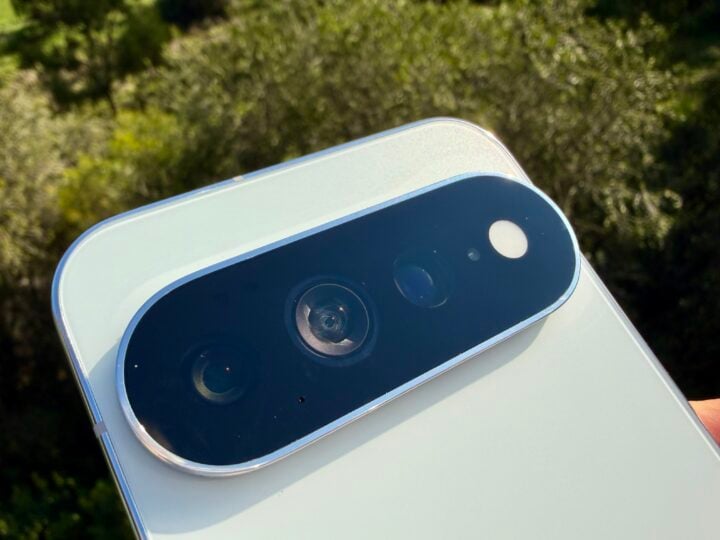
When it comes to the cameras, the Google Pixel 11 Pro XL’s rear array looks different now that the flash and spectral sensor are in line with the three rear lenses, all behind dark glass.
Here you find a quirky new feature in the “HiLight” ambient LED in the camera array. It can flash in a range of patterns and colours, to indicate who is trying to contact you when the screen is face down.
Some people would find HiLight useful, even though it only works with a few apps. Others might find it goes against the principle of putting your phone face-down on the table as a show of good faith to those people who are expecting your full attention.
A close-up of the Google Pixel 11 Pro XL rear camera array, with the HiLight light on the right. Image: Adam Turner.
This aside, the Google Pixel 11 Pro XL sticks with 50MP Wide, 48MP Ultrawide with Macro and 48MP 5x Telephoto rear lenses, plus a 42MP selfie camera around the front.
The main wide rear shooter does an excellent job at 1x zoom. Image: Adam Turner.
The selfie camera captures great shots without glossing over wrinkles. Image: Adam Turner.
The upgraded 48MP telephoto lens has a larger sensor which now takes in 30 per cent more light. Combined with increased computational power, this helps Pro Res Zoom step up from 100x to 120x – bringing it into line with other super-zoom options.
Pro Res Zoom is still assisted by generative AI and the results are very impressive, but the final quality depends on the predictability of the scene. Put to the test, this man’s face from around 75 metres away looks better than what the Pixel 10 Pro produced.
Pro Res Zoom 120x at around 75 metres. Image: Adam Turner.
Looking further afield, the four-wheel drive below is more than 300 metres away. It appears amazingly sharp thanks to generative AI filling in the gaps, but the license plate and other areas with writing betray the fact that it’s still taking educated guesses.
Pro Res Zoom 120x at more than 300 metres. Image: Adam Turner.
Enhanced sensor capabilities and Tensor G6 processing also allow low-light Night Sight to operate up to 4.5 times faster, which is now visible directly in the viewfinder before hitting the shutter.
Its performance is impressive in challenging lighting conditions, like the street scene below left. Yet, it still leaves a night sky full of stars looking overblown (below right) compared to best-in-class efforts from the iPhone Pro and Galaxy S Ultra, which leave the sky darker.
Images: Adam Turner.
AI features
That beefed-up Tensor G6 in the Google Pixel 11 Pro XL powers Google’s most advanced on-device AI to date. It runs faster and more efficiently to save battery while also reducing the need to send processing off to the cloud.
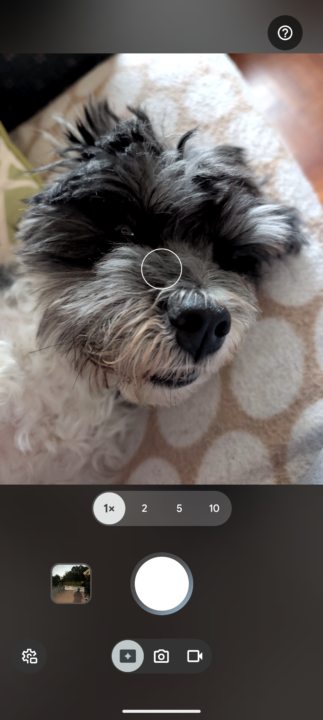
When it comes to multimedia, one key addition is Magic Capture, which adds a third icon alongside the traditional Photo and Video icons.
Selecting Magic Capture and pressing the shutter button captures photos and video simultaneously – all you need to do is keep the camera pointed at the subject (preferably doing something interesting).
Once you’re done, Magic Capture selects and polishes the best shots, along with producing a few highlights video clips. While the idea is sound, handing your creative choices to AI produces mixed results, and anyone who likes to craft their multimedia will likely be underwhelmed.
The new Magic Capture icon, to the left of the photo and video icons. Image: Adam Turner.
Then there’s Gemini, which gets a bit confusing. “Gemini” is an overarching name that refers to Google’s family of AI tools, while “Gemini Intelligence” refers to the proactive, Agentic AI built into Android devices.
You’ve got smart assistants like “Gemini Live”, built into the latest Google Home Speaker, but “Gemini Intelligence” is more than just a bot that answers your tricky questions. Agentic AI can also execute actions on your behalf across multiple applications, making it a powerful tool for getting things done – more like a true assistant, rather than simply an advisor.
For starters, Gemini on the Google Pixel 11 Pro XL underpins a range of enhanced features, many revolving around multimedia.
You’ve got automatic real-time audio dubbing and translation for videos and podcasts, along with an on-screen teleprompter in the Creator Suite which scrolls your pre-written script as you record a piece to camera.
Meanwhile, Rambler takes audio transcription to the next level. Built into the on-screen Gboard keyboard, it is designed to cope with the way people actually talk rather than taking each “um” and “ahh” literally.
To be fair, iOS’ dictation also cuts out those kinds of filler words, but Rambler goes a lot further. It cleans things up if you stumble on a word and even corrects the text if you change your mind. For example, “I think I’ll go on Monday, nah, Tuesday” becomes “I think I’ll go on Tuesday”.
Meanwhile, the underwhelming Magic Cue feature from the Pixel 10 range has been rebranded as Proactive Assistance. It’s gradually getting smarter at surfacing useful information, such as contact details for someone when you mention them in a conversation.
Then you’ve got Gemini Intelligence, which supports continued conversation and contextual follow-up questions for in-depth discussions. Plus you can opt into Gemini Personal Intelligence, which also taps into data from your private Google apps.
Who is the Google Pixel 11 Pro XL for?
If you’re a fan of Google’s AI ambitions and fancy a plus-sized display, then the Google Pixel 11 Pro XL is the best way to keep Gemini in your pocket.
That said, iterative hardware improvements make it difficult to justify upgrading from last year’s model, or even the year before, considering the hefty price tag. If you’re after a real Android powerhouse with plenty of grunt, you might look elsewhere.
GadgetGuy occasionally uses affiliate links and may receive a small commission from purchased products.
Google Pixel 11 Pro XL
With a fresh dollop of AI but minimal hardware upgrades, the Google Pixel 11 Pro XL breathes new life into Gemini.
Features
9
Value for money
8.5
Performance
8
Ease of use
9
Design
9
Positives
Large, stunning display
Excellent cameras
Advanced AI features
Qi2 magnets for fast wireless charging
Negatives
More expensive
Minimal hardware improvements and still no Action or Camera Control buttons