There are lots of bargains to be found during Click Frenzy, but none as ludicrously cheap as an iPhone 15 on sale for $15.
That’s not a typo. It’s part of what’s aptly named the “Go Nuts 99% Off Deals” over the next few days. Just released last month, an iPhone 15 normally retails for $1,499. It’s a good phone, too, making a strong transition to USB-C, along with performance upgrades based on the iPhone 14 Pro’s chipset.
But that’s not what you’re here for. You want to know how you can get one for $15. To set some realistic expectations, only an extremely limited number of people will land this massive discount. With that out of the way, here’s how it works.
iPhone 15 Click Frenzy 99% off sale
There are some specific instructions to follow to give yourself every chance of getting a $15 iPhone 15. You’ll need to keep a Click Frenzy tab open to see a pop-up notification when one of the 99% off deals starts. These pop-ups contain a question to answer within a 30-minute window. According to the sale organisers, you’ll need to respond correctly and quickly for a shot at the mega-deal.
Those successful will then receive a text message containing an exclusive discount code to purchase the item at 99% off. The folks behind Click Frenzy recommend opting into their emails and watching social media for hints as to when a pop-up is imminent.
A new iPhone isn’t the only 99% off deal during Click Frenzy, either. There’s some pretty cool tech also included as part of the rare discounts, including a MacBook and a Nintendo Switch. They’re all $20 or less, so if you’re lucky enough to secure one, you’re saving a massive amount of money.
$15 iPhone 15
$6 GoPro Hero 12
$5 Nintendo Switch
$20 MacBook (13-inch)
$4 Apple AirPods Pro
$8 Xbox Series X
There are also more deals expected between now and Thursday 26 October 2023, which is how long the current Click Frenzy sale lasts. Good luck to anyone in the hunt for a big bargain.
As the deals continue rolling in from the Click Frenzy sale, you can currently get an LG C3 OLED TV at a huge discount. It’s one of the best TVs on the market and is absolutely worth the investment for film buffs and gamers alike.
Major tech retailers JB Hi-Fi and The Good Guys have a big sale to coincide with the flurry of Click Frenzy discounts. Along with big discounts on the affordable Hisense Mini LED range, the LG C3 is also at one of its cheapest prices ever.
For the next few days, you can get an additional 20% off TVs, including already-discounted models. For example, the 55-inch LG C3 is already $500 off, down to $2,795 at JB Hi-Fi. At the checkout, use the code ‘CLICKVISUAL20’ to make it an even cheaper $2,236. At The Good Guys, you can use the code ‘FRENZY23’ at the checkout for the same discount.
As far as performance is concerned, the LG C3 is one of the best TVs we’ve reviewed. No matter what you mainly use a TV for, “you’ll get the best experience for movies, sports and games available in this price range, and that’s hard to go past.” At more than a $1,000 discount, it’s even easier to recommend.
When it comes to TV technology, OLED continually comes out on top. It produces great colours and a stellar contrast, along with a wide viewing angle so everyone can enjoy the picture from any seat in the house.
LG C3 OLED TV sale
Live now until midnight on Thursday 26 October 2023, here’s what you pay after applying the checkout code:
With Click Frenzy in full swing again, there is currently a terrific Hisense TV sale. There are a few good models on sale to choose from, one being the Hisense U7KAU Mini LED. At less than $1,000 for the 55-inch size, it’s a great-value TV.
As part of the Click Frenzy sales, both JB Hi-Fi and The Good Guys have increased the discounts on lots of different TVs. This includes this year’s range of Hisense Mini LED models, like the U7KAU and U8KAU. Both retailers already have the 55-inch U7 model discounted to $1,195, down from its $1,499 RRP.
Here’s where it gets even better. At the Good Guys, use ‘FRENZY23’ at the checkout for an additional 20% off. For JB Hi-Fi shoppers, use ‘CLICKVISUAL20’. This brings the 55-inch Hisense U7KAU Mini LED TV down to $956, more than $500 off its full price.
This discount applies to larger TVs, too, letting you save even more if you have a big TV-sized hole in your home. A 65-inch Mini LED TV for less than $1,200 is, quite frankly, one hell of a bargain.
We recently reviewed the U7KAU, concluding that it’s a great 144Hz gaming TV suited to daytime viewing thanks to its bright backlights. Although we haven’t gone hands-on with the U8KAU, it contains more dimming zones, so it should provide more precise lighting when watching movies at night. Mini LED is a solid upgrade from edge-lit TVs, as there’s more control over the panel’s lighting, helping produce better contrast.
Hisense Mini LED TV sale
These TVs are on sale from now until the end of Thursday 26 October 2023, so you don’t have long to take advantage of the discount.
Remember to use the store’s corresponding discount code at the checkout to get the best price. While you’re shopping for a bargain, make sure to check out the best Click Frenzy tech deals.
As its name suggests, the LG Gram notebook range is all about lightweight portability. Under the LG Gram banner, there are a few different models, including the SuperSlim, and the slick Style laptop.
Available in a few different sizes and configurations, the SuperSlim looks great and performs well enough but its lightweight build doesn’t feel as sturdy as competing devices. It’s ideal if space is at a premium and you want a gorgeous OLED display. Just make sure it’s well protected.
Regardless of which model you choose, picking up a Gram laptop feels much lighter than you would expect it to be. With the 15.6-inch OLED SuperSlim model, for example, it weighs a sliver under 1kg at 990 grams, making it a snap to wave around one-handed, and you get the benefit of a generous screen, too.
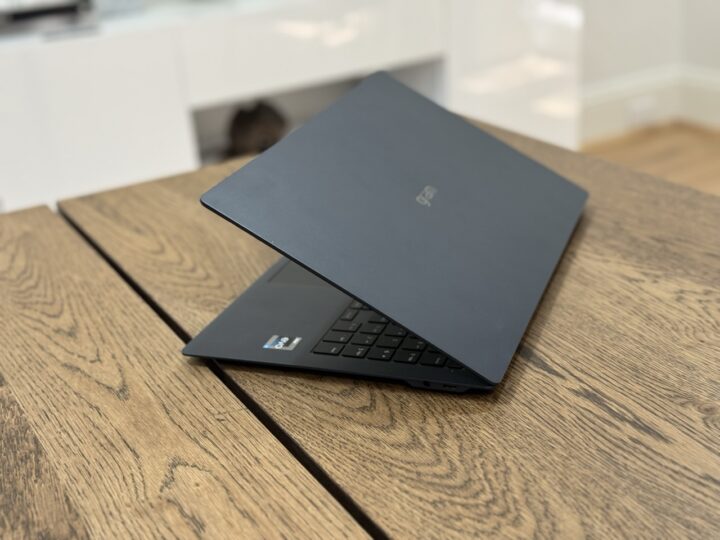
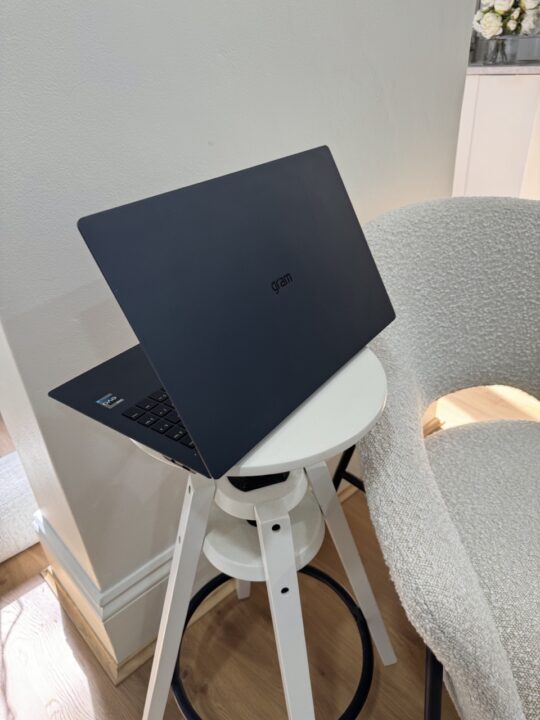
This model is also very thin at just 109mm at its widest point, and almost svelte enough to stuff into a document envelope. Its stylish Neptune Blue finish looks fantastic too, which I absolutely love. Shame about the fingerprints but I can live with an occasional wipe-down for such an eye-pleasing colour.
The Gram’s sleek design is thanks to lightweight materials including a magnesium-alloy chassis. However, there are trade-offs with an ultra-thin and light laptop, the main one being durability. Compared to the MacBook Air 15-inch with its full aluminium construction, the LG Gram SuperSlim feels like you need to take extra care with it, such as always packing it into a well-protected sleeve when toting it around. I also question if it would survive student life, such as being chucked into a bag filled with heavy textbooks.
While the keyboard base is sturdy, flexing it from corner to corner does reveal a bit of give, and the large bottom panel creaks when pressure is applied. The bottom also bows inwards when you press it, giving the impression that there’s a hollow space beneath.
The screen is secured by a long, sturdy hinge that adds rigidity to an otherwise very thin display. It’s good that OLED screens are inherently flexible too, because this one does bend without applying much pressure.
Otherwise, the hinge’s friction helps the screen stay where you tilt it, and the lid closes firmly and stays closed. There’s also a little indent on the front lip so it’s easy to open again.
OLED display
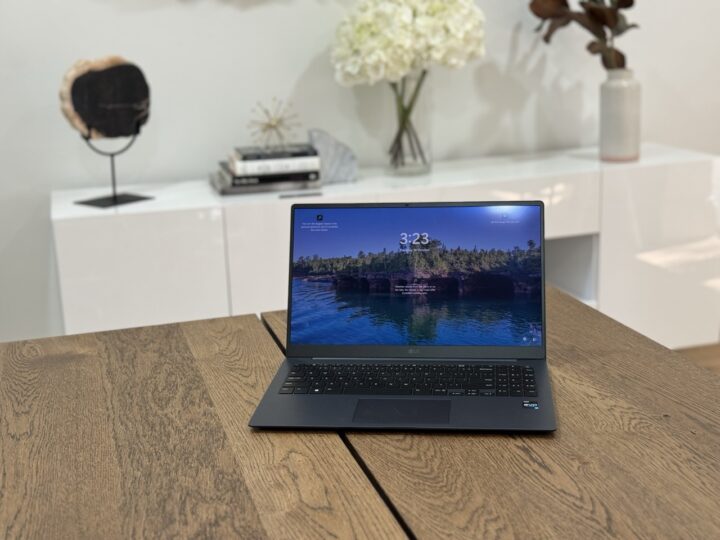
One of the Gram SuperSlim’s hallmarks is the roomy 15.6-inch OLED display. OLED is a fantastic panel technology and a dream for a laptop thanks to wide viewing angles, stunningly deep contrast and lifelike colours. It features High Dynamic Range (HDR) support and can display over a billion colours along with 100% coverage of the P3 gamut.
Contrast is rated at 1,000,000:1, which essentially means that black looks like ‘real’ black and not a dark grey, plus there are oodles of detail visible when displaying darker colours. OLED is perfect for watching film noir movies, for example. It’s also decently bright, punching out about 400 nits, with a peak brightness of 500 nits. Gamers will love this screen too for its ultra-low response time of just 0.2 milliseconds.
While the screen is undoubtedly lovely to look at, there are a few drawbacks, namely the 16:9 aspect ratio and HD resolution. The wide but narrow screen is great for watching movies but would benefit from a taller shape, such as a 16:10 aspect, in order to provide space for viewing an entire document or long web page.
The relatively low HD resolution (1920 x 1080 pixels) is a bit old-school for this price point too and isn’t particularly sharp. This means that text has fuzzy edges and there’s a visible ‘grain’ along thin straight lines and in some images. The MacBook Air’s 15-inch display, while not OLED, has more pixels (2880 x 1864) allowing for pin-sharp text and minimal graininess. Dell’s XPS 15, on the other hand, has even more pixels than the MacBook Air with a 3456 x 2160 resolution.
Keyboard and ergonomics
The keyboard is roomy thanks to the Gram SuperSlim’s width and features a half-height function key row across the top and a full numerical keyboard to the right. While the backspace and tab keys are slimmed down to accommodate everything, the keyboard layout is a great option for those who do a lot of data entry or prefer to have a keypad.
To help keep the Gram slim, there’s not a lot of key travel. Key presses still provide some tactile feedback, however, this isn’t as luxurious or heavy as the MacBook Air. Still, it’s good to see that the keys have two levels of backlighting so you can pick the level that’s right for your environment.
Trackpad-wise, this is okay in terms of size and position. It’s responsive and there are many different settings that you can customize for the way you like to use it.
Connections
Wi-Fi connectivity is the latest 802.11ax, or Wi-Fi 6, type and there’s Bluetooth 5.1, which is not the very latest but certainly not outdated.
As with many ultra-thin laptops, there isn’t room for bulkier connections including HDMI or an SD card reader. The Gram features USB-C type ports that protrude from each side; the two on the left are the Thunderbolt 4 ultra-fast variety, and there’s a standard USB-C without Thunderbolt on the right beside a 3.5mm headphone jack. This is still one more USB-C plug than on the MacBook Air and you can charge the Gram via any of them.
Speaking of charging, there’s a separate power brick, which is reasonably small, and unlike Apple’s MacBook Air charger, it’s not integrated into the plug so it doesn’t need to hang off the wall.
To keep it running, there’s a 60 Watt-hour Lithium-ion battery. In use, I was impressed that could operate the SuperSlim as my daily driver without being plugged into the mains for about a day. This wasn’t using it all the time mind you, however, it’s rated for 13 hours on MobileMark 2018’s benchmark test, along with 16.3 hours of continuous video playback.
Daily use
In use, the Gram felt responsive and took general tasks in its stride thanks to the 13th Gen Intel Core i7 processor and 16GB of RAM, as I would normally have three or four applications open at once including mail and office apps, a web browser with multiple tabs, video conferencing software, etc. It was about middle of the pack for its specification when tested on GeekBench 6 and PC Mark 10 too.
For gaming, there’s Intel’s Intel Iris Xe Graphics (i7) integrated graphics, which has seen some upgrades over the Gen 12 model and it can deliver reasonable frame rates (normally towards 60fps) on popular AAA games. However, Iris Xe is ideal for thin and light laptops and doesn’t compete with dedicated GPUs, so hardcore gamers or those working with intensive visualization or 3D applications will need a beefier machine.
I used the integrated webcam for my daily stand-up meeting on Microsoft Teams. However, the 1080P (HD) resolution camera really didn’t impress. The image was blown out, with too many highlights, and it was grainy as well. The camera can also apparently be used for Windows Hello facial recognition, however, I simply couldn’t get this to work. Hopefully, a future tweak to the camera drivers will fix the problems.
For audio, there are two 2-watt speakers, with a max 5-watt Smart Amp, and the Gram supports Dolby Atmos. While it does the job for videos and movies, there isn’t a lot of depth overall, even with Atmos, as the thin dimensions of the chassis don’t allow for much bass.
Who’s the LG Gram SuperSlim for?
The 15.6-inch OLED LG SuperSlim makes a good impression with its incredibly lightweight dimensions and lovely OLED screen. It’s ideally suited for busy professionals who want a laptop that’s capable, attractive, and easy to move from home to office to boardroom – and will take proper care of it during transport. The large 15.6-inch screen is also handy to fit more on screen than the 14-inch Gram and is very nice on the eyes. Battery life will keep pace with long, busy days, and while the screen is bright and colourful, high-end content professionals will want higher resolutions.
However, size and weight bring compromises in terms of durability, along with some lower-spec components compared to other models at this price point. At the time of writing, you can pick up a 15.6-inch OLED LG Gram SuperSlim at JB Hi-Fi for $2,399, a decent saving on its $3,299 RRP.
The MacBook Air 15-inch, on the other hand, has $2,499 with a slightly smaller 15.3-inch screen, M2 chip, 512GB SSD storage and 8GB of RAM. It’s arguably more powerful and has a long battery life. However, this is about half a kilo heavier at 1.51kg and is 16mm thicker at 115mm.
LG Gram SuperSlim OLED laptop
The LG Gram SuperSlim with 15.6in OLED display is an amazingly light and thin laptop with gorgeous 15.6in OLED screen, however, it's size and weight mean it's a bit fragile and cuts a few corners in terms of specifications.
Performance
8
Features
7.7
Ease of Use
7.5
Value for Money
8
Design
8.8
Positives
Amazingly light at 990 grams, and super slim too. Nice to move around
OLED display is colourful, bright and has incredible contrast
Attractive design that you'll be proud to show off
Decent battery life and can be charged from any USB port
Negatives
Lightweight materials don't feel as sturdy as a full aluminium body
OLED screen is only HD resolution
Webcam should look better than it does
Pricey but there are some good deals to be had right now
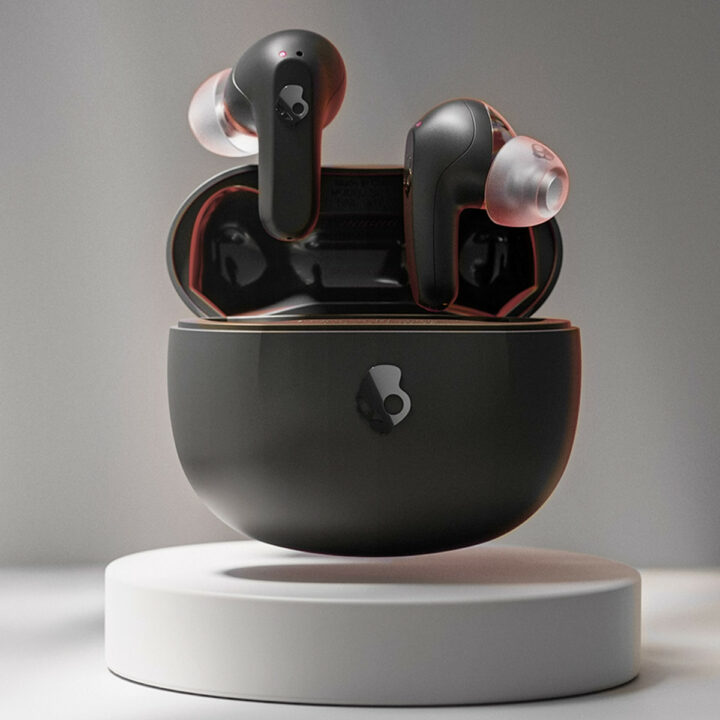
What if AirPods came in a slick black finish and cost nearly half the price? That’s what Skullcandy is going for with its “value-driven” Rail range of wireless earbuds.
Apple’s AirPods Pro are widely considered to be the best in-ear wireless headphones with active noise cancellation (ANC). But, at $399, they cost a pretty penny. To combat this, Skullcandy has two Rail models out in Australia for less than $230.
Of the two sets of earbuds, the Skullcandy Rail ANC is the closest AirPods Pro competitor. It uses four-microphone ANC technology to enable adjustable noise cancellation and block out unwanted noise. For $60 less, you can get the Skullcandy Rail True Wireless Earbuds that come without ANC but share plenty of other features.
Both sets of earbuds are designed to fit ergonomically, and pair with the Skull-iQ app. This app drives the devices’ voice commands, giving you hands-free control. Platform agnostic, each set comes with Bluetooth 5.2 connectivity, with the ability to connect to two devices at the same time.
Skullcandy’s Rail headphones have similar battery lives, too. The ANC model advertises up to 38 hours of charge (when the ANC feature is off), with the buds providing 10 hours in addition to the charging case’s 28 hours, which you can top up wirelessly. Looking at the base Rail model, you lose wireless charging but gain an extra few hours of battery life – up to 42 hours.
You should be able to use the Rail earbuds while exercising, thanks to both models carrying an IP55 rating. This means they’re sweat, water, and dust resistant. Splashes of water should be fine, just don’t go swimming with them.
Skullcandy Rail release date and price
The Skullcandy Rail costs $169.95, while the ANC version costs $229.95. Both models are out now via the brand’s website. At nearly half the price of the pro-level AirPods, the Rail ANC could be a reasonable alternative.
It’s getting harder to write meaningful reviews of each new Apple Watch, and the Series 9 doesn’t make it any easier. It’s not that the watches are getting any less good; there are small but helpful improvements every year. The issue is that it’s still basically the same watch. I could link you to last year’s review, or the one from the year before.
The problem is that the base Apple Watch model is still the best basic smartwatch. Without cannibalising what makes the Apple Watch Ultra great, the most it could do is add some more health sensors that don’t do anything more than look good on paper. Yet, Apple still feels the need to release a new watch every year, so there are three small (and delightful) upgrades for new watch owners to enjoy.
Having reviewed a few smartwatches recently, the main thing that really struck me about the Apple Watch Series 9 (priced from $649) was how easy it was to set up. It didn’t need me to link accounts with some nonsense to activate the fitness features (like the Google Pixel Watch), and it wasn’t going out of its way to make me feel bad about my body (like the Samsung Galaxy watches). I brought it near my phone, did an update, transferred data from my old watch, and I was ready to go.
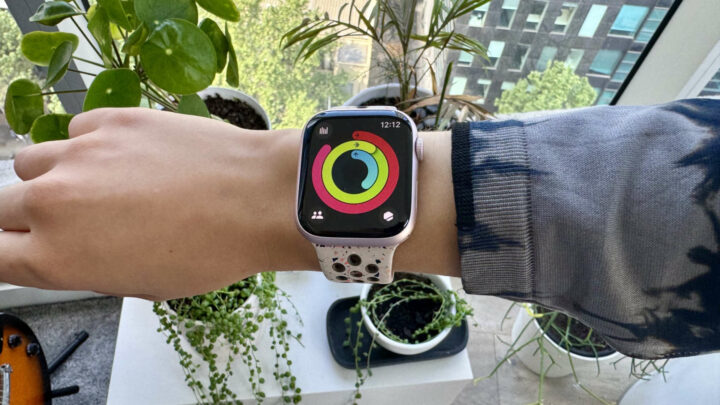
It looks much the same as last year’s watch. The subtle pink of the pink aluminium model is nice. The new Nike band is soft and comfortable and looks fashionable with its recycled plastic marbling. Overall, a good first impression.
Apple Watch Series 9 specifications
Display
Always-On Retina LTPO OLED display
Chip
S9 SiP with 64-bit dual-core processor4-core Apple Neural Engine64GB capacity
The main takeaways from these specs are that the chip is a bit faster, the screen gets a lot brighter, it’s now even better at finding your phone, and you can pinch your fingers to select stuff (more on that later).
Performance
Overall, the Apple Watch Series 9 performs like an Apple Watch. If you’re not familiar with Apple Watches, it’s easy to track workouts, operate various apps, get lots of information at a glance (or a little, if you prefer a more minimalist face), activate Siri, use as a Walkie-Talkie with any friends that also have Apple Watches, and check notifications without getting your phone out.
In comparison to Apple Watches of previous years, there are four main new features that stand out:
Brighter and Faster
The Series 9 has been upgraded with the new S9 SiP, which makes it faster than last year’s watch, and it has a brighter display. Compared to the Ultra, which has always had a blindingly bright display, I’ve found that the normal Apple Watch could be a little dark on very sunny days, and the new brighter display has really helped with that. I didn’t have any complaints about the speed of the S8 chip, but it is nice that things react slightly faster now. It’ll make a big difference coming from a Series 6 or older.
Better at finding stuff
Most people love their Apple Watch, and they’ll tell you a bunch of standout features if you ask them. Maybe they’re fitness junkies, or like knowing the UV at a glance because they’re as pale as a ghost and burn easily (that might just be me), the noise meter that tells them if the volume of an area is bad for their health, etc. But the one feature that is universally loved, and is certainly the most used on my watch, is pinging your iPhone when you’ve put it down somewhere and can’t find it. On the older Apple Watches, it would make your phone emit a little sound to help you find it. Now, with the new Precision Finding for iPhone feature, your phone will make a sound, and the watch will display in which direction you should look and how many metres away you are. It’s like a high-tech game of warmer-colder, and I am delighted.
Double Tap Gestures
Out of all the physical updates, it’s the double tap gesture that’s made the most difference for me. You can now tap together two fingers on the hand that’s wearing the watch in a kind of pinching motion (without touching the watch) to respond to notifications or to scroll through your open apps on your watch. It’s great for when your alarm goes off and you’re sleeping on your stomach, because then you don’t have to manipulate your other arm around to snooze the alarm. I’ve also really appreciated it when I’ve gotten a phone call while carrying shopping, or riding my bike and didn’t have a spare hand. Unlike the Action Button on the new iPhone 15 Pro, it’s easy to see how this would immediately change how you interact with your watch and reduce friction.
WatchOS 10
The best thing about the Apple Watch Series 9 is WatchOS 10. It’s a massive update that’s released to most models of Apple Watch (Series 4 and newer), and drastically improves a lot of things. My favourite is, of course, the new cycling workout features, which have really improved how I handle my training rides. But there are also medication reminders, logging your emotions at key times throughout the day, measuring how much time you spend in sunlight, finding hiking trails in the Map app (in some areas), and ping your Apple Watch from your iPhone (turning the tables a bit). It’s a really substantive update and well worth checking out.
Who is the Apple Watch Series 9 for?
The Apple Watch is still the best smartwatch around, though the gap between Apple and its competitors is shrinking with each passing year. The Series 9 is for iPhone users who want a great smartwatch. Hikers, endurance runners, and divers would be best served by the Apple Watch Ultra 2 (which is an incredible watch), but everyone else is more suited to the Series 9.
WHY APPLE WATCH SERIES 9—Your essential companion for a healthy life is now even more powerful. The S9 chip enables a superbright display and a magical new way to quickly and easily interact with your Apple Watch without touching the screen. Advanced health, safety, and activity features provide powerful insights and help when you need it. And redesigned apps in watchOS give you more information at a glance.
CARBON NEUTRAL—Pair an aluminum Apple Watch Series 9 with a Starlight, Midnight, Winter Blue, or Light Pink Sport Loop for a carbon-neutral combination. Learn more about Apple’s commitment to the environment at apple.com/2030.
ADVANCED HEALTH FEATURES—Keep an eye on your blood oxygen. Take an ECG anytime. Get notifications if you have an irregular heart rhythm. See how much time you spent in REM, Core, or Deep sleep with sleep stages. Temperature sensing provides insights into overall well-being and cycle tracking. And take note of your state of mind to help build emotional awareness and resilience.
For existing Apple Watch owners, it’s perhaps worth upgrading from the Series 5 or 6, but any newer than that and I’d hold out a bit longer for a more substantial upgrade. People with a Series 3 or older watch should consider upgrading now, as those watches aren’t compatible with WatchOS 10.
But, put simply, the Apple Watch Series 9 is a fantastic smartwatch, and if you have an iPhone, and don’t already have a recent watch, then this is the one to buy.
GadgetGuy occasionally uses affiliate links and may receive a small commission from purchased products.
Apple Watch Series 9
The Apple Watch Series 9 is a fantastic smartwatch, and if you have an iPhone, and don’t already have a recent watch, then this is the one to buy.
Features
9
Value for money
8
Performance
9
Ease of use
9.5
Design
9.5
Positives
The best smartwatch on the market
The double tap gesture is easy and effective
Precision finding is super useful
Negatives
The battery still doesn’t last more than one day
The upgrade isn’t particularly significant over last year’s watch
Thanks to NBN wholesale price structure changes, you soon might be paying less for fast internet, while others struggle with higher costs.
It follows the Australian Competition and Consumer Commission (ACCC) accepting the latest Special Access Undertaking (SAU) variation from NBN Co. In a long and drawn-out process, prior SAU proposals were rejected and labelled “not acceptable” by Communications Minister Michelle Rowland partly due to fears over privatisation.
Under the agreed SAU changes, wholesale prices will be reduced for 25 Mbps and 100 Mbps or faster internet services. Meanwhile, 50 Mbps wholesale prices will increase. It’ll be up to internet service providers (ISPs) to determine how they pass costs or savings onto consumers.
NBN price changes: how they impact you
Aussie Broadband is one of the first local telcos to make changes to its pricing structure following the SAU change. Lower-speed NBN plans up to its 50/20 product will cost $6 more per month starting on 21 November.
Source: Aussie Broadband.
According to Phillip Britt, Aussie Broadband Managing Director, this is because of changes to the Connectivity Virtual Circuit (CVC) charge. Faster plans no longer incur this charge, but slower plans are now charged per individual, based on usage. Previously, it was based on a shared usage pool, where it evened out between high-usage individuals and those on the opposite end of the spectrum.
“By not only continuing to charge CVC, but doing so on an individual basis, the NBN has effectively forced our hand to raise prices for the majority of our broadband customers – and at a time of heightened financial uncertainty,” Britt said.
Also mentioned by Britt is that 50/20 plan accounts for approximately 45 per cent of the market. With phone bills also costing more across the board, it spells extra financial stress for people trying to save money on lower-speed plans.
There is good news for those on faster plans, however. Aussie Broadband’s revised pricing means that customers on 100/20 plans and above will save between $4 and $20 per month. The transition to the new wholesale pricing structure will begin over the next three months, so expect to see more ISPs follow with revised pricing soon.
Keep an eye out for the cheapest NBN plans over the coming months to make sure you’re paying the best price.






![Apple Watch Series 9 [GPS 45-mm] Smartwatch with Aluminum Case with Midnight Sport Band M/L](https://m.media-amazon.com/images/I/41ikK77gYIL._SL160_.jpg)


