The next big leap in creative technology is not just about generating images or videos. It is about asking an AI to collaborate with you. To understand what you want, help you refine ideas and guide your project through every step from concept to delivery. This is the promise of conversational or agentic AI, a creative teammate that thinks in context, not just in one-off prompts.
I have been at the AdobeMAX conference in Los Angeles to experience this new direction first hand. Adobe is introducing assistants into its design software including Photoshop, Express and Firefly, that follow your instructions in plain language and help shape your project from start to finish.
Why this matters for creators
Content creation is booming, but most people do not have time to master professional tools. Adobe’s research shows the majority of creators are already using generative AI to make content they could not produce before. Many now want AI to guide their workflow, not just automate a single step.
Agentic AI helps by carrying your vision from one task to the next. You can build on your idea without restarting or remembering which tool does what.
Adobe brings agentic AI into key creative apps
Adobe Express
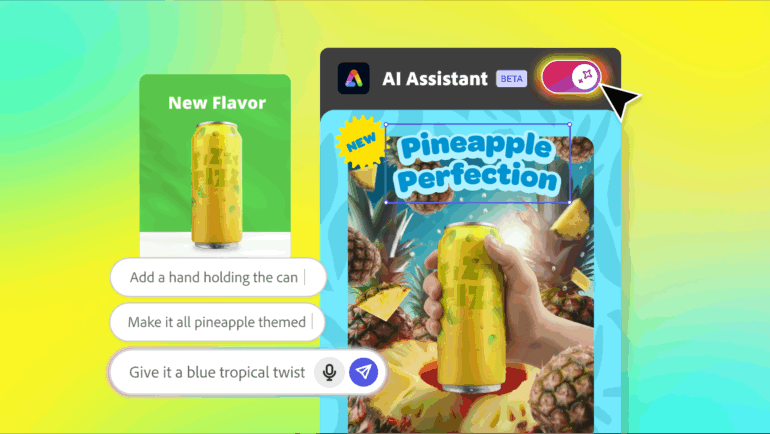
The new way of designing – ask the AI to make the big changes and then fine-tune it yourself, all at the same place and with the same tool. Credit: Valens Quinn
The new AI Assistant in Express turns a template into a working conversation. You can ask for changes like:
Make this more tropical
Add my brand colours
Change this to a TikTok format
The assistant updates the artwork automatically. If you want to fine tune anything, you simply switch to regular controls without leaving the canvas.
Photoshop (for web)
Photoshop (web) interface showing the text panel on the right for conversational AI requests that can be applied to your photos. Source: Valens Quinn
Photoshop now includes a private beta of its own assistant inside the web version of the app. It can take instructions like:
Remove that object cleanly
Match the lighting between these images (Harmonise)
Add a soft depth of field
Make this look like a studio portrait
Photoshop then recommends steps or performs the changes itself. You can ask follow-up questions and then take over manually whenever you want precise control. This combines the speed of conversational editing with the accuracy professionals expect from Photoshop.
Adobe and ChatGPT
Adobe is also working with OpenAI to link ChatGPT with Express. Soon, users will be able to request a design inside ChatGPT and it will be created using Adobe’s tools, then returned for further editing or sharing. Photoshop support is planned too, which is really exciting because of the power that it puts behind ChatGPT’s text based interface.
ChatGPT5 demo showing results for Adobe Express-built designs, and you can see the Adobe Express icon in the chat box. Source Adobe
[VALENS NOTE: You can add your own view here about whether this makes powerful creative tools available to a much wider audience.]
What makes Adobe’s approach different
Adobe says these assistants are trained with real design and production knowledge. They draw on:
Established design principles and workflows
Millions of professional-grade assets
Adobe and partner AI models suited to different tasks
Knowledge of what drives visual engagement
The goal is high quality results that are ready to share or publish.
Project Moonlight is Adobe’s next step
Instead of one assistant per app, Moonlight coordinates across them. You can describe a full project and it brings together editing, design and content planning, all in one place.
The Project Moonlight is basically an infinite canvas for using AI to create concepts to finished art, and you can even have it review your social performance to guide your creations. Source: Adobe
It will also be able to connect to social accounts to help with content strategy and performance insights, so imagine doing your research first, then moving to ideation, concepts and production.
How this helps business users too
New enterprise features in Express will allow more staff to create on-brand materials through conversation. Locked templates and approvals will help large and small teams produce more content without losing consistency.
A perfect example is adapting content from head-quarters to a local market without needing a skilled designer. This would be especially handy for fast-turnaround work for local events or social platforms.
Where this is heading?
Conversational AI aims to reduce friction and complexity, so you can focus more on ideas and less on technique. The more it understands your intent and creative style, the more helpful it becomes.
This is a major shift towards a future where we may not ever need to learn, for example, Photoshop’s complex interface, but still being able to leverage its powerful tools. But to stop a scenario where art becomes homogenised into AI-created slop, creators can simultaneously access the tools for fine tuning and adding their uniqueness to the finished art.
Valens Quinn attended AdobeMAX in Los Angles as a guest of Adobe Australia.
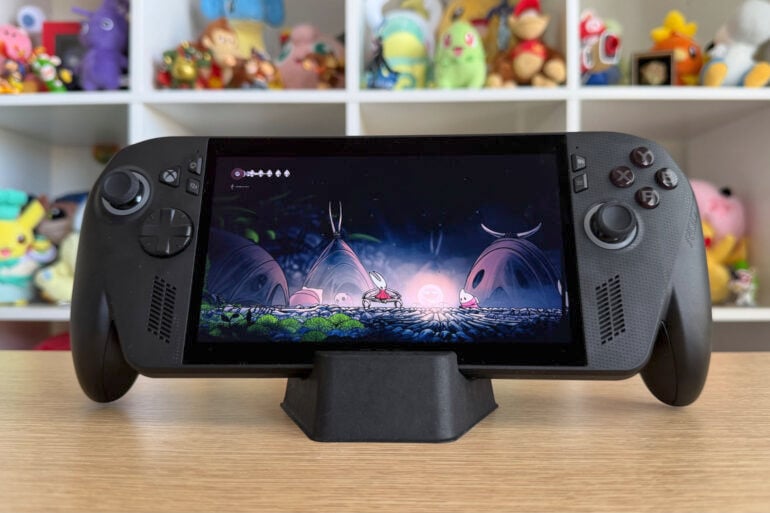
Xbox by name only, the ROG Xbox Ally X is a handheld gaming PC first and foremost. Designed to rectify the frustrations of shoehorning Windows 11 onto a device not custom-made for gaming, this is a much better attempt that still struggles with friction. In terms of power (and its high price), the ROG Xbox Ally X stomps over other handheld gaming PCs. But from a usability perspective, Windows 11 still pops up to cause a nuisance every now and then.
This device serves as a reminder that Xbox has entered its midlife crisis phase. Instead of buying a motorbike, it’s teamed up with a gaming PC brand to enter a new hardware division. Under pressure to make more money than ever before, Xbox is making fewer big hits and focusing more on a platform-agnostic future.
Don’t expect to play your entire library of Xbox games natively on this device, though. Past the Xbox branding, this is an ROG device through and through. At its core, the ROG Xbox Ally X is like its predecessors, the ROG Ally and ROG Ally X, albeit with some console gaming flourishes.
As such, this imposing handheld primarily plays PC games. It’s possible to play console games by streaming them from your console, or compatible games via the cloud with an increasingly expensive Xbox Game Pass subscription. But the ROG Xbox Ally X is ultimately a PC dressed up as a gaming device.
What it does, however, is provide an all-in-one launching pad for the many different PC platforms. That, and more power than most other handheld gaming PCs. Windows 11 sucks up some of that power and occasionally diverts attention away from gaming, but not nearly as much as it historically has.
When ROG and Xbox first teased the collaborative device, the promise was that they would make a better Windows experience for handheld gaming. As opposed to a Steam Deck, which runs on the gaming-specific SteamOS, most handheld gaming PCs use Windows 11.
Not a custom Windows operating system for playing games, but the same Windows 11 you get on a laptop or desktop PC. In the past, it made for a clunky experience. Virtual keyboard prompts not appearing properly, gamepad inputs failing to register, and other quirks frequently got in the way.
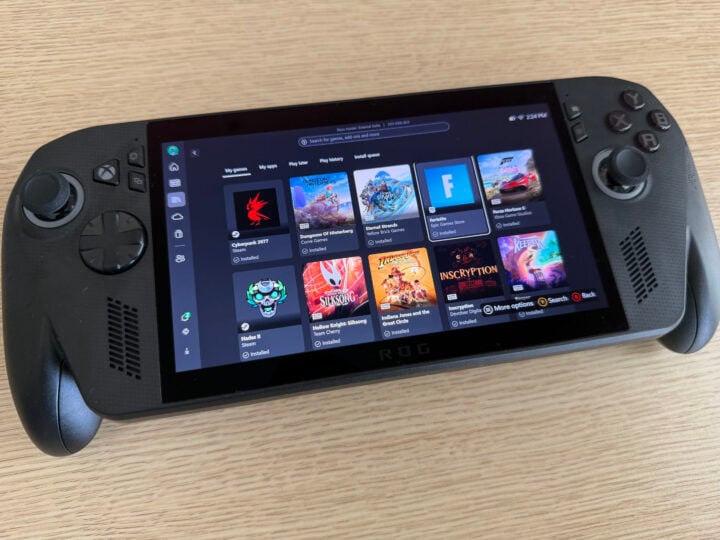
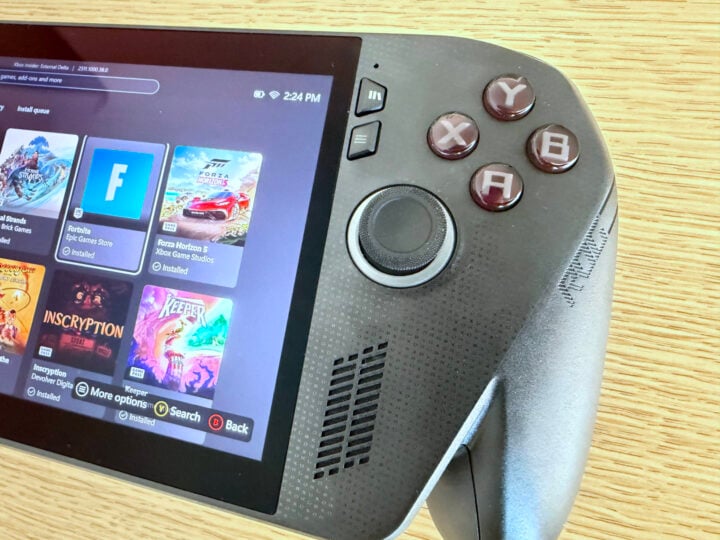
ROG and Xbox have partially made good on their collective promise with the Xbox Ally. Their attempt comes in the form of the ‘Xbox full screen experience’, a new version of the Xbox app that blocks most of Windows’ background nonsense, theoretically freeing up more power for gaming.
Image: Chris Button.
By long-pressing the Xbox button, you can choose to swap over to the regular Windows 11 experience. I had to do this a few times to install some third-party apps and check that some software was running properly. As much as I tried to avoid the Windows 11 side of the ROG Xbox Ally X, having access to the full operating system was handy for troubleshooting — a hallmark of PC gaming.
But swapping between Windows 11 and the optimised Xbox app isn’t as free and easy as you might like. Going back to the Xbox app from the Windows 11 desktop triggers a pop-up recommending you restart the device to get the most optimised experience. Presumably, the ROG Xbox Ally X can only disable unnecessary background processes if it launches directly into the Xbox app. All going well, you shouldn’t need to swap between the two sides of the Windows 11 operating system often, once you’re up and running.
Two apps, both alike in functionality
My review unit arrived with the setup already complete, possibly to bypass any initial boot complexities. To find out for myself, I reset the device, only to learn that it was a far less cumbersome task than I expected. The only complication I encountered was needing to manually initialise and update Armoury Crate SE, ROG’s device management tool, so that it would work properly.
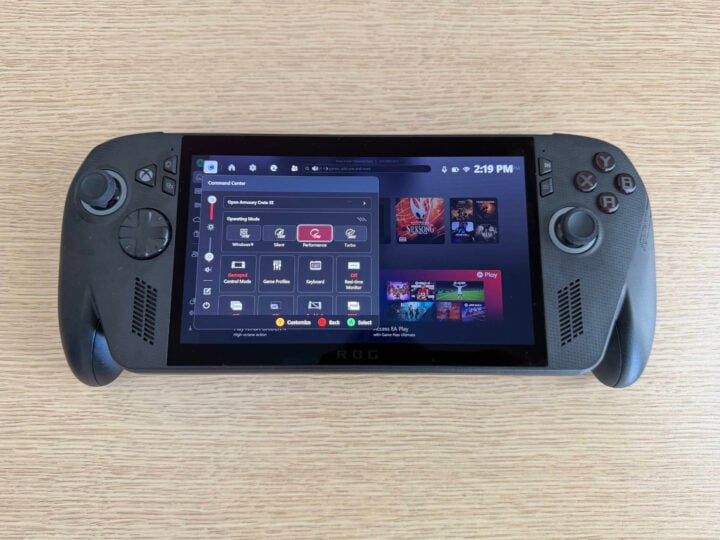
Curiously, the ROG Xbox Ally X combines Armoury Crate SE on top of the Xbox software. I thought pairing the two would be overkill, creating a clash of apps trying to assert dominance over one another.
Image: Chris Button.
After roughly a week of using the device, however, I’m pleased that this clash hasn’t eventuated. Xbox’s app mainly handles the software and game library management, while Armoury Crate SE controls the hardware, including performance settings and the like. Both have dedicated quick-access buttons on the top-left side of the device, making it easy to change settings in a matter of seconds.
Peering through Windows
That’s not to say I haven’t encountered my fair share of frustrations. Supporting multiple different PC game launchers is one of the touted advantages of a Windows handheld gaming PC versus a Steam Deck (putting aside the fact that you can tweak a Steam Deck to play non-Steam games). But at least I can install Fortnite via the Epic Games Store without any software trickery.
Navigating those storefronts smoothly is another story. Opening the Steam storefront for the first time launched it in the regular desktop view. It meant that none of the ROG Xbox Ally X’s gamepad inputs worked, forcing me to resort to using my finger on the touchscreen. I get it, a touchscreen is meant to be touched, but the less I can smudge a display with my sweaty mitts, the better. Compounding my frustrations was the default zoomed-out scaling of Steam made it tricky to tap the exact menu items I wanted.
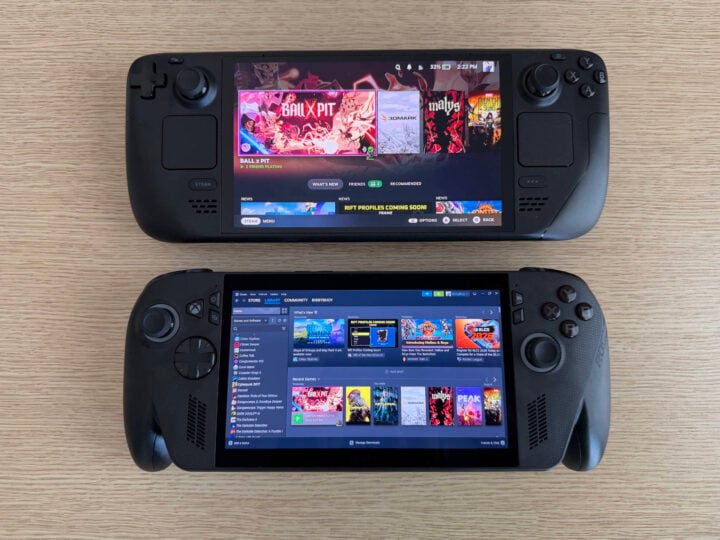
Steam Deck’s (top) native SteamOS is easier to navigate than the desktop view the ROG Xbox Ally X (bottom) defaults to. Image: Chris Button.
Trying to launch Steam’s ‘Big Picture mode’, which is compatible with controllers, only slightly improved the experience. Immediately, the gamepad controls worked as intended. Unfortunately, the scaling was off again, cutting off the edges of the app’s UI. On top of that, despite the Steam app’s UI purporting I could press the Xbox button to access the software’s menu, it only opened the Xbox quick menu baked into the device.
I could’ve tinkered with some more settings and likely fixed the app’s view scaling, but I’d had enough by this point. In better news, after installing a game from Steam, you can then access it from the Xbox library menu. It automatically populates with games you install, regardless of storefront, which is convenient.
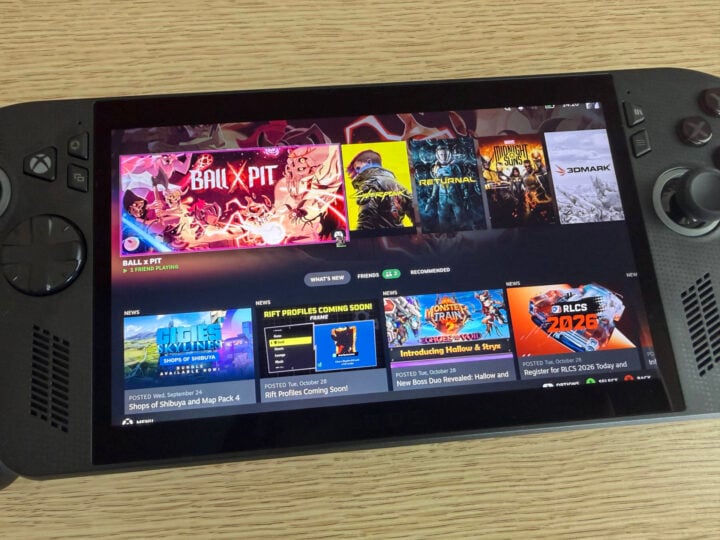
Launching Steam’s ‘Big Picture mode’ doesn’t work properly, cutting off UI elements, among other irritants. Image: Chris Button.
The ROG Xbox Ally X’s user experience is not completely frictionless, but it’s much better than previous Windows 11 handhelds I’ve tried. ROG and Xbox say they’ll continue to update the software post-launch, so that might smooth out a few more creases. As it stands currently, it’s a workable, if occasionally janky, platform with room to grow.
A note on price
Australians get a slightly better deal than those in North America, for once. When the ROG Ally X (not the Xbox version) launched last year, it was priced at US$799 overseas, while Aussies copped a $1,599 price tag.
In the US, the ROG Xbox Ally X costs US$999, a fairly steep year-on-year increase. Fortunately, that didn’t result in an increase here, with the local price holding steady at $1,599, same as the non-Xbox Ally X.
That’s still an expensive device, no matter whose branding is on it, but it’s refreshing to see an almost 1:1 currency conversion, dismal as the exchange rate may currently be.
ROG Xbox Ally X specifications and price
Processor
AMD Ryzen AI Z2 Extreme
Memory
24GB LPDDR5X
Display
7-inch FHD (1920 x 1080) 120Hz touch-enabled IPS display
Size
29.0 x 12.1 x 2.75 cm
715 g
Storage
1TB PCIe 4.0 NVMe M.2 SSD
Battery
80WHrs
Type-C 65W AC adapter
Connectivity
Wi-Fi 6E (802.11ax)
Bluetooth 5.2
3.5mm Combo Audio Jack
USB 3.2 Gen 2 Type-C DisplayPort / power delivery
USB 4 Type-C (Thunderbolt 4, DisplayPort 1.4, Power Delivery 3.0)
UHS-II microSD card reader
Like the PlayStation Portal before it, the ROG Xbox Ally looks like someone stretched an Xbox controller and slapped a big screen in the middle. It’s built for performance, not for looks. I’d argue it’s like me in that regard, although it’s debatable I meet even the performance criteria.
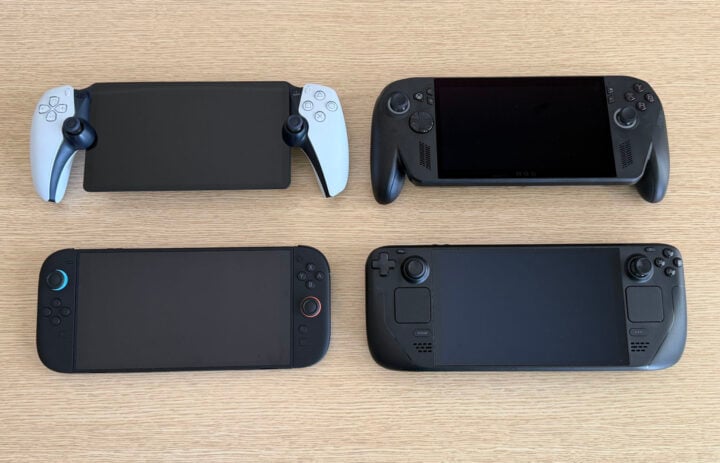
I’ve got moderately sized hands, and the ROG Xbox Ally X is only just portable enough for me to hold comfortably. At 715 grams, it’s noticeably heavy, heavier than the Ally X (678g), Steam Deck OLED (640g), and Nintendo Switch 2 (534g). Surprisingly, though, it’s lighter than the 740g Lenovo Legion Go S.
Clockwise, starting from the top-left: PlayStation Portal, ROG Xbox Ally X, Steam Deck OLED, and Nintendo Switch 2. From the top, they all look similarly sized. Image: Chris Button.
Offsetting its bulk are the protruding controller grips on either side. The ROG Xbox Ally X is much easier to hold because of this, as chunky as it looks. My hands and wrists still fatigued after a while, which could have more to do with my lack of upper-body strength than anything else.
Everywhere else, the ROG Xbox Ally X looks similar to ROG’s past handheld gaming PC. The large, seven-inch LCD 120Hz panel remains the same (no OLED, unfortunately), as does a commitment to control sticks bordered by RGB lighting. That’s how you know it’s for gamers. It was also one of the first things I disabled to preserve battery life.
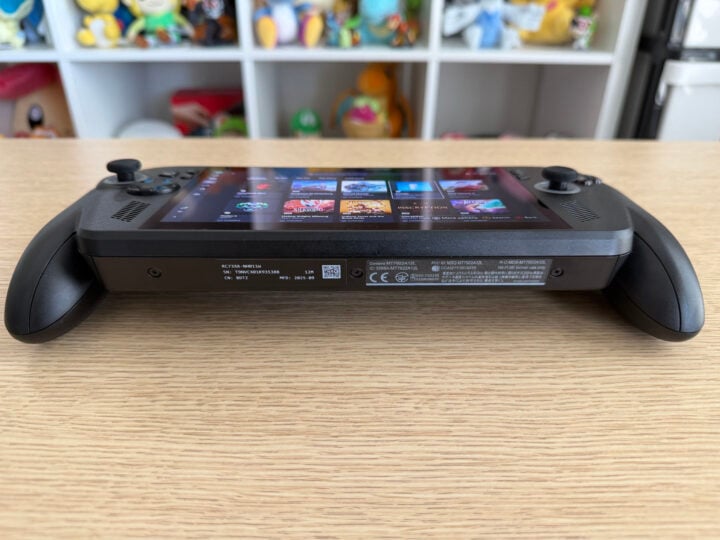
From underneath, however, the Xbox Ally X’s heft shows. Image: Chris Button.
Both USB-C ports sit adjacent to one another on top of the device. After enjoying the top and bottom placement adopted by the Switch 2, I’m slightly annoyed I don’t have the option of plugging in via a different angle, depending on what’s most comfortable at the time.
Also, whose idea was it to place the near-identical library and menu face buttons together? One has horizontal lines, and vertical lines on the other. At a quick look, they barely stand apart. I still accidentally press one instead of the other, opening the Xbox game library instead of pausing a game.
I’d like to have a word with whoever put these menu buttons together. I’ll be gentle, I promise. Image: Chris Button.
Games and benchmark performance
Here’s where things get particularly interesting. Perhaps glossed over in favour of the shiny Xbox branding, the ROG Xbox Ally X uses a new chipset on the inside, the AMD Ryzen AI Z2 Extreme. Aside from the upgraded system-on-a-chip, most of the device’s specs are on par with last year’s ROG Ally X.
As spotty as the software integration may be at times, the hardware is the consistently strongest performer here. Likely the result of a more power-efficient processor, and the ability to crank the power settings to a higher 35W when plugged in, the ROG Xbox Ally X is notably more powerful than past handheld gaming PCs.
Using 3DMark’s Time Spy benchmark at the highest power settings, the ROG Xbox Ally X returned a score 15 per cent higher than the Ally X, and roughly 26 per cent higher than the vanilla ROG Ally. Compared to the Lenovo Legion Go S, which uses the less powerful AMD Ryzen Z2 Go chipset, the ROG Xbox Ally X crushes it with more than a 116 per cent performance leap.
This trend continues with the Forza Horizon 5 benchmark; on the Extreme graphics preset, the ROG Xbox Ally X averaged 73 frames per second (fps) at its native 1080p resolution, more than 120 per cent higher than the Ally X. While the results were closer with other hardware in Shadow of the Tomb Raider’s notoriously tough benchmark, it still outperformed devices running at their respective 800p resolutions.
An odd anomaly popped up when running the Cyberpunk 2077 benchmark, however. Set to the handheld-optimised ‘Steam Deck’ preset, the ROG Ally X surpassed the Xbox Ally X’s average frame rate by around 13 per cent. Neither reached the golden 60fps mark, but remained relatively smooth, nonetheless.
I’m not sure what to put the difference down to — variables like driver updates and game patches can impact performance in weird and wonderful ways. Considering I ran the Cyberpunk 2077 test on the Ally X a year ago, and no longer have access to the older device, it’s tricky to say for sure. For now, I’ll chalk the discrepancy up as an outlier, given that the ROG Xbox Ally X outpaces it in other benchmarks. Running the recent Doom the Dark Ages at 60fps in the ‘Handheld’ preset is a pretty mean feat.
Optimised for handheld, battery life
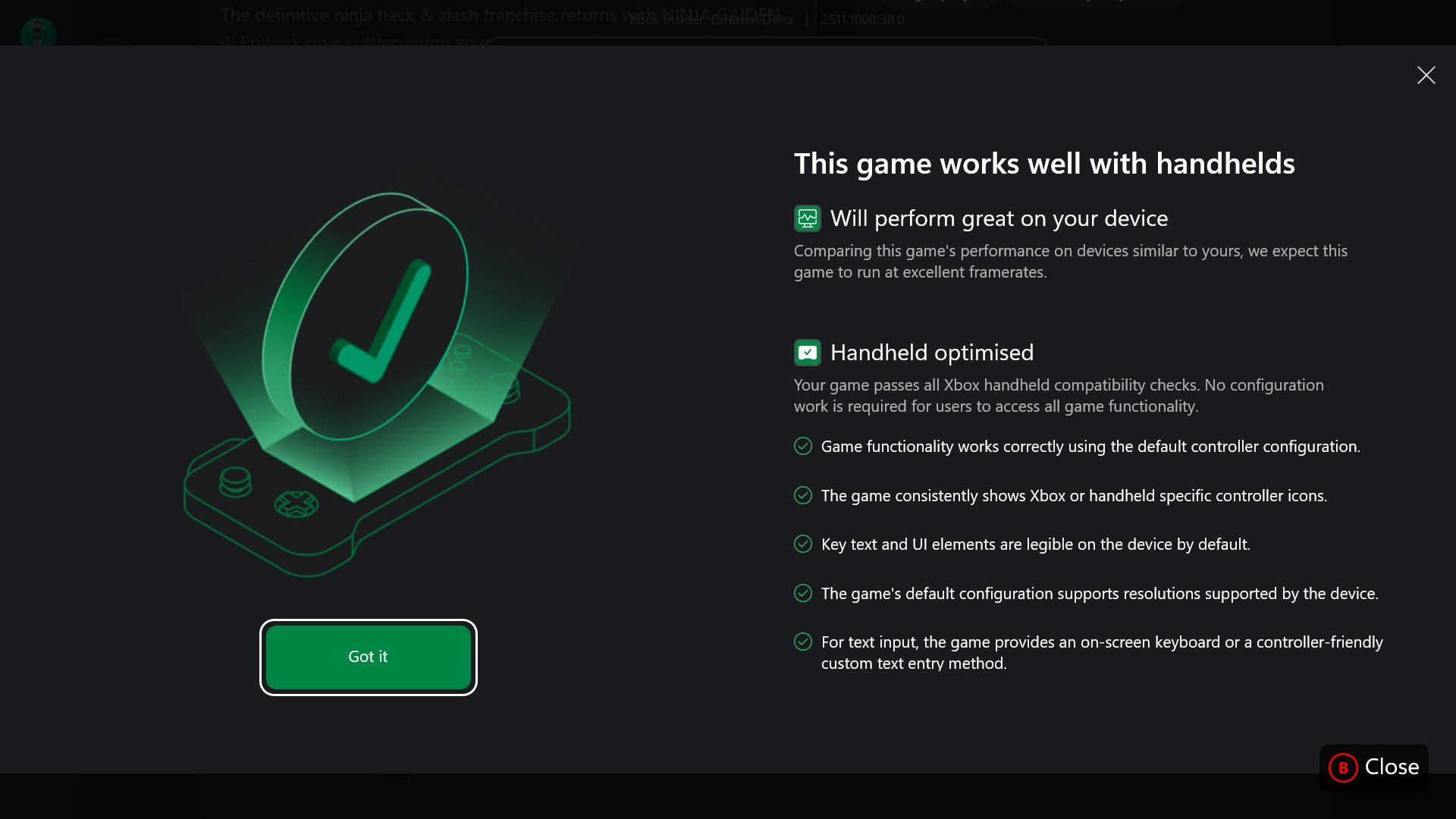
Finding games that run well on handheld gaming PCs is now a little easier, with the Xbox app now listing each game’s handheld compatibility on the store page. Like the ‘Deck Verified’ label on Steam, it indicates which games are optimised to run well on handheld gaming PCs.
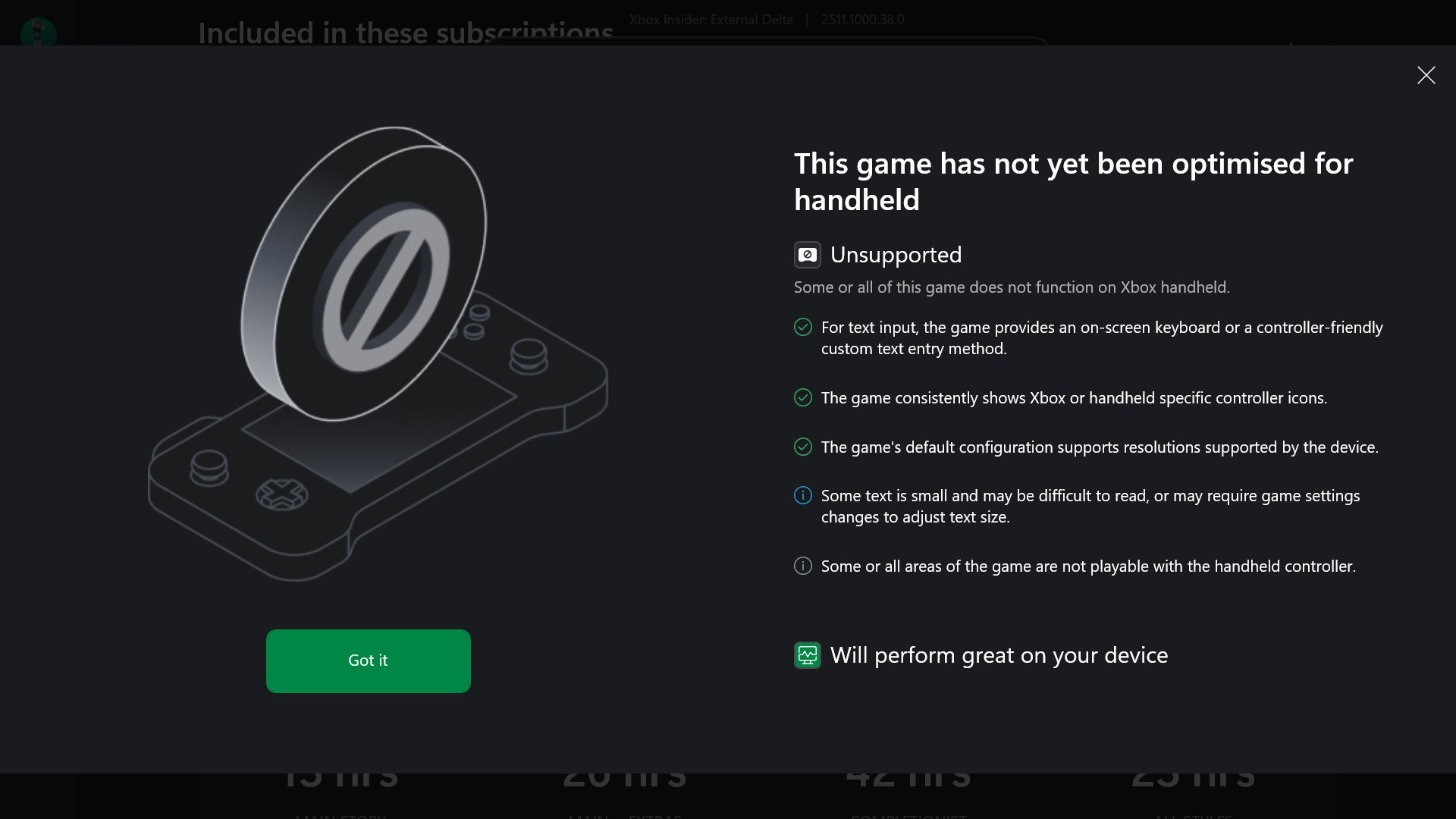
It’s not perfect, though, and it doesn’t mean that a ‘Handheld Optimised’ game will run smoothly from the get-go. Ninja Gaiden 4, a recent fast-paced action game, carries the official optimised badge. However, it needed a bit of tweaking before I could enjoy reasonably smooth gameplay.
For some reason, Ninja Gaiden 4 defaulted to the ‘High’ graphics preset. Because it had the ‘Handheld Optimised’ signifier on the storefront, I assumed that the game would automatically choose the optimal settings. If you consider between 20-30fps on the Xbox Ally X’s 17W power mode optimal, then sure, it did a bang-up job.
Some of the notices are confusing. Unsupported, but will perform great on the device? Which is it? Screenshots: Chris Button.
Dropping the settings down to ‘Medium’ fared much better, hovering between 40-50fps for the most part. I considered locking the frame rate to 30fps, but the screen’s variable refresh rate support prevented any ugly stuttering or screen tearing when dropping a few frames.
On a full battery, I got nearly three hours of playing Ninja Gaiden 4 on the 17W power setting, which is pretty good for a new and visually complex game. Battery life largely depends on which game you play, plus the graphical and power settings you choose. ROG’s low-power ‘Silent Mode’ will get hours of battery life when playing older or less-demanding 2D games. Crank up to the 25W ‘Turbo’ setting and expect to get less than two hours from bigger, more graphically intensive games.
Who is the ROG Xbox Ally X for?
When the first ROG Ally arrived in Australia, the more affordable Steam Deck wasn’t yet out locally. Now that Valve’s device is available here, seeing a device cost nearly double the OLED Steam Deck variant raises an eyebrow.
For that $1,599 price tag, the ROG Xbox Ally X does outperform cheaper devices. It plays PC games, new and old, well. Xbox’s controller grips are much more comfortable to use, even with the device’s still-heavy frame.
There’s still no escaping the spectre of Windows 11, though. Not yet, at least. Despite some good attempts to streamline the user experience for handheld gaming, the Windows OS still frustrates, albeit less frequently.
But for those with patience, a penchant for customisation, and the pennies to match, the ROG Xbox Ally X is a more powerful and more versatile gaming handheld than other iterations.
Xbox provided an ROG Xbox Ally X for review coverage.
ROG Xbox Ally X
The ROG Xbox Ally X is a much-improved attempt at a Windows 11 handheld gaming PC, but it still has some friction to sort out.
Adobe has just announced a new mobile phone version of its Premier Pro video editing software. Given that Premiere Pro is one of the industry’s most respected editing tools, I had to try it out – and it’s available now on the Apple App Store. There’s an Android version “coming soon” but Adobe hasn’t revealed just when as of yet.
Made-for-mobile interface
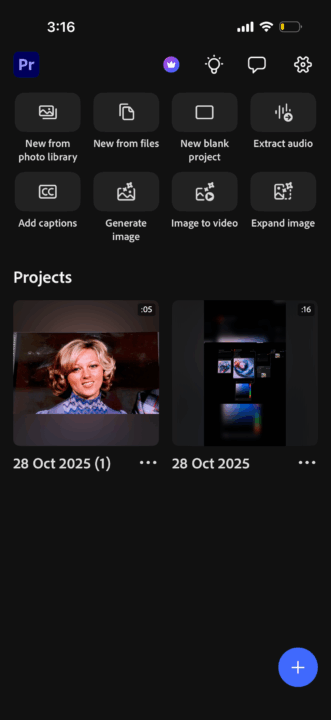
Working with the vertical nature of mobile phones, I’d say that Premier mobile is ideally suited to short-form video editing, however, you can also edit widescreen 16:9 footage. Fire it up and you’re greeted with a Home Screen with direct buttons for various task. This includes starting a blank project to generating images, converting images to video, extracting audio and more.
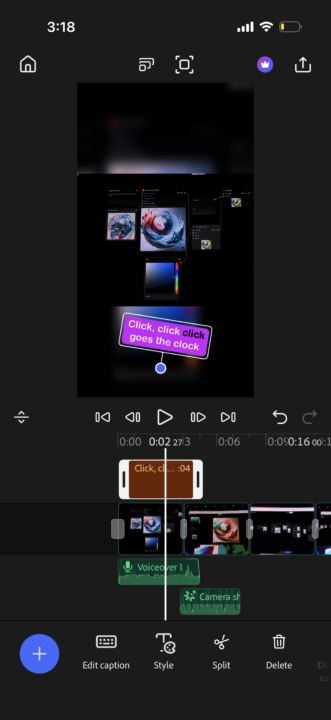
The editing interface is clean, straight-forward and quite simple. It includes a multi-track timeline and row of buttons for Videos and Images, Music and Audio and Titles and Captions. The source window scales to full screen playback as well.
The start-up screen with easy tasks at-a-tap. Credit: Valens QuinnThe multi-track timeline and interface. Credit: Valens Quinn
You can import images from your photo library, Adobe Stock, files or record voice-overs right from the app.
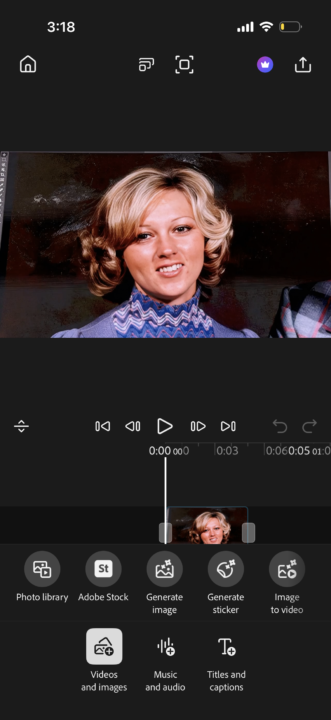
What I really like is that you can access Adobe’s powerful Firefly generative AI for tasks like creating a video from an image. I turned a static image of a person’s face into a short video of that person smiling and it took hardly any time at all.
Once assembled to your timeline you can clean up audio, such as removing background noise, add a soundtracks, etc.
AI-generated captions are easy to add too, and you can stylise text using templates or custom settings.
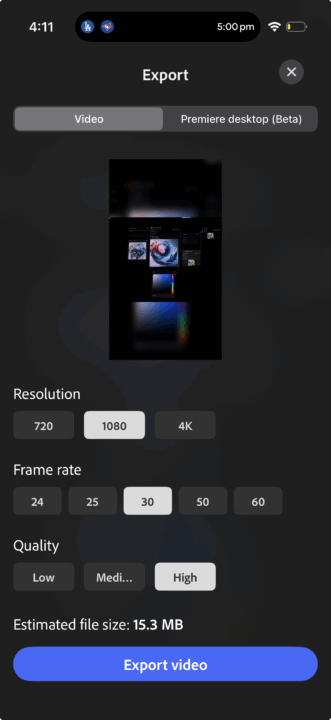
Once your video is edited, you can choose your export settings including resolution, quality and frame rate, or set your project to open in the desktop version of Premiere Pro.
I made this static face into a smiling video using Firefly. Credit: Valens QuinnExport options. Credit: Valens Quinn
Google Shorts partnership
Adobe is also adding a new Create for YouTube Shorts space within Premiere mobile. By tapping “Edit in Adobe Premiere” directly from a YouTube Short, creators will open a dedicated workspace designed specifically for short-form content. The aim is to make high-quality Shorts faster to produce and easier to upload.
Key features include:
Access to exclusive effects, transitions and title presets so clips stand out
Ready-to-use templates for polished, professional content
The ability to customise and share templates, helping new trends emerge
One-tap publishing back to YouTube Shorts
Creators also keep the full functionality of Premiere mobile, including pro-level editing tools, studio-quality audio with Generative Sound Effects and Firefly-powered AI features for generating unique assets.
The YouTube Shorts creation space in Premiere mobile is coming soon.
The verdict
All in all, I found Premiere Pro very easy to learn and it has some helpful features built-it. I expect that more generative AI features will be added in future builds. And while there isn’t as many tools, customisations or effects as CapCut, I expect that many will appreciate Adobe’s corporate-friendly content controls.
Adobe Firefly is taking a major leap from image generator to full creative studio, now adding multitrack video editing, AI-generated soundtracks and voiceovers directly inside its browser-based platform.
Unveiled at the AdobeMAX 2025 conference in Los Angeles, the update means you can create, edit and finish a whole project in the one place, without jumping into separate apps.
It also raises a big question for creators: how much of your workflow could now be handled in Firefly instead of Adobe’s more complex desktop tools?
Video editing now built directly into Firefly
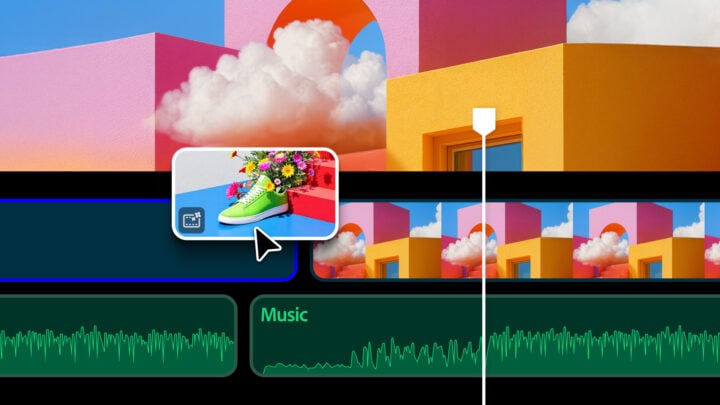
One of the headline additions is a new private beta Firefly video editor, offering creators precision timeline editing in the browser. You can organise clips, generate assets on the fly, trim, sequence and add titles. It supports frame accurate control and even text based edits through transcript workflows.
Users can bring in their own footage and combine it with generated shots, including stylised looks like claymation or anime. Title templates and quick generation tools make scratch edits fast, while a history panel keeps track of previously created media.
The Firefly video editor supports multiple tracks and you can add your own footage or generate it using AI. Credit: Adobe
The Firefly video editor could be a handy way to quickly edit videos on the go, as well as fill in missing shots or effects using generative AI, without launching into Premiere Pro. Speaking of Premiere, Adobe also announced its Premiere for Mobiles app, you can read more on this here.
Generate soundtracks and voiceovers in seconds
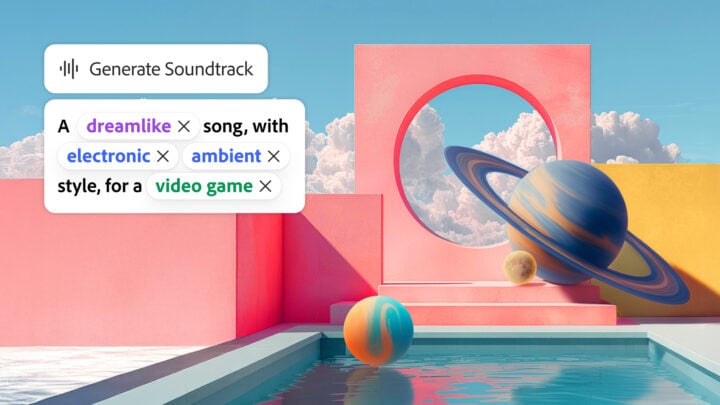
Firefly now includes AI audio creation tools designed for licensed, commercially safe output. Generate Soundtrack produces multiple music variations that sync to your video automatically. Generate Speech adds lifelike text to speech voices with fine control over emotion, pacing and emphasis.
Adobe has partnered with ElevenLabs for multilingual voice options, helping creators rapidly produce content for different audiences.
Generate a soundtrack to match your video’s content in Firefly. Credit: Adobe
These new audio creation options can be especially useful for creating copyright safe music and voice overs, or simply spending less time and money using stock licences.
Firefly Image Model 5 boosts photorealism
Adobe’s latest model, Firefly Image Model 5, generates native 4MP visuals with improvements in fine detail, accurate lighting and realistic human anatomy. It also introduces conversational editing with Prompt to Edit, allowing users to describe changes to an image using natural language.
There wasn’t a huge buzz about Firefly Image Model 5 but it has a number of human-centric improvements. Credit: Adobe
Interestingly, the Image Model 5 announcement was quite short, with a much greater spotlight on Adobe’s integration of many different 3rd-party generative AI models into its apps and platforms.
Personalised content with custom models
Firefly Custom Models let creators train AI using imagery they have rights to use, producing asset sets that stay consistent to their brand or style. Models are private by default and can only be shared with permission, making this a safer approach for commercial creative teams.
This was demonstrated at the keynote and it was surpassingly easy to train a custom model using existing assets, and looks to be a useful way for many businesses to add consistency to their artwork.
More AI models to choose from
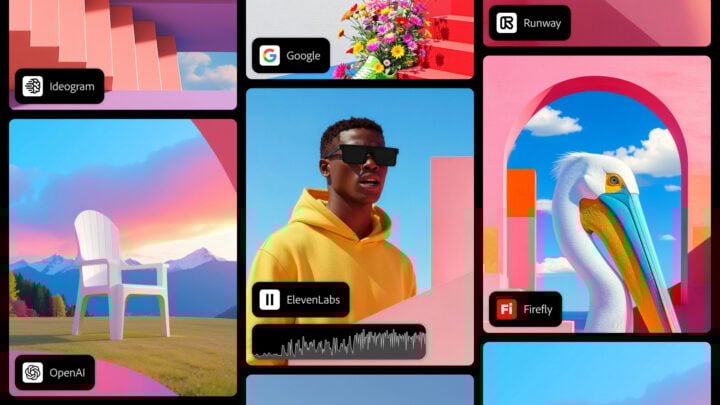
Firefly continues to add partner models including Google, Topaz Labs, Black Forest Labs, OpenAI, Runway and more. This means creators can access a library of top AI engines within one subscription rather than jumping between services.
Lots of 3rd party image and video AI models mean you can get everything you need without leaving Firefly. Credit: Adobe
So now, you can simply select which model is particularly strong at a particular type of generative work, such as adding photo-realistic visual effects to a video.
It’s also an interesting admission by Adobe that its own generative AI models may not always be the right tool for the job all the time, allowing you a more seamless pathway to the best results.
Project Moonlight previewed across Adobe’s ecosystem
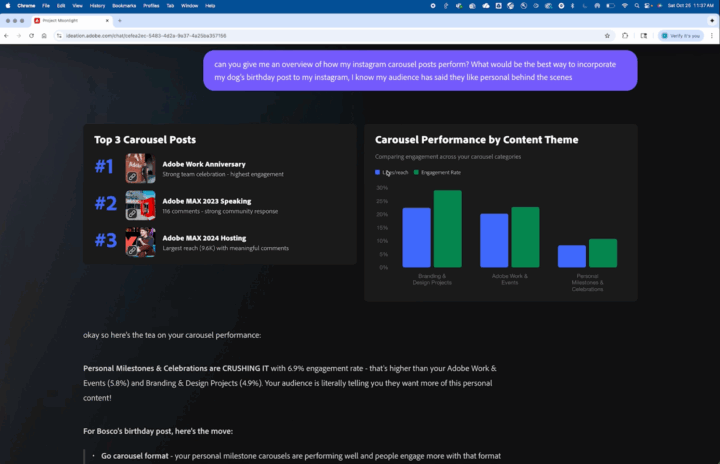
Another previewed feature, Project Moonlight, is an AI creative assistant that can analyse content and social performance to help with ideation and recommendations. Once finished, Adobe says creators will be able to move from concept to finished content in minutes simply by describing what they want.
The Project Moonlight interface showing graphs of your social media performance. Credit: Adobe
Adding the ability to analyse the performance of your social posts is particularly interesting, and may help improve views and engagement of your future posts.
Availability and pricing
Many features such as Prompt to Edit, Generate Soundtrack and Generate Speech are available in public beta now. Others like the Firefly video editor and Custom Models are in private beta, with waitlists open.
Creative Cloud Pro and Firefly plan customers currently have access to unlimited image and video generations through to 1 December.
What this all comes down to is that you’ll be able to do more in Adobe Firefly, as it’s not just the place to go for creating generative AI images. It could also mean avoiding, or even opening Adobe’s more pro-level apps like Premiere Pro, Audition, Photoshop and more.