
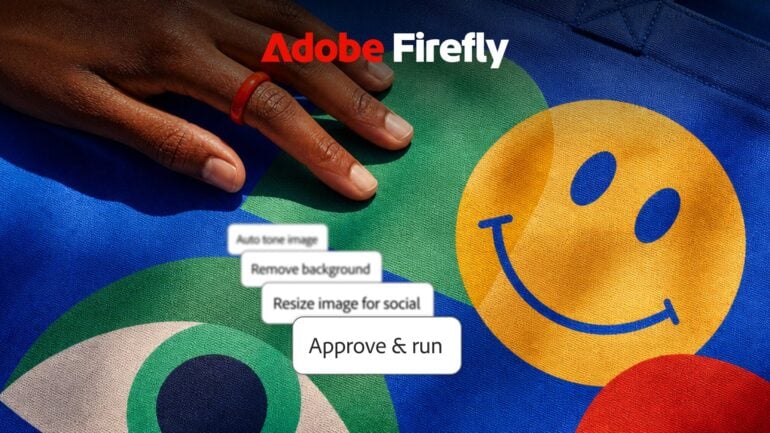
At Adobe MAX 2026 in Miami Beach, Adobe positioned its latest version of Firefly as “the AI creative studio for any creator”. So it’s a destination where you can come up with an idea, make it, and then turn it into all the versions you need, all without leaving the app.
There’s a lot in this update. Firefly gets an expanded AI agent you can direct in plain English, more video editing tools, a new design workspace, finer image editing and a longer list of third-party AI models. But the question I had going in was more basic, and I suspect plenty of Premiere and Photoshop users share it: if you already know Adobe’s flagship apps, why would you use Firefly at all?
Why would you use Firefly?
I put that question to Deepa Subramaniam, Adobe’s vice president of product marketing for Creative Cloud, at a press briefing on the first day of MAX. Adobe’s Creative Agent is now built into Premiere and the Photoshop beta as well as Firefly, so as someone who knows Premiere, I wanted to know where Firefly fits and where a working creative should start.
Her answer: most creative professionals she talks to are “not necessarily going into Firefly to create in the medium that they’re already very good at”. “They are going into Firefly for ideation with Boards, or post-production workflow creation and sharing with Graph,” she said.
In practice, a video editor might use Firefly Boards to rough out a concept or storyboard, then take what Subramaniam called the “battle-hardened concept” into Premiere to do the real work. Or they might build a repeatable process in Firefly Graph and share it with the rest of the team, so everyone works faster.
She also pointed to a keynote demo in which an artist fluent in Photoshop created her artwork there, then went into Firefly rather than After Effects to animate it, because she could describe what she wanted and get it done quickly.
Then there’s everyone else. “There’s a whole class of creatives out there who are not as adept with Photoshop, Premiere, After Effects,” Subramaniam said. “They still want to create and there’s still pressure on them to create.” For them, Firefly offers simpler, prompt-based tools and simpler editing, with what she called “that Adobe magic” behind it.
Put simply, if you already live in Premiere or Photoshop, Firefly is a sketchpad and a workflow tool rather than a replacement. If you’re a creator, marketer or small business owner who needs a video, social post or ad and doesn’t have time to learn the pro apps, Firefly is now Adobe’s on-ramp to them.

An AI agent you direct, and check
The biggest change is an expanded Firefly AI Assistant (beta), powered by what Adobe calls the Adobe Creative Agent. You describe what you want in your own words, and the agent works out the steps and pulls in Adobe’s tools and AI models to carry them out. Adobe says creators have already used it for jobs such as batch retouching portraits and turning product shots into short social videos.
Three new controls make it more practical for real work:
- Plan Mode: the agent shows you its plan before it starts. You can edit it, approve it or let it run on its own.
- Preferences: set your formats, colours, brand guidelines, characters and products once, and they apply across every project.
- Model Selector: pick the AI model for a session, or leave it on Auto-Select and let the agent choose based on what you’re making.
Plan Mode is the most practical of the three. A common frustration with AI agents is that they head off in the wrong direction and you only find out at the end. Seeing the plan first means you can fix a wrong step before it runs.
The agent is also now in Firefly Boards, where you can build mood boards, storyboards and concepts through conversation.
Further out, Adobe previewed always-on agents that keep working in the background on recurring jobs. Its example is a multi-week video project, where an agent organises incoming footage, removes duplicate clips and flags camera shake or audio problems. Always-on agents are previewing in the Firefly AI Assistant now, with a beta due in early 2027.
Firefly Video, from story to final cut
Firefly’s video tools now cover the whole job in one workflow (beta). You can build a story from narrative arc to scenes and shots, assemble clips on a simplified timeline, add captions, and generate transitions and b-roll for shots you didn’t capture.
The keynote demo was a good example of how a creator might actually use it. Starting with their own footage, the presenter added titles, asked for ideas to fix a dull shot using different camera angles, such as a low angle, fisheye or mid shot, and boosted the voice on a clip recorded without a proper microphone using Adobe’s Enhance Audio. A still of a departures board was edited to show a personalised message, then turned into video with ByteDance’s Seedance 2.5 model. Dynamic captions went on, and a custom transition blended a shot of the Golden Gate Bridge into a redwood forest.
To finish, the presenter used the Thumbnail Generator, one of Firefly’s new Quick Actions. You scrub to the frame you want, describe the look in text and try different styles. In the demo it removed the old text from the frame and placed new text behind the person on screen.
It’s impressive, and the AI touches were subtle rather than overdone.
Change one part of an image and leave the rest
Firefly Image gets new precision editing tools: Edit Object (beta), Edit Text, Relight and Retouch. The idea is that you can change one part of a picture, such as removing a distracting object, changing the wording on a sign, adjusting the lighting or retouching a detail, while everything else stays exactly as it was. Relight and Retouch combine prompt-based edits with manual controls for finer adjustments. If you’d rather work in Photoshop, Relight is in the current release there too.
Quick Actions and Firefly Design
Quick Actions is a gallery of dozens of ready-made workflows. Some are one-step fixes, such as Remove Object and the Thumbnail Generator. Others are guided projects, such as Build Product Ad. There are also trend-based actions and actions made by creators that you can remix with your own style. For small businesses that need social content without a designer, this is likely where many will start.
Firefly Design (beta) is a new workspace that puts illustration, image editing, animation, 3D and print on one canvas. Adobe’s pitch is that you can take a brand identity, packaging or a campaign from first idea to client review in a single file, with review and export built in.
Your pick of AI models
One of Firefly’s strongest arguments is that it isn’t limited to Adobe’s own AI models. Alongside the Firefly image and video models, you can use models from Google, OpenAI, ByteDance, Kling, ElevenLabs and Topaz Labs, which Adobe now owns, among others. Recent additions include Seedance 2.5, Kling 4.0, Nano Banana 2.1 and two versions of GPT Image 2.6.
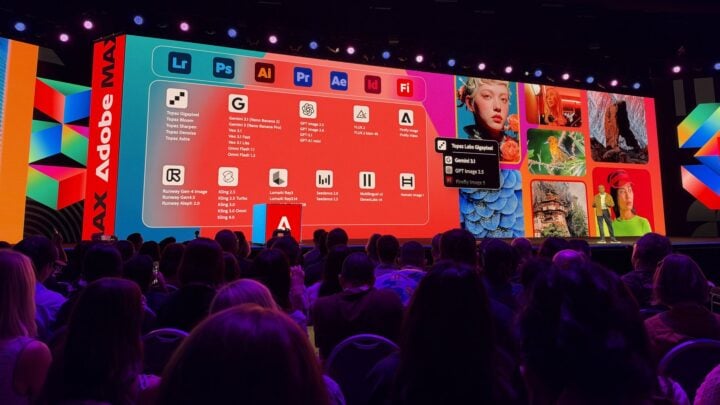
That matters because different models suit different jobs, and trying several under one subscription is simpler than juggling separate accounts. Adobe describes its own Firefly models as commercially safe, so if you plan to use output from a partner model in paid work, check that model’s terms first.
Graph and Builder for scaling up
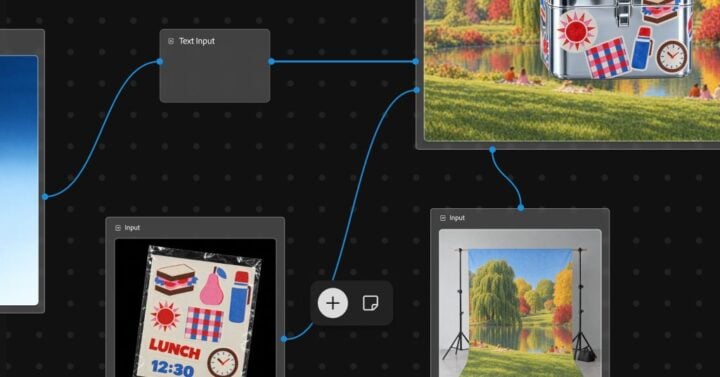
Firefly Graph (beta) lets you build repeatable workflows by connecting AI models and Adobe tools, for jobs from character studies and shot lists to applying brand guidelines across a whole campaign. A built-in AI Assistant helps build and fine-tune each workflow, and you can share them with your team. It’s the tool Subramaniam pointed to for professionals who want to package up a process once and hand it on. This isn’t the first time I’ve seen Firefly Graph. Adobe showed an earlier version at last year’s Adobe MAX, and this one is much closer to finished.
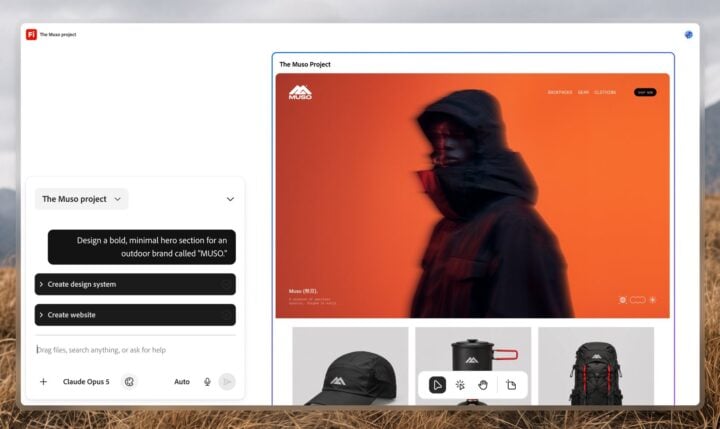
Firefly Builder (private beta, by waitlist) turns an idea into an interactive, on-brand prototype, such as a website, presentation or app, from a plain-language prompt, with no code required for the first version. You can then edit any element directly on the canvas, while a design system keeps it all consistent. It looks impressive, and could be a quick way to go from a website concept to a working prototype.
What’s available now, and what it costs
- Available now: Edit Text, Retouch, Relight and Quick Actions
- Beta: Firefly AI Assistant with Plan Mode, preferences and Model Selector, the Creative Agent in Firefly Boards, Firefly Video’s new editing tools, Edit Object, Firefly Design and Firefly Graph
- Private beta: Firefly Builder, via a waitlist
- Preview: always-on agents, with a beta due in early 2027
Firefly runs on the web and mobile. In Australia, paid plans start at A$16.49 a month for Firefly Standard, which includes 2,000 generative credits a month and access to partner models. Firefly Pro, at A$32.98 a month, doubles that to 4,000 credits and adds Photoshop on the web and mobile and Adobe Express Premium. There’s also a free tier with a limited number of daily generations. Adobe hasn’t said how many credits the new agent features use.
For Premiere and Photoshop users, the message from MAX is that Firefly isn’t trying to replace the tools you know. It’s where you sketch out an idea, or build a workflow so you stop doing the same job twice. For everyone else, it’s Adobe’s simplest way in.
Read more from MAX 2026: Adobe’s creative tools are breaking out of their apps
Valens Quinn attended Adobe MAX 2026 in Miami Beach as a guest of Adobe.
The post Adobe Firefly: what’s new, and who it’s really for appeared first on GadgetGuy.


0 comments:
Post a Comment