Jaguar Land Rover cars is laying the foundations for an exiting future. The British luxury car brand is teaming up with NVIDIA to jointly develop a new software-based platform that will underpin many driving functions and in-car experiences.
Some might remember NVIDIA as a graphics card maker. While there’s no doubt that Jaguar and Land Rovers’ on-screen graphics will look spectacular, NVIDIA is also a leader in Artificial Intelligence (AI).
Starting in 2025, the companies will implement NVIDIA DRIVE for all new Jaguar and Land Rover vehicles. The new platform will enable next-generation automated driving systems, AI services and advanced visualisation of the vehicle’s environment. This includes active safety features, automated parking, plus driver and occupant monitoring.
Next-generation cars will transform automotive into one of the largest and most advanced technology industries. Fleets of software-defined, programmable cars will offer new functionalities and services for the life of the vehicles. We are thrilled to partner with Jaguar Land Rover to reimagine the future of transportation and create the most advanced cars.
Jensen Huang, NVIDIA founder and CEO
For the more technically curious, the full-stack solution is built on NVIDIA DRIVE Hyperion technology. This forms the central nervous system of the car, feeding information to its ‘brain’, which is called DRIVE Orin. The artificially intelligent brain then runs the Jaguar Land Rover operating system.
This networked architecture is very different to the way older cars have completely independent software and hardware for entertainment, safety, engine management and other sub-systems. As such, they don’t interact or benefit from a big-picture view of what the car and driver are experiencing.
Another good thing we can expect to see is over-the-air software updates. Hopefully, these will be similar to Tesla’s cars where free improvements to safety, entertainment, driving performance and battery efficiency can be added without even visiting a garage.
TAG Heuer has been making luxury watches since 1860. Over the years, the Swiss company’s mechanical watches have seen innovations including oscillating pinions and automatic-winding. Times have changed with the introduction of the Apple Watch, and in 2015, TAG introduced its first luxury smartwatch. TAG is continuing to innovate with a new generation of ‘Connected’ watches, which are built to combine elegance with sporting performance.
The new TAG Heuer Connected Calibre E4 range has just been launched, and available in two models. The larger 45mm has a distinctly sporty design, while the smaller 42mm version is more slimline and elegant. Both have technology upgrades, updated designs, watch faces, straps and bracelets.
The developments of these new watches highlight how Connected has become a pillar of TAG Heuer, alongside Aquaracer and Carerra, building on 160 years of Swiss watchmaking experience
Frédéric Arnault, CEO TAG Heuer
42mm model
With a smaller bezel, the 42mm model is sophisticated and elegant, and crafted to appeal to a broad range of tastes. It’s a match for elegant events, wearing to the office or on the tennis court. The sleek case has two mechanical steel pusher buttons that taper towards the bracelet, which is integrated into the design.
45mm model
TAG’s 45mm Connected Calibre model is designed to compliment a range of sporting activities, while retaining a traditional high-end timepiece aesthetic. The strong ceramic bezel defines its style, while providing durability along with an increased sense of flow. The large crown and two mechanical pushers make for easy adjustments, and taper towards a range of bracelet designs.
Elegant 42mm model (left) and sporty 45mm version (right)
Straps and bracelets
A selection of new bracelets and straps are available to compliment both watches. Materials include premium leather or steel, while customers can express themselves with an assortment of multi-coloured rubber straps.
Watch faces
The new Connected models also come with a wide assortment of watch faces. These include more traditional designs derived from TAG Heuer’s rich watchmaking heritage. For a more modern look, there are artistic animations and trendsetting designs available as well. Examples include the Riverside and Wellness watch faces, with a futuristic time elapse effect on the former and heart rate and steps summary on the latter.
In terms of functionality, the watch faces include new digital features for up-to-the-moment weather, calendar and wellness details. There are also easy-to-read information panels that display a 5 day forecast along with activity charts and graphs.
A range of new straps and bracelets (left) and modern or classic watch faces (left)
Sports and activity
The TAG Heuer Sports app helps you keep track of your fitness routines. With a recent revamp, the app includes guided workouts and fitness information, along with sports-specific activity tracking. Users can now track indoor and outdoor runs, cycling, swimming, golf and walking.
New charge stand
The Connected range comes with a new charger concept that also functions as a night-stand. During night charging, the watches will stay lit and display the time. Otherwise they will display the charging level. Integrated magnets in the stand position the watches over the electrical contacts, making it easy to keep them topped up.
Updated tech
Technology improvements include a higher contrast display for better outdoor visibility and colour reproduction in bright sunlight.
Battery life of the 45mm model is improved by 30% compared to the previous version, according to TAG Heuer. This means users can have a full day of battery charge, even while using up to 5 hours of battery-intensive sports tracking. The 42mm model will also last a day while using the wellness app.
With updated Bluetooth 5.0, TAG has doubled synchronisation speeds when connecting to mobile phones and computers.
Tennis star Naomi Osaka is TAG’s Connected watch ambassador
There’s also an altimeter for tracking altitude changes, which adds more accuracy to sports tracking activities including running and cycling. The altimeter works in conjunction with the GPS, compass, accelerometer and heart rate monitor.
At launch, both Connected watches will run on Google’s new Wear OS 2. There’s a free upgrade to the more advanced Wear OS 3 as soon as it becomes available.
Trade in program
For those who already have one of TAG’s earlier Connected timepieces, the trade in program has been extended. This means that customers will be able to bring back an eligible device and receive a credit towards the latest Connected Calibre E4 models.
The program will apply to all previous generations of TAG Heuer Connected watches, even non-functional ones and is subject to a few restrictive eligibility criteria. TAG Heuer is committed to working actively towards the environmental cause and we take great care in dismantling old watches and their accessories to separate the reusable materials.
Price and availability
The new generation of TAG Heuer’s Connected watch will go on sale on March 10, with both the 42mm and 45mm styles available in select stores worldwide. 42mm models are priced from AUD $2,600 and 45mm models start at $2,950.
Specifications: Connected Calibre E4 – 42mm
Movement
Mod Connect 42 mm
Hardware
Battery: 330mAh all-day battery
Battery life: 1 Full Day (1h Running, including Wellness)
Charging time: 100% in 1h30 at temperatures between 15° and 45°C
Sensors: heart rate, compass, accelerometer, gyroscope, NFC, microphone, Barometer Processor: Qualcomm Snapdragon 4100+
Connectivity: BT 5.0, Wifi
GNSS: GPS, GLONASS, BeiDou, QZSS, Galileo
Display: OLED display 1.28”, 416×416 (326 ppi)
Operating System
Wear OS 2 by Google, upgradable to Wear OS 3 once available
Watch Experience (TAG apps)
Watch faces
Sports Watch App: Running, Cycling, Swimming, Fitness, and Golf Wellness
Other TAG Heuer branded micro apps: Stopwatch, Timer, Alarm
Case
42 mm diameter
Silver & grey integrated timer
Steel polished, fine brushed case Domed sapphire crystal
Silver steel crown at 3 o’clock
Steel shaped push button at 2 o’clock Steel shaped push button at 4 o’clock Steel case back
Water resistance : 50 meters
Specifications: Connected Calibre E4 – 45mm
Movement
Mod Connect 45 mm
Hardware
Battery: 430mAh all-day battery
Battery life:
1 Full Day (1h Running, 2h Walking, including Wellness),
1 Full Day (5h Golfing, including Wellness)
Charging time: 100% in 1h30 at temperatures between 15° and 45°C
Sensors: heart rate, compass, accelerometer, gyroscope, NFC, microphone, Barometer Processor: Qualcomm Snapdragon 4100+
Connectivity: BT 5.0, Wifi
GNSS: GPS, GLONASS, BeiDou, QZSS, Galileo
Display: OLED display 1.39’’ 454×454 pixels (326ppi)
Operating system
Wear OS 2 by Google, upgradable to Wear OS 3 once available
Watch Experience (TAG apps)
Watch faces
Sports Watch App: Running, Cycling, Swimming, Fitness, and Golf Wellness
Other TAG Heuer branded micro apps: Stopwatch, Timer, Alarm
Case
45 mm diameter
Flat sapphire crystal
Black steel, rubber crown at 3 o’clock Steel shaped push button at 2 o’clock Steel shaped push button at 4 o’clock Water resistance : 50 meters
As Windows 11 leaves old computers behind, Google’s Chrome OS Flex aims to grant them a new lease of life.
Support and security updates for Windows 10 Home and Pro are scheduled to cease in October 2025, leaving those old computers which can’t make the leap to Windows 11 in the lurch.
Google’s Chrome OS Flex could come to their rescue – a lightweight operating system basically designed to turn old computers into Chromebooks. It’s available for free as an early access for developers, with a wider launch expected later this year.
The idea of breathing life into old computers sounds appealing, but there are a few major caveats which mean that Chrome OS Flex won’t always save the day.
For starters, using Chrome OS Flex is like using the original Chromebooks. Its primary job is to run the Google browser, with cloud sync features to automatically synchronise your bookmarks, browsing history, auto-fill details and plugins between your devices.
You don’t have access to the Play store, Android apps or Parallels Desktop, plus obviously you can’t install traditional desktop applications like Apple’s iTunes or Adobe’s Photoshop. That said, these days some websites can offer app-like functionality thanks to the rise of Progressive Web Apps.
Chome OS Flex’s hardware requirerments
The biggest limitation of Chrome OS Flex is that it can only be installed on computers with 64-bit x86 processors, with a recommended 4 GB of RAM. There’s no support for ARM processors, or 32-bit Intel/AMD CPUs, plus Chrome OS Flex doesn’t run well with low-end integrated graphics like the Intel GMA 500, 600, 3600 and 3650.
All of this means that those ancient computers gathering dust in your garage are probably out of luck. Chrome OS Flex does run on Intel Macs which are too old to run Monterey, although some of the earliest Intel Macs only sported 32-bit processors.
Chrome OS Flex is based on CloudReady, which Google acquired last year. It supports older hardware, so it’s possible Chrome OS Flex’s minimise requirements could be more forgiving once it reaches public release.
We’ve all heard of surround sound, but what about surround lighting? Philips is looking to take the TV viewing experience to the next level with the Hue Play HDMI Sync Box. This impressively matches on-screen content with your Hue lights. You’re also going to need to invest in either a set of Hue Play Light Bars or a Gradient Light strip to slap on to the back of your TV, in addition to a Hue Bridge (if you don’t already own one) for all this to work. It all adds up to a steep price, so is it worth the investment?
Installation
On the surface, the HDMI Sync Box looks like a fancy HDMI splitter consisting of four HDMI inputs for connecting source devices like a streaming box, blu-ray player and a games console as well as a single HDMI out for connecting to your TV. The content passing through the Sync Box is rapidly analysed and seamlessly translated to flashes of colour on any connected Hue light. For this reason, streaming apps built into the TV won’t work with the Light Sync effect.
The Sync Box does an impressive job of matching Hue lights with the action onscreen that never fails to pull you in
The HDMI Sync Box essentially maps portions of the image on screen to different lights, so you need a spread of lights around the rear of the screen, as well as ideally elsewhere in your home theatre to get the full surround lighting effect.
You’ll want to make sure you have an unobstructed flat white wall behind the television for it to work effectively, so it’s not an ideal option for televisions located in a corner position, for example.
You won’t find any lights included in the box and at the bare minimum you will need either a ‘Hue Play Gradient Light strip’ or a pair of ‘Hue Play Light Bars’. I tested out the 55-inch Hue Play Gradient Lightstrip which also comes in 65 and 75-inch variants to match the size of your television.
The Gradient Lightstrip is much thicker than a regular Hue Colour Lightstrip outputting a whopping 1100 lumens. Installation is a breeze with the included plastic brackets that stick onto the back of your TV, enabling the Gradient Lightstrip to be piped along the top and sides.
Disappointingly, the Gradient Lightstrip won’t cover the bottom side of the TV so you’ll want to augment it with another Hue light to avoid having a large dark void below the TV.
I already had a regular Hue Colour Lightstrip plastered behind an entertainment unit located directly below the wall-mounted TV. I was able to easily pair this up with the HDMI Sync Box to complete the look.
The Sync Box’s power brick smartly comes with two extra power outputs so you connect the Gradient Light Strip and another Hue light without taking up additional power points.
Sadly, the HDMI Sync Box doesn’t include a physical remote. There is an option to program key functions to a regular IR remote such as the one that comes with your television but I couldn’t get this working.
While the Sync Box boasts automatic HDMI switching, it isn’t particularly reliable. This means that you will need to resort to using the Philips Hue Sync app for changing inputs and adjusting the brightness of the lights. It does, however, support voice commands via Google Assistant, Siri and Amazon Alexa.
The HDMI Sync Box works with any connected streaming device or games console
Setup
Things get a little more complicated if you’re using an AV receiver (AVC) in your setup. With your video inputs connected to the receiver rather than your TV, you could rely on the receiver’s HDMI video-out cable to one of the Hue Play’s inputs. You’ll also need to remember to ‘enable ARC bypass’ within the Philips Hue Sync app.
Connecting it this way means you can use your AV receiver’s remote to switch inputs as usual, which is a big plus since the Sync Box doesn’t come with a remote. Just be aware that ARC can be unreliable and adding another device between the AVR and TV chain means potentially more issues. I encountered my fair share of HDMI ‘handshake’ glitches during the review period.
Alternatively, you could connect all your HDMI devices to the Sync Box and then connect the box to the TV’s spare HDMI input while keeping the TV’s ARC port connected to the AVR. Doing it this way kept issues to a minimum but, again, your mileage will vary depending on the AVR, TV and HDMI source devices.
You will need to use two apps to complete the setup process. The main Hue app is used to create an ‘entertainment’ area for assigning the Gradient Lightstrip and any other lights you plan to use with the HDMI Sync Box. The other app is called ‘Hue Sync’ which acts as the main interface for controlling the Sync Box as well as the brightness and intensity of the lights assigned to it. I hope that Philips eventually integrates the Hue Sync’s features into the main Hue app for a more seamless user experience.
Sync Box compatibility
The light sync feature will work with signals up to 4K at 60Hz or 1080p/1440p up to 120Hz if your TV supports it. It also supports light sync with all the main flavours of HDR including HDR10+ and Dolby Vision.
Philips maintains a list of compatible televisions that have been tested to work with Dolby Vision on its website. It’s worth noting that I couldn’t get light sync to work with Dolby Vision content with my 2017 LG C7 even though it was listed as compatible. (I was able to get it working fine with my 2020 LG CX television).
The Sync Box HDMI ports are limited to version 2.0 and, as such, do not support light sync with content delivered at 4K 120Hz. It’s an unfortunate omission given the increasing number of games on the PS5 and Xbox Series consoles that support 4K at 120Hz output, and the relatively steep price tag of the Sync Box.
The $400 Hue Play Gradient Lightstrip (sold separately) sticks on to the back but isn’t long enough to cover the bottom of your TV
Performance
The Hue Play Sync Box creates a surrounding light effect that looks incredible, with the bursts of colour capturing the intensity of the onscreen action beautifully. Dramatic set piece moments in your favourite movies and games really come alive, with a sense of immersion that is unlike anything I’ve experienced before. What’s more, the colour changes are impressively responsive, with no perceived latency.
The enjoyment isn’t just limited to special effects laden films or colourfully animated shows. The synchronised smart lighting does an equally convincing job of creating a sense of dramatic ambience in quieter scenes.
The Sync Box mostly nails the colour choices as well to the point that it feels like a natural extension of the content you’re watching. A wonderful side effect is that it can make a television look bigger as colours leap off the edges of the screen.
I would go as far as to say that the smart lighting experience can elevate the sense of immersion just as much as a good surround sound system or a bigger screen can. It also adds something that even an actual cinema doesn’t deliver.
I was initially concerned that the lights would be more of a distraction and that it would blow out the picture but those fears melted away the moment I fired up the first show. Depending on your tolerance for flashing lights, you may need to adjust the intensity and brightness of the colours based on what you’re playing or watching. With action packed games like Halo Infinite, I maxed out the brightness and synchronisation intensity to better complement the on-screen action. Switching gears to a nature documentary like Planet Earth, I found adjusting the intensity down a couple of notches for a subtle transition of lights more suitable.
Of course, you won’t want to keep it on all the time as there would be little benefit to watching something like MasterChef or a daytime soap with synchronised smart lighting. I defaulted to switching it on for any piece of content that I really wanted to immerse myself in.
The light sync effect is just as immersive when gaming
GadgetGuy’s take
The Philips Hue Play HDMI Sync Box delivers the most responsive and immersive TV-based smart lighting system on the market. If you’re looking to take your home theatre experience to the next level, the HDMI Sync Box should be at the top of your list.
The main issue with the HDMI Sync Box is the cost. To get started, you’re going to need the Sync Box ($500), a Gradient Lightstrip (starts at $400 for the 55-inch model) and a Hue Bridge ($100). The fact that the Gradient Light Strip doesn’t cover the bottom of the TV means you’re going to have to spend at least another $200 on a Hue Lightstrip or Play Bar to complete the experience. At that point you’re well over a $1,000 investment.
When you’re stumping up that much cash, you’d want it to have some element of future proofing. But the lack of HDMI 2.1 ports means gamers who are heavily invested into the new consoles such as the PS5 and Xbox Series X should wait until Philips release an updated Sync Box before going all in.
The Philips Hue Play HDMI Sync Box delivers the most responsive and immersive TV-based smart lighting system on the market and will take your home theatre to the next level.
Features
9
Value for money
7
Performance
9.2
Ease of use
8
Design
9
Positives
Synchronised lighting effect keeps up with the onscreen content flawlessly
Adds a sense of immersion to movies and games that is unlike anything else
Sleek and discrete box that can easily hide away behind the TV
Doubles as a HDMI Switch
Support for Google Assistant, Amazon Alexa and Siri
Negatives
Expensive
Lacks support for HDMI 2.1
No physical remote control
Light sync doesn't work with a television's built-in streaming apps or TV tuner
Internet access is so important in our lives that we tend to get pretty upset when there’s an outage. This is made worse when the Wi-Fi router our service provider gives us is not up to the job, thanks to keeping costs down. With this in mind, upgrading your Wi-Fi router can give you a a more reliable home network, plus a whole lot of other features. We’ve taken a deep dive into D-Link’s Eagle Pro AI AX1500 Mesh System to see what it can bring to your home.
Also, if you haven’t already read GadgetGuy’s article on “How to Improve my Internet?” It has some great suggestions about how to improve your internet, and some simple fixes.
D-Link is a global leader in designing and developing networking and connectivity products for consumers, small businesses, medium to large-sized enterprises, and service providers. From relatively modest beginnings in Taiwan, the company has grown since 1986 into an award-winning global brand with over 2000 employees in 60 countries.
What is a ‘mesh’ router anyway?
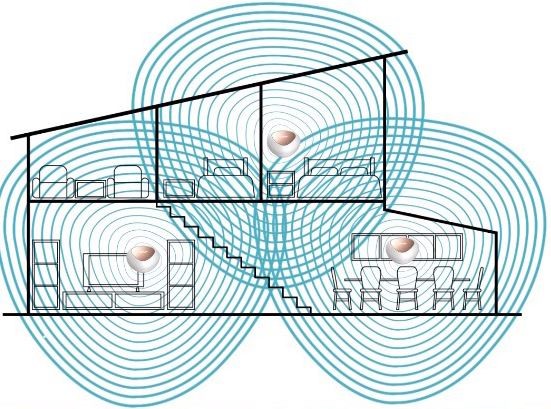
Think of an antenna with a circle around it. That circle represents the range of that antenna. The range of a Wi-Fi router in a home is limited by distance and the obstacles the signal must pass through. A double brick wall and a concrete slab will reduce the range and slow the speed of traffic carried on that Wi-Fi signal. A Mesh router allows you to essentially repeat that signal by creating a repeater station. A mesh router also keeps the same network name, meaning a seamless signal handoff between base stations. As you walk around your house your Wi-FI will work just like a mobile phone network, handing the signal seamlessly from one base station to the next. The result is fewer black spots and faster Wi-Fi speeds in all your rooms.
Priced for what you need
A top of the line Mesh-type Wi-Fi system generally costs about $1000, which is why the Eagle Pro solution is so attractive at $279-$379. You purchase either a 2-pack or 3-pack unit based on the size of your home, so you don’t need to pay for more than you need. The more repeaters/cubes, the greater the coverage. The 2-pack will cover 370m2, and the 3-pack hits 500m2 (a 20m x 25m single story house). With a two-story house, you should definitely go for the 3 pack.
It’s also great to see that the Eagle Pro supports the latest Wi-Fi 6 technology. This Wi-Fi standard means improved performance, greater coverage, support for more devices, and better security.
What the Eagle Pro doesn’t have, and more expensive systems do, is a dedicated channel between each repeater. This means that each repeater can send traffic over a private link rather than a shared pool of Wi-Fi devices. As such, it means faster data transfers, so this router may not be the best option if you have a lot of high-speed Wi-Fi devices connected at once while on a top-tier NBN plan.
You’ll also see more Ethernet ports on pricier models, as the Eagle Pro has just one plug per repeater. This is handy for connecting non-Wi-Fi devices to the network, such as an older printer.
Lastly, if you are a computer wiz kid who wants lots of settings, the Eagle Pro may not offer super-detailed controls. For the rest of us, it is a solid balance of costs and capability.
Key features of Eagle Pro AI
Considering its low price, the Eagle Pro is no slouch. It will support up to 128 devices but is better suited to 30, where it can operate at up to 1Gb Ethernet speed and 120(?)Mbps 5GHz Wi-Fi.
The Eagle Pro uses all the Wi-Fi 6 tricks, including MU-MIMO, OFDMA and Beam-forming to ensure the best throughput. Security protocols include the latest WPA3, and mobile devices can save power with Target Wake Time (TWT).
Other things we liked include a guest Network feature, which can be configured with the downloadable app. This creates a separate network for guests to separate them from your devices and the information they contain. You can also limit the guest network speed to keep the best performance for yourself. Connecting for guests is as simple as scanning a QR code.
D-Link has not forgotten about the kids either, with a suite of parental controls where you can restrict the number of hours of used and websites visited.
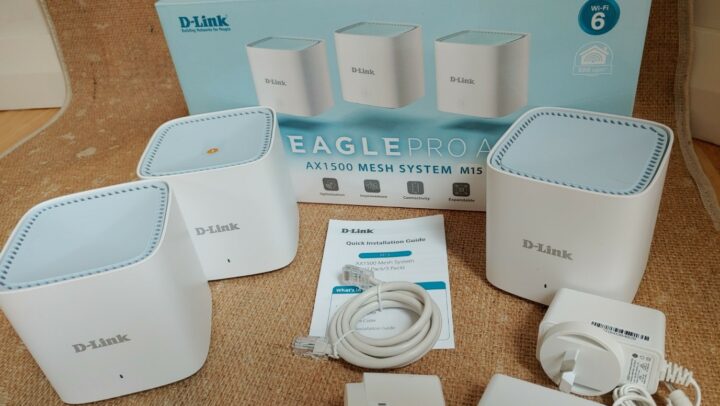
Aesthetically, there are no ugly antennas on the Eagle Pro units. These are attractive 9cm cubes that shouldn’t upset the decor or offend your better half.
Artificial intelligence in a router?
The Eagle Pro uses artificial intelligence. We are not talking robots here. Instead, this is clever software that automatically makes things work better by adjusting the signals to improve your individual situation.
Let’s say you live in a busy townhouse complex where everyone has a Wi-Fi network. This will mean everyone is competing for radio frequencies or channels. The Eagle Pro will work out which ones others are not using and automatically use the least congested channels.
The Eagle Pro uses both the 5Ghz and 2.4Ghz spectrums to talk to your devices. The 5Ghz is faster, but the 2.4Ghz will travel further. The M15 automatically moves your devices between these Wi-Fi bands to maximise performance for all devices. It will also recognise some applications need more bandwidth and ensure that the device gets what it needs to work properly, like watching a 4K video feed from Netflix.
Setting up the Eagle Pro AI
The 3-pack comes with three receivers, 3 power packs and an Ethernet cable. You start with the cube with the orange “1” sticker on it. Plug this cube with the supplied ethernet cable into your NBN modem or internet service provider supplied router if your landline phone is plugged into it. Power the cube up, and when ready, the LED will flash orange.
Meanwhile, download the Eagle Pro AI app for Android or Apple. Follow the simple onscreen instructions. You will have the option to change the network ID name and password at one point. Unless you are confident, I would just leave these as the default. You will, however, need to set a device password. Best to keep a record of that password just in case.
Within minutes, your first cube is operational, with the LED light showing solid white. The additional satellite cubes are added by simply turning them on and waiting for their LED lights to go solid white. Placement is important as each cube must communicate with one of the other cubes. Total setup took me around 5 minutes, and I did not need to know anything technical to achieve this install.
After you set up, the unit will likely do a software upgrade. These will happen automatically by default each time there is a software update, so you don’t have to worry about it. Software updates improve performance, security, and sometimes add new features.
Eagle Pro AI app control
The Eagle Pro AI app is simple to use and clearly lays out your options. A handy feature includes a YouTube video that appears when you first visit a new section to explain how that feature works, like Parental Control.
This router really is a ‘set and forget’ device but you can do some other cool things like controlling the router from your Alexa or Google smart assistant, test your internet speed and access advanced options for those who want to tinker under the hood.
GadgetGuy’s take
This router is for the average Australian that wants better W-Fi coverage in their house. They don’t want to worry about cables – just a simple plug and play unit that is just going to work. Having set up many routers over the years, this setup was bug-free and running in minutes. Starting at $279, the Eagle Pro has all the latest technology for future-proofing your home network.
D-Link Eagle Pro AI AX1500 Mesh System
The Eagle Pro offers a great combination of capability and cost. You can choose between a 2 or 3 unit package too.
Features
7
Value for money
10
Performance
7
Ease of use
9
Design
9
Positives
Very good price
Simple to set up
AI technology to make the router perform better
Latest technology and security
Negatives
Lack of multiple ethernet ports
There is no tri-band to carry backhaul between recievers.