In the recent WWDC keynote, Apple made headlines with its release of the Apple Vision Pro mixed reality headset, as well as the latest iPhone software update, iOS 17. This update promises a host of cool new features to the millions of iPhone users across the globe. However, as was the case in last year’s move, Apple is once again leaving a portion of its loyal customer base behind.
With the introduction of iOS 17, Apple has decided to exclude the iPhone 8 and iPhone X from the list of compatible devices. These two models, released in 2017, miss out on the latest operating system, leaving users in a state of technological stagnation.
It is worth noting that Apple’s decision to exclude these older models is not unprecedented, as the company has historically always had a cut-off point beyond which it no longer supports older devices. For example, the original iPhone and iPhone 3G received two major iOS updates, while subsequent models usually enjoyed software updates for five to six years. The iPhone 6s, for instance, defied expectations by becoming the first generation to witness a seventh iOS version.
However, this year’s decision to abandon the iPhone 8 and iPhone X is a reminder that Apple, like all major tech companies, continues to have limits when it comes to supporting older devices. While the introduction of iOS 17 is highly anticipated by many, it’s just as much a disappointment for those being left behind. For those that are still more than happy with their iPhone 8 or iPhone X, to enjoy all the latest innovations will require an upgrade to a newer device.
Which iPhones are compatible with iOS 17?
Any iPhone from 2018 onwards can run the upcoming software update, including the iPhone XS through to the recent iPhone 14 Pro Max. Anyone with these phones benefits from the upcoming new features like live voicemail transcription, improvements to the Health app, and family check-in services. If you have an older phone? No dice.
More than just fancy new features, software updates are important for securing your device and data. Incremental updates close up dangerous vulnerabilities that threaten your privacy. Unfortunately, upgrading to a new phone is costly, prohibitively so for many people. One solution is to consider purchasing a refurbished phone. This way, you can get a more recent model for cheaper and in like-new condition.
A history of iOS compatibility. Source: Statista.
Another consideration when upgrading to a new phone is what you do with your old device. Australians generate a lot of e-waste per capita, and MobileMuster estimates that only eight per cent of phones get sold or traded when upgrading. Fortunately, you have multiple options at your disposal. One is to trade in your old iPhone to Apple. If it’s a recent enough model, you’ll get some value towards an upgrade. At the very least, it ensures the phone gets properly recycled.
Another method for all types of phones is to use the Boost Trade-In app. By just following a few simple tests, you can assess your device for trading in, its value, and even receive an Aus Post label to send it away. Take for example, my iPhone X 256GB, which at the time cost $1,829. Boost Mobile is currently offering $220 as a trade in for it, and when you take that off the price of a refurbished iPhone 12, I’m looking at a changeover of $579 for a like-for-like capacity iPhone with better hardware and is compatible with iOS 17.
How does Apple compare to others?
Between five and six years of software support for a phone is actually pretty decent by modern standards. It wasn’t that long ago that Samsung only guaranteed three years of OS upgrades, which has thankfully since increased. Plenty of budget phones only offer between two or three years of software upgrades, albeit usually with longer security update commitments.
As phones like the Nokia G22 and G42 encourage users to repair devices at home, saving money and prolonging hardware life, it’s important that software support follows suit. If manufacturers are truly committed to reducing e-waste, then OS updates need to last the distance too.
iOS 17 is exciting, there’s no doubting that. However, plenty of us get left behind when software support stops for older phones. As users, we need to make informed decisions based on our own needs and circumstances when considering an upgrade. At the same time, tech companies need to meet us halfway, if not to consider their customers during tough economic times, then to at least commit to a sustainable future of long-term device use.
Giving your dumb air conditioner a smart overhaul, the Sensibo Air Pro helps you keep your cool while also keeping an eye on your home’s air quality.
The smart home revolution has made it easier to manage a high-tech household but, realistically, it can be hard to justify replacing expensive household appliances just so you can control them from afar.
This is where internet-enabled sensors like the original Sensibo Sky come in handy. It hangs on the wall and mimics your aircon’s infrared remote, so you can control the air from your computer, smartphone, tablet or smart assistant. Better yet, it features built-in sensors for measuring the temperature and humidity, so it can automatically adjust the aircon during the day.
The original Sensibo Sky is handy for staying cool while managing your power bill, but these days people are also concerned about what they’re breathing. That’s where the new Sensibo Air Pro comes in, adding sensors to monitor air quality in your home.
Sensibo Air Pro first impressions
The palm-sized Sensibo Air Pro is smaller and has a more elegant design than the original Sensibo Sky. This means it won’t look too out of place on the wall, in line of sight with your aircon so the Sensibo can beam infrared commands at it.
There’s a tiny mounting slot on the back, so you can hang the unit on a screw in the wall. Alternatively, there’s a square of strong mounting tape in the box so you can stick the Sensibo on the wall. It casts a fairly wide infrared beam, so it doesn’t necessarily need to be on the opposite wall and might even be able to sit upright on a flat surface.
One complication is that you need to get power to the unit. There’s a recessed micro-USB slot on the bottom and it comes with a 120cm USB cable and AC adapter. This means you need to install the Sensibo within reach of a power point, which could leave an unsightly USB cable snaking across the wall.
The micro-USB port is recessed at the back, plus this is a wall mount slot.
Another complication is that you now have two devices vying for control of your aircon: the Sensibo and the old infrared remote. If you place the Sensibo near the aircon then it can pick up the infrared commands coming from the remote. This ensures that the Sensibo app can keep track of the aircon’s current status, even if someone turns it on or off with the remote while you’re out.
Its setup is pretty straightforward: download the Sensibo app, create an account, configure the Sensibo Air Pro and link it to your Wi-Fi network. Pointing your infrared remote at the Sensibo and pressing the ‘on’ button should be enough for it to figure out the make and model of your aircon.
From here, it can configure all the aircon’s controls, similar to a universal remote in the lounge room. This way you can send commands to the unit even when you’re away from home, and it can relay those commands to your aircon via infrared.
Of course, that relies on your aircon working with an infrared remote. The box says “make any air conditioner or heat pump” smart, but the fact is that not every aircon system can accept infrared commands.
If you have a split-system or portable AC unit then you’re almost certainly okay. But if you have central air conditioning or heating with ducts spread around the house, which is controlled via a wall panel, then you’re probably out of luck. It’s worth checking with the manufacturer if you’re not sure.
Thankfully, the Sensibo Air Pro setup worked with my split system first go, unlike when I tested the original Sensibo Sky when the initial set-up process failed to correctly identify two different split systems.
Remote access allows you to control your aircon from afar, such as turning it on using your smartphone when you’re almost home. Yet Sensibo Air Pro’s most useful features are linked to its sensors which can track conditions in the room.
Like the original Sensibo Sky, the new Sensibo Air Pro features temperature and humidity sensors. This lets you check conditions from your smartphone but, more importantly, it lets you create automations that adjust your aircon during the day. Responding to the actual conditions, rather than remembering to manually turn your aircon on and off, can keep your home cooler while also curbing your power bill. Sensibo also sells room sensors that can automatically turn the air on and off as people come and go.
Additionally, geofencing lets you control the aircon depending on the location of your phone. You could use this to automatically turn it on when you’re almost home or to ensure you don’t accidentally leave it running when you go out.
What makes the Sensibo Air Pro special is that it adds sensors for detecting carbon dioxide (CO2) and Total Volatile Organic Compounds (TVOC).
The carbon dioxide detector can indicate where you have poor ventilation and low oxygen levels, as high levels of CO2 can impair your mental capabilities, make you ill and even be life-threatening. While it’s not specifically a carbon monoxide detector, Sensibo says it can also detect faulty or improperly used fuel-burning appliances like gas/wood heaters and stoves.
Meanwhile, TVOC refers to a somewhat vague collection of particles in the air. According to Sensibo: “Many VOCs come from electronic devices, cleaners and disinfectants, pesticides, air fresheners, paints and solvents, glue, new furniture and carpets, construction materials and plywood. VOCs can irritate the eyes, nose and throat, and can cause difficulty breathing.”
The Sensib app offers an overview of conditions in the room, with the ability to control the aircon and dive down into more granual detail
Realistically, none of these is likely to be a major ongoing problem in your typical home. They’d be more of an issue in the workplace, where you really should have professional-grade ventilation and air quality monitoring.
It’s worth noting that it’s not a smoke detector and it doesn’t measure particulate matter in the air, so it’s not designed to monitor air quality issues created by events like nearby bushfires. Nor does it detect dust and pollen. That said, the Sensibo app can tap into pollution alerts for your area.
The app also can show you historical graphs for temperature, humidity, CO2 and TVOC readings in the room, plus it can send you alerts if they reach dangerous levels. It can also automatically turn on your aircon or a separate Sensibo Pure air purifier to improve the quality of the air.
Some advanced features require a US$2.49 monthly Sensibo Plus subscription. It can unlock advanced automations, AC statistics, health check, pollution updates, the ability to detect open windows and an auto shut-off feature when you leave the house.
Quality
Put to the test, the Sensibo Air Pro does a reliable job of controlling your aircon from afar, once you find the right place to install the sensor – which is especially important if someone might also be using the handheld remote while you’re away.
Creating schedules is particularly useful, such as setting the temperature in bedrooms at night, or in the living area when people get up in the morning and arrive home at the end of the day.
For some people, the best feature will be the ability to adjust the air according to the exact temperature and humidity in the room, as judged by the Sensibo’s built-in sensors. If your aircon isn’t very accurate and reliable in this department, or takes its measurements in an inconvenient location in your home, the Sensibo could make a big difference to the conditions in the room and your power bill.
SMART AC CONTROL WITH AIR QUALITY SENSOR – The Sensibo AirQ is a smart AC controller with a built-in air quality sensor, designed to maintain an ideal temperature while continuously monitoring your air quality. Turn your existing home cooling or heating system into a smart connected device in just minutes.
HEALTHIER LIVING – Maintaining a high level of air quality in your home or office and boost your energy levels. Monitor the room for unhealthy air with a device that’s designed to sync harmoniously with your existing remote controlled air conditioner or mini split / ductless / heat pump system.
REDUCE COOLING COSTS – Sensibo Air PRO has smart climate features that work to maintain a consistently comfortable climate in your home. Replace hot and cold fluctuations while reducing cooling bills by up to 40%, while maintaining a good air quality at home.
Reacting to real-time conditions would also make it useful for automatically turning on the aircon for your pets when you’re not around.
The added air quality monitor features of the Sensibo Air Pro are very telling. For example, in my open kitchen/dining area, the CO2 levels sit steady at a very low 400 parts per million when the windows are open and/or the aircon is circulating the air. TVOC is also steady at a very low 9 parts per billion. Turn off the aircon, close the windows and you’ll see both of them slowly creep up.
The air quality degrades quickly if you light a gas cooktop without remembering to turn on the exhaust fan and/or open a window. With the Sensibo sitting only 20cm away from the pan, levels steadily climbed to CO2 504 and TVOC 193 over 30 minutes – although the readings wouldn’t have been as high elsewhere in the room.
While that sounds significant, both figures are still well within Sensibo’s definition of “good” air quality. CO2 becomes moderate at 1000 and high at 2000, while for TVOC it’s 500 and 1500.
Who is the Sensibo Air Pro for?
A Sensibo makes the most sense for people with very old and/or basic aircon systems which don’t offer remote access or let you create schedules. These features alone might make it worth the money if they will help curb your power bill in the summer, and perhaps the winter if you have reverse-cycle aircon which can heat and cool.
The extra air quality features of the Sensibo Air Pro are harder to justify, especially if you need to pay for the subscription. Realistically, CO2 and TVOC levels are not a major concern for your average person in your average home. I would have needed to cook up a feast with all the gas jets running and no ventilation to even hit moderate air quality – at which point anyone with an ounce of common sense would at least crack a window.
That said, if you have particular health concerns or there is something particularly unhealthy about your environment, then the Sensibo Air Pro might be a good fit for your home. Keep in mind, If you just need to monitor the air quality there are cheaper options, so it’s worth doing your research.
GadgetGuy occasionally uses affiliate links and may receive a small commission from purchased products.
Sensibo Air Pro
Controlling your aircon from afar, the Sensibo Air Pro can curb your power bills and help keep your air quality in check.
Features
8
Value for money
8
Performance
9
Ease of use
9
Design
9
Positives
Control aircon from afar (including smart assistant integration)
Create schedules and respond to current conditions
Monitor CO2 and TVOC levels
Negatives
Detects TVOC but not smoke, dust and pollen
Some features require subscription
Doesn't support central aircon that lack an infrared remote
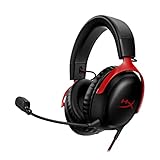
Buying a new gaming headset is a stressful experience because you never know what you’re getting until you bring it home and open the box. But the HyperX Cloud III is the most well-named and well-advertised headset I’ve ever put on my head.
Lightweight, soft and extremely comfortable, the HyperX Cloud III is an absolute delight to use. While its microphone has some minor issues with picking up noise, and the sound quality is largely the same as the previous-gen headset, the comfort and durability of the HyperX Cloud III make it worth it at an attractive price.
HyperX Cloud III first impressions
The picture on the box led me astray. The gunmetal-black HyperX Cloud III is unassuming, but once you open up the packaging and get a closer look, a soft, sleek black leatherette is wrapped around cloud-like memory foam on both the headband and the ear cups. The rest of the headset is a sturdy metal that is also surprisingly flexible and feels like it’s made to last.
Setting up the HyperX Cloud III is as easy as plugging in the mic and then plugging the headset into your computer, Nintendo Switch, PlayStation, Xbox or mobile. The headset comes with three different styles of connectors (USB-A, USB-C and 3.5mm) so you can easily switch the headset to different devices.
Also, it’s just really comfortable. As soon as I put it on my head it felt great. I didn’t need to spend time adjusting the way the ear cups sat on my piercings or hair, which is a first. The HyperX Cloud III feels as if a headset and a cloud had a baby.
Specifications
Driver
Dynamic, 53mm with Neodymium magnets
Frequency
10Hz-21kHz
Materials
Aluminium frame
Memory foam and premium leatherette ear cushions
Compatible with: PC, PS5, PS4, Xbox Series X|S, Xbox One, Nintendo Switch, Mobile
Features
A simply-designed wired headset, it comes with a detachable microphone and a mic mute button on the left cup, and a volume dial on the right. The microphone also has a small red light to indicate whether or not your microphone is muted. This feature is great because the mic mute button has no indicator of its status. Before I realised the light was there, I was spending lots of time testing to see if I was muted or not in Discord calls.
The mic also boasts noise-cancelling capabilities and DTS Headphone:X Spatial Audio that allows for surround sound if you install the Ngenuity software. Unfortunately, the software is only available on Windows, but it isn’t a requirement to use the headset.
At $159, the HyperX Cloud III seems simple, but the comfort it offers in combination with this simplicity is perfect if you’re looking for a no-fuss wired gaming headset.
Performance
While it is simple to set up and use, comfortable for long periods of time, and has relatively good natural noise cancellation, the sound quality of the HyperX Cloud III doesn’t threaten premium-level headsets like the SteelSeries Arctis Nova Pro X. Also, its microphone is quite sensitive, occasionally picking up unwanted sounds.
Thanks to the memory foam cushioning, leatherette finish and overall lightweight build, this is easily the most comfortable headset I’ve ever used. I have worn this headset for a maximum of around five hours continuously and can definitely see myself wearing it for longer periods of time for gaming, entertainment, and even work.
A closed-back headset, it provides good natural noise cancellation, which is also great for when you’re in a crowded space. It won’t block out loud noises, but it’s fantastic for muffling quiet background sounds and ambient noises.
As for the sound quality, it’s perfectly fine while playing games, watching YouTube and talking in a voice call, but it can be a little tinny if you’re listening to music. Other than that, its audio performance holds up well against other affordable headsets, without punching too far above its division. The DTS Headphone:X surround sound is also good, but definitely not necessary if you can’t (or don’t want to) install the Ngenuity app.
Another thing going for the headset is the improved detachable microphone. It’s flexible and overall does a great job of transmitting your voice without picking up minor background noises. I got a lot of comments on my voice sounding clearer in comparison to when I was using my old headset, the HyperX Cloud II.
An improvement over the Cloud II’s microphone, it’s not perfect at blocking loud background noise.
Unfortunately, it does have a tendency to pick up high-pitched and loud background noises. It also picks up the sound of the click from the mic mute button being switched on and off, depending on your voice settings. So, while its noise-cancelling qualities keep most unwanted sounds away, it doesn’t keep everything out.
But overall, the HyperX Cloud III delivers on its promise of being an extraordinarily comfortable headset at a good price.
Who is the HyperX Cloud III for?
The HyperX Cloud III is a fantastic mid-range gaming headset that prioritises comfort without compromising too much on quality. People who want a sturdy, lightweight wired headset will be pleasantly surprised by the price, comfort and simplicity of the Cloud III. It’s a no-frills piece of hardware that is great for gamers on any platform – especially if you have multiple devices you want to use it with.
GadgetGuy occasionally uses affiliate links and may receive a small commission from purchased products.
HyperX Cloud III
The HyperX Cloud III is a great gaming headset that delivers on being comfortable and lightweight, without sacrificing quality.
Features
9
Value for money
9
Performance
8
Ease of use
10
Design
10
Positives
The memory foam and leatherette make for an extremely comfortable experience.
Flexible and sturdy.
Highly versatile, with three different connectors for multi-device compatibility.
Negatives
Sound quality is roughly the same as the previous-gen headset.
The microphone tends to pick up on loud and high-pitched background noises.
It’s nearly time for one of the biggest online retail events of the year: Amazon Prime Day. Across two big days, the sale is known for being one of the best times to grab a tech deal.
Some of the major brands participating this year include the likes of Bose, Ecovacs, Nintendo, and Samsung. Tech and video games are just a couple of the categories that feature prominently during Amazon Prime Day. As is always the case, many Amazon devices will go on sale, providing an opportunity to affordably bolster your smart home setup.
To help guide you through the chaos of the retail giant’s big sale, here’s everything you need to know before it starts. Some early sales are already live, which we’ll highlight and help you find a bargain.
Around the world, Amazon holds a limited-time sale exclusively for its Prime members. During this time, products from both Amazon and third-party sellers see deep discounts rarely seen at any other time of the year. Comparatively, the Black Friday sales held in November are a similarly large-scale online event, albeit hosted by many different retailers.
To access the many sales active during Prime Day, you need to sign up as an Amazon Prime member. There’s a 30-day free trial available for new users, and it costs $9.99 per month thereafter. In addition to access to exclusive sales, the membership also grants you free delivery on eligible items, access to the Prime Video streaming service, and plenty of other perks.
When does Amazon Prime Day take place?
Amazon Prime Day 2023 takes place on Tuesday 11 July starting at 00:01 AM AEST and runs until 11:59 PM AEST on Wednesday 12 July. However, Australians benefit from overseas sales too. According to the official sale announcement, we can also access Prime Day deals from Germany, Japan, the UK and the US until 5:00 PM AEST on Thursday 13 July.
An important thing to remember is that even during Amazon Prime Day, there are many limited-time deals that pop up. Some products remain discounted throughout the entire event, while others are blink-and-you’ll-miss-it “Lightning deals”. This latter variety often includes popular big-ticket items like video game consoles and devices from major brands. It’s worth checking back regularly, as these offers usually only last for an hour or sell out in a matter of minutes.
To make the most of the sales, it’s worth downloading the official Amazon Shopping app (available on iOS and Android) to your phone. From here, you can add items to your wishlist ahead of time and receive notifications when they’re discounted.
Early Amazon Prime Day 2023 deals
Commonly the case with any major sale event, you can find early discounts on products before the actual start date. At the time of writing, you can see and purchase a range of early deals now, including devices from Ecovacs, Roborock, Sony, and Amazon.
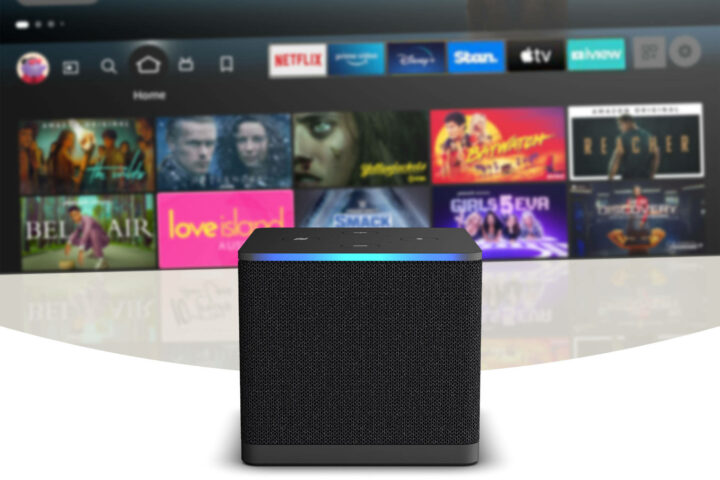
Up to 51% off Amazon Echo, Fire TV, and Kindle devices + more
We’ll update this article as Amazon Prime Day kicks into gear. Prices are correct at the time of writing, although it’s likely that stock and prices may change throughout the sale.
Sometimes, you need a laptop that can do a bit of everything, portability be damned. That laptop may just be the Asus ExpertBook B6 Flip, a 2-in-1 laptop hybrid made for versatile professional use.
It’s not the slimmest laptop going around, that’s for sure. However, it uses its heft to mostly good effect, while packing plenty of power on the inside. Bountiful in ports, the B6 Flip’s decent CPU and GPU combo make for a flexible device – literally and figuratively.
Asus ExpertBook B6 Flip first impressions
There’s no kind way to say this: the B6 Flip is a chunky device. At 2.7kg, it’s not highly portable by modern standards. You won’t want to lug it around in a backpack all day or regularly take it while travelling lest you quickly maximise luggage limitations. It also takes up a sizable footprint on your desk, presenting another challenge in the form of trying to find enough room to comfortably use it while on the move.
For the most part, the B6 Flip makes the most of its large stature. Except for a distractingly noticeable bezel bordering the display, it’s comfortable to type on and has plenty of connectivity options. You can plug all manner of peripherals in at any time, something I’ve grown used to missing when using much smaller devices. Perhaps a small but important observation for anyone like me who regularly has sweaty hands, is that the matte finish doesn’t produce smudges and fingerprints easily. It’s the little things that matter.
Another benefit of the hybrid laptop’s size is its durability. It feels sturdy, like it could withstand a few knocks, and won’t shatter just by looking at it. True to its name, you can flip the B6’s display in various configurations, including all the way around to use it as a mega 16-inch tablet. At a reasonably sharp 2560 x 1600 resolution and 100% DCI-P3 colour gamut, this gives creative professionals the flexibility to use the included stylus for drawing and other artistic projects.
For size comparison, the B6 in tablet mode completely eclipses the 6th Gen iPad Mini.
I usually get nervous when using hybrid laptops, as some of them feel like they’re seconds away from snapping. Not so with the B6 Flip. Its strong build quality gave me the reassurance that I wasn’t going to break it by flipping the screen over. That, and it was going to stay comfortably in place if I placed it in a tent-like configuration.
Other than a hulking physical presence, the device backs it up with performance, too. Across synthetic benchmarks and real-world performance, the B6 Flip packs plenty of power for all sorts of users.
Based on benchmark software alone, the i7-12850HX processor housed within the Asus ExpertBook B6 Flip is one of the most powerful we’ve recently tested. In practice, this was reflected in smooth multitasking. I didn’t notice any struggles when photo editing while watching a video with several Google Chrome tabs open in the background.
GPU
Device
Score
Asus Zenbook Pro 16X OLED
82480
Apple MacBook Pro (M2 Max)
72833
Asus TUF A16
69434
Asus ExpertBook B6 Flip
67165
Geekbench (OpenCL)
Billed as an all-in-one workstation capable of rendering visuals, the B6 Flip wields an Nvidia RTX A2000 8GB graphics card. When benchmarked against other devices using a synthetic test, it doesn’t reach the same high score posted by the Zenbook Pro 16X’s RTX 3060, and is almost on par with the TUF A16’s AMD Radeon RX 7600S GPU. This checks out, considering that The Verge compared its specs to that of a desktop RTX 3050 card.
In reality, this means you can absolutely use the B6 Flip for photo and video editing, 3D rendering, and even a bit of gaming. On this latter point, the device returned a 3DMark Time Spy score of 6382, a bit behind the TUF A16’s 9196. In other words, expect decent but not world-changing graphical performance from the productivity hybrid.
Disk Speed
Even with an increasing reliance on cloud storage and services, it’s still important that your computer’s storage gives you quick access to files. Whether you’re opening large files, measured in read speeds, or saving them, measured in write speeds, a good SSD should let you do both efficiently.
CrystalDiskMark tests storage drive speed, which gives you an indication of how fast it can read and write files. According to this benchmark, the ExpertBook B6 Flip’s Samsung SSD returned up to 6300MB/s read speeds and 5300MB/s write speeds. It’s a pretty decent result, especially when compared to the sluggish SSD included in the Asus TUF A16 gaming laptop (4305MB/s read, 1811MB/s write). You can also expand the B6 Flip’s storage with another M.2 drive, which you can find at reasonably affordable prices.
General use
To use another synthetic benchmark as an example of how the ExpertBook B6 Flip fares as a general productivity machine, PCMark 10 returned a score of 6334. This puts it below the TUF A16 (7145) but slightly above the Lenovo 9i (6277). Again, the important part is how these numbers translate into real-world use.
Its sturdy build means you can leave it in tent mode without fear of it easily falling over.
As for how the device fares as a general productivity machine, there are no issues to speak of. The B6 Flip easily handles multiple programs at once, and the responsive stylus and touchscreen combo opens up plenty of creative possibilities.
As I’ve mentioned in other reviews, I don’t like low-profile keyboards favoured by most modern laptops. Fortunately for me, the B6 Flip’s slightly raised keycaps make for a pleasant typing experience. I won’t be throwing my mechanical Ducky keyboard out any time soon but it’s nice to use a laptop keyboard that doesn’t have me muttering under my breath in frustration. Another benefit to the hybrid’s big size is that it includes a number pad, making it suitable for those who bury their heads in spreadsheets.
And this thing has ports for days. USB-A, USB-C, HDMI: it’s all there in addition to the fast and reliable Wi-Fi 6E and Bluetooth 5.3 wireless protocols. It further adds to the device’s flexibility, in that you have all manner of connectivity options to maximise your workstation.
There’s not much to dislike about the overall experience, although the otherwise good display tricked me at first. When booting up the B6 Flip for the first time, I thought it loaded in the wrong aspect ratio. It wasn’t until I looked closer that I noticed it simply had a thick bezel. It’s not particularly attractive, framing the display as if to tease you with more screen space, but I speculate it has something to do with the flip design.
Also, a memo to laptop manufacturers: please don’t put the fingerprint sensor on the side in a difficult-to-reach location. That was the case here, which made not only the setup process but also the actual use of it tricky. It’s much easier to rest a finger on a sensor facing you than uncomfortably contort your wrist to access one on a large device like the B6 Flip.
Who is the Asus ExpertBook B6 Flip for?
At an RRP of $4,499, it’s an expensive device for just general productivity use. To get full use out of the B6 Flip, you’ll want to regularly engage in a mix of creative visual work alongside admin and multimedia use. If you only need a device capable of handling standard clerical work and don’t need tablet functionality, opt for something cheaper instead. This is more suited to design-based industries that need a rendering machine for regular use.
If portability and price isn’t a barrier, the Asus ExpertBook B6 Flip is a powerful hybrid laptop for creative professionals who need a device that can keep up with their diverse needs. Its strong CPU and GPU combo capably handles a wide range of resource-intensive tasks, while its plethora of connectivity options enables a modular setup.
Although big, bulky and expensive, the B6 Flip has its place. Even if it only has niche appeal.
Asus ExpertBook B6 Flip
It's big and expensive, but the power of the Asus ExpertBook B6 Flip makes for a versatile creative workstation for those who need it.
Made for cleaning up both wet and dry messes around the home, the Tineco Floor One S7 Pro vacuum cleaner has arrived in Australia.
Wet-dry vacuums are an increasingly popular cleaning gadget, as it means you don’t have to use two separate devices for tidying. An interesting feature of Tineco’s latest vac is the self-cleaning system that makes it easier to maintain over time.
Another feather in the cap of the Tineco Floor One S7 Pro is that it won a Red Dot Design Award, given to products that showcase strong design elements. The vacuum received praise for its self-cleaning technology, energy efficiency, ergonomics and large 3.6-inch LED display.
Tineco Floor One S7 Pro cleans your floors and itself
Using a multi-step process, Tineco’s latest wet-dry vacuum tackles dirt and stains to comprehensively clean floors. To do this, it wets the attached brush roll, which rotates at 450 revolutions per minute to thoroughly scrub surfaces. An in-built mechanism then squeezes the dirty water out of the roll, which is then vacuumed up.
The S7 Pro can automatically adjust settings based on what you’re cleaning.
To save on manual cleaning, the S7 Pro smartly cleans itself when on its charging dock. Here, it deeply cleans the roller and dries it to prevent mould and bacteria buildup. With a 4000mAh battery, the vacuum lasts up to 40 minutes on a single charge, although you’ll need to wait a while in between washes, due to its charging time of up to five hours.
When cleaning, the S7 Pro uses Tineco’s iLoop Smart Sensor to automatically adjust the required amount of water and suction power. To make it easier to use, the vacuum has self-propulsion technology that detects which way its motorised wheels are going. This should make it easier to push and pull for users who struggle with vacuuming.
The Tineco Floor One S7 Pro is out now in Australia at Godfreys for a price of $1,299. You can check out more details and specifications on Tineco’s website. It adds to an increasingly competitive market where devices like the Dyson Submarine and LG CordZero vie for your cleaning budget.
In a big announcement for Australians living in rural and remote areas, Telstra has agreed to provide Starlink-powered voice and broadband services.
At the moment, Telstra uses technologies such as its own mobile network, copper and radio networks in addition to NBN Fixed Wireless to service rural Australians. Once the agreement with the US-based company SpaceX, which Starlink operates under, takes effect, there will be another voice and internet connectivity option available.
Starlink uses low Earth orbit (LEO) satellites, which are said to send and receive signals faster than other technologies. This is helpful for people in remote areas not well-serviced by existing mobile infrastructure.
Telstra + Starlink partnership details
Telstra labels the Starlink agreement as the first of its kind across regional and remote Australia. The expanded service offering is expected to launch by the end of 2023, before which Telstra will announce specific details regarding price and device compatibility.
According to the major telco, one of the biggest advantages of partnering with Starlink is providing local support to Australians. While specific details will come later, Telstra mentioned professional installations and local help with setting up as a core part of the service.
Available to both consumers and businesses, the upcoming satellite voice and broadband technology better supports remote users who need low-latency services. This encompasses voice and video calls, which can be prone to drop-outs in poorly serviced locations. Telstra CEO Vicki Brady mentioned that the Starlink agreement was based on providing more options for rural Australians.
“Telstra is always looking to invest in new and better connectivity options for our customers,” Brady said. “We know that collaborating with the right partners is one of the best ways to help unlock a digital future, in this case for people in rural and remote Australia looking for an improved voice or broadband service.”