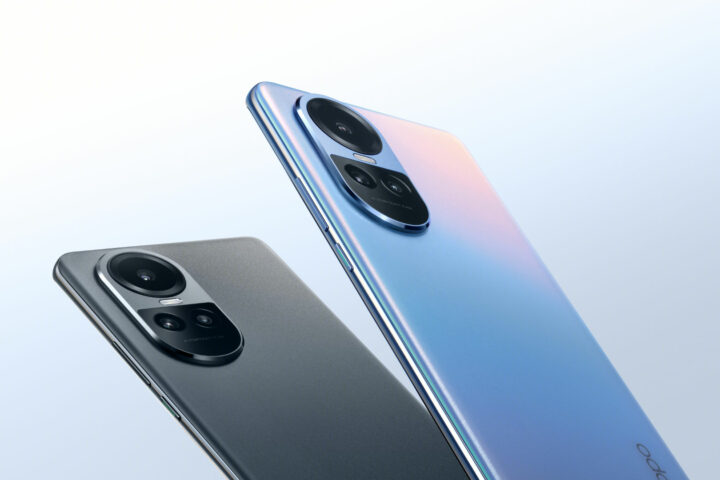
Out now in Australia, the Oppo Reno 10 5G brings a new 3D curved design made for a more comfortable grip, while adding a telephoto portrait lens to its camera array.
Shipping with Oppo’s ColorOS 13.1 Android wrapper, the Reno 10 5G enters the market as a mid-range handest aimed at creators who take photography seriously. A successor to the Reno 8, Oppo’s latest entry makes several internal and external upgrades to further refine the phone in the crowded Android space.
At a price of $749, the Oppo Reno 10 5G faces some strong competition. For a similar price, other highly regarded handsets include the Google Pixel 7a, the Motorola Edge 40, and the Samsung Galaxy A54. Attention-grabbing features like the extra portrait camera and fast charging might hold the Oppo phone in good stead as it hits retailers.
What does the Oppo Reno 10 5G improve?
Compared to the Reno 8, the new model does a few things differently. For starters, it adds a third camera sensor to the rear: a dedicated telephoto portrait lens. Wielding a 32MP IMX709 sensor, this lens enables 2x optical zoom for snapping portraits at a 47mm focal length, which should be nice for photographing people and generating a pleasant depth of field.
Another improvement the Oppo Reno 10 5G introduces over its predecessor is a larger and smoother display. It supports 120Hz refresh rates, up from the Reno 8’s 90Hz, while the screen sits at a generous 6.7 inches. Oppo also highlights its “3D micro-curved” body that makes the phone look slimmer while sitting nicer in your hand.
Fast charging is a big selling point of Oppo’s phones, and the Reno 10 5G is no different. This model supports 67W SUPERVOOC wired charging, taking roughly 47 minutes to get to 100%. Plus, the Battery Health Engine technology helps retain battery longevity over time.
I’d argue that the most important aspect is that the Reno 10 5G continues Oppo’s stylish line of iridescent colour options. Sure, there’s Silvery Grey if you want an understated phone, but the flashy Ice Blue is where it’s at.
Silvery Grey looks nice but Ice Blue is right there, come on.
You can pick up Oppo’s latest phone direct from the brand’s website, which also comes with an included pair of $299 Enco X wireless earbuds Screen Care. This latter offer refers to Oppo’s 12-month program where the company will replace a damaged screen once at no extra cost within a year of purchase. Other retailers to stock the Reno 10 5G include JB Hi-Fi and Officeworks, which also include the same headphones bonus.
Mid-range Android phones tend to offer a lot of decent features for a reasonable price. If the specs are anything to go by, then the Oppo Reno 10 5G might be a decent option among its competitors.
With so many great phones from which to choose, deciding how to choose a phone requires asking yourself a few key questions upfront to help narrow down your options.
Before the rise of smartphones, it wasn’t too difficult to decide which mobile phone was the best fit for your needs. These days, modern phones have so many bells and whistles that it’s easy to become overwhelmed.
Establish a rough price range to start narrowing down your options. Even if your needs are basic, $300 to $400 is a good starting point for a brand-new smartphone – below which you risk wandering into cheap and nasty territory.
As you work your way up, there are so many great mid-range smartphones around that it’s difficult to justify spending more than $1,000 unless you really want or need a top-of-the-line model with all the bells and whistles.
Of course, that’s outright pricing, which means you’ll also need to consider the cost of a pre-paid or post-paid phone service. Alternatively, you’ll need to crunch the numbers if you’re looking to pay off a phone on a plan.
Once you know how much you want to spend, here are five main things to consider to help you choose the perfect phone.
Operating system
As competitors like Windows Mobile, Blackberry and Nokia have fallen by the wayside, these days it’s a choice between Apple’s iOS which runs on iPhones and Google’s Android which runs on a wide range of other handsets.
When thinking about how to choose a phone, little separates iOS and Android in terms of usability and advanced features. If you’re simply shopping on price, then you’ll find a wider range of options and more bang for your buck in the Android world. iOS has the upper hand when it comes to security, but Android has improved in recent years.
Features are fairly similar across iOS and Android, so the decision largely comes down to your personal preference.
If you’re upgrading from an existing smartphone that you’ve been happy with, it’s usually best to stick with what you know. Especially if you’ve already spent money on apps and accessories which you can transfer across to your new phone.
If you’re buying your first smartphone and you already own an Apple iPad or MacBook then an iPhone is probably a good fit. Alternatively, if you have no allegiances and you’re not overly confident with new technology, consider recommendations from family and friends. If you rely on them for tech support, it might help to have the same operating system.
Screen size
A big screen lets you see more at once, or bump up the size of the text without sacrificing too much. Big screens are also more immersive when watching videos. The trade-off is that you end up with a big phone, unless you want to spend top dollar on a folding Android phone.
Foldable phones, like the Motorola Razr, have big displays that fold in half to more easily fit in your pocket.
If you’ve got small hands, then you probably don’t want to go beyond a 6.1-inch screen (remembering that screen sizes are measured diagonally). The same goes if you’ve got small pockets, unless the phone will live in your bag. Then you can get away with something larger, although you’ll want to protect that screen with a wallet-style case.
Some people opt for a very large screen so they can use it like a smartphone and a tablet, rather than needing to own two devices.
Storage
Many smartphones come with a choice of onboard storage, with higher capacities significantly driving up the price. Some phones let you expand the storage with a tiny micro-SD memory card, but this is becoming less common.
If your needs are basic, then you can probably make do with 64 gigabytes (GB) of storage – not to be confused with RAM memory, which is also measured in GB. That 64GB might start to get tight if you download a lot of large applications, take a lot of videos or store a lot of music and movies on your device rather than streaming them from the internet.
The alternative to paying for more onboard storage is taking advantage of cloud storage to offload things when your phone gets full. Services like iCloud and Google Drive let you store a modest amount of data online for free before you need to start paying for additional storage.
Performance
Grunt under the bonnet is one of the key differentiators between budget, mid-range and flagship smartphones. It’s dictated by the CPU processor, GPU graphics and RAM memory (not to be confused with storage), but it can be hard to decipher a phone’s spec sheet to understand exactly what you’re getting.
Thankfully, when you’re thinking about how to choose a phone, performance tends to go hand in hand with the amount of RAM and the price tag. Be wary of spending less than $300, or opting for a phone with only 4GB of RAM, lest it be sluggish for even basic tasks.
These days, 6 or 8GB of RAM is the sweet spot for a mid-range phone. Stepping up to 16GB of RAM could be overkill unless you tend to push your devices to the limit, such as playing demanding games.
Camera
Even if your smartphone needs are simple, if you will rely on it as your primary shooter then you’ll want to give some thought to the quality of the camera.
Once again, it can be hard to decipher a phone’s spec sheet, although a higher price tag generally means better photos. The sharpness of the picture is measured in megapixels (MP), but a higher number isn’t always better because it also comes down to the quality of the pixels and the quality of the lenses.
Devices like the Samsung Galaxy and Google Pixel range are highly regarded for their camera quality.
This is where it pays to create a shortlist of smartphone candidates and then read a few detailed reviews which discuss the picture quality. Pay particular attention to low light to ensure you can take decent photos indoors and at night.
How to choose a phone: summary
These are just some of the factors to consider when buying a phone. We regularly review the latest phones to help you decide what’s worth your hard-earned money. While there’s no singular best phone for everyone, there are plenty of options regardless of whether you want to buy from Apple, Samsung, Google, Motorola, or any other brand.
In the ongoing battle between Nvidia, Intel and AMD, otherwise known as Team Green, Team Blue and Team Red, both companies have continually stepped up their hardware in an effort to gain superiority. This time around, it’s AMD that’s on the front foot, announcing the Ryzen 9 7945HX3D processor, which the company says is its first mobile processor to use the company’s 3D V-Cache tech.
That’s a fair amount of tech jargon to say that we’re about to see some (even more) ridiculously powerful laptops. We’ll first see the Ryzen 9 7945HX3D in the upcoming Asus ROG Scar 17 X3D, a variant on the existing line of souped-up gaming laptops.
AMD’s confident that it’s got the “world’s fastest mobile gaming processor” on its hands. And, looking at some of the specs, it’s looking promising.
AMD Ryzen 9 7945HX3D and 3D V-Cache explained
Based on the company’s Zen 4 architecture, the new Ryzen 9 laptop chip wields 16 cores and 32 threads upon which to reach 5.4GHz boost clock speeds. That’s damn powerful. It also houses 144MB of AMD 3D V-Cache, designed to improve performance further.
Other than a fancy-sounding phrase, what actually does AMD 3D V-Cache refer to? At a basic level, it’s an extra layer of cache on top of the CPU that helps handle more processes more efficiently. Included on the Ryzen 9 7945HX3D is 128MB of L3 cache and 16MB of L2 cache, which can be accessed quicker than system memory. This technology has been used with some of AMD’s desktop CPUs but not its laptop chips, until now.
According to internal testing results, AMD claims that the Ryzen 9 7945HX3D produces an average of 15% faster frame rate performance than the non-3D chip. This includes better performance on graphically-demanding games like Cyberpunk 2077 and Deus Ex: Mankind Divided.
Further details about the ROG laptop are incoming but there’s a spec sheet with what’s in store. Listed at the moment is an Nvidia GeForce RTX 4090 GPU, along with a 240Hz 2560 x 1440 17.3-inch display.
When paired with a top-of-the-line graphics card, the Ryzen 9 7945HX3D looks to power even greater performance than existing laptop CPUs. For desktop gamers who aren’t necessarily looking for power at all costs, AMD announced the Radeon RX 7600 earlier in the year, a sub-$500 GPU in direct competition with the Nvidia RTX 4060.
Expect to see the beefy new AMD chip starting on 22 August 2023. We’ll let you know about local availability and pricing as we learn more.
When Motorola announced its 2023 range of foldable flip phones, the brand adopted a bold strategy. For the first time in Australia, there are now two different-specced models you can choose from in the same range: the more affordable $999 Motorola Razr 40, and the aptly-named Ultra model, retailing for $1,499.
With a smaller cover display and reduced processing power, it’s easy to question who the target market for the Razr 40 is. Conversely, it’s a nifty little foldable that still impresses with a gorgeous main display, an above-average battery, and a convenient form factor. One can’t help but get a little envious of the larger cover displays, and therefore enhanced utility, seen with the 40 Ultra, Oppo Find N2 Flip, and the new Samsung Galaxy Z Flip 5. Which, mind you, all cost at least $500 more.
Arguably the biggest selling point of the Motorola Razr 40 is that it’s the most affordable flip phone in Australia out of the gate. We all want big, detailed screens to enjoy media on, but our pockets aren’t getting any bigger. Here’s where the Razr 40 does a great job of selling the foldable phone concept: you can still enjoy the benefits of having a big device that actually fits into your pocket.
Motorola Razr 40 first impressions
Both the Motorola Razr 40 and its Ultra sibling share a reasonable amount in common, highlighted by a large 6.9-inch foldable AMOLED screen. Of course, the biggest difference at a glance is seen on the cover display, the screen accessible when the phone is folded shut. Here, the Ultra boasts a big 3.6-inch cover display, compared to the base 40’s 1.5-inch screen. Interestingly, this puts the newer, cheaper model’s outer-facing screen at even smaller than the 2022 Razr’s 2.7-inch cover display.
Another significant sacrifice comes in the form of processing power. Both the 2022 Razr and this year’s Ultra benefit from the Snapdragon 8+ Gen 1 Mobile Platform, while the base Razr 40 adopts the older Snapdragon 7 Gen 1 Mobile Platform. As you’ll see later on with some benchmarks and real-world applications, this does make a tangible difference. However, like with any phone, you need to weigh up the importance of spending more for extra performance. One advantage the cheaper model does wield is a 4200mAh, while the Ultra only packs a 3800mAh battery.
I was immediately impressed by the Razr 40’s vegan leather finish. It looks and feels great, with the texture adding a welcome layer of grip when the phone’s open and closed. Plus, the metallic accents and hinge feel good quality. Folding and unfolding the phone is a fun novelty, aided by the sense of durability the hinge imbues.
You can’t discuss a foldable phone without mentioning the “C” word. Before your minds venture too far into the gutter, I’m referring to “crease”, of course. Folding display technology has progressed rapidly, reducing crease visibility to the point you barely notice it’s there. With the Motorola Razr 40, reading articles on the main screen yields an experience the exact same as any conventional phone. Unless you look at the phone from an angle or a bright light source hits the screen, the crease is imperceptible. Not to mention that the display is a real looker, too. Bright and vibrant, it’s super easy to read and watch content on.
How about the cover display?
Although I like the concept of an outer display, the small size of the Motorola Razr 40’s means it’s limited in scope. You can use it to quickly check notifications, check calendar entries, access contacts, and so on, but it’s a fairly shallow experience. Especially if, like me, you wear a smartwatch most days and already have access to these things without needing to check your phone.
Photography is another story, though. I’ve long thought that foldable phones offer more utility to content creators and avid selfie-takers than other types of users. This is because the cover display shows a preview of the camera, letting you use the more powerful outer camera array instead of relying on the selfie lens. With a quick double-flick of the wrist, you can open the camera app while the phone’s folded, and take a photo by raising a palm, setting a three-second timer to strike a pose. These gestures work seamlessly, making the act of taking photos super easy.
Unfortunately, the 1.5-inch cover screen makes it tricky to compose the best shots, as you can’t see the full frame of what the camera sees. Although I don’t film TikToks every other day, the limited preview is even more prominent if you want to take photos and videos in vertical orientation. At the very least, you can unfold the phone halfway and sit it on a surface to shoot using the selfie camera and see a full preview on the main screen. But this then defeats the purpose of having an outer display and using the main camera. Again, it comes back to budget: if having a big, feature-rich outer display is important to your workflow and daily use, then $500 more for the Ultra model is a reasonable ask.
Motorola Razr 40 specifications
Operating System
Android 13
Storage
256GB built-in
Processor
Snapdragon 7 Gen 1 Mobile Platform
Memory (RAM)
8GB
Battery and charging
4200mAh
30W TurboPower charging support (33W charger included)
5W wireless charging support
Display
Main display: 6.9-inch pOLED 2640 x 1080, up to 144Hz
External display: 1.5-inch OLED 194 x 368, up to 60Hz
Dimensions
188.6g
73.95 x 170.82 x 7.35mm (open)
73.95 x 88.24 x 15.8mm (closed)
Connectivity
802.11 a/b/g/n/ac/ax/Wi-Fi 6e
2.4GHz & 5GHz & 6GHz
Wi-Fi hotspot
Bluetooth 5.3
USB-C
General doomscrolling, my preferred phone activity of choice, is nice and smooth when using the Motorola Razr 40. Its peak refresh rate of 144Hz ensures that navigating browser tabs and the like looks sharp. However, once you start putting the phone under load, it does noticeably slow down. I like having lots of tabs open at once, which is where I first observed a bit of lag, particularly when switching between multiple Chrome tabs.
Iconic foldable design. Flip the script with a pocketable flip design in a range of fun, trendsetting colors and a leather-like finish.
Capture like never before. With Flex View, stand your phone on its own at multiple angles, giving you entirely new ways to interact, capture, and create.
Everyday essentials at a glance. View notifications, check the weather, snap a selfie, and more, all without having to flip open your phone.
Immersive entertainment. Flip open the phone to reveal a massive 6.9″ pOLED screen, combined with multidimensional Dolby Atmos and Spatial Sound.
Versatile high-res cameras. Capture crystal-clear photos and selfies in any light with a 64MP main camera and OIS—or a 32MP camera with Quad Pixel technology.
Even when using the helpful Moto app that goes through several onboarding tutorials, including how to best use the flip form factor, the phone chugged at times. There would sometimes be slight delays between pressing a prompt and the next screen loading. It wasn’t much, and it’s worth noting that I’m coming from an iPhone 14 Plus, but you definitely notice slightly slower performance when compared to a more powerful handset.
To put my observations to the test, I ran a couple of benchmarks to see how the Motorola Razr 40 stood up alongside other phones using data we’ve previously collected.
Phone
Geekbench CPU
(single-core)
Geekbench CPU
(multi-core)
Motorola Razr 40 Ultra
1801
4658
Samsung Galaxy Z Flip 4
1825
4494
Motorola Razr 2022
1312
4171
Oppo Find N2 Flip
1191
3389
Motorola Razr 40
1019
2808
With Geekbench, a synthetic benchmarking tool, the Motorola Razr 40 returned lower CPU performance than the other main flip phones on the market. It’s worth mentioning that its performance isn’t that far behind the Oppo Find N2 Flip, which currently retails for $1,499.
I also ran the Razr 40 through some graphics and gaming tests using 3DMark, comparing it with publically available data. Graphics performance is where the gap widens further between flip phone models.
Phone
3DMark Wild Life
Samsung Galaxy Z Flip 4
8746
Motorola Razr 2022
7995
Oppo Find N2 Flip
7689
Motorola Razr 40
3153
As you can see, there’s a big difference between the Snapdragon 7 Gen 1 and Snapdragon 8+ Gen 1 chips in terms of graphical performance. Essentially, this means that the Razr 40 isn’t a gaming powerhouse, nor does Motorola claim that it is, for that matter. You can still play the odd game here and there, just don’t expect flawless performance from graphically demanding games like Call of Duty Mobile or Diablo Immortal.
Photography
Overall, the Motorola Razr 40 gives a pretty decent performance in the camera department. It captures colours well and produces a nice depth-of-field before turning to software adjustments. I found that even with AI optimisation switched off, the Razr 40 overprocessed images a touch, smoothing over facial features like freckles and pores to create a slightly unnatural result. It’s definitely a preference thing, but I prefer to make any adjustments after the fact and not have it done automatically when taking a photo.
I took photos across various scenarios to compare with the iPhone 14 Plus I use daily, finding that the Razr 40 compared reasonably well in good conditions. It struggled in low-light settings but not enough when compared to a phone costing roughly $600 more. Be warned, you’re about to see a bunch of my face.
Razr 40 main cameraRazr 40 selfie cameraiPhone 14 Plus selfie camera
Taking selfies, the Motorola Razr 40 took some nice snaps (as nice photos of me can be). Using natural light filtering through the back door, the Razr captured a good amount of light, and did a better job of representing colour than the iPhone 14 Plus’ selfie camera, although Apple’s device did capture more light overall. As you can see, the Razr 40’s main camera does smooth over my freckles and forehead lines a bit, as if I used a soft Instagram filter. I’d prefer it captured my details, imperfections and all, but the result ain’t shabby.
Motorola Razr 40iPhone 14 PlusMotorola Razr 40iPhone 14 Plus
My reluctant cat model, Billie looks sharper in a dim-light photo taken by the iPhone, although the Razr 40 did well to capture a decent amount of light. If you zoom in, you’ll notice that the pic taken by the Moto is a bit blurry. It’s possible that it doesn’t have the same level of image stabilisation, so any movement with lower shutter speed snaps will show in the final image. It’s a similar story with the food snaps taken in a dimly lit restaurant. The Moto resulted in a bit of blur and quality loss, while the iPhone photo is less impacted by the colour of the ambient light, resulting in a truer white balance.
Motorola Razr 40iPhone 14 PlusMotorola Razr 40iPhone 14 Plus
Again, the Motorola Razr 40 does reasonably well in low-light situations, although the colour from ambient lighting bleeds into the rest of the restaurant image using the wide-angle sensor, unlike the iPhone 14 Plus. At a FIFA Women’s World Cup game, you can see that the iPhone takes better and more vibrant photos as its strong HDR capabilities better isolate the highlights and lowlights. Meanwhile, the Motorola Razr 40 photo shows more of a blown-out sky by the stadium lights, impacting the rest of the image. It’s not bad by any stretch, but shows the difference between a $999 phone and a nearly $1,600 one.
Who is the Motorola Razr 40 for?
Having a phone with a big screen is great for the most part, until you need to fit it into a pocket alongside your keys, wireless earbuds case, and anything else you carry regularly. Where the Motorola Razr 40 shines is as an example of having your cake and eating it too. With its sleek foldable design, you get a large, vibrant display in the form of something that actually fits comfortably in your pair of jeans, chinos, etc.
It’s not as powerful as other flip devices, like its premium Razr 40 Ultra sibling, and its cover display isn’t as useful as larger iterations. However, $999 at launch is a sweet spot for the features and convenience the base Razr 40 offers in an emerging form factor.
For power users who need extra performance and a larger cover display, the Ultra is for you. Otherwise, the Motorola Razr 40 is a sleek foldable flip phone that fits into your life for less than $1,000.
GadgetGuy occasionally uses affiliate links and may receive a small commission from purchased products.
Motorola Razr 40
At $999, the Motorola Razr 40 is Australia's most affordable foldable flip phone. It makes some sacrifices along the way but makes up for it with a great display and convenient form factor.
Features
8
Value for money
8
Performance
7
Ease of use
8.5
Design
8.5
Positives
Attractive and portable design
33W charger included
Beautifully vibrant main display
Negatives
The cover screen's small size diminishes its usefulness