Showcasing the latest in consumer tech and home appliances from the likes of Samsung, LG and Sony, IFA 2023 throws open its doors in Berlin this week.
Now in its 99th year, IFA – or Internationale Funkausstellung – is Europe’s biggest technology show. This year it has attracted 2059 exhibitors from 44 countries and expects 180,000 visitors from around the globe.
When is IFA 2023?
IFA 2023 runs from Friday 1 September to Tuesday 5 September, covering 130,000 square metres at the Messe Berlin exhibition grounds. The exhibition is open to the general public, unlike technology trade shows such as CES in Las Vegas.
While IFA has a heavy focus on the home, handheld devices look set to steal the spotlight this year.
One of the most anticipated announcements at IFA 2023 is the likely global launch of the Honor Magic V2, a foldable smartphone that was first unveiled in China earlier this year. Other rumours say we might see the introduction of a flip phone from Honor.
Huawei also has a history of announcing the European availability of handsets at IFA, so it’s another one to watch closely.
Meanwhile, Sony is expected to unveil the Xperia 5 V compact flagship smartphone at its IFA 2023 keynote, following on from the launch of the Xperia 5 IV at IFA last year.
As for Samsung, it recently unveiled a swag of new mobile gear in Korea, but is expected to reveal the AI-powered Samsung Food app at IFA 2023. Its features range from recipe discovery and storage to meal planning, cooking and content sharing.
South Korean rival LG is expected to focus on its LG Home Energy Platform and Universal UP Kit as part of its “Net-Zero House“, focused on an environmentally conscious lifestyle. It’s also possible we could see new TV and screen innovations from the two South Korean tech giants.
One of the most popular robot vacuums in Australia is on sale once again, with the Ecovacs Deebot Neo featured as part of an Aldi Special Buys promotion.
Valued at $799, the Ecovacs Deebot Neo hits Aldi stores on Saturday 9 September for only $399. Don’t let the budget price fool you, as this is a neat little device. Accompanying the robot vacuum during the upcoming Special Buys are all sorts of other cleaning products, which could also be a good time to stock up on dishwashing tablets and the like.
We’ve written extensively about robot vacuums, with the Deebot Neo a particular favourite thanks to its combination of features and affordability. Capable of both vacuuming and mopping floors, it does an impressive job of cleaning up across both hard floors and carpets. Combine that with its laser-based navigation technology and smartphone integration, you can set the Deebot Neo to tidy your house with minimal effort required.
$399 Aldi Deebot Neo sale inspires charming nicknames
Nicknaming household appliances seems to be a national hobby among Australians – when reviewing the Deebot Neo, my partner and I referred to the inanimate object as “Betsy”. According to Ecovacs Australia, there is no shortage of popular Deebot nicknames, with Aussies on social media contributing to the following witty labels:
Sadie (Sadie the Cleaning Lady)
Rosie (a nod to The Jetsons)
Lightning McClean
Vacky Chan
Vac Efron
Fleetwood Vac
Meryl Sweep
Dustin Bieber
Optimus Grime
Hairy Botter
It’s little surprise as to why we grow fond of our robot companions. They take care of the time-consuming cleaning duties many of us would rather not do. Having that time back in the day is invaluable, freeing you up to focus on more important things in your life.
Also, the Deebot Neo from Aldi is just one of many Ecovacs devices designed to help around the home. We’ve got an entire guide dedicated to choosing the right Ecovacs robot vacuum for your home, including how to differentiate between the handy Deebot N10 Plus and the premium X1 Omni models. More recently, Ecovacs also launched the Deebot T20 Omni, which cleans its mop pads with hot water, reducing the amount of maintenance you need to perform.
As for the Deebot Neo, you can grab the reliable robot vacuum for $399 as part of the 9 September Aldi Special Buys range. These specials don’t last long, so you’ll want to get to a store quickly so you don’t miss out.
Video games keep growing in size, leaving less and less room on your gaming machine’s storage. To use a recent example, the Bethesda-developed sci-fi epic Starfield takes up over 100GB by itself. Although there are plenty of storage upgrade solutions, Xbox players have had comparatively fewer options to choose from, with big prices to match. Fortunately, change appears to be on the horizon with the recent launch of the WD Black C50 Expansion Card.
With the Xbox Series X and S consoles, you can use an external hard drive to back up games and free space up on the internal drive. These tend to be reasonably cost-effective, as it doesn’t require a proprietary storage drive to work. However, you can’t play games on an external drive due to not matching the Xbox’s internal NVME SSD speeds. So, you can transfer games between internal and external storage as needed, but in order to play a game, it needs to be on the internal drive.
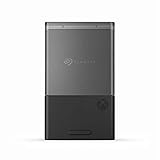
For Xbox owners, the only solution to expand playable storage is via an official expansion card that plugs into a Series X or S console’s storage expansion slot. Until recently, Seagate has been the only manufacturer making Xbox expansion cards, equating to less competition on price. With the WD Black C50, there are already promising signs of cheaper storage for consumers. With the larger capacity 1TB Xbox Series S nearly here, there are multiple methods of fitting more games onto your machine, although expanding your hardware’s existing storage is definitely cheaper than buying a brand-new console.
WD Black C50 brings more affordable Xbox storage
At a retail price of $289 for the 1TB WD Black C50 expansion card, it’s now slightly cheaper to boost your Xbox’s playable storage. Compare this to the recommended retail price of $349 for the Seagate equivalent – and $699(!) for 2TB – it’s already forced a market shift. At retailers like JB Hi-Fi, the Seagate can be found for the same $289 price tag as its Western Digital competitor. From all reports, the Seagate expansion card performs well, but the price has previously been a steep hill to climb. Mind you, $289 for 1TB isn’t cheap either.
This is especially compared to the PlayStation 5 solution that lets you pop the case open and install an M.2 NVME SSD for more storage. At retail, storage drives like the WD Black SN850 and PNY SSDs don’t cost that much less than an Xbox expansion card. However, you can often grab them for much cheaper from Amazon and other online stores. We’re talking significantly lower than $200 levels of cheaper. Because more companies make M.2 drives, there’s greater competition. Ultimately, it comes down to Microsoft’s decision to use the comparatively locked ecosystem of its expansion card technology that’s resulted in high prices.
Now, with both Western Digital and Seagate duking it out to offer genuine competition for Xbox players, expect to see better prices on expansion cards and more frequent discounts. The WD Black C50 is out now for $289 from tech retailers including Amazon, JB Hi-Fi, and more. At the time of writing, you can even get a C50 for less than $250. While that’s still a fair chunk of change more than what you can upgrade your PS5 with using an M.2 drive, it’s much better than the $300-plus it used to be.
Sustainability continues to be a driving factor among major home appliance brands, with LG revealing its latest range of energy-efficient appliances it’ll show at IFA 2023.
After showing how it’s making appliances more accessible for more people, LG will also demonstrate what it calls the “Net-Zero House” at the massive trade show in Cologne, Germany.
Included in the tech company’s upcoming range is a new front-load washer and dryer combo, a bottom-mount fridge and freezer, a dishwasher, plus a new InstaView oven. Among each new appliance is a renewed emphasis on saving energy while maximising performance.
“Designed to be energy efficient, LG’s home appliances support households to save energy, reduce their utility costs and lower their carbon footprint,” Lyu Jae-cheol, president of LG Electronics Home Appliance & Air Solution Company said. “We will continue to leverage our industry-leading core technologies to create products that make people’s lives better with less impact on the planet.”
LG Net-Zero House appliances push sustainability forward
As the appliances have only recently been shared with the world, we don’t yet have Australian details for any of them, like pricing or local energy efficiency ratings. If it’s anything like the LG MoodUp fridge that was shown at last year’s IFA, it’ll get another showcase at the following year’s CES before arriving on local shores.
What we do know, however, is that the upcoming appliances do carry high energy efficiency ratings according to the standard used by the European Union. For example, each appliance carries an A-grade rating or higher, indicating low power consumption relative to other products on the market.
As is the trend currently, AI technology is among some of the notable features. Both the washer and dryer have AI cycles you can choose, aimed at removing the guesswork behind which settings you should choose. We recently tried out Samsung’s spin on the technology, finding that AI wash cycles do a pretty good job, although there’s room for improvement when it comes to drying.
Smart home connectivity is also a big part of LG’s future vision via its ThinQ app. Between the likes of LG and Samsung building smart technology that gives you live energy efficiency data, and Hisense bringing its ConnectLife platform to Australia, a lot of companies recognise consumer demand for appliances that reduce your power bill.
We’ll let you know as soon as we get local details about the new LG home appliance range. For now, the company will show a glimpse at IFA 2023 starting on 1 September 2023.
AMD recently announced its latest graphics cards, the Radeon RX 7800 XT and RX 7700 XT at Gamescom in Germany, aiming for what it calls the “enthusiast” market.
Both GPUs are built primarily for 1440p resolution gaming, making them beefier choices than the RX 7600 released earlier this year. As for a red-versus-green comparison, the two new Radeon cards appear to directly compete with Nvidia’s RTX 4070 and 4060 Ti cards respectively.
Although AMD’s senior vice president and general manager of its graphics business unit, Scott Herkelman, claimed that “gamers today are choosing 1440p displays more than any other display resolution,” the numbers say otherwise. According to the Steam Hardware and Software Survey, more than 60% of Steam users play games at 1080p, while less than 15% use 1440p, reflective of the higher cost of components and displays required to hit the sharper resolution. Granted, the proportion of people playing on the higher 1440p resolution is growing, but it still has a way to go.
AMD Radeon RX 7800 XT and 7700 XT details
At US$499 for the 7800 XT and US$449 for the 7700 XT, the cards are competitively priced against AMD’s main competitors in Nvidia. We’ll include local pricing as soon as it’s available, which shouldn’t be too far away considering both cards launch on 6 September 2023. For comparison, the Nvidia RTX 4060 Ti retails for US$400, while the RTX 4070 costs US$600.
Notably, despite either costing less or a similar amount to its direct competition, both the Radeon RX 7800 XT and 7700 XT include more GDDR6 memory than Nvidia’s cards. Here, the 7800 XT wields 16GB compared to the RTX 4070’s 12GB, while the 7700 XT houses 12GB to the RTX 4060 Ti’s 8GB (although there are separate 16GB models that cost more).
The AMD Radeon RX 7800 XT (top) and RX 7700 XT (bottom)
AMD benchmarks highlighted by The Verge seem to indicate stronger gaming performance at native 1440p for the Radeon cards. This includes higher frame rates on intensive games like Call of Duty: Modern Warfare 2 and Cyberpunk 2077.
In addition to the new hardware, AMD also revealed during its Gamescom presentation that it’ll launch FSR 3 on the same 6 September date. FSR stands for FidelityFX Super Resolution, the latest version of which will include frame generation technology to help boost games’ refresh rates. It’s AMD’s version of DLSS from Nvidia, which basically renders frames at a lower resolution before upscaling them, lightening the load on the hardware.
I recently had the pleasure of spending time with Samsung’s new laundry range. I spent a night dirtying a wide variety of fabrics, and then washing and drying them while staying in a very nice apartment. While it’s impossible to do a full review of a washing machine, dryer or styler in just one night, it did give me useful insight into how the new features of the Samsung Bespoke laundry appliances have changed the experience, given I happen to own last year’s models and am very familiar with them.
Bespoke AI Front Load Washer machine
The washing machine is really at the heart of any laundry set-up, and this year’s model looks sleeker, prettier, and generally nicer than last year’s the upgrade to tempered glass looks really good. It also looks sleeker because the add wash door has been removed. At first, I was horrified at such a useful feature being removed, and then I tried to think back to the last time I really used my add-wash door and failed. After asking Samsung’s reps, it turns out it was removed because, while people like the idea of being able to add an extra sock in the first five minutes after pressing start, not many people actually use that feature.
The other big thing is that the washer now has two more sensors to tell how dirty your clothes are after the initial soaking by using lights to see how gross the water is. This is to help with the “AI Wash” setting. Last year’s models also have AI wash settings, but I haven’t found them to be as helpful as just picking the correct setting, or filling out the little quiz in the app to determine the correct settings.
One benefit of the Samsung Bespoke laundry range is that you can stack the washer and dryer, which is great for small apartments. Image: Alice Clarke
The biggest thing, though, is that now more of the range has auto-dosing detergent options. Last year, only the biggest and fanciest models had that option, now they’re on all models. This means that you can just pour in liquid detergent every 30 washes, and the machine will calculate how much it needs.
That new AI Wash setting worked quite well in most of my tests. I poured coffee on some white sheets, and most of the stain came out. I would have liked to have seen more of the coffee come out, but it’s really hard with washing machines to work out if it’s the machine, the detergent, the lack of stain treatment, or if the fabric is just like that. That kind of insight only comes with time.
However, on my soft toy rabbit test, where I stomped dirt into it, poured coffee over it, and then massaged coffee grounds into its fur, it came out of the AI Wash looking like nothing had ever happened to it. This is definitely a point in favour of the AI Wash.
The other wash settings were pretty much unchanged from last year, and they receive my wholehearted endorsement after using last year’s model for well over 100 washes without complaint.
Samsung Bespoke AI Dryer 9kg
The dryer included in the Samsung Bespoke laundry range also has the same new aesthetic, and uses the same extremely energy-efficient heat pump as last year’s model.
But here, the focus on AI settings really let the team down.
The regular, non-AI settings work great, they’re just like last year’s model (which I could write love songs about). But, on AI Dry, which was the big new feature for this year that the Samsung reps were pushing, I just could not get anything to dry. I put the sheets through on AI Dry twice, and both times the sheets came out wet after a long time in there. I similarly had to put the rabbit, a puffer jacket and some other items in there twice with the same results.
After being subjected to more punishment than it probably deserved, the plush bunny looked pretty fresh after an AI wash cycle. Images: Alice Clarke
This can probably be fixed with a software update, or you could just never use AI Dry and instead focus on using the regular settings. If you use the washing machine on a setting (like towels, or colours), then the dryer will automatically know what the washer did and suggest using the same setting. The AI Dry may suck, but the other settings still work perfectly. It’s just something worth keeping in mind.
Samsung Bespoke Mirror AirDresser
It’s the Samsung AirDresser that received the biggest upgrade of the Bespoke laundry appliances, which is very exciting. The AirDresser is a product I never expected to love, and now I can’t imagine living without it. It now has a lot of new, extra settings, to better take care of a wider variety of clothes that you might not want to or need to put in the washer, but still need to be refreshed.
The new settings include Outdoor, Bedding, Daily Care, School Wear, Denim, Babywear, Toys, Suits, Wool/Knit, Down Jackets, Blouses/Dresses, Winter Coat, Fur/Leather, Accessories, Mask Sanitise, and Self Cleaning filter. This is clearly a huge leap over last year’s list, which was limited just to Normal, Quick, Delicates, Drying, Sanitize, Room Care and Delay End.
There are also more accessories included, and it holds five hangers instead of the three from last year’s mode. My biggest complaint about last year’s model is that it has a place to put a shelf, and you’re encouraged to put shoes in there on a shelf, but it didn’t include the shelf and Samsung didn’t sell one separately. The new AirDresser now comes with a shelf.
You can use the Bespoke Mirror to freshen up clothes otherwise not suited to a washing machine and dryer. Image: Alice Clarke
However, it still lacks the features of the LG Styler, which also has a section of the door that allows you to press pants with a crease, if that’s your jam.
The new mirror finish looks much nicer in a room than the old matte brown door, and overall this is the AirDresser growing into the product it always should have been, and I’m excited for more people to get to experience it. It’s not an essential, but it is such a nice luxury that I want to be a part of every wardrobe set-up I have from now on.
I tried it on a range of outfits that either just needed a light refresh, or would be utterly murdered by a normal wash, and all of them came out looking fresh and smelling good (or at least better).
AirDressers aren’t an essential item, but my love for them knows no bounds, so if it’s in your budget and you think you might use it, I recommend checking out the category to see which model works best for you.
Earlier this year I wrote a love letter to the LG C3 OLED TV. It’s a beautiful TV with a lot of premium features. Now that I’ve spent time with the LG G3 OLED, I’m even more impressed by its cheaper C3 sibling due to how similar they are. The G3’s main differences come in the form of higher brightness, a slimmer design, and is ineffably more premium overall. It is expensive, however, and not the right choice for everyone (or every room), but it’s the best pure OLED can be in 2023.
LG G3 OLED first impressions
One thing that I always really enjoy about LG TVs is that they don’t assume how you want to use them. When you’re setting up, it asks if you want the TV to boot to the home screen (for easy access to apps) or free-to-air TV. There are lots of other similar little things that give you more control over how you use the TV, unlike some other brands that assume you’re the typical user.
Otherwise, the setup is a fairly unremarkable experience. You tune the channels, download and sign into apps, and set up the soundbar you’re going to use with it (I cannot stress the importance of a soundbar enough). The main thing is just getting used to a new remote, which always requires a bit of adjustment.
One thing that I did find tiresome is how many ads are built into this TV, which has been an ongoing irritant. This isn’t unique to LG: every brand is guilty of it, but having ads built into the home screen, and on the remote itself (there are shortcut buttons for apps that cannot be reprogrammed, presumably because there’s a financial relationship between LG and the streaming companies). It’s exhausting and frankly doesn’t belong on a TV this expensive.
I mean, sure, if I’ve only paid $1,000 for an extremely fancy TV, these ads would be an understood part of the bargain. But at $5,295, I think this TV is expensive enough that you shouldn’t have to put up with any ads built into the TV. I wouldn’t expect an automatic coffee machine to be serving me in-screen ads for brands of coffee, why do we think it’s okay for TVs that we’ve paid full price for to serve us ads? But this is a rant for another day.
I reviewed the 65-inch LG G3, but it’s also available in 55, 77 and 83 inches. The biggest selling point for LG TVs for me is that they have both HDR10 and Dolby Vision, I still think it’s weird that not all premium TVs support both, and it’s great to see them together here.
Aside from that, the biggest headline is how bright this Evo OLED panel gets. It is, without a doubt, the whitest white available on an OLED panel, which can be amazing for HDR. Is that always good? Not really! Read on to learn why, though.
Performance
The biggest difference between the G3 and the C3 LG TVs is that the G3 has much higher peak brightness, which has proven to be a double-edged sword in regular viewing. But, overall, this is the best pure OLED TV I’ve ever reviewed.
Regular TV and movie viewing
I just keep being blown away by how good the colours are. Some TV manufacturers really lean into making colours look as vibrant and bright as possible, but LG goes for realism, and that’s really on display here, especially thanks to the high contrast ratio. There really wasn’t any content I could throw at this TV in medium-light conditions that didn’t look incredible.
The OC? Spectacular. The light looks beautiful on the glittering sea in amongst all the teen angst.
Red, White and Royal Blue? Sure, no one in this movie could act and the script has the same internal logic as an average fan fiction, but the 4K definition and HDR textures really shone in a way the source material couldn’t.
Coyote Ugly? Dark scenes with a lot of movement and upscaling a lower-definition picture seem to be what this TV is made for. The same goes for Good Omens, which is in 4K, but seemingly no one on set could find a light switch for a lot of the last episode of season 2, which lesser TVs really struggle with. I couldn’t watch that episode of Good Omens during the day with the curtains open, but it looked fantastic at night.
Watching the FIFA Women’s World Cup on it was also fantastic, because this 120Hz TV lives for motion. It was a pleasure to watch.
Gaming performance
Gaming performance was even better than standard TV viewing. The Game Mode menu gave the usual options that gamers now expect from premium TVs, and having that buttery smooth 120 FPS was just gorgeous, and the experience was especially helped by that super low input lag. I did find that the brightness dropped a bit in game mode, but not to a significant, or detrimental degree. The G3 also has HDMI 2.1 on all four HDMI ports, so you can plug in all the latest current-gen consoles, like the PlayStation 5 and Xbox Series X, and get the most out of them.
Viewing in a bright room (and other light blooms)
Here is where I start to get a bit disappointed. Part of the whole point of OLED is that the technology is supposed to virtually eliminate light blooming, but with subtitles turned on, the bloom around the white text on black backgrounds/darker scenes was extremely noticeable. I also found that watching in the afternoon on a sunny day (a rarity in Melbourne winter) meant that having subtitles on was practically physically painful with the brightness, while dark scenes behind the white text were unwatchable. I had to turn subtitles off during the day because the brightness disparity was so painfully bad.
While not as pronounced during bright scenes, subtitles can cause distractions when watching darker pictures.
This is extremely disappointing, as there should be better brightness control and uniformity across the screen. If the text is super bright, I’d want dark scenes to also be boosted for daytime viewing, but sadly this wasn’t the case.
Without subtitles on, I was impressed by how bright (non-dark) scenes were, and how few reflections were on the screen on bright days, particularly compared to the C3.
So, while I still wouldn’t say OLED TVs are ready for apartments where two walls are windows, the G3 would work in quite bright rooms, as long as you don’t use subtitles. People who use subtitles, like to watch TV during the day, and don’t want to close their curtains might be better off with other TV technologies, like Mini LED.
Sound
Using just the TV speakers was a tolerable but not ideal experience. This is always the way with super thin TVs: there just isn’t enough room for the audio to move to sound good. This is not helped by not having any of the speakers facing you and instead facing in random directions dictated by wherever there is space on the screen.
As part of this review, I also checked out the LG Sound Bar C (SC9) and I was really impressed by how much sound and directionality could come out of just one bar. There were times when I could have sworn there were rear speakers because I could hear sounds coming from behind and to the side of me. LG soundbars always have really good tuning so I should have not been as surprised as I was.
The LG SC9 soundbar kit adds a great layer of depth and directionality to the TV’s audio.
As a default, when I plugged in the soundbar, the TV’s built-in speakers also played sound alongside the soundbar. This ability is sometimes used to great effect on other TV models, like Q-Symphony on the Samsung QN900C TV and HW-Q990C soundbar, because it takes advantage of all the speakers available to give you a better soundstage. However, on the LG G3 OLED, it just gave a weird echo, and didn’t seem to work as intended, so I just turned it off.
As always, I strongly recommend using a soundbar with your TV, it gives you a much better experience and this soundbar seems to be perfectly paired with the G3.
Who is the LG G3 OLED TV for?
If you have a room that doesn’t get too bright (but still is a bit too bright for the C3), you don’t use subtitles, and you have a pretty big budget, the LG G3 is the TV I recommend. If you have a darker room, I’d probably suggest the LG C3, given they’re so similar, and the main difference is just the brightness and the aesthetics of the TV. The G3 is the best LG OLED TV for wall mounting, whereas if you have it on a stand the C3 would be a good choice.
If you do have a particularly bright living room, and/or you use subtitles on sunny days, I would steer you more towards a different TV technology.
But the LG G3 OLED TV is absolutely gorgeous. It’s the best of what LG has to offer, and it’s perfectly suited to most home environments.
LG G3 OLED TV
The brightest LG OLED TV yet, which can be a double-edged sword.