Belkin showed a lot of new charging and mobile tech at IFA overnight, including the 75W BoostCharge car charger that comes with a retractable cable.
Plugged into a car’s cigarette lighter, the charger houses a USB-C cable that extends up to 75cm, giving you a bit more room to deal with. This cable supplies up to 60W of power, enough to keep larger devices, like laptops, powered. It’s also capable of powering multiple USB-C and USB-A devices at the same time.
Belkin also announced another Qi2 25W wireless charger to add to its previously announced range. Rounding out the brand’s announcements were several SoundForm earbuds, including an ANC model. Australian pricing details and release dates are set to be confirmed soon.
Stair-climbing robots are in, if IFA is anything to go by. Dreame took to the Berlin tech expo by showing the Cyber X, a robot vacuum that comes with a system that can ascend stairs while cleaning the home.
As described by Dreame, when the robot approaches stairs, the Cyber X attaches to what the brand calls the “QuadTrack” system. Equipped with rubber treads, it can climb stairs up to 25cm in height, across both hard and carpeted floors.
Alongside the concept device, Dreame also showed the Cyber10 Ultra, coming to Australia in 2026, the brand’s take on a robot with a mechanical arm. The advantage it has over the recently released Roborock Saros Z70 is its capacity to lift objects weighing up to 500g, while the Roborock’s limit is 300g.
One of Dreame’s most interesting IFA announcements was its mop-swapping Matrix10 Ultra robot cleaner. Instead of just using one type of mop, the robot’s dock houses three mop types made from different materials. Ranging from nylon bristles to more spongey designs, the mops automatically swap out when the robot is docked, so it can clean specific messes more efficiently.
The Matrix10 Ultra is out in Australia on 26 September for $3,499. It will be followed by several other appliances in the coming months, including the Dreame V20 Pro and V20 cordless stick vacuums. Both have anti-tangle technologies that cut strands of hair, and include a 90-degree foldable wand to help clean hard-to-reach areas.
Valens Quinn attended IFA 2025 with the support of Anker, Aqara, Dreame, Ecovacs, Reolink, Roborock, and Samsung.
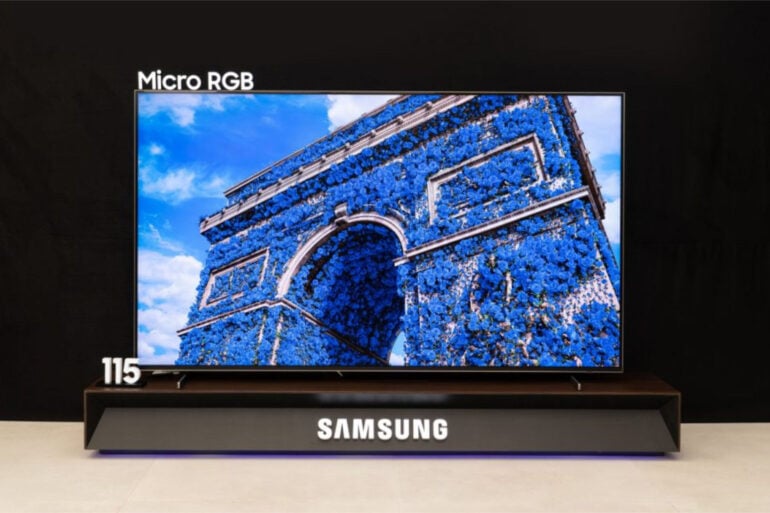
LED, OLED, Mini LED: you’d be forgiven for thinking there are too many different types of TV technology to keep up with. But if there’s one constant in consumer tech, it’s change. Case in point, Samsung announced its new in-house Micro RGB technology at IFA, designed to produce more colour and contrast than existing TVs.
True to its name, Samsung’s new technology combines red, green, and blue RGB LEDs that measure less than 100 micrometres. For a reference point, a micrometre is one thousandth of a millimetre.
If a Mini LED backlight is roughly the size of a small grain of rice, Samsung’s Micro RGB LEDs are somewhere around the size of a dust particle. It’s tiny.
Samsung then arranges these tiny LEDs behind a TV panel, patterned to produce colourful images. And because the LEDs are so small, it should allow granular light control with minimal blooming or light bleed.
Unsurprisingly, AI plays a part in how Micro RGB works. Samsung explained that a specific AI engine analyses each frame, optimising the picture to make it “more lifelike and immersive”. Using AI, a feature called “Micro RGB Colour Booster Pro” aims to turn content with “dull colour tones” into a “more vivid” result.
So, what does that mean for creative intent? Earlier in the week, Dolby claimed that its updated HDR standard will make adjustments “without compromising artistic intent”. Samsung’s TVs famously haven’t supported Dolby Vision so far, so it will be interesting to see how Micro RGB processes images while keeping the original vision intact.
At IFA, Samsung demonstrated the new technology via a 115-inch screen, which will come to Australia sometime in the next few months. Being a brand-new technology, don’t expect it to come cheap.
Two new Samsung Sound Tower party speakers are coming to Australia, making the announcement at its annual IFA appearance in Berlin.
Including the ST50F and ST40F versions, each speaker is designed to be portable, yet large enough to produce a big room-filling sound. Built with dual dome tweeters and dual woofers, Samsung says the Sound Tower speakers combine clear treble with powerful bass that can be customised based on listeners’ preferences.
Specific to bass, the speaker has deep, punchy, and gentle modes, while further modes, including stadium and outdoor, tweak the audio profile depending on the setting. As you’d expect from a set of party speakers, both models come with customisable LED lights that sync to music.
Of the two speakers, the ST50F is the most powerful, with a 240W output and larger 6.5-inch woofers. Meanwhile, the ST40F has a 160W output and 5.25-inch woofers. Both speakers have built-in handles to help move them around, while the bigger ST50F model also has a set of wheels for maneuverability.
For bigger parties, multiple speakers can be paired together using Auracast or Samsung’s proprietary technology. That way, you can experience a fuller soundscape in stereo.
Aussies will have to wait a bit longer until the speakers arrive locally. Samsung confirmed that they’re launching them across different regions starting today, but we’re on track for a 2026 release date.
Samsung expands its smart home ecosystem at IFA
Like LG’s grand plans for AI, Samsung used IFA to show how it’s approaching interconnected smart home appliances.
One way is through the expansion of its Home Appliances Remote Management (HRM) service. Now available in Australia, HRM connects to SmartThings-connected appliances to monitor appliance usage data.
Samsung sees it as a big boon to servicing, being able to use the technology to provide remote support for its appliances. Importantly, it’s only done with customer consent, so the company won’t snoop around your fridge as it pleases.
According to Samsung, it has been using HRM in Korea since 2020, able to monitor fridge temperature, air conditioner performance, and dryer moisture levels without stepping into a home. Designed to try and resolve issues with appliances remotely, the service also extends to screen-sharing of appliances with built-in displays, like recent Samsung Bespoke fridges.
And speaking of fridges, Samsung also announced that its latest Bespoke AI models, alongside the Jet Bot robot vacuums, are now security certified by TÜV Nord, which is a first for the company. It’s basically a recognition that the appliances meet modern data security requirements.
With IFA 2025 yet to officially kick off, stay tuned for more news about the latest home appliances and smart home tech.
Valens Quinn attended IFA 2025 with the support of Anker, Aqara, Dreame, Ecovacs, Reolink, Roborock, and Samsung.
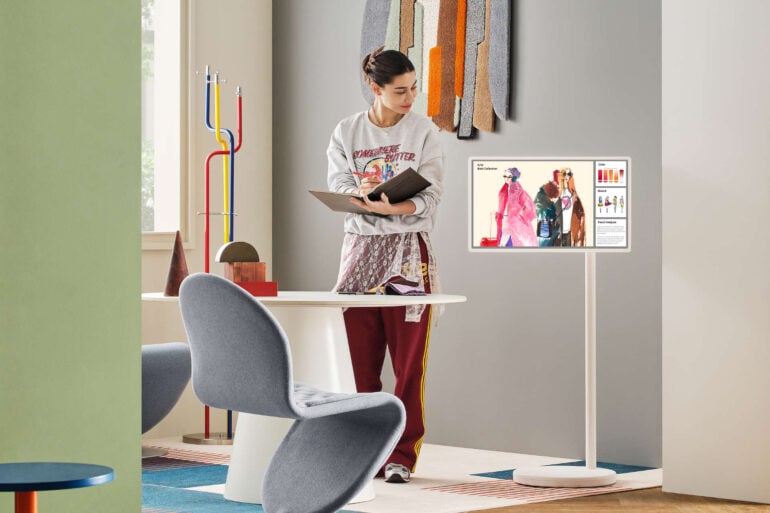
Nearly everything has a screen these days. Name a common household appliance, and there’s likely a model with a screen on it. Instead of just putting screens on everything, though, LG has doubled down on its portable displays by launching the StanbyME 2 in Australia.
An updated model of the range that includes a briefcase-style TV, the $2,199 StanbyME 2 is no longer confined to a wheel-equipped stand. LG’s new portable screen can now be dismounted and hung on a wall via an included strap.
Regardless of where it’s placed, the screen is LG’s version of a smart display. A large smart display, it should be said. At 27 inches, it’s the same size as its predecessor, albeit with a sharper resolution. While the last model sported a Full HD resolution, the new model steps up the pixel count to 2560 x 1440.
LG’s new portable display can also hang on the wall as a digital art frame. Image: LG.
LG’s StanbyME 2 also functions as a touchscreen, with both Apple AirPlay and Google Cast functionality via its webOS interface. Alternatively, its HDMI and USB-C ports mean you can also use the screen as an external monitor for laptops and gaming devices.
Designed to operate independently of a separate power source, LG claims the StanbyME 2 lasts up to four hours when relying on its internal battery. As always, battery life will depend on real-world use factors, like brightness and audio volume.
Expect to see LG’s new smart portable display appear on its website and in retailers by the end of the month.
Finally bringing colour to Amazon’s eBook reader, the Kindle Colorsoft Signature Edition is for those who enjoy looking at the pretty pictures.
eBook readers survived the arrival of tablets because they offer avid readers a range of advantages. For starters, eBook readers are typically more affordable, plus they’re lighter than tablets and more comfortable to hold in one hand for extended periods.
As an added bonus, an eBook reader’s E Ink screen is easier on the eyes and ensures the device’s battery life is measured in weeks rather than hours.
Of course, the key drawback with E Ink readers is that they rely on monochrome screens. I would argue that this doesn’t matter once you’re engrossed in a good book, but it hasn’t stopped people from asking for colour models.
Kobo beat Kindle to the punch last year with the Kobo Libra Colour and Kobo Clara Colour. Amazon’s first colour e-reader launched soon after, but it’s only recently come to Australia – as both the standard Kindle Colorsoft (sorry, no bonus ‘u’ for Aussie shoppers) and the Kindle Colorsoft ‘Signature Edition’ with a few extra bells and whistles.
The move leaves Australians with a choice of six Kindles. Along with the $199 6-inch standard Kindle, you’ve a range of 7-inch options in the $249 Kindle Paperwhite, $279 Kindle Paperwhite Signature Edition, $329 Kindle Colorsoft and this $449 ($379 at the time of writing) Kindle Colorsoft Signature Edition. Finally, there’s the giant 10.2-inch $529 Kindle Scribe that comes with a stylus.
The Kindle Paperwhite remains the sweet spot in terms of price and features, with the Paperwhite Signature Edition adding $30 to the price tag. In return, you get the addition of an auto-adjusting backlight and Qi wireless charging, as well as doubling the onboard storage to 32 GB.
Likewise, the Kindle Colorsoft Signature Edition offers the same improvements over the standard Kindle Colorsoft, but with a significantly higher $120 premium.
Kindle Colorsoft Signature Edition first impressions
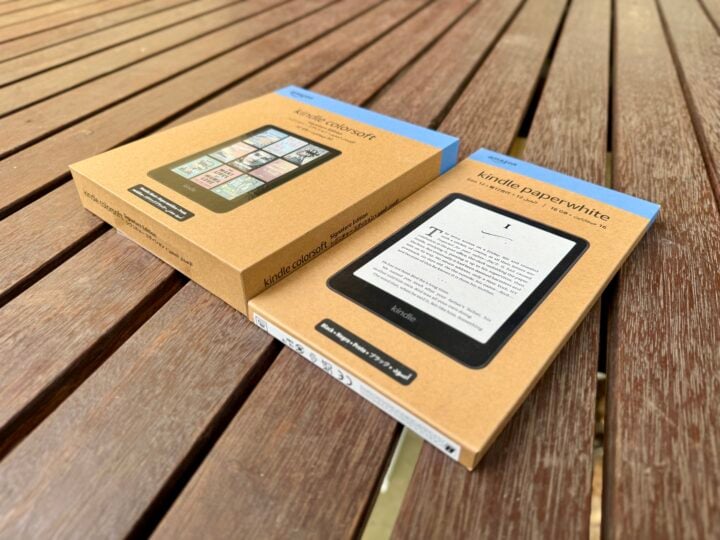
Before you even open it, you can tell by the size of the box that the Kindle Colorsoft Signature Edition is something special compared to your everyday Kindle. Of course, inside the box it’s mostly empty space to help create the sense of a premium product – a common trick amongst gadget makers.
Like all modern Kindles, you’ll find a USB charging cable in the box, but no AC adaptor. The new colour Kindles feature a USB-C connector, but Amazon has stuck with a USB-C to USB-A cable, making it easier to use an old AC charger lying around the house.
While the Kindle Colorsoft Signature Edition comes in a more impressive box, it’s the exact same dimensions as a Kindle Paperwhite. Image: Adam Turner.
Compared to the standard Kindle Colorsoft, the Signature Edition adds Qi wireless charging. It’s certainly a premium feature, but perhaps it isn’t as useful as it sounds when you remember that you only need to charge it less than once a month.
That said, colour clearly takes a toll on the battery life, with Amazon citing an 8-week typical battery life compared to 12 weeks on a Paperwhite model.
When it comes to overall design, Amazon has retained the standard Kindle layout, with a single power button at the bottom alongside the USB-C port and charge light. There are no page-turning buttons or a full physical keyboard like Kindles of old, as everything is managed via the touchscreen.
Old-school Kindle owners shouldn’t worry too much about losing page-turning buttons. You can swipe your thumb left or right across the screen, or tap the side of the page to move in that direction. Either option quickly becomes second nature, although tapping is only really practical if you’re holding the Kindle in your right hand (assuming you’re reading left to right).
By now, old-timers should have also come to terms with the fact that Amazon’s WhisperNet 3G/4G mobile service was retired long ago. This means you can only access the Kindle eBook store using Wi-Fi, perhaps from your smartphone hotspot when you’re on the move. Amazon also killed off Kindle’s ‘Download and Transfer via USB‘ feature earlier this year, which upset a few people.
The loss of WhisperNet makes onboard storage more important, but doubling the Kindle Colorsoft Signature Edition’s onboard storage to 32 GB is overkill if you’re just reading novels, which tend to be only 2 to 3 MB.
To be fair, colour graphical content such as comics can weigh in at more than 50 MB, so it makes sense to bump up the storage on a colour Kindle.
That extra onboard storage also would come in handy for Audible audiobooks – which take up about 150 MB each – if it weren’t for the fact that listening to Audible audiobooks still isn’t available on the Kindles in Australia. You might get lucky if you play around with the location settings in your Amazon account.
Australians can still connect Bluetooth headphones to listen to the VoiceView screen reader, but there’s no headphone jack or built-in speaker.
Kindle Colorsoft Signature Edition specifications and price
Display size
7-inch
Display resolution
300 ppi monochrome (16-level greyscale)
150 ppi colour (4096-colour)
Display technology
Colour E Ink
Onboard storage
32 GB
Charging
USB-C, Qi wireless
Battery
A single full charge lasts up to eight weeks – based on a half hour of reading per day with wireless off and the light setting at 13.
Wi-Fi
2.4 GHz and 5 GHz networks
Bluetooth
Yes (VoiceView screen reader, no Audible support in Australia)
That colour screen is obviously the big talking point, but whether you’d make the most of the Kindle Colorsoft Signature Edition depends on what you like to read.
As someone who owns an ancient 167 dpi Kindle 3, I can say the step up to crisp 300 dpi monochrome displays certainly made text much easier on the eyes. Of course, these days, 300 dpi monochrome displays are now standard across the entire Kindle range.
Likewise, the step up to Paperwhite lighting technology improved the reading experience, and is also now standard on all but the entry-level Kindle.
One bonus feature with the Colorsoft and Paperwhite Signature Editions is an auto-adjusting backlight, inherited from the now-retired Kindle Oasis. It’s a subtle improvement over the standard model, but arguably the most useful.
When the auto-adjusting backlight kicks in, it’s such a smooth transition that you don’t even notice it as you move from outside to inside and then into a darkened room.
So that brings us to the benefits of the colour screen. Keep in mind that, apart from their front covers, most Kindle eBooks are only black and white text. So once you’re lost in a great novel, there’s no difference between holding the $249 Kindle Paperwhite and the $449 Kindle Colorsoft Signature Edition.
Actually, that’s not quite true. Putting a Kindle Paperwhite and Kindle Colorsoft Signature Edition side by side, you can see that the colour of the “paper” and image quality are subtly different.
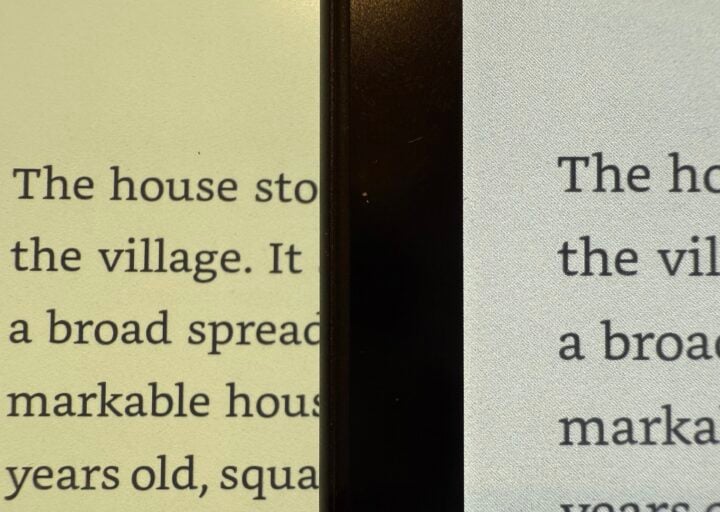
Open the same monochrome book on the two devices, side-by-side at maximum brightness and zero warmth, and the Colorsoft screen clearly has more of a blue tinge than the Paperwhite. It’s annoying if you’re familiar with the great Paperwhite screen, but after a while, you’d get used to it.
Less forgivable is that, when you look closer, you can see that the Colorsoft display looks more grainy, and black text isn’t as crisp or as high-contrast on the Paperwhite.
The Kindle Colorsoft screen (right) is less sharp and more grainy than the Kindle Paperwhite screen (left). Image: Adam Turner.
“The Kindle Colorsoft display is optimised for reading in colour and is different from the Kindle Paperwhite display, which is optimised for black and white reading.”
“If you are looking for a slightly crisper black and white reading experience, you may want to check out Kindle Paperwhite, which has the fastest page turns and highest contrast ratio of any 2024 Kindle device.”
It’s also worth mentioning that the Colorsoft models don’t support ‘Dark Mode’, which inverts pages to white text on a black background. Instead, it supports ‘Page Colour’, which again doesn’t look as good. All of these shortcomings might frustrate you if you primarily use your Kindle for reading novels.
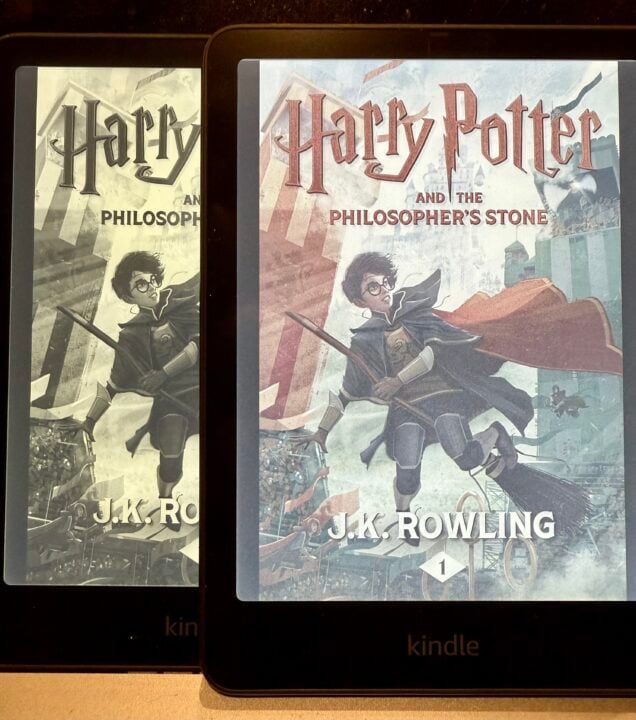
Looking at the cover art, you can immediately see that the colours are rather muted and images lack fine detail compared to what you’d see on a tablet or in print. You can choose between standard or vibrant colour modes, which don’t make a major difference but thankfully don’t compromise the quality of the text on the page.
A colour eBook cover is nice to look at, but once you open a novel, you’re back to monochrome text. Image: Adam Turner.
The limited colour palette looks like a style choice, but it’s due to the limitations of Amazon’s colour E Ink display.
Firstly, E Ink isn’t as vivid as a tablet’s screen or a printed book cover. Secondly, Kindle’s Colorsoft E Ink technology is limited to 4,096 colours and only 150 dpi sharpness – which falls well short of the 250+ dpi and millions of colours available on a decent tablet screen or printed page.
This might seem an unfair comparison, but understanding the screen’s limitations helps you appreciate that colour is more practical in some scenarios than others. It’s certainly not worth spending the extra money on a colour Kindle just to glance at a fancy cover before you dive into a book.
Reading experience
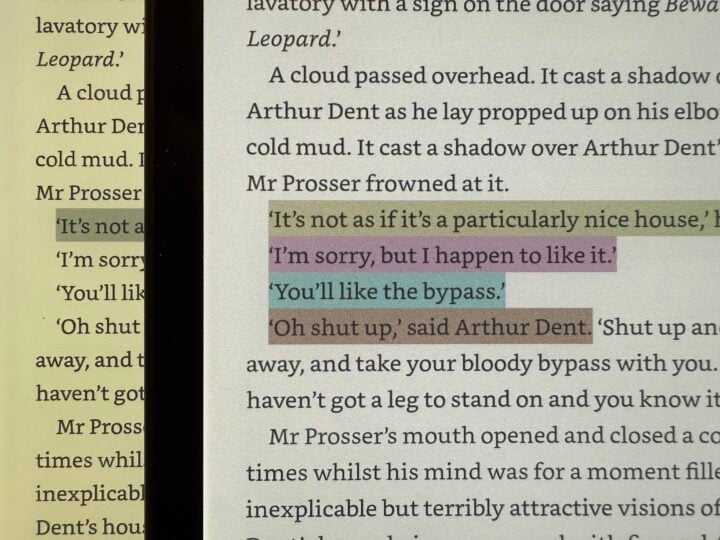
One of the most practical uses for colour is the ability to highlight text in four different colours, which you can filter when searching. This could be genuinely helpful if you use a Kindle to study texts.
Multi-colour highlighting could be useful when studying important texts like The Hitchhiker’s Guide to the Galaxy. Image: Adam Turner.
Of course, the primary application for a colour eBook reader is looking at colour images, and that’s where the results are very hit and miss. In short, the nicer the illustration, the worse it looks on the Colorsoft Kindle compared to a tablet or a printed book.
Just like a standard Kindle, the Colorsoft is fine for viewing explanatory diagrams in novels. Image: Adam Turner.
Turning to Matthew Reilly’s Ice Station, the black and white explanatory diagrams don’t look too bad, although the screen is certainly not as clear as the printed page of even a cheap paperback.
Once you start looking around at books with more impressive colour illustrations, the Colorsoft Kindle’s 7-inch screen starts to feel quite small and makes it harder to see the fine details. The Colorsoft’s colours, resolution and contrast also fail to bring to life the majesty of the printed page.
The three books below are different genres and are aimed at different readers, but they have a few things in common. Firstly, the physical books are all larger than the Kindle, which means the images and text are smaller on the screen. Secondly, reading all these books is intended to be a premium, tactile experience.
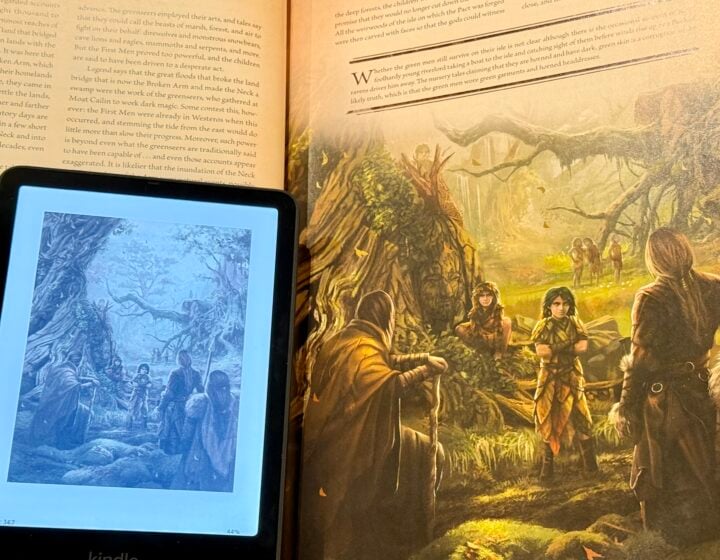
A beautifully illustrated coffee table-style book like George R. R. Martin’s The World of Ice and Fire is a great example of how the Colorsoft Kindle struggles to match the majesty of the printing page. With something like a coffee table book, the quality of the physical book is a big part of the reading experience.
Try as it might, the Kindle Colorsoft can’t do justice to a beautifully illustrated book. Image: Adam Turner.
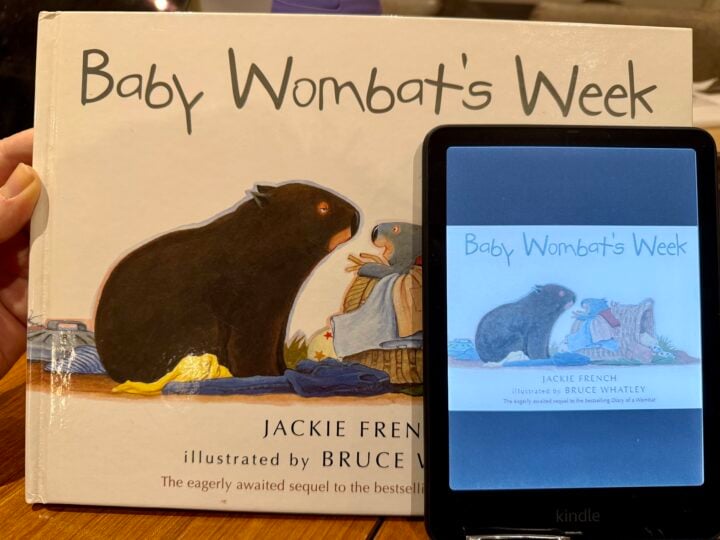
Meanwhile, Jackie French’s Baby Wombat’s Week gives you a feel for reading bedtime stories on the Colorsoft Kindle.
Reading to young children on a Kindle Colorsoft would suck a lot of the joy out of story time. Image: Adam Turner.
While young children are likely less discerning when it comes to picture quality, reading picture books to them on a Kindle is a rather hollow experience compared to holding up a physical book for them to see and enjoying the ritual of turning the pages. A colour eBook reader might be more practical when they’re up to reading on their own.
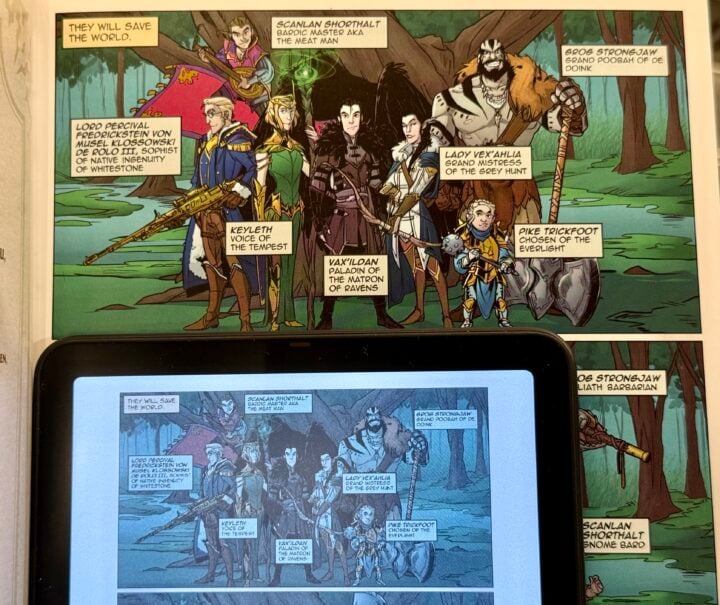
That brings us to comics and graphic novels, like Critical Role: Vox Machina Origins, which are arguably the genres best suited to a colour eBook reader.
The Kindle Colorsoft doesn’t do justice to the illustrations in a graphic novel, plus the text is difficult to read. Image: Adam Turner.
The look and feel of holding the beautiful physical book is lost, but you might be able to put that aside once you become engrossed in a good graphic novel. Yet the screen size also has a significant impact on the reading experience.
Because text on the page is actually part of the images, it can’t rescale, so it’s very difficult to read on the Kindle if it’s smaller than the original printed page. You can pinch to zoom in and out on every text block, but that makes for a very cumbersome and disjointed reading experience.
Alternatively, you can enable the Kindle’s panel view by double-tapping in the middle of the screen. This lets you flick through a page’s panels one by one, while making them larger and easier to read. It’s a reasonable compromise, although purists might argue that reading a graphic novel this way ruins the experience.
Unlike coffee tablet books and illustrated children’s books, you’re more likely to tolerate the compromises of the Kindle reading experience if it makes it easier to keep comics and graphic novels in your bag for reading on the go.
Who is the Kindle Colorsoft Signature Edition for?
If you have a genuine need for a colour screen on your eBook reader, then Amazon’s Kindle Colorsoft Signature Edition is probably the one you’ve been waiting for. But, considering the very high price tag compared to the excellent monochrome Kindle Paperwhite, you need to be absolutely sure.
A Kindle Colorsoft is certainly not worth the money if you’d only notice the colour when looking at book covers. Especially considering that, once you’re reading the book, the Colorsoft screen isn’t as crisp as a cheaper Paperwhite screen.
So in order to make the most of a Kindle Colorsoft, you need to be reading books that feature colour illustrations. If that sounds like you, then a colour E Ink screen is great in theory – but the harsh truth is that any book with beautiful colour illustrations worth looking at, probably isn’t worth looking at on the Colorsoft Kindle. Especially when the 7-inch Kindle is probably too small to display the images as the artist intended.
Even in the digital age, reading a beautifully illustrated book is a tactile experience, which is totally lost on the Kindle Colorsoft. Its limited screen size, resolution, and colour palette fail to bring colour content to life – something which Amazon might improve with version two.
For now, coffee table books and children’s books are not worth reading on a colour Kindle; you might be more prepared to live with the Kindle Colorsoft’s shortcomings when reading comics and graphic novels on the go.
GadgetGuy occasionally uses affiliate links and may receive a small commission from purchased products.
Kindle Colorsoft Signature Edition
Amazon's Kindle Colorsoft Signature Edition brightens up eBooks but still struggles to bring colourful content to life.
Features
9
Value for money
7.5
Performance
8
Ease of use
9
Design
8
Positives
Amazon's first colour Kindle E Ink reader
Auto-adjusting backlight
Generous 32 GB onboard storage
Qi wireless charging
Negatives
Expensive
Limited screen size, resolution and colour palette hampers colour content
Are you ready to get your head around a new TV technology? I ask because Dolby Vision 2 is on its way, building on the existing HDR technology in some eyebrow-raising ways.
Announced overnight ahead of IFA in Berlin, the official word is that Dolby Vision 2 “is designed specifically to meet the evolving opportunities of television experiences today”. An empty corporate statement in isolation, it appears that the technology aims to do more to adapt how a picture looks and how TVs process motion.
That last point could send a shudder up the spines of anti-motion smoothing and Filmmaker Mode advocates around the world. Coming to the new Dolby standard is a feature called “Authentic Motion”. According to the announcement, it aims to “make scenes feel more authentically cinematic without unwanted judder on a shot-by-shot basis”.
How this will work in practice will be interesting. Most modern TVs come with a Filmmaker Mode setting that preserves the source material’s frame rate and disables any post-processing, like motion smoothing. Read up on the soap opera effect if you want to know why motion processing causes cinephiles to break out in hives.
2 Dolby 2 Vision: An HDR sequel
Less controversially, the main addition to Dolby Vision 2 is “Content Intelligence”. Based on the provided details, it adjusts a TV’s picture based on the content, your television set, and the viewing environment.
Under the banner of Content Intelligence are three sub-technologies: Precision Black, Light Sense, and Sports and Gaming Optimisation.
Precision Black adjusts picture clarity during dark scenes, aimed at people who struggle to see what’s happening on screen. Meanwhile, Light Sense is Dolby’s standardised ambient light detection technology that responds to the content and the viewing environment. Sports and Gaming Optimisation speaks for itself; it’s meant to handle motion to suit fast-moving action.
Most importantly, Dolby claims its new HDR standard acts “without compromising artistic intent”. To take advantage of newer TVs capable of producing a wider spectrum of colours, Dolby Vision 2 also employs a new bi-directional tone mapping technique. Theoretically, it should assist TVs in showing brighter and more colourful visuals.
Hisense is the first TV brand confirmed to support Dolby Vision 2 on its high-end TVs, although no date has been locked in yet. Dolby specifically name-dropped Hisense’s RGB Mini LED TVs, which use a combination of red, green, and blue backlights, covering up to 95% of the BT.2020 colour gamut.
Dolby also confirmed that there will be two variants of its new HDR standard: Dolby Vision 2 and Dolby Vision 2 Max. The base version is reportedly aimed at improving the picture quality on “mainstream TVs”, while Max will get “additional premium features” on high-end TVs.
Only time will tell how much of a difference this new technology will make.