Everything’s so dang expensive now, so plenty of folks are keen to save money wherever and however they can. This includes saving on essentials, like phone bills, which is tricky when major telcos keep raising their prices. In an effort to offer a cheaper alternative to the big three, Boost Mobile has launched a new six-month SIM plan for $180.
Boost’s new plan comes with 160GB for the first recharge, working out to be 26GB per month. However, subsequent recharges only include 100GB, equal to just over 16GB each month. In terms of a monthly price equivalent, you’re effectively paying $30 per month, albeit in an upfront lump sum.
Compared to the major telcos, it costs the same as similar six-month SIM plans from Optus and Vodafone when at full price. Optus includes 140GB per recharge for the first three recharges, before dropping the data down to 90GB. Meanwhile, Vodafone includes 150GB with the first activation, which then drops to 100GB thereafter.
Going directly with Telstra for a six-month plan will set you back $200 per recharge. At first, you’ll get 160GB, the same as with Boost, but following recharges with Telstra halves the data allocation to 80GB.
It is certainly strange that vinyl has made a comeback. In most respects, it is clearly inferior to digital sound, whether provided on compact disc or via streaming. Vinyl delivers higher distortion and much higher levels of noise; it’s fragile and fiddly, and it’s not even cheap. Some new release LPs will cost you about the same as four months of streaming. And the streaming service you choose will include millions more tracks than the dozen or so on your album.
Yet, somehow, while I would suggest that it can’t be higher in fidelity (that is, more accurate) than the same mix of the music in digital format, it can sound better in some indefinable way. Or so I, and many others, think. This can never be proved, because it is impossible to use the proper double-blind protocols for testing such a subjective thing.
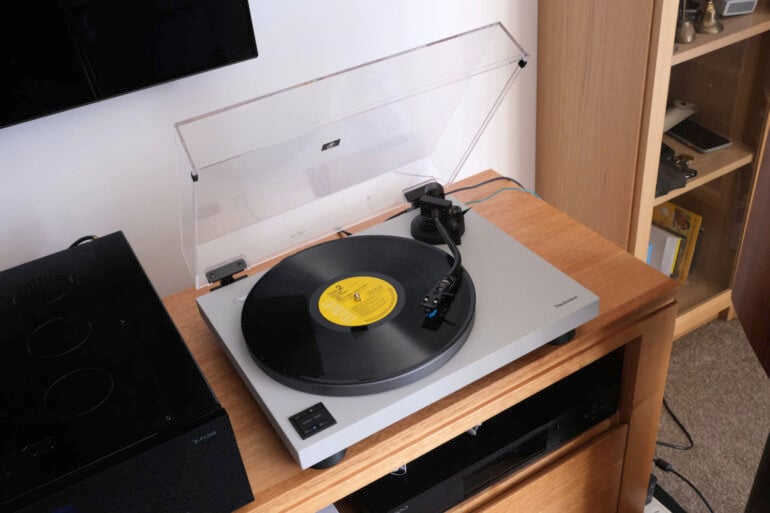
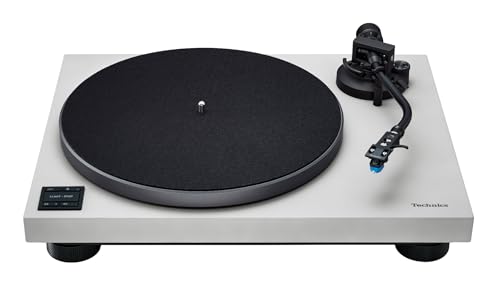
If you are someone who loves the sound of vinyl, then your selection of a turntable is important. The sound is seductive, and you may soon want to upgrade. Which brings me to the Technics SL-40CBT turntable. This is the company’s entry-level model.
Now, a retail price of $1,299 may seem rather high for an ‘entry-level model’. But I’d suggest that this would make a good starting point for vinyl, and certainly an excellent move should you want to move up from some other brand’s entry-level model. Because unlike some turntables, it need not remain an entry-level model.
I like this turntable a lot for several reasons. One is that it is properly upgradable. Another is that it is easy to set up and use. A third is that it is utterly fuss-free. And, importantly, it sounds excellent.
Since returning to turntables some years ago, Technics has had on offer several models at any one time. At the moment, the range runs from the SL-40CBT to the $35,000 SL-1000R. And, no, I did not misplace the comma in that price.
Across the range, there are quite a few family resemblances. All use direct drive technology for spinning the platter. All use a similar-looking tone arm. All spin up their platters to speed in just 0.7 seconds. All but the most expensive model have the same very low 0.025% weighted RMS figure for wow and flutter, a traditional measure of turntable speed variations (wow is slow variation, flutter is fast). That 35-grand gets you a 0.015% figure. Neither figure will result in any audible speed variations.
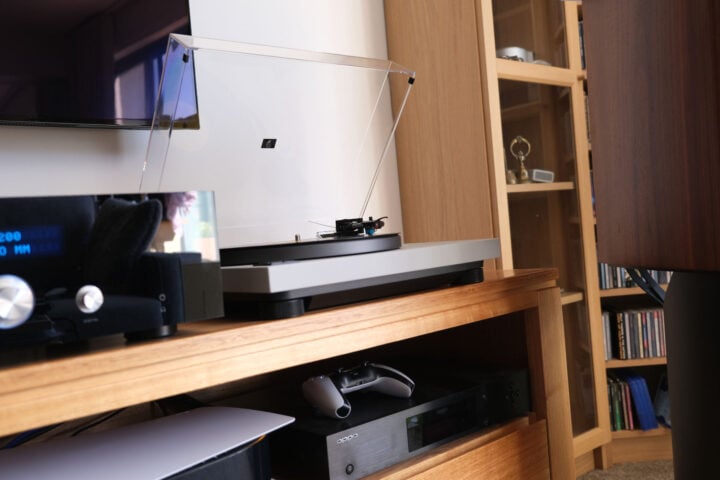
Image: Stephen Dawson.
Several of the more expensive models have strobe markings around the platter and a slider for speed. All the more expensive models have heavier platters and more powerful motors, most using improved sigma-delta technology. And heavier bodies, which, with the heavier platters, provide better mechanical damping of vibrations. And, unlike this one, they all provide tonearm height adjustments and a 78rpm speed selection in addition to the usual 33-1/3 and 45 speeds. Several of the higher-level models use tonearms that look pretty much the same but use different materials.
For as long as I’ve been using turntables – I bought my first one in 1974 – there has been a dispute in the hi-fi community about whether belt drive or direct drive is better. The belt drive people had the better of it back in those days, but in recent years, there has been more appreciation of quality direct drive. Which is to say of Technics, apart from a few boutique marques.
Belt drive turntables use a silicone or rubber, well, belt, to transfer rotational energy from a faster-rotating motor to the platter. That provides isolation between possible motor noise and the platter. A turntable’s stylus will happily pick up any mechanical noise from the machinery operating it and turn it into sound out of your speakers. Something you don’t want.
Image: Stephen Dawson.
A direct-drive motor runs at the same rotational speed as the platter. Technics models – including the SL-40CBT – have magnets affixed to the underside of the platter. The electrical field that acts on the magnet is produced by electronics affixed to the chassis. The platter is, in effect, a part of the motor. There is no noise to be transmitted. And any possible vibrations are ironed out by the rotational inertia of the platter, which is rather heavy. The platter of the Technics SL-40CBT weighs 1.26 kilograms. (That on the SL-1000R ups that to nearly 8kg!)
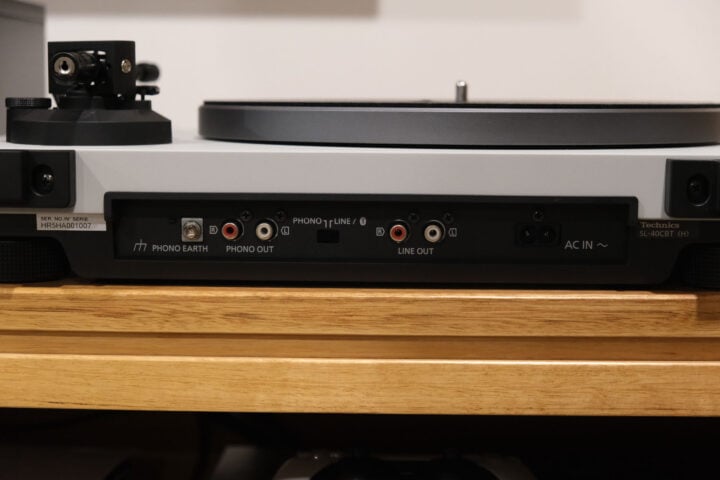
The SL-40CBT, unlike most of the other models, comes with a phono cartridge pre-installed. I’ll talk more about that later. It also comes with three output formats. One is the traditional stereo phono output, one is a line-level output, thanks to the built-in phono preamplifier, and one is Bluetooth. That last supports the SBC and aptX Adaptive codecs.
Missing is a USB output. Since the sound is pre-amped and digitised for Bluetooth anyway, adding USB would have facilitated making digital recordings with a computer.
Upgrading the Technics SL-40CBT
So, let’s say you purchase a turntable to experience what vinyl has to offer, and you get bitten by the bug. Some entry-level turntables achieve low prices – typically, much lower than the cost of this one – by eliminating the basics that allow you to upgrade a turntable.
This one eases that path. First, and most obviously, you don’t need to use the built-in phono preamplifier. If you use an amplifier with a superior one, or decide to go for an audiophile-level separate unit, you can do so. With a separate unit with support for moving coil cartridges, you can even start to explore that exotica.
Note, though, that to use the phono level outputs, you have to flick the switch on the back, which also cuts out Bluetooth support.
Image: Stephen Dawson.
And second, you can upgrade the stylus and cartridge.
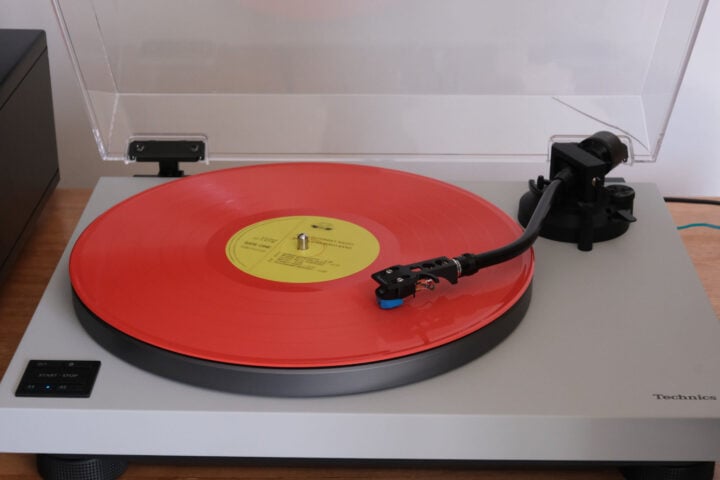
First, the stylus. The Audio-Technica AT-VM95C cartridge is part of a range. The only difference between the models in that range is the stylus. You can upgrade the cartridge simply by purchasing a different stylus. The ‘C’ stands for conical. That’s the shape of the stylus. Horizontal cross-sections of the stylus are circles. Better performance is typically achieved with styluses that are narrower front to back, forming elliptical cross-sections. They can fit better into the narrow grooves variations resulting from high frequencies. Around $50 will upgrade the cartridge to an AT-VM95E, and it’s easy to do. You slide the stylus out and slide the new one in.
Or you can go further to the AT-VM95EN (nude elliptical, the whole stylus is diamond, not just the contact point on the end), AT-VM95ML (Microlinear, a different shape intended to even better follow those narrow grooves), and the AT-VM95SH. That one’s yet another shape – Shibata – that was developed for quadrophonic recordings, and supports playback of frequencies up to 50,000 hertz. The Shibata stylus will set you back the better part of $300.
Or you can change brands entirely, or even technologies, such as the aforementioned moving coil cartridges, or Grado moving iron models. All have their fans.
You can even have a whole selection, each with its own headshell. With a bit of practice, you can switch cartridges and rebalance the tonearm in less than a minute.
Image: Stephen Dawson.
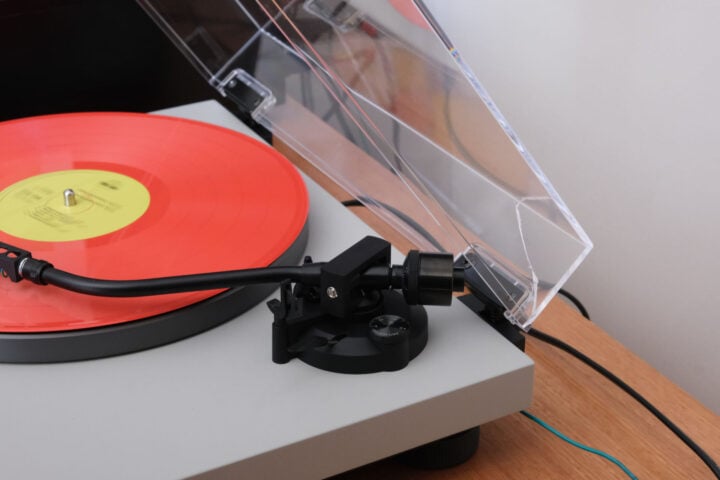
Finally, anti-skating and balance. One entry-level model from a reputable brand has a counterweight with no markings and a fixed, pre-set anti-skating bias. Changing to a different cartridge would require you to purchase a gadget to check the stylus pressure, and forget about the accuracy of the anti-skating. The tone arm on this turntable is properly equipped, and the manual lays out the proper procedure for setting stylus pressure and anti-skating. It’s easy to do.
Stylus pressure should always be set to manufacturer specification. Both too light or too heavy will cause damage to records.
Anti-skating is a force applied to the tone arm to pressure it a little away from moving towards the centre of the record. This counteracts the natural skating force which pushes the tone arm towards the centre of the record. That force is an unavoidable result of the geometry of the forces on the turntable.
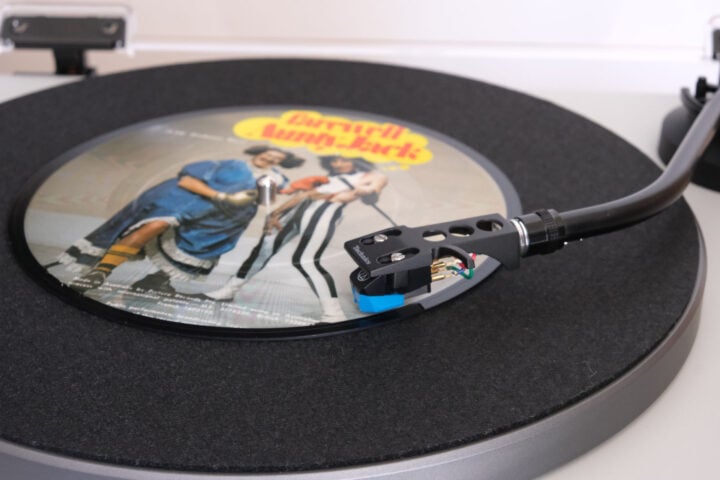
There is one upgrade that may be worth considering. The turntable mat on this unit is kind of odd. It’s almost like some kind of black polystyrene, even though at first glance it looks like felt. It’s quite inflexible, and a little slippery. All the better Technics turntables use a fairly heavy rubber (or similar) mat.
I routinely use a carbon fibre brush on a record before playing it. Much to my surprise, the rotational speed of the record was slowing down, almost stopping. I was applying very little pressure. This is the kind of thing that I expect to see with belt drive turntables, which have been deliberately designed with low-torque motors. But that made no sense with this one.
Eventually, I worked out that it was the record slipping on the mat. Which means that there’s a possibility that some highly modulated sections on a record could lead to slippage, which would result in speed variations. I did not experience this, but I’d still consider replacing the mat.
Or use a record weight or clamp. A record weight sits over the centre of the record. It has a spindle hole to make sure it is properly centred. Technics says that a weight of up to 500 grams can be used.
I used my record clamp from the 1970s.
Setting up the Technics SL-40CBT
First things first: setting up. I’ve done that with turntables a lot over too many decades. Setting up the Technics SL-40CBT was as easy as any turntable I’ve done, and easier than many. I didn’t consult the manual initially, but if you’re new to this, just follow the clear steps in it. You just place the platter over the spindle, the mat over the platter, insert the headshell with the pre-installed cartridge into the end of the tone arm and tighten the shoulder lock, balance it and dial in the correct anti-skating figure. Done!
Image: Stephen Dawson.
I checked the stylus pressure with my Rega electronic stylus pressure gauge, and it came in a bit low at 1.82 grams for a 2.0 gram setting. As always with these things, is the measured thing in error or the measuring thing? I checked my Technics SL-1500C turntable: it measured at 2.06 grams for a 2.0-gram setting. Likewise, my Thorens TD 1600 turntable came in pretty close to spot on.
I don’t think the lower value is too much of a problem with the great majority of material. If you do experience clear distortion on the loud bits on some records – new ones, not old worn ones – then experiment with winding the pressure up by a few tenths of a gram. I did my listening with the turntable’s setting, since that’s what just about everyone will do.
Listening
I listened to a lot of records with this turntable. So that you know my context, I normally use my Technics SL-1500C turntable with the same AT-VM95 cartridge. Well, several of those cartridges. With second-hand vinyl I’ve picked up, I use the elliptical stylus (which is cheap to replace if a disk wrecks it). For regular listening to records I can trust will not destroy the stylus, I use the Shibata. These are on separate cartridges on separate headshells, so very easy to swap. I also have yet another one with a stylus suitable for 78 rpm records (these have a much wider groove), but the SL-40CBT turntable doesn’t provide this speed. For my critical listening, I use a Thorens TD-1600 with a Goldring Ethos moving coil cartridge.
So, how did the SL-40CBT go?
Extremely well in general. There were no audible speed variations and no audible noise. Noise sources from a turntable can include rumble (a low-frequency sound, often caused by poor bearings), motor noise or electronic hiss from the built-in preamplifier. There was none of this, at all.
What there was, for the most part, was an accurate representation of the contents of the groove. That could be good or bad. A 1970s pressing of Abba’s Waterloo, which I hadn’t played in many years, seemed rather mediocre. But I checked the lossless version on Spotify, and it also sounded mediocre. Well, it was recorded in Sweden in 1973, so it wasn’t the vinyl’s fault.
Right now, though, I’m playing Brain Salad Surgery by Emerson, Lake and Palmer, and the turntable is doing a fine job. Even with the bass, with which this album is unusually well-endowed. The final track on Side 1 gets quite close to the run-out loop near the centre of the record, so it can be quite a challenge for a turntable attempting to extract all its information. I switched over my Shibata-fitted AT cartridge, and the improvement was modest but definite. Truth is, if I were to buy this cartridge, I’d quickly spend the $50 for an elliptical stylus. They’re readily available online.
But if you’re only an occasional vinyl spinner, you probably won’t need it.
Image: Stephen Dawson.
Switching back to the included cartridge, I tried a much newer release: Trouble Will Find Me by The National. This has its contents spread out over four sides on heavy vinyl. When the drums on “I Should Live in Salt” kicked in, they did so with impressive body and considerable authority. All the instruments were nicely separated.
Different genres were equally well handled. The New York Saxophone Quartet’s An American Experience showed the turntable was good on delivering jazz, and a 1980s pressing by Chesky of an early RCA Red Seal stereo recording of Respighi’s The Fountains of Rome and The Pines of Rome showed the turntable also delivered with classical.
The built-in phono preamplifier was fine, pretty much at the same level as the phono pre-amps built into good-quality modern amplifiers. For a significant upgrade, you’d need to spend big bucks on a standalone.
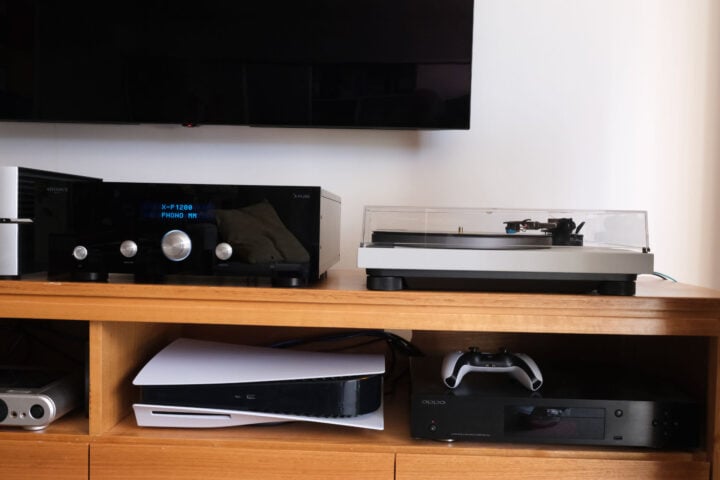
I spent roughly equal time with the turntable’s own preamp, and using the phono outputs directly to my Audio Paris X-P1200 pre-amplifier’s phono input (along with an earth cable connection). There was little difference between the two.
The Bluetooth feature worked well, after setting up with the usual amount of breath-holding: will this work? It isn’t like a phone where you check out the list of available speakers on the Bluetooth settings page. You just put it in pairing mode, switch on the Bluetooth headphones or speaker, and wait for lights to stop flashing. Happily, the turntable found my receiving device within seconds, so I didn’t have to hold my breath for long.
As is so often the case, I could not confirm which codec the turntable used. But the Bluetooth receiver does support aptX Adaptive, and it sounded fine, so I’m guessing that is what it used. But, seriously, if your sound system – even if it’s a compact Bluetooth speaker – has a wired input, that is preferable on general principle. No interference, no uncertainty.
Who is the Technics SL-40CBT for?
I should note that Technics direct drive turntables from the 1970s still command high prices all this time later. And nobody doubts that modern Technics turntables are a significant upgrade from those.
So from me, the Technics SL-40CBT is a strong yes.
GadgetGuy occasionally uses affiliate links and may receive a small commission from purchased products.
Technics SL-40CBT turntable
While it may be pricey for an 'entry-level' model, the Technics SL-40CBT turntable sounds excellent and is highly upgradable.
Features
9
Value for money
9
Performance
9
Ease of use
9
Design
10
Positives
Excellent audio performance
Extremely reliable
Easily upgradeable
Lacks the fussiness of many of its competitors
Negatives
It would be nice of the cue level were a little less sloppy in operation
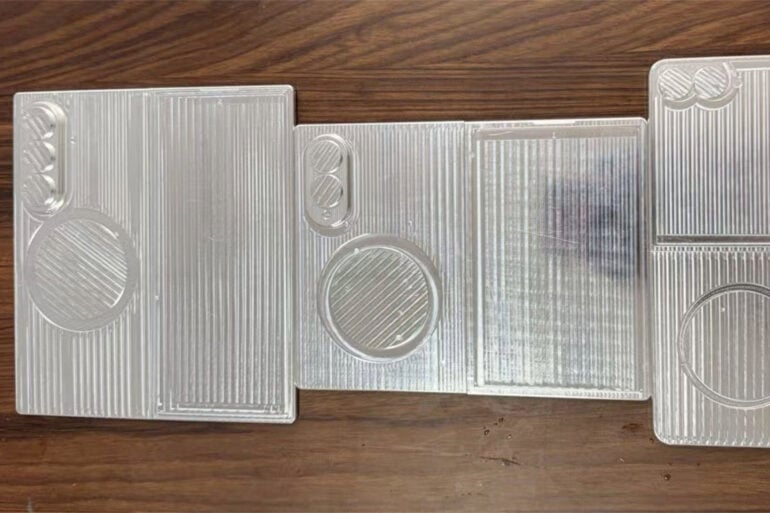
First look at dummy units of the Samsung Galaxy Z Fold8, Z Fold8 Wide, and Z Flip8. The Fold8 Wide lines up closely with the expected size of the iPhone Fold. pic.twitter.com/NVP3agwsrM
References to the Samsung Galaxy Z Fold 8 Wide have also been found in the brand’s upcoming One UI 9 operating system update. The dummies and renders shared so far point to a phone with two rear cameras, instead of the three found on the standard book-like foldable design.
Last year, Samsung announced its foldable phone range, including the Galaxy Z Flip 7, in July. The company’s foldable range typically arrives just after the midpoint of the year, several months after the flagship Galaxy S range. However, with phones like the Galaxy S26 Ultra arriving slightly later this year, it’s possible that Samsung could push back the rest of its phone launches.
At this stage, Samsung hasn’t officially confirmed its upcoming launch plans. But with what we know so far, it’s highly likely that we’re about to see a wave of passport-sized foldable phones land by the end of the year.
Dash cams have come a long way since the technology became a popular in-car accessory over the past couple of decades. Handy for sorting out insurance disputes and keeping an eye on erratic road behaviour, they’re now an all-in-one security solution for your car. To help you keep your car safe, we have a MiVue Smart True 4K Surround dash cam to give away, thanks to Navman.
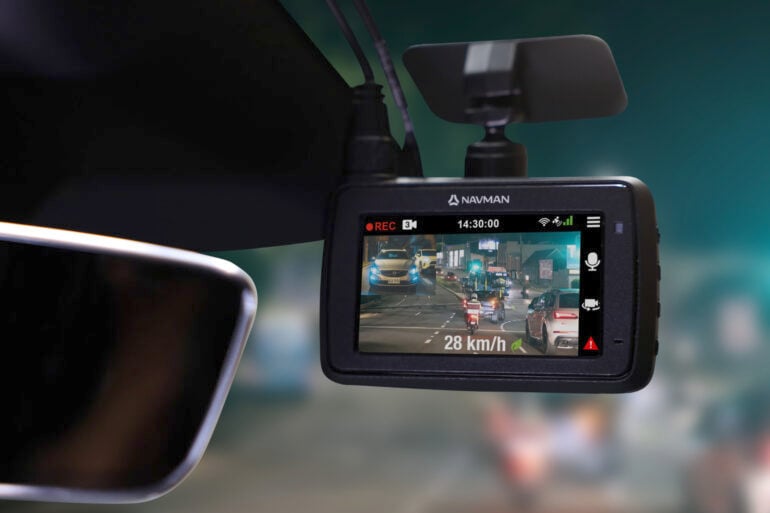
Valued at $529, this dash cam includes three cameras in one package: a 4K 120-degree front camera, a 2.5K 135-degree rear camera, and a 2.5K 170-degree interior camera. Combined, each camera provides comprehensive coverage in and outside of your car, letting you see what happens on the road, including if anyone bumps into the side of your car.
Just as helpful is Navman’s Smart Parking mode. When installed with the included 12V hard wiring kit, the MiVue Smart True 4K Surround can record footage when detecting motion, making sure that any car park scrapes get captured using all three cameras.
This dash cam truly is an all-in-one safety and security device for your car. It can help keep you safe on the road, including safety alerts while driving, while keeping an eye on your vehicle when parked. That level of reassurance is worth having, and you might be the lucky winner of Navman’s latest premium dash cam.
How to win a Navman MiVue Smart True 4K Surround dash cam
If you’re keen to win this dash cam for yourself, check out the instructions below to be in with a chance.
All you have to do is enter the giveaway via the entry form in the following widget. It supports multiple entry methods; the more ways you enter, the greater your chances of winning.
Can’t see the widget? Visit the entry form page here and fill out the details directly.
You can enter now until 19 May at 2:00 PM AEST, so you’ve only got a couple of weeks to try your hand at winning. Dash cams are a popular gadget, so you’ll want to enter now to avoid missing out.
Make sure to share this giveaway with your friends and family, too! Car safety is something worth sharing, so send this to anyone you know who could do with a high-quality dash cam.
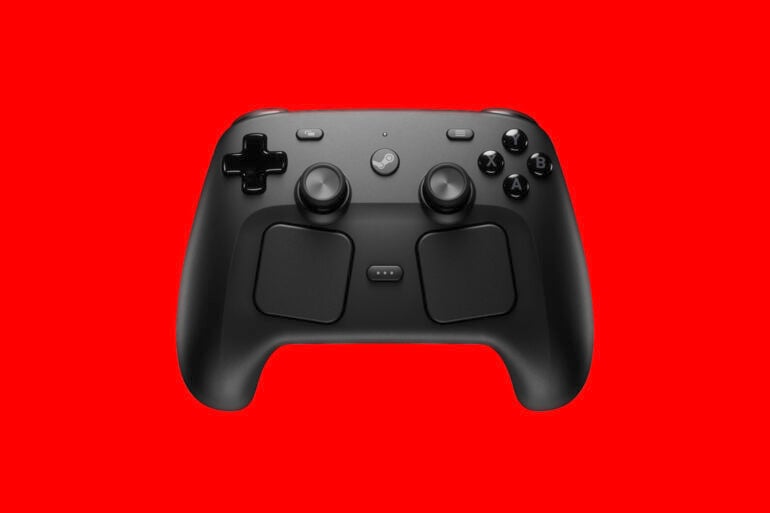
Just hours after going on sale, the new-look Steam Controller is already sold out in Australia. Orders for Valve’s $149 gamepad went live at 3:00 AM AEST this morning, but tough luck if you were hoping to buy one on your lunch break.
Valve’s website doesn’t specify when the Steam Controller will be available again. A big ‘Out of stock’ button occupies the place where the ‘buy’ button once stood. If it’s any indication of how popular the Steam Machine will be when it launches, it’s going to be brutal.
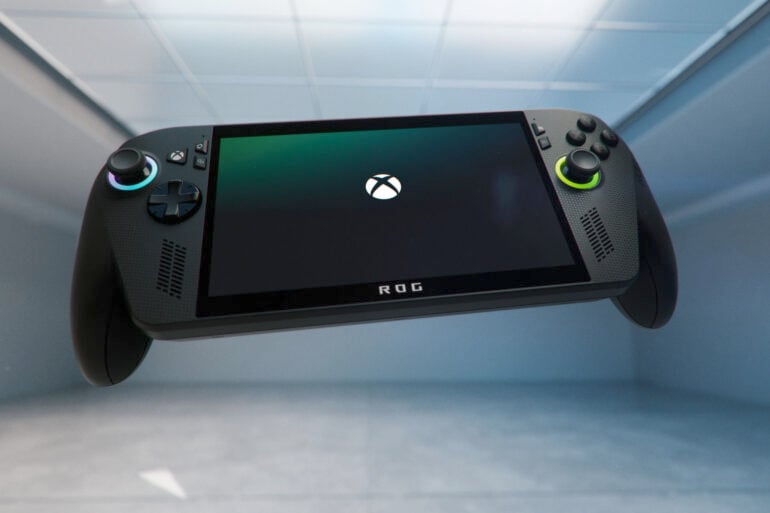
A fresh update for the ROG Xbox Ally handheld gaming PC makes playing on a TV or an external monitor much more seamless than before. As outlined in a recent blog post on Xbox’s website, plugging an Xbox Ally into an external display, it will automatically move the gameplay to the big screen and turn the device’s built-in display off.
One of the things I ran out of space to cover in my ROG Xbox Ally X review last year was the docked experience. Trying to get games running on my TV in the right resolution, or even output to the correct display, was fiddly, to say the least.
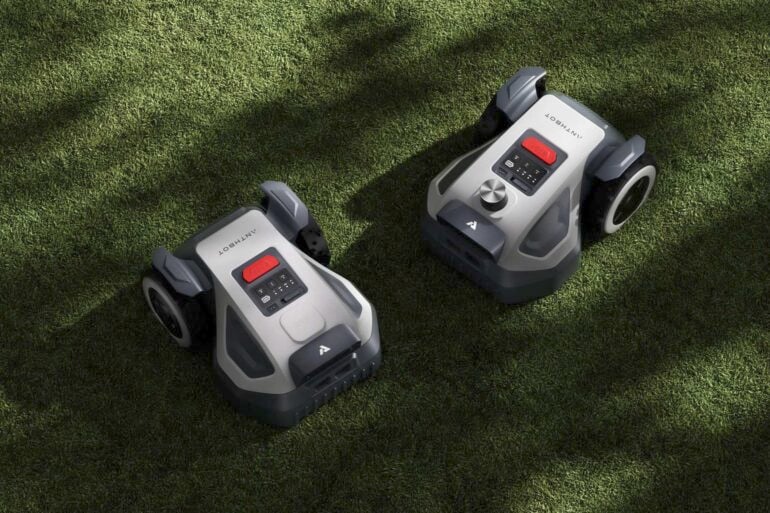
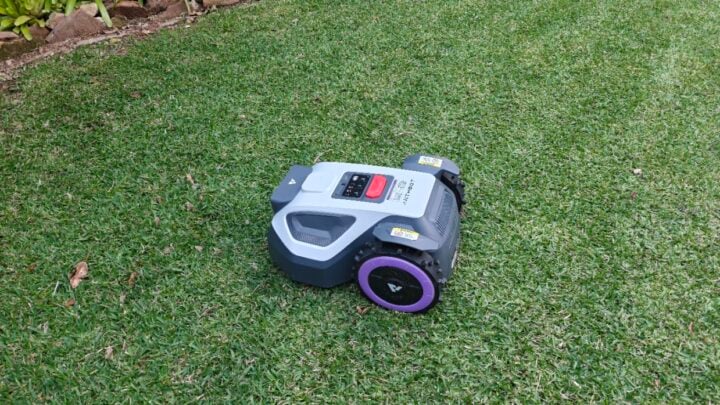
Instead of mowing the lawn, I am writing about a robot mowing my lawn. I have more time to write as I am saving at least 30 minutes each week in the summer because a robot is mowing my lawn. I am now a complete convert to robot lawnmowers, and the Anthbot M9 is the fifth robot lawnmower I have tested.
Now you may be thinking, “it would not work in my garden, it’s too complicated, and it won’t do as good a job as I can do”. My back lawn is buffalo grass, which is difficult to cut; it has a 1-in-6 slope, and it has never looked as good as it has since I started using robot lawnmowers.
A lawn cut with a robot mower looks better because it is cut more often, with less removed each time, by sharp razor blades, compared to a dull blade on a conventional lawnmower. Regular cutting encourages sideways growth rather than vertical growth, which makes your lawn look lusher. The tiny offcuts fall into the lawn unseen, creating mulch for future growth.
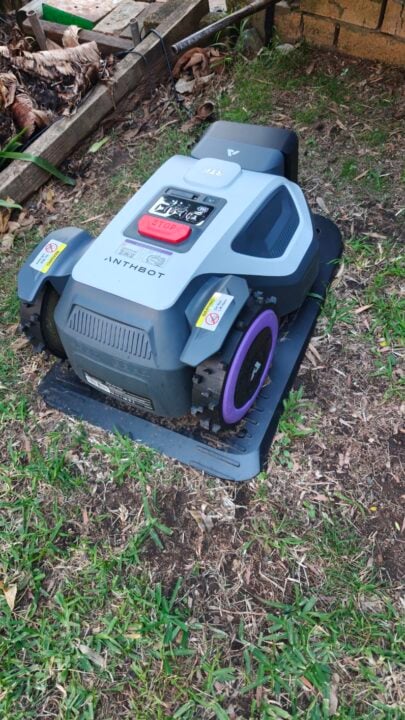
Anthbot M9 in its docking station. Image: Angus Jones.
N8: from $2,249 GPS or LiDAR — 1,500m² with a catcher — great for a garden with lots of leaves
Even the smallest model will suit most suburban blocks in Australia. The GPS models use a GPS base station and a receiver in the mower, improving accuracy and enabling the mower to navigate your garden precisely.
My backyard has lots of trees, so I was worried I would have issues with GPS reception, but the M9 has worked flawlessly. If you spend the extra for LiDAR, the lawnmower has a laser which maps your back garden and then uses that laser and the map it has created to work out where it is. The LiDAR model does not require a clear view of the sky, unlike GPS.
Anthbot GPS antenna. Image: Angus Jones.
Beyond the navigation technology, the mowers also have a set of cameras that further help them navigate to identify obstacles and surfaces. When you first set up the mower, an auto function can determine the edges of your lawn to create your initial map. Ongoing, the camera system will stop the lawnmower from running over the cat or a favourite toy and avoid the clothesline.
We have fruit trees in our garden, and I have noticed the lawnmower does not avoid small, immature green fruit that has dropped from the tree. Small toys may be an issue.
Mowing the lawn automatically
I initially set the lawnmower up in the auto function. The setup time was under 10 minutes, assuming you have an accessible power outlet. This setup is assembling the base and mounting the GPS base station. Once you have registered your app and paired your mower, you likely press go to start the auto-mapping. Once this is complete, you press mow. Lawn cutting height is also set via the app.
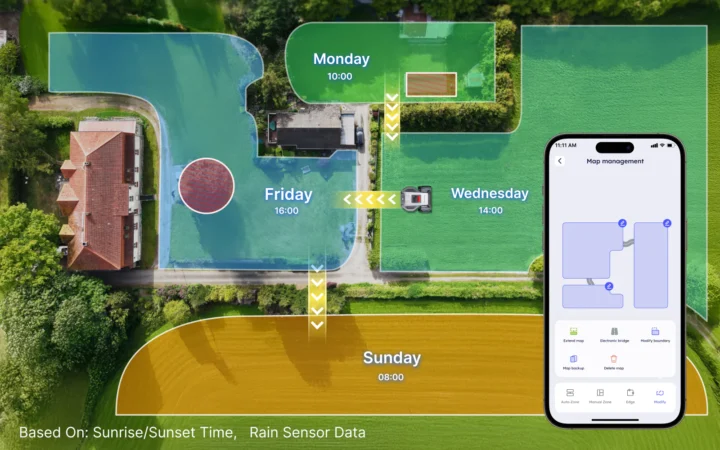
The next step is to set a schedule. I have mine mowing on Monday, Wednesday, and Friday. I will likely change this to twice a week or once a week during winter. The net result is that the lawn always looks freshly mown, there are no excess lawn clippings, and the wife loves this gadget. (She does not like a lot of the tech I bring into the house).
Mowing zones. Image: Anthbot.
If you have a larger property with multiple zones, you can program the mower to travel along paths between zones and even mow them on different days. In my situation, a steep, slippery brick path meant the mower could not get traction, so it could not reach my front lawn for mowing. I also found that the auto perimeter setup did not get close enough to my lawn edges, so I reprogrammed the map manually to get closer. I still find I need to whipper snip the edges every few weeks, and it only takes me five minutes.
The M9 is super quiet, and you hear just a faint whir as it navigates your lawn. The mower is IPX6 waterproof, which means it is rainproof and can be cleaned with a hose. A rain sensor, however, returns the mower to its base when it rains. For extra safety, the mower will stop if lifted, and a big red stop button on the top can also be easily pressed.
Image: Angus Jones
I am very pleased with the Anthbot M9 running around my back garden, knowing it’s one less chore that I have to do. If you’re still apprehensive, Anthbot offers a 30-day return policy, which might make the decision easier.