
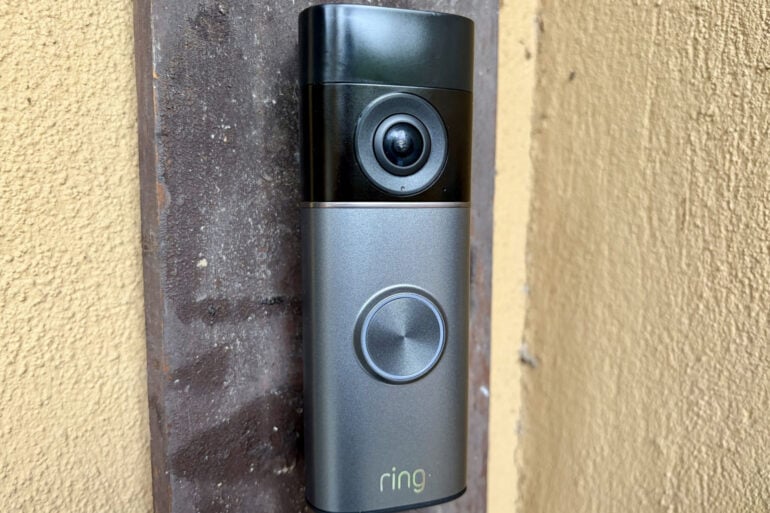
Amazon’s first battery-powered doorbell to offer super-sharp 4K picture quality, the Ring Battery Video Doorbell Pro (2nd Gen) helps you keep a close eye on your doorstep.
Video doorbells have taken off in popularity over the last few years, with the likes of Google, Arlo, Eufy, Lorex, Tapo and Swann all chasing a slice of the action. There’s plenty of competition, yet Amazon-owned video doorbell pioneer Ring is still the heavyweight.
Ring’s video doorbell range is divided into slimline wired-only models that need to be connected to doorbell wiring with AC power, as well as more bulky models that offer a choice of running on AC power or a battery.
Battery video doorbells are easier to install, but the trade-off is that they need to be recharged every few months (although some now support solar panels).
Ring reserves its most advanced and power-hungry features for the wired models, but they trickle down over time. We’ve seen this over the last few years with the 2022 Ring Video Doorbell 4, 2023 Ring Battery Video Doorbell Plus, 2024 Ring Battery Video Doorbell and 2024 Ring Battery Video Doorbell Pro.
Table of contents
- First impressions
- Specifications and price
- Features
- Subscription
- Quality
- Who is the Ring Battery Video Doorbell Pro (2nd Gen) for?
First impressions
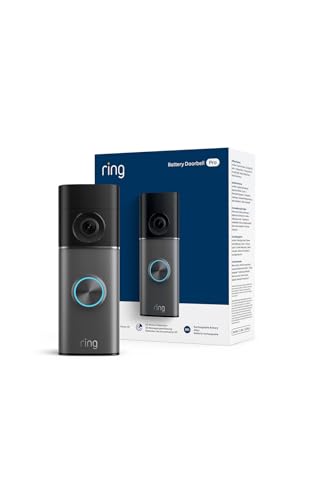
The Ring Battery Video Doorbell Pro (2nd Gen) further closes the gap with its wired brethren, the first to adopt the same slimline design and step up to 4K picture quality.
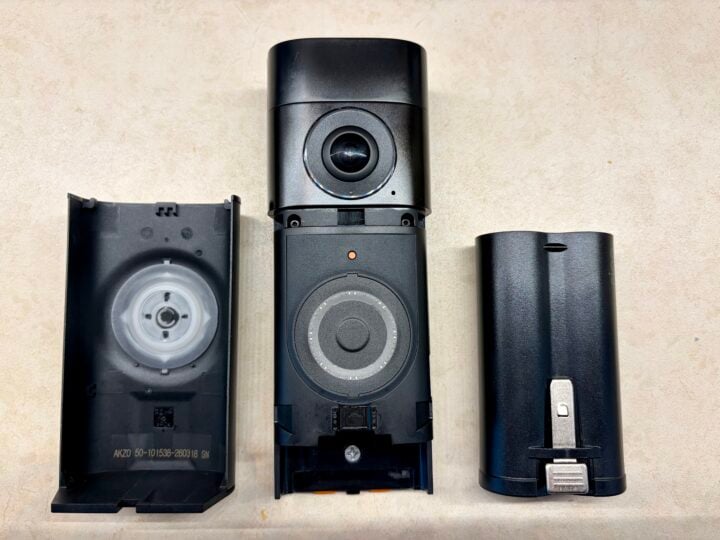
The faceplate pops off, so you can remove the battery and recharge it via USB-C (finally abandoning micro-USB). Australians have to settle for Deep Silver, while US customers can also choose from Polished Night Navy, Polished Mocha and Polished Sandstone. Amazon sells faceplates separately in Australia, but choose with care to ensure you don’t get one for the original Ring Battery Video Doorbell Pro (this Amazon link is correct).
It’s best to install the doorbell about 1.2 metres off the ground so you get a good view of people’s faces. Ring also includes a plastic wedge, in case you need to install the doorbell at an angle. This is useful if it’s in a corner or alcove and you want the camera looking to the side rather than straight ahead.
If you’re upgrading from a previous battery-powered model like the original Ring Battery Video Doorbell Pro, you can’t do a straight swap onto your old wedge because the new doorbell is slightly thinner and taller. (Note: this model isn’t compatible with Ring’s old adhesive no-drill mount. There is a new no-drill mount for this doorbell; I’m waiting on more details from Amazon).
The new doorbell also relies on a different mounting system. No complaints here, as the old battery-model design relies on narrow and deep screw holes, making it very tricky to attach to your house.
Instead, you screw a simple bracket onto your house, with the Ring Battery Video Doorbell Pro (2nd Gen) clicking onto the bracket. If you need the camera at an angle, you screw the wedge to the wall and then screw on the bracket.
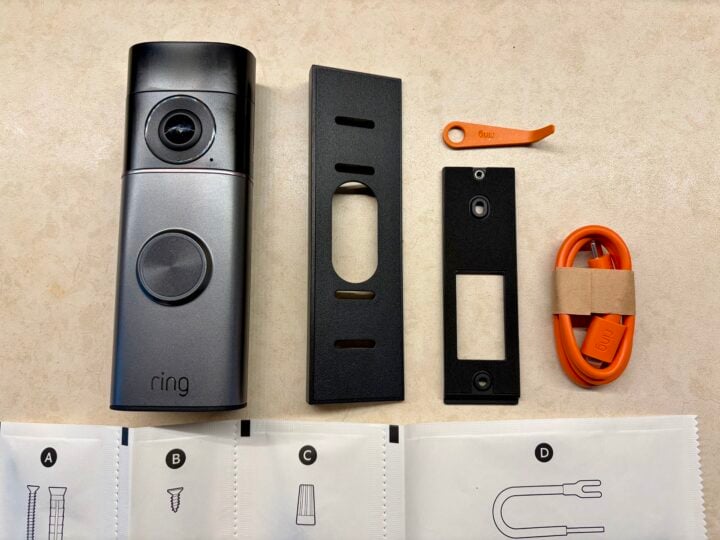
This design makes it much easier to install the doorbell, and detach it when you want to get at the battery. Even so, there are traps for young players.
Pro tip one: don’t attempt to install the doorbell at night, so you’re not scrambling to find dropped screws in the dark.
Pro tip two: screw the wedge to the wall before you screw the bracket to the wedge. Otherwise, the bracket blocks you from screwing the bottom half of the wedge to the wall.
Pro tip three: triple-check that you’re attaching the bracket right-way-up to the wedge. Otherwise, the camera will end up tilted in the wrong direction.
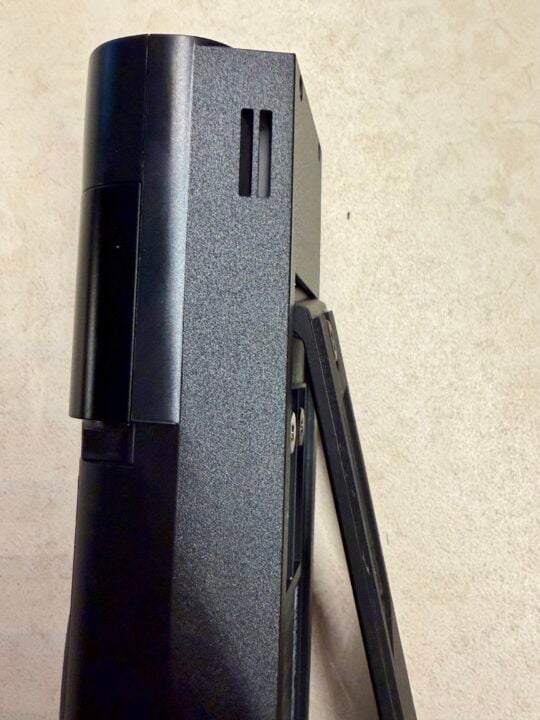
If you’re not wiring the doorbell to an existing indoor chime, you’ll want to invest in Ring’s wireless indoor Chime or Chime Pro (you’ll get a discount if you buy it bundled with the doorbell). The Pro also extends your Wi-Fi signal to boost the network for all your Ring video doorbells and cameras.
Ring says the new 9400 mAh Li-ion battery supports faster charging but, if you don’t want to worry about charging the battery every few months, there’s a $79 solar charger and $89 solar panel. Based on Ring’s estimates, the panel needs three to four hours of direct sunlight each day to keep the doorbell running.
Ring Battery Video Doorbell Pro (2nd Gen) specs & price
| Dimensions | 5.36 x 14.7 x 3.64cm with wall mount |
| Weight | 320 g |
| Field of view | 140° horizontal, 140° vertical |
| Video | Ring Retinal 4K (3,840 x 2,160-pixel) with 10x Digital Zoom |
| Night vision | Colour with Low-Light Sight |
| Audio | Two-way talk with Audio+ |
| Motion detection | 3D Motion Detection with Customisable Motion Zones |
| Wireless | Wi-Fi 6 (802.11ax), Dual-band 2.4 and 5 GHz |
| Battery | 9400 mAh rechargeable Li-ion battery |
| AC Power | Standard doorbell system with 8-24 VAC, 40VA max, 50/60Hz doorbell transformer |
| Weatherproof | -20°C to 50°C. Weather-resistant IP55 |
| Body colour | Black |
| Faceplate colours | Deep Silver |
| Price | $399 RRP |
| Warranty | 1 year |
| Official website | Ring Australia |
Features
Setting up the Ring Battery Video Doorbell Pro (2nd Gen) is very straightforward using Ring’s iOS or Android app. It’s a dual-band Wi-Fi device, connecting to 2.4 or 5 GHz networks, which makes life easier.
During setup, you can configure alerts, adjust motion detection sensitivity, create detection zones and set smart alerts for people, vehicles, packages and general motion. All of this reduces false alarms and conserves battery life.
I like to set Ring doorbells so that pressing the button sets off both the indoor chime and a smartphone alert, while motion detection only triggers a smartphone alert. That way, everyone in the house knows if someone rings the bell, plus I know if a courier has done a drop-and-run.
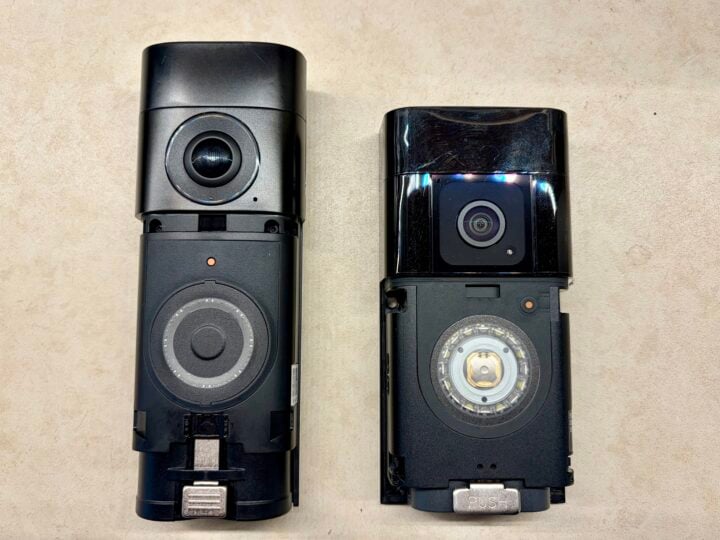
Like the original Ring Battery Video Doorbell Pro, the 2nd Gen offers the benefit of 3D Motion Detection, underpinning the Bird’s Eye features previously limited to Ring’s wired cameras.
Bird’s Eye View provides a simulated top-down view of your front yard, overlaid on satellite imagery, so you can see how people are moving across your property. It also supports top-down Bird’s Eye Zones, limiting alerts to events that occur in a defined area.
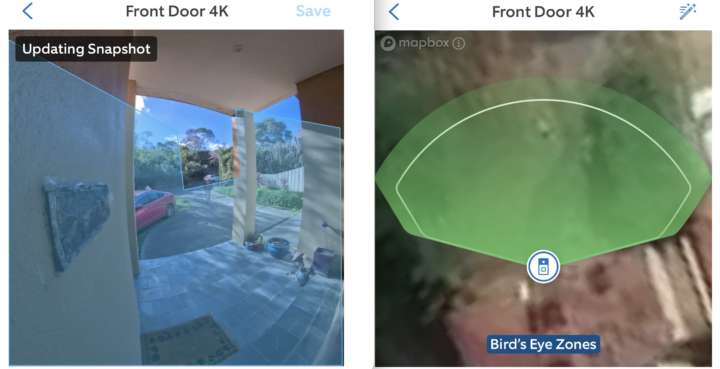
Bird’s Eye View is limited to a range of 9.5 metres, which is shorter than my driveway, so I initially disabled it. Instead, I relied on standard zones to draw the line at the end of the driveway. This way, I’m not disturbed by people walking down the street but catch them as soon as they come onto my property.
After some testing, I re-enabled Bird’s Eye View to try it out. This involves changing the settings in the Ring app, and even then the change wouldn’t take until I rebooted the camera. After this, it worked, although the 9.5 metre range means it takes longer to detect someone walking down my driveway.
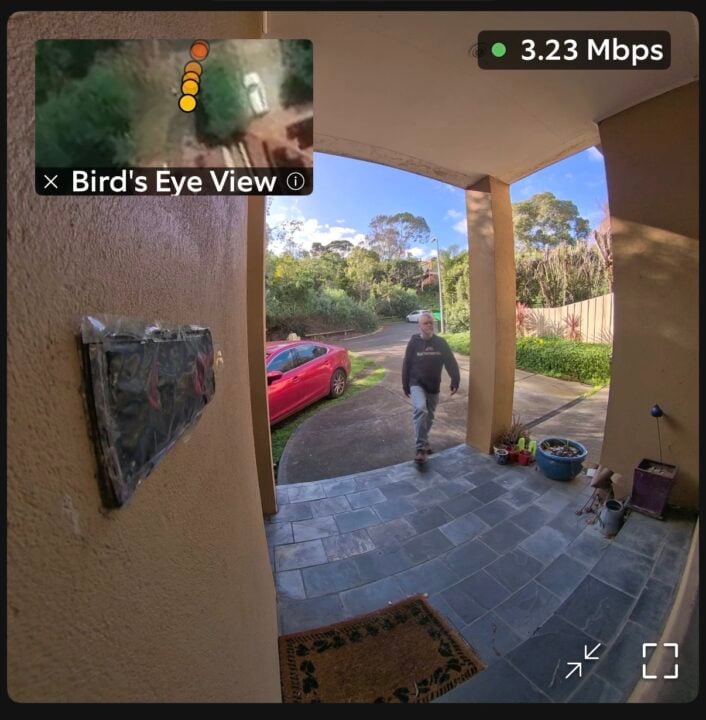
I still think Bird’s Eye view is a novelty, plus I don’t trust it. I found motion detection on the original Ring Battery Video Doorbell Pro was never as reliable as its predecessors – occasionally failing to notice someone walking right past it. Bird’s Eye View was part of the problem; disabling it improved things, but the doorbell still had bad days.
For now, Bird’s Eye View can consider itself on probation and has performed well for a week. I updated my review of the original Ring Battery Video Doorbell Pro several times to document its unreliability, and I’ll do the same here if I encounter similar problems with the Pro (2nd Gen).
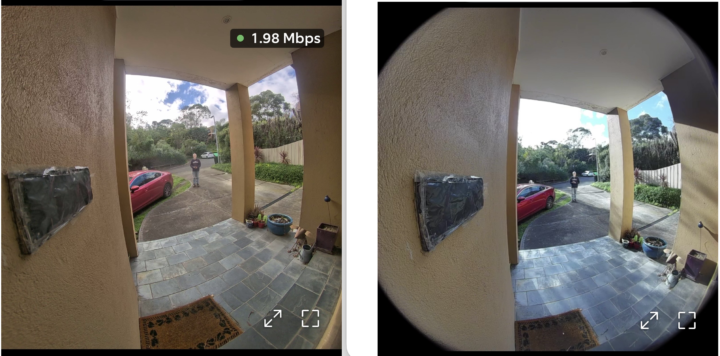
When it comes to picture quality, the new Pro (2nd Gen) features decent 140-degree horizontal and vertical viewing angles to ensure it has a good view of your doorstep. It’s a slight reduction from the original Pro’s 150-degree angles, which means it can see slightly less to the sides and of the ground directly below the doorbell.
Looking at the comparison below, you can see the 4K doorbell on the left is much sharper, while the 1080p doorbell on the right has slightly wider viewing angles but also greater fisheye.
The doorbell also features improved two-way audio with echo reduction, so you can talk to your visitors via your smartphone or Alexa devices.
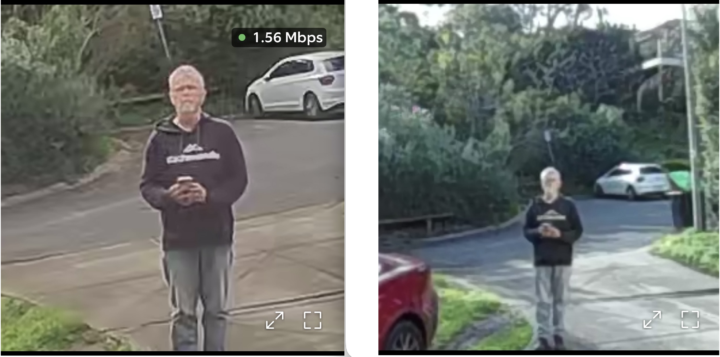
Of course, the Pro (2nd Gen)’s headline improvement is stepping up to 4K resolution so you get a much clearer view of what’s happening outside your front door and improved 10x zoom (I’m standing 6.5 metres from the doorbell in the shots below). Frustratingly, Australians still miss out on the facial recognition features available in the US, which would allow for smarter alerts. Amazon says “we don’t have any updates to share” when it comes to Australian availability.
One of Ring’s great features has always been the pre-roll. It shows several seconds leading up to an event, which can make the difference between seeing someone’s face or just catching the back of their shoulder as they pass by. Wired models support “Advanced Pre-Roll”, while battery models support “Standard Pre-Roll”, which is shorter and lower quality.
Ring has been very fickle when it comes to including Standard Pre-Roll on the last few battery models. It was included with the original Ring Battery Video Doorbell Pro, but now it’s been removed with the Pro (2nd Gen). Ring claims it is to preserve battery life, but I’m not happy about it. The lack of pre-roll makes the doorbell less reliable, and I think users deserve the option to enable it with warnings that it will shorten the battery life (which is the way it treats some other advanced features).
To be fair, I think the Pro (2nd Gen) responds to events more quickly than its predecessor, so you’re less likely to miss important details, but removing pre-roll is still a major disappointment for no seemingly good reason.
Subscription
Like most smart home gear that uploads video to the cloud, you need a subscription to access many of the Ring Battery Video Doorbell Pro (2nd Gen)’s advanced features.
A Ring Protect subscription includes smart alerts when the camera detects people, vehicles or parcels, along with features like video preview alerts and text descriptions. There’s also the option to let a doorbell press come through to your smartphone as a call – which I think is less practical than viewing the scene and then deciding if you need or want to speak to the person on the other end.
The doorbell comes with a 30-day free trial, after which it’s $4.95 p/m ($49.95 p/a) just to cover the doorbell with ‘Ring Solo’, or else $14.95 p/m ($149.95 p/a) to cover multiple Ring devices with ‘Ring Multi’.
Frustratingly, you’ll need to step up to the new $29.95 p/m ($299.95 p/a) for Ring Pro to take advantage of video descriptions, video search, single event alert (combining related events) and unusual event alert, the latter of which learns your habits and then only bothers you when it sees something out of the ordinary.
Be warned, the doorbell lacks onboard storage and doesn’t capture any recordings without a subscription, so there are no replays. At this point, it’s only really useful for receiving alerts and checking the door in real-time.
Also keep in mind that this is a very Amazon-centric device. It plays nicely with Echo speakers and screens, but doesn’t support Apple HomeKit or Google Assistant.
Quality
Put to the test, the 4K view from the Ring Battery Video Doorbell Pro (2nd Gen) is certainly much sharper than its predecessor, with the 10x digital zoom available during live view and when watching replays.
This makes it much easier to tell what’s happening in the distance, or to get a better view of important details like a person’s face or a car’s license plate. The improved picture quality also helps with night vision.
With Bird’s Eye view disabled, the doorbell didn’t fail to record events such as people, cars and other motion like animals. Enabling Bird’s Eye view didn’t see the camera’s reliability decrease, but I’ll report back if any of this changes over time.
Who is the Ring Battery Video Doorbell Pro (2nd Gen) for?
The Ring Battery Video Doorbell Pro (2nd Gen)’s step-up to 4K offers a big improvement in picture quality, although Bird’s Eye view still feels like a novelty. The slight drop from 150-degree to 140-degree viewing angles is disappointing, but not a deal-breaker. Losing pre-roll is more frustrating.
The doorbell is a great fit for Amazon-centric homes where it’s not practical to wire up a video doorbell. Even if you favour another smart home ecosystem, it’s still worth weighing up Ring’s doorbells against alternatives.
That said, the need for the even more expensive Ring Pro subscription to unlock all of the Pro (2nd Gen)’s features is a real slap in the face in these difficult economic times. Those extra features don’t seem worth the money, but you can always trial it for a month and decide for yourself.
GadgetGuy occasionally uses affiliate links and may receive a small commission from purchased products.
The post Ring Battery Video Doorbell Pro (2nd Gen) review: Look sharp appeared first on GadgetGuy.


0 comments:
Post a Comment