This is default featured slide 1 title

Go to Blogger edit html and find these sentences.Now replace these sentences with your own descriptions.

This is default featured slide 2 title

Go to Blogger edit html and find these sentences.Now replace these sentences with your own descriptions.

This is default featured slide 3 title

Go to Blogger edit html and find these sentences.Now replace these sentences with your own descriptions.

This is default featured slide 4 title

Go to Blogger edit html and find these sentences.Now replace these sentences with your own descriptions.

This is default featured slide 5 title

Go to Blogger edit html and find these sentences.Now replace these sentences with your own descriptions.

Sunday, 28 January 2024

ASUS Zenbook DUO to shake up laptops with dual OLED screens

After years of experimentation, ASUS might have just found the most versatile laptop design ever with the new Zenbook DUO arriving in Australia soon.

Combining the convenient form factor of a clamshell laptop with the versatility of a tablet, the 2024 ASUS Zenbook DUO (UX8406) is the world’s first dual-screen 14-inch OLED laptop. Nestled in a portable package, it’s designed to be highly customisable and powerful to meet modern computing demands.

Underneath the attention-grabbing design is the brand-new Intel Core Ultra processor built to handle AI workloads. The Zenbook DUO is a revolutionary device made for content creators, multitaskers, and gamers alike.

Zenbook DUO design

ASUS has a strong history of pushing the boundaries of laptop technology. With the Zenbook Fold, the company thrust foldable display technology into the spotlight, hinting at what could soon be possible. Previous dual-screen laptops have also shown the benefits of having more screen space without sacrificing portability.

Now, the ASUS Zenbook DUO demonstrates a perfected formula, one that combines recent laptop innovations in one device. Instead of using one large foldable display, it has two 14-inch 120Hz 16:10 OLED touchscreen displays that can be configured to suit your exact needs. Plus, it only weighs 1.35kg.

Available in up to 3K resolution (2880 x 1800), both screens use ASUS’ Lumina OLED technology, regarded highly for its vibrancy and colour accuracy. Creative professionals need the best representation of their work: the 100% DCI-P3 colour gamut makes this possible, while supporting other formats, like sRGB, to suit every visual project. Importantly, the touchscreens support precise stylus input from peripherals like the ASUS Pen, which is ideal for digital artists.

Made for flexibility

Sure, having two displays is great, but it’s how you use them that counts. Joined by a 180-degree hinge, the screens combine to provide the equivalent of a huge 19.8-inch workspace. The detachable full-size Bluetooth ASUS ErgoSense keyboard and touchpad also give you full control, whether you want a traditional laptop experience or to fully embrace dual-screen flexibility.

Audio is just as important as having dazzling OLED displays, which is why the Zenbook DUO’s premium quality extends to its speakers. Certified by audio specialists Harman Kardon, the Dolby Atmos audio speakers pump out immersive spatial sound for a complete audiovisual experience.

Asus Zenbook Duo UX8406 outdoors

Even with the Zenbook DUO’s 14.6mm-thin chassis and dual screens, it still has all the connectivity features you need. Keeping you connected at all times are Two Thunderbolt 4 ports, a USB-A slot, an HDMI 2.1 (TMDS) port, and a 3.5mm audio jack. It also has fast wireless technology under the hood, supporting both Wi-Fi 6E and Bluetooth 5.3 connections.

Durability and sustainability are another two important factors when choosing a laptop. The ASUS Zenbook DUO meets strict US MIL-STD-810H standards, meaning that it’s built to last, which is great for your wallet and the environment. The laptop uses 90% post-industrial-recycled magnesium-aluminium alloy in its construction, and the packaging uses 100% recyclable FSC Mix-certified paper.

Even the battery contributes towards the DUO’s sustainable design. Its redesigned 75Wh battery supports up to 20% more charging cycles than the previous iteration, according to internal testing.

More versatile

With the ASUS Zenbook DUO, your options go far beyond that of a regular laptop. Supported by the ScreenXpert software, you’re unshackled from preconceived ideas about what a laptop can and can’t do. Four distinct modes let you work, create, and play however suits you best.

Asus Zenbook Duo CES 2024

In Dual Screen mode, the ZenBook DUO unfolds to provide 19.8 inches of total screen space. Thanks to its built-in kickstand, you can prop the laptop up and easily access both OLED displays while using the Bluetooth keyboard. Both screens can be used separately, and the App Switcher feature makes window management simple. Or, via the ViewMax feature, you can use both displays as one big screen to see everything at a glance.

Desktop mode sees you flip the displays vertically, functioning like the Dual Screen mode but in portrait view. This mode suits anyone who needs quick access to information that would normally require continually scrolling down a page – programmers, writers, and spreadsheet specialists in particular. In addition to displaying different programs on each screen, ViewMax also enables the big single-display experience.

For a more traditional experience, Laptop mode functions exactly like you’d expect. Simply place the included Bluetooth keyboard and touchpad on the lower screen and use the Zenbook DUO like a regular laptop. It’s also a convenient way of recharging the keyboard. Alternatively, you can use the lower display as a virtual keyboard if you don’t have the physical accessory nearby.

Asus Zenbook Duo UX8406 sharing mode

To make showing off your work as easy as possible, Sharing mode takes full advantage of the Zenbook DUO’s 180-degree hinge. This lets you lay the laptop completely flat, giving everyone around you a full view. Handily, the upper screen can also rotate content 180 degrees to save you from rotating the device back and forth.

More power

Beneath the Zenbook DUO’s displays is an impressive amount of power thanks to the latest technology from Intel. At its heart is the new AI-enabled Intel Core Ultra 9 H-series processor, with performance enhancements across the board. Alongside the high-powered CPU, the laptop includes up to 32 GB of LPDDR5x RAM and a 2 TB PCIe 4.0 SSD.

These new Intel processors usher in some of the biggest laptop improvements in recent history. For one, they house a dedicated neural processing unit (NPU), designed to handle AI workloads – like background blur and noise cancellation in video calls – while reducing CPU and GPU strain, helping increase power efficiency. The integrated graphics are also greatly improved, with Intel Arc technology better at rendering visuals for both work and play.

Increased AI capabilities are becoming increasingly important as technology progresses. It sits at the core of the Windows Copilot experience, helping summarise masses of information and generating responses to your queries.

Asus Zenbook Duo copilot

Equipped with the Zenbook DUO is the ASUS AiSense camera and AI Noise Cancellation, vital features for staying connected, no matter where you are. Aided by the NPU, the AiSense camera uses Windows Studio Effects to make you look your best during video calls, generating background blur and automatically framing you in the centre. ASUS 3DNR technology also reduces visual noise, producing a clearer image.

The audio noise cancellation works both ways, using AI to lower background noise for speakers and listeners. AI technology, alongside the NPU, helps power these features while prolonging the battery life, helping you get through the day without needing to recharge.

ASUS Zenbook DUO release date and price

Available to pre-order today via the ASUS eStore and JB Hi-Fi, the 2024 ASUS Zenbook DUO (UX8406) costs $3,999. You can also buy the laptop from local computer retailers starting on 14 February 2024.

With an eye to the future, the ASUS Zenbook DUO embodies many of the major technology trends up to this point. Its vibrant dual screens cleverly integrate smartphone design innovations while catering to those who need a powerful laptop. It promises to be the ultimate productivity and creativity machine.

Learn more about the Zenbook DUO via the ASUS website.

The post ASUS Zenbook DUO to shake up laptops with dual OLED screens appeared first on GadgetGuy.


Thursday, 25 January 2024

Taylor Swift tickets scam costs Australian Swifties more than $135k

Australians desperate for Taylor Swift tickets have lost over $135,000 to scammers taking advantage of the huge demand for the pop star’s sold-out shows. The Federal consumer watchdog is warning others not to fall for the same tricks.

Swift dominated local headlines last year when a record number of people attempted to purchase tickets to the Sydney and Melbourne stops of The Eras Tour. Many die-hard fans walked away from the virtual queue empty-handed despite waiting for hours.

As Swift’s seven sold-out Australian shows approach, scammers are cashing in. 273 reports have already been made to Scamwatch since tickets went on sale. Victorians have lost a combined $53,607, while reported figures from New South Wales total $54,645.

According to the National Anti-Scam Centre, the Taylor Swift ticket scam involves scammers gaining access to people’s social media profiles to advertise fake tickets. Because they’re using real people’s social media accounts, it looks like a legitimate offer from someone you know. Catriona Lowe, the Australian Competition and Consumer Commission Deputy Chair, labelled the practice a “low act”.

“The Eras Tour is the hottest ticket in town this summer and scammers are seizing the opportunity to dupe Australian Swifties looking to buy resale tickets,” Lowe said. “This scam is a low act, seeking to take advantage of fans, many of whom are young and are desperately trying to secure a ticket to make their dream of seeing Taylor Swift live come true.”

Looking for Taylor Swift tickets? Avoid these scams

In some examples provided by the National Anti-Scam Centre, these recent scams follow a specific formula. Via a social media post, comment or direct message, scammers offer tickets to one of Taylor Swift’s shows, including additional details to make the offer seem genuine. Adding an extra layer of deception is the fact that scammers are taking over real social media accounts.

There are a few telltale signs to help you identify fraudulent ticket sales. Scammers may include a made-up story about why they’re selling the tickets, while adding a sense of urgency to the offer. Some might also try to rush you into making a quick transaction before you can think things through. You may also be asked to pay an additional fee – scammers claim this is related to changing the name on the ticket.

From the reported scams, victims sent money anticipating Taylor Swift tickets, only to receive nothing in return. Afterwards, they realised the social media account they’d interacted with was hacked and had no recourse. With the Australian concert dates drawing nearer, ticket scams are tipped to rise.

“We are urging fans to be alert to scammers and think twice before seeking to buy a ticket on social media, even if it’s from a friend or community page you trust,” Lowe said. “Be mindful that scammers have been hacking genuine accounts to appear legitimate and are tricking trusting friends or connections into buying Taylor Swift tickets that don’t exist.”

How to respond to scams

Your first port of call for any ticket purchases should be the official seller. Ticketek handles everything related to The Eras Tour in Australia. For any resales, you can visit the Ticketek Marketplace, a secure website for selling unused tickets. The platform also prevents anyone from selling tickets above face value.

If you see a scam in the wild, stop and think before acting. After taking your time assessing whether the offer is real, try to contact the seller via another platform. If it’s someone you know, try contacting their phone number or catching up in person.

Although you should avoid accepting tickets via social media, never hand over your credit card details if you decide to proceed. Use a secure payment platform like PayPal, Apple Pay or Google Pay instead. The fewer details you provide, the better.

In the unfortunate event that a scam tricks you, contact your bank immediately. Depending on the details shared, you may need to lock your credit card. You can also report your experience to Scamwatch to help others avoid a similar fate.

Read more scam news on GadgetGuy

The post Taylor Swift tickets scam costs Australian Swifties more than $135k appeared first on GadgetGuy.


Wednesday, 24 January 2024

TPG and iiNet now offer eSIM plans: here’s how much they cost

It’s now quicker and easier to swap your mobile phone plan, with TPG and iiNet the latest telcos to roll out eSIM products to new and existing customers.

Instead of visiting a store and buying a physical card, you can now get an eSIM through TPG and iiNet online, connecting you in just a few minutes. An eSIM serves the exact same purpose as a physical SIM card, minus the physical component.

Convenience is the biggest reason to consider an eSIM. Aside from being quick to set up, it’s easy to transfer between devices when you upgrade, and enables you to swap between multiple SIMs on the fly. For example, you could have a regular SIM plan for day-to-day use, and another specifically for travelling or work. In the event of a nationwide outage, like what happened to Optus in 2023, an eSIM lets you quickly connect to another carrier.

Before you rush to swap or upgrade your plan, you need to check that you have a compatible device first. Not every phone is eSIM-compatible, although the feature is quickly becoming standard among new devices.

TPG has a list of compatible handsets – albeit non-comprehensive, omitting devices like the Motorola Edge 40 – including major Apple, Samsung, and Google releases from the past few years.

How much does a TPG or iiNet eSIM cost?

The good news is that an eSIM costs the same as a physical card. Many telcos now offer eSIM plans, with TPG and iiNet the latest to join the party. Both telcos are mobile virtual network operators (MVNO), meaning they don’t own the network they provide a connection to. Instead, they use Vodafone’s network, offering some of the cheapest SIM plans in Australia.

At the moment, both TPG and iiNet have near-identical eSIM plans starting from $10 a month for new customers. With TPG, its 12GB plan costs $10 for the first six months, half its usual $20 price. This includes unlimited local calls and messages, with international add-ons also available.

For the same price, iiNet offers slightly less data: 8GB per month on the $10 tier. For a few dollars extra, you can get more data, although ACCC data shows that Australians don’t use much more than 10GB of mobile data each month.

To get an eSIM, simply choose the option when activating your plan, or swap using your login details if you’re already connected. TPG and iiNet only offer 4G connectivity, which is fine for most use cases, but it’s worth knowing in case you want a 5G plan. Also double check the coverage map to ensure your area is serviced.

To make sure you’re getting the best value for money, make sure to browse the cheapest SIM plans, including the best deals from Telstra and Vodafone.

Read more telco news on GadgetGuy

GadgetGuy occasionally uses affiliate links and may receive a small commission from purchased products.

The post TPG and iiNet now offer eSIM plans: here’s how much they cost appeared first on GadgetGuy.


Save up to $2,000 on the best OLED TVs in Australia

Get ready to grab a fantastic OLED TV on sale, LG is clearing out last year’s models at discount prices, including the brilliant G3 model.

Starting today and running until 8 March 2024, LG has a massive runout sale on its wide range of TVs and soundbars. There’s up to $2,000 off its high-end LG G3 OLED TVs, and up to $1,000 off the mid-range C3 model.

We labelled the LG G3 OLED TV the best OLED TV in 2023 thanks to its excellent looks, strong contrast, and bright output. OLED displays are widely considered a premium technology but often carry a premium price tag, which is true of the G3, costing $5,295 for the 65-inch size.

Slightly more affordable is the also-excellent LG C3 model, although $4,299 for 65 inches is understandably a bit rich for plenty of people. It is a great TV though, for watching movies and TV shows or playing video games.

It’s not just the top-end benefitting from discounts: LG also has up to $700 off its QNED TVs that use LED technology. It includes the solid LG QNED81 4K TV which is well worth a look. Plus, the brand’s soundbars are up to $500 off during the sale.

If you were considering a TV upgrade, now might be your best bet to grab a bargain. LG announced its 2024 TV range at CES, including the M4 wireless OLED TV. This means that retailers are keen to make room for the new stock arriving in the next few months. Expect to see stores competing fiercely, offering further discounts and bundles to sway your decision.

LG G3 OLED sale: big clearance on great TVs

At the time of writing, the sale is live on the LG website, but most brick-and-mortar retailers haven’t yet applied the discounts. Some stores, like JB Hi-Fi, have assorted discounts active while the sale kicks into gear, including an additional 15% discount when pairing a TV with an eligible soundbar, which can save you a fair chunk of money.

LG G3 OLED TV

LG C3 OLED TV

LG QNED81 TV

LG QNED75 TV

LG UR80 UHD TV

Soundbars

As always, shop around for the best deal. If you’re able to get a further 15 % discount by bundling a TV and soundbar together, it becomes a pretty sweet deal. For example, a 65-inch C3 OLED TV then drops to $2,970.75 and the S95QR soundbar costs $1,274.15, saving nearly an extra $750 in the process.

LG C3 sale JB Hi-Fi screenshot
Image: Chris Button.

Find more deals on GadgetGuy

The post Save up to $2,000 on the best OLED TVs in Australia appeared first on GadgetGuy.

Tuesday, 23 January 2024

Samsung’s Galaxy S24: Rise of the ‘Thinkphone’

Artificial intelligence is already a big buzzword for 2024, and it’s only a few weeks in. Just about everything worth talking about at the Consumer Electronics Show had some sort of AI story, and we’ve just seen the back of Samsung’s UnPacked event, where its new Galaxy S24 phones have ‘Galaxy AI’ at their core.

I had a chance to visit Samsung’s Research America R&D facility in the heart of Silicon Valley to go deeper into the new AI-enhanced Galaxy S24, not to mention what makes it ‘smart’ for phones going forward.

What is an AI on phone anyway?

‘AI’ can mean a lot of things, especially when marketers start sharpening their pencils. Sometimes, an ‘AI’ logo stamped on a device just means that a complex algorithm has been ‘baked-in’ allowing it to do something better. This algorithm is probably pre-formulated using a large server farm somewhere, so there’s no ‘machine learning’ conducted on the device itself.  

An example could be an electric toothbrush that’s marketed as being able to teach you how to brush better using AI. It leverages a large database of people’s brushing habits, and an AI learning model, but none of this happens on the toothbrush itself. This just compares the pre-computed results to what it learns about your brushing to give you the most appropriate tips. It may even occasional refresh its algorithm via an online update. So you could say that this is AI but the device you’re using isn’t really capable of it.

On-device AI

The Samsung Galaxy S24 operates differently. Its AI features are made possible in two ways, via actual AI processing ‘on-device’ as well as the ‘in-the-cloud’ type of AI. On-device AI happens in real-time using the phone’s processing power. An example could be speech-to-text-translation, where a phone ‘hears’ and ‘understands’ your speech and then transforms it into text.

This requires a powerful Neural Processing Unit (NPU), which is part of the S24 Ultra’s exclusive Snapdragon 8 Gen 3 chipset. Also needed is a training model for the system to understand how to turn sounds into text. In the ‘old days’, this type of task would be impossible on a smartphone due to hardware limitations.

In addition to advances in processing power, the Galaxy S24 employs a variety of compression optimisations including 3-bit quantisation and techniques like training for multiple languages rather than just one, to create more on-device AI capability than ever before.

Samsung’s Galaxy AI enables on-device language translation, both in text messages and even via voice over a phone call

As a result, the S24 can tackle a variety of tasks including Speech Recognition (voice to text), Neural Machine Translation (translating one language to another), and Voice Synthesis (converting text to natural voice).

Another considerable benefit of ‘on-device’ AI is that people’s personal information doesn’t need to be sent to the internet, so it stays safe. In addition to privacy, on-device AI processing is much faster than waiting for information to transfer to the cloud to processed by a neural network, and then sent back again.

In-the-cloud AI

While the Galaxy S24 Ultra has plenty of on-device power, it still needs to rely on off-site processing for some services. For the most part, this includes ‘generative’ tasks, such as re-drawing and touching-up photos. For example, generative AI is needed to extend the background of a lopsided photo to straighten it up, or to remove an unsightly object such as a lamp post from an urban landscape. 

Generative AI is when completely new parts of a photo are generated by AI. This requires the photo to be sent to the cloud for processing

Also, Samsung is collaborating with Google to leverage its latest AI, called Gemini. This multi-modal AI drives the new ‘Circle to Search’ feature, and if you haven’t tried it yet, it looks to be a game-changer. You can circle, highlight, squiggle or press nearly anything on your screen to find out more about it using Google Search. You could be watching a video and spot a great hat that you want to buy or highlight some text in a message about a town that you want to visit.  The genius here is that the AI can identify a picture, text, concept or what have you, and attach context and meaning to it.

Gemini ‘Pro’ will also assist with Samsung’s Notes, Voice Recorder and Keyboard apps, delivering “better summarization features”, according to Google.

Samsung has also developed its own ChatGPT-style AI technology too, and this is called GAUSS. This Large Language Model (LLM) helps with language-focused tasks such as summarising written and spoken information, even across different languages. For example, it can create a transcript of a meeting with different language speakers, and then translate what is being said.

Overcoming AI’s challenges

According to YJ Kim, Samsung’s Executive Vice President and the Head of Artificial Intelligence Team for Samsung Mobile eXperience Business, the biggest challenges they faced bringing AI features to the Galaxy S24 were size and performance. Size, in terms of the learning model, and performance by way of running an on-device neural network. However, with the power delivered through the specialised Snapdragon 8 Gen 3 and Neural Processing Unit, as well as optimisations in Quantisation and compression, they made it work. 

Circle to Search can identify nearly anything that you’ve selected on-screen and help you learn more about it

Kim also said that the Live Translate feature was especially challenging because existing models were trained on written language, not spoken, so a lot of work needed to be done to optimise for verbal elements.

Who pays for AI?

With AI becoming an essential feature-set for the latest generation of premium phones, providing these services is not cheap. Off-site processing, for example, requires servers and storage, plus there are fees for using partner Ais such as Google’s Gemini.

The net result is that Samsung has stated that its AI services will only be available for free until the end of 2025. After this point Samsung may need to charge for them, probably in the form of a subscription. 

So, even if you’ve bought a Galaxy S24 Ultra, which comes with AI features today, you may not have access to them permanently. So the future costs of phones may be less about the hardware and more about the subscription fees for AI functionality that we can’t live without!

Is AI trustworthy?

When it comes trust, there have been some instances where bias and bigotry have found their way into AI-generated results. During my visit to Samsung’s R&D centre, Samsung’s YJ Kim, Executive Vice President and the Head of Artificial Intelligence Team for Samsung Mobile eXperience Business, said that there are filters in place to prevent unacceptable responses, so it looks like we’re safe for now. Also, as the current AI services are generally for translating, summarising, searching and photo editing, there are less opportunities for these issues to creep in, as opposed to a full LLM like ChatGPT.

What does the future hold?

While an all-knowing smartphone is still a ways off, the next major development we can expect from AI is greater personalisation. For example, the Live Translate feature can convert my English voice into a synthesised French voice, but doesn’t sound like me. Soon, we can expect Live Translate to convert my voice to a French version that still sounds my voice, and not a synthesised one. 

I also asked YJ Kim why we haven’t seen Bixby (Samsung’s version of ‘Google Assistant’) get smarter. I would have thought that Bixby could become a verbral version of a ChatGPT-style LLM, so you could, in essence, ask it anything and it would give you a natural sounding and intelligent reply. Imagine using a phone that would know what information you want before you asked it, find out anything, make calls for you, summarise your mail, feeds and news and even write you a love poem. This is what a LLM running on your phone could do.

Unfortunately, we aren’t going to be seeing this any time soon because the on-device processing demands are just too high, and LLMs are much too large to squeeze onto a phone. It will be interesting when this happens however, as then, a phone might truly become your thinking, pocket-sized personal assistant. 

So, I’m calling it now – with Galaxy AI, phones are changing forever. They’re not smartphones anymore, they’re ‘thinkphones’.  Don’t forget that you heard it here first!

Valens Quinn attended Samsung’s Research America facility in Mountain View CA as a guest of Samsung Australia

The post Samsung’s Galaxy S24: Rise of the ‘Thinkphone’ appeared first on GadgetGuy.

Fire TV Stick 4K Max (2nd Gen) review: streaming excellence

Gee whiz, it’s hard to keep track of the ridiculous number of streaming services in 2024. Not only do you have the heavy hitters in Netflix and Disney+, but you also have catch-up services for every major free-to-air channel in Australia. Fortunately, a Fire TV Stick makes watching your favourite shows easy.

Amazon launched its latest-generation devices late last year, including refreshed versions of the Fire TV Stick 4K and 4K Max, touting faster performance than previous models, better Wi-Fi, and a fancy new remote. It’s functionally similar to the previous-gen streaming stick albeit with improvements across the board.

My TV is getting on in years: it was one of the early affordable 4K models that only had bare-bones smart features. Native Netflix and YouTube apps aside, good luck trying to stream anything else of note without using an external device.

Plugging in a Fire TV Stick resulted in an immediate improvement. It’s a super-easy way to get more life out of a relatively dumb TV at a cheaper price than many competing options. Only its lack of native smartphone casting support stops it just short of being the ultimate streaming device.

Fire TV Stick 4K Max review

First impressions

Taking the form of a small dongle that plugs into your TV’s HDMI port, the Fire TV Stick is literally a plug-and-play experience. Keep in mind that you also need a spare power outlet nearby. Fortunately, a small HDMI extender comes included in the box, giving you a bit more reach between a TV and any nearby wall outlets.

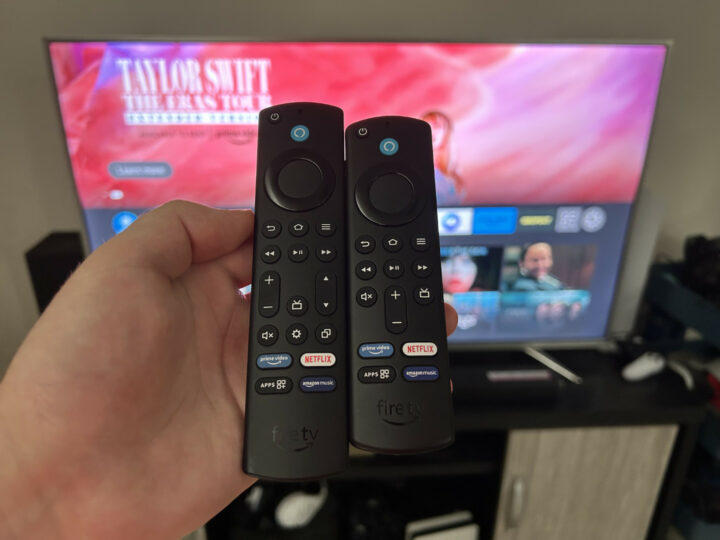
Once you plug everything in, the initial start-up sequence begins. When I went through this process, the streaming stick picked up its included remote almost instantly. Depending on which model you opt for, you get one of two remotes: the Alexa Voice Remote or the Alexa Voice Remote Enhanced. I’ll get to the specific differences between them later, but they ultimately serve the same function of controlling the Fire TV Stick.

After pairing the remote, what followed wasn’t quite as seamless. As is standard operating procedure with any modern TV operating system, you have the choice between using the remote to navigate the setup process or your phone via an app. I tried using the Fire TV app on an iPhone, but it repeatedly got stuck while searching for the local network. A few futile attempts later, I resorted to manually typing in the network details using the Alexa remote – it worked first try.

Perhaps the subsequent device updates it downloaded then resolved the app connectivity issue, because I didn’t have any problems afterwards. Slightly cumbersome setup aside, the Fire TV Stick 4K devices then yielded a responsive, easy-to-navigate experience that improved my older TV’s streaming capabilities tenfold.

Searching for and downloading additional streaming apps – of which there are plenty – took barely any time at all. If you know how to navigate a TV, you know how to use a Fire TV Stick. My only disappointment came from the lack of built-in Chromecast and Apple AirPlay.

Specifications

Fire TV Stick 4K (2nd Gen) Fire TV Stick 4K Max (2nd Gen)
Video format 4K up to 60Hz, Dolby Vision, HDR 10, HDR10+, HLG 4K up to 60Hz, Dolby Vision, HDR 10, HDR10+, HLG
Audio format Dolby Atmos, 7.1 surround sound, 2-channel stereo Dolby Atmos, 7.1 surround sound, 2-channel stereo
Processor CPU: Quad-core 1.7 GHz GPU: 650 MHz CPU: Quad-core 2.0 GHz GPU: 850 MHz
Memory 2 GB 2 GB
Storage 8 GB 16 GB
Connectivity Wi-Fi 6 (2.4 GHz and 5 GHz) Bluetooth 5.2 HDMI ARC Micro USB Wi-Fi 6E (2.4 GHz, 5 GHz and 6 GHz) Bluetooth 5.2 HDMI ARC Micro USB
Remote control Alexa Voice Remote (3rd Gen) Bluetooth Alexa Voice Remote Enhanced Bluetooth and infrared
Price (RRP) $79 $119
Warranty One year One year
Official website Amazon Australia Amazon Australia

Performance

A true test of any streaming device relies on various factors. After all, it’s your network connection that ultimately determines the stream quality. Despite my relatively patchy home Wi-Fi system, I had no quality or buffering issues when using the Fire TV Stick. Job done, right?

The Fire TV Stick 4K supports Wi-Fi 6 connectivity, while the Max takes it one step further with Wi-Fi 6E support. Don’t fret about rushing out to buy a new router, though, because Wi-Fi protocols are backwards-compatible. If you have an older router, it’ll still work just fine.

Those with newer routers, however, benefit from faster and more reliable connections, meaning a more consistent stream quality and fewer dropouts. On my Wi-Fi 6 mesh network, the new Fire TV Sticks maintained a better stream quality than any of my Wi-Fi 5 devices, including an Xbox Series X and an older Apple TV model. Previously, I’d occasionally encounter dips in video resolution, none of which I noticed when using Amazon’s streaming hardware.

Usability

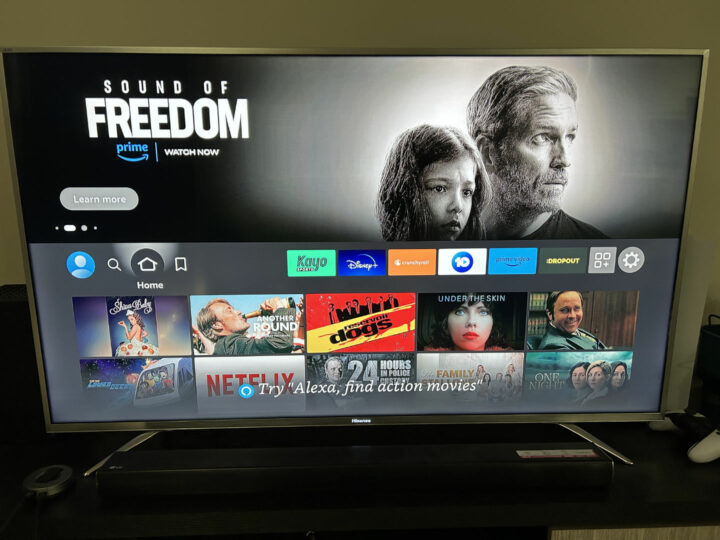
Beyond the act of streaming, Amazon’s devices succeed in several other areas, too. They’re so easy to use following the plug-and-play setup. The intuitive interface is uncomplicated, and it’s easy to ignore the promotional tiles for Amazon Prime content you’re not interested in.

Kudos also need to be given to the Alexa Voice Remote Enhanced. Simple, easy to hold, and satisfyingly tactile, it’s a far cry from some of the ridiculous TV remotes out there. You can use the mobile Fire TV app as a virtual remote, which is handy for typing text, but I stuck with the physical remote for its ease of use. It’s also an excellent choice to map Alexa voice controls to a physical button instead of the “always-listening” approach. Simply press the button, request an app or specific show, and it’ll launch you right in.

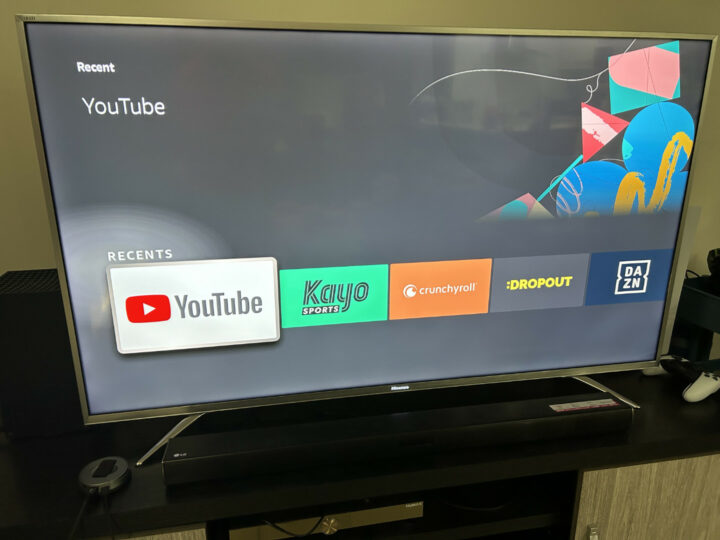
This “Enhanced” version of the remote that comes with the 4K Max model – and the Fire TV Cube – also includes a “recents” button. It gives you quick access to your recently used apps, which in my case was regularly populated by Kayo, YouTube, and Crunchyroll. This button lets you quickly bypass any promotional content displayed on the home screen, reducing the number of button presses required to get to the app you want.

Both remotes do have an “apps” button that does almost the exact same thing, except it brings up a list of every app you have installed. The Enhanced remote is slightly larger to accommodate the extra button, with both options equally comfortable and easy to use.

Fire TV Stick 4K versus Fire TV Stick 4K Max

There’s a $40 difference between the two Fire TV Stick 4K models currently available in Australia. By going with the more expensive Max version, you get a slightly different remote, more processing power, and Wi-Fi 6E support. More responsiveness while navigating apps is nice, and for those who already have a Wi-Fi 6E home network, or want to future-proof their smart homes, it’s a decent purchase.

Most people, however, will get by just fine with the base 4K model. Both devices support the same apps, enable voice controls, and take up the same amount of space. Wi-Fi 6 is still ahead of many smart TVs stuck using Wi-Fi 5 hardware, so you’ll immediately benefit from a better wireless connection.

Neither Fire Stick TV supports native Chromecast and Apple AirPlay, however. It makes realistic sense, given that Amazon is in direct competition with Google and Apple. Still, there are times when I want to cast something on the TV from my phone but can’t. Android devices can use the screen mirroring feature, but not iPhones.

The Fire TV Stick makes up for the casting omission through its huge range of apps. Just about every major streaming app is represented, including Binge and Kayo. There’s also plenty of niche-appeal stuff – I can easily watch Crunchyroll for anime, and Dropout for silly improv series. I’m not deterred by the lack of casting support because the remote is great, and it’s much easier to navigate than my existing setup.

Compared to other streaming devices

If smartphone casting is high on your priorities, the Apple TV 4K is excellent for iPhone users – although it costs more than double the Fire TV Stick 4K. Android users have a more price-competitive alternative in Google’s Chromecast devices. Albeit currently limited to Wi-Fi 5 connectivity, a Chromecast makes sense for Android households keen to seamlessly cast media from their phones to a TV.

Another option in Australia is the Fetch TV Mighty box. It’s an excellent, albeit pricier, device that you can bundle with an internet plan to offset the cost. Although it doesn’t have all the apps under the sun, namely Foxtel’s Binge and Kayo services, there’s still a comprehensive array of local and international content available.

Amazon does have the edge in terms of cost. Wait for any sale and you can routinely pick up either 4K model for half price, thus making any upgrade to your TV dirt cheap. Another perspective is that I’ve enjoyed putting my phone out of reach while watching TV, confident that I can still watch what I want via a comprehensive streaming ecosystem.

Who is the Fire TV Stick 4K Max for?

This is such an easy device to recommend. If your TV is getting on in age and doesn’t support many of your favourite streaming apps, get a Fire TV Stick. If you hate your TV’s existing operating system, get a Fire TV Stick.

Even for an Apple-centric household like mine, it’s immeasurably improved the streaming experience on my older TV. Although the lack of native AirPlay and Chromecast support is slightly annoying, it’s easily offset by the huge range of apps supported by the Fire TV ecosystem. The excellent remote design also makes navigating menus totally frictionless.

Short of buying a new TV replete with built-in casting features, a Fire TV Stick 4K or 4K Max is simultaneously the easiest and most affordable upgrade you can make.

GadgetGuy occasionally uses affiliate links and may receive a small commission from purchased products.

Fire TV Stick 4K Max
Features
8
Value for money
9
Performance
9
Ease of use
9
Design
9
Positives
Strong streaming performance and huge range of apps
Competitive price
Comfortable and easy to use remote
Negatives
No native Chromecast or AirPlay support
8.8

The post Fire TV Stick 4K Max (2nd Gen) review: streaming excellence appeared first on GadgetGuy.