
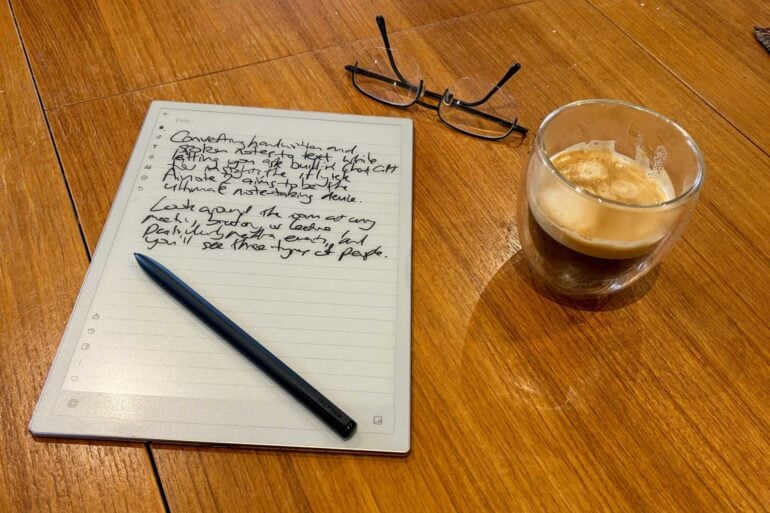
Converting handwritten notes and audio to text, while letting you ask built-in ChatGPT for insights, the iFlytek Ainote 2 aims to be the ultimate note-taking device.
Look around the room in any meeting, briefing or lecture, and you’ll see three types of people taking notes. Most are typing away on a laptop, while a few old-school relics like me still rely on their trusty pen and paper notepad.
The third type of person simply slaps down a digital recorder or smartphone to capture every word. This way, they can concentrate more on what’s being said and asking intelligent questions.
Upload the audio recording to an AI-powered transcription service, and you’ll get back a reasonably accurate transcript within a few minutes. Of course, you then need to go through it to pick out the important points, although that’s easier now that most transcription services offer excellent summaries.
You’ll also find combinations of the above. Journalists in particular are likely to place a recorder on the table and also write or type notes. I imagine this would also be extremely useful in university lectures.
Each approach has its strengths and weaknesses. Personally, I can write by hand faster than I can type, while paying more attention to what’s said.
The trade-off is that I often need to retype my handwritten notes, preferably straight away because my note-taking scribble is so illegible that even I struggle to read it unless it’s fresh in my mind.
Digital notes are also easier to store, search and share than written notes, especially if you have decades’ worth of paper notepads stashed away in a box.
That long preamble brings us to the $1,099 iFlytek Ainote 2, which combines all three approaches in an effort to create the one note-taking device to rule them all.
iFlytek Ainote 2 first impressions
The iFlytek Ainote 2 relies on an e-Ink display like an Amazon Kindle eBook reader, Kobo or high-end Kindle Scribe, rather than an LED display like an iPad Air or Samsung Galaxy Tab.
The Ainote 2’s screen is almost as white as a Kindle Paperwhite, offering excellent contrast against the black text so it’s easier to read. The plastic Mobius Carta e-Ink screen is less fragile than some e-Ink screens, making it less likely to be damaged in your travel bag. To safeguard the screen, you can opt for a protective case or a keyboard cover.
The beauty of e-Ink displays is that they make for thinner and lighter devices than traditional tablets, with a battery life measured in weeks rather than hours. As an added bonus, they’re easier on the eyes because they lack a flickering LED backlight.
Unlike some eBook readers, the iFlytek Ainote 2 lacks a front light, so – just like real paper and pen – you need a light source by which to work. Surprisingly, there is a front light built into the smaller 8.2-inch iFlytek Ainote Air 2, plus it has a rear camera for document scanning.
The main downside of e-Ink displays is that you need to make do with a monochrome display, except for a few top-shelf options like the Kindle Colorsoft and Kobo Libra Colour.
The 10.65-inch monochrome iFlytek Ainote 2 is primarily designed for note-taking, although it can moonlight as an eBook reader. There’s a basic public domain bookstore, plus you can sideload eBooks or install third-party reader apps from the Google Play Store (because it runs on a custom version of Android 14).
The Ainote 2 is incredibly thin and light, even more so than the 11-inch iPad Air and 11-inch Kindle Scribe. This makes it very comfortable to hold in one hand for extended periods.
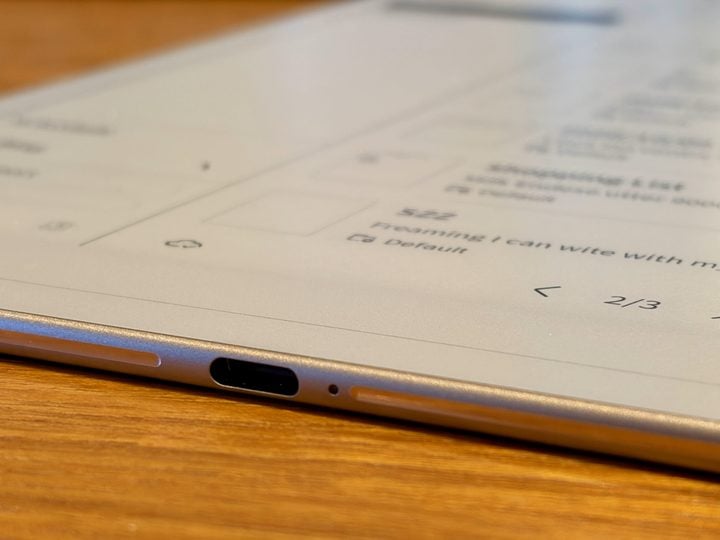
It’s so slender that it’s almost the stuff of science fiction, looking like the kind of digital slate that a Star Trek ensign would hand to the captain, listing the week’s duty roster.
“Slate” is perhaps the best term to describe it, harking back to the old slate chalkboards you might have used in primary school.
The Ainote 2’s 10.65-inch screen size sits between an A4 and A5 sheet of paper, with the same 3:4 aspect ratio (like an iPad) so it feels natural to hold and write on in portrait mode. The interface doesn’t auto-rotate when you turn it sideways, but you can manually switch to landscape mode.
The size is about the perfect compromise when it comes to ensuring it’s large enough to write on but still small enough to slip comfortably in your bag.
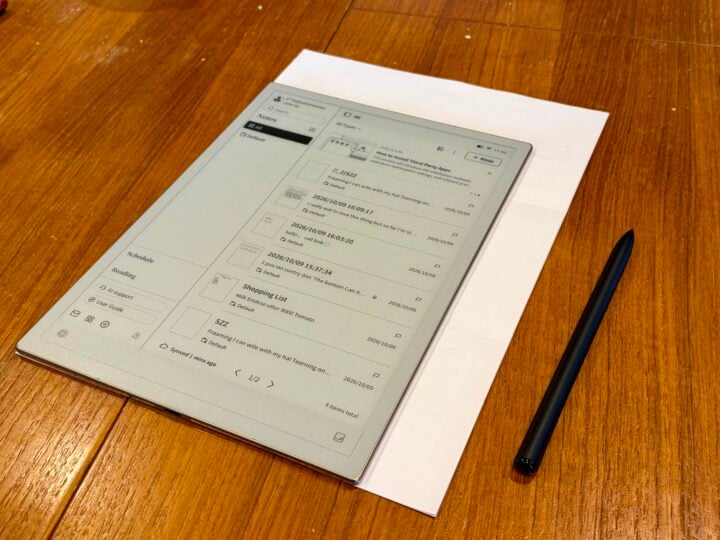
The slate comes with a Wacom EMR stylus supporting 4,096 pressure levels. There’s a programmable action button and eraser, but thankfully it never needs charging like a typical active stylus. Magnets allow the stylus to cling to the side of the slate when not in use.
Its minimalist design won’t turn heads, but that’s good. When you’re conducting an interview or sitting in a meeting, you don’t want to draw attention to your tech and distract the speaker. (Spoiler alert: Ainote 2 also records audio, which is less intimidating and distracting than placing a recorder on the table).
You’ve got a power button at the top right with a built-in fingerprint reader, plus the device is protected by a PIN. There’s also a programmable button at the top centre, along with a USB-C port at the bottom for charging.
Fire up the iFlytek Ainote 2, and it looks excellent, with the low-glare 300 PPI screen as sharp as a laser-printed page.
Similar to a smartphone, you can drag your finger down from the top right to call up the settings menu. Alternatively, you can drag down from the top centre to see notifications, or up from the bottom to see recently used apps.
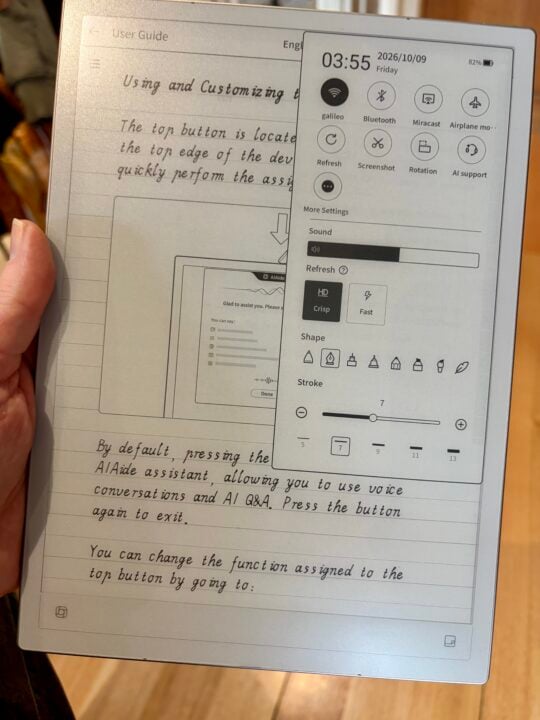
Like all e-Ink displays, it’s slower to respond than a tablet when you interact with the screen.
You get used to that slight lag, but the bigger frustration is that all the menus and apps also feel sluggish. It could do with a bit more grunt under the bonnet to help it feel more responsive. Don’t expect great performance if you install demanding Android apps.
Of course, a less power-hungry processor (and display) means it should go for about a week between charges if you use it a few hours each workday.
iFlytek Ainote 2 specifications and price
| Display size | 10.65 inches |
| Display resolution | 1920 × 2560 pixels, 300 PPI density |
| Display technology | Carta 1300 Mobius e-Ink, 16 shades of grey |
| Chipset | RK3576 Octa-core |
| RAM | 4GB |
| Onboard storage | 64GB |
| microSD slot | N/A |
| SIM | N/A |
| Charging | USB-C |
| Battery | 4000mAh |
| Wi-Fi | Wi-Fi 6 |
| Bluetooth | Bluetooth 5.4 |
| Operating system | iFlyTek NoteOS (based on Android 14) |
| Ruggedness | Not specified |
| Dimensions | 247x178x4.2mm |
| Weight | 295g |
| Price | $1,099 RRP |
| Warranty | 1 year |
| Official website | iFlytek |
Handwriting features
However you like to take notes, the iFlytek Ainote 2 has you covered. Of course, depending on how you’ll use it, it might not always be the best tool for the job.
The Ainote 2’s primary use is taking handwritten notes, with support for 83 languages. It can convert your handwriting into text so it’s easily searched, stored in folders and shared. There’s also an onscreen virtual keyboard, although it’s not a great typing experience.
The screen is large enough, and the stylus nib fine enough, that you can write a reasonable amount of text on the page and even sketch ideas. Thankfully, you can adjust the width of the strokes if you prefer to write with a fine pen.
The nib slides smoothly across the screen and, unlike some touchscreen technologies, the device doesn’t get upset if your hand is resting on the screen. Meanwhile, small rubber feet on the back ensure it doesn’t slide when it’s resting on the desk.
To help with productivity, you can select from a wide range of blank page templates. Along with straight lines and grids, there are schedules, to-dos, planners, reports, sheet music and even analytical templates such as SWOT and Fishbone.
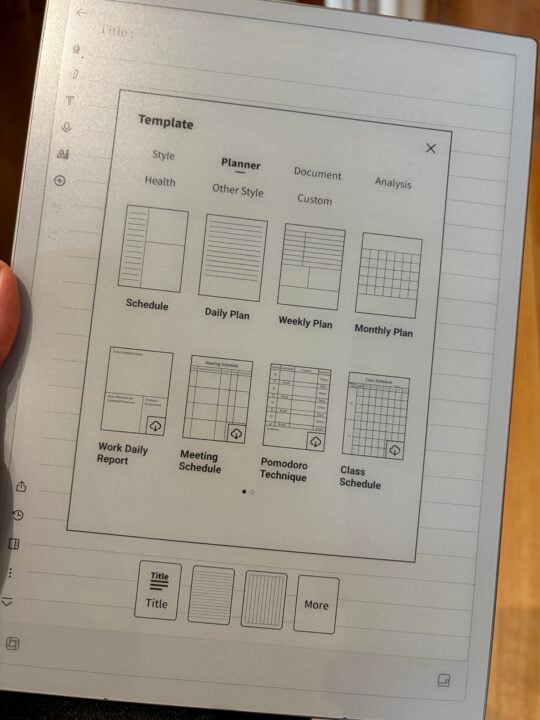
Once you’ve filled a page with notes, you can swipe up to reveal more paper or swipe left to start a new page. There’s also a Quick Bar strip across the bottom of the screen which supports gesture-based navigation and easy access to some features.
Your notes can be synced to a mobile app and your desktop, but it’s all done in the background via AWS. Thankfully, you can use the Google Play Store to sync it with OneDrive, with support for Google Drive and other options on the way.
That’s important; without access to your cloud of choice, it probably fragments your productivity ecosystem. It’s one reason to weigh up the iFlytek Ainote 2 against its more open rival, the reMarkable 2, or against a traditional tablet.
As a journalist, I see the iFlytek Ainote 2 primarily as a tool for rapidly taking notes during presentations and face-to-face interviews. Unfortunately, it doesn’t support shorthand formats like Pitman and Teeline (not that I ever managed to master them back when I was a cadet).
Your mileage will vary depending on how you’ll use Ainote 2 and the legibility of your handwriting. That’s where I run into trouble.
The faster I write, the worse my handwriting gets. That’s common, but I don’t just get messier; on a bad day I’m also more likely to skip or shuffle letters and make other mistakes (a fun quirk of my health issues). All of this makes it especially tough for the Ainote 2 to decipher my scrawl once I get up to speed, and it’s a shame you can’t train it over time.
If I slow down, my handwriting improves, as does the recognition accuracy. That’s fine if I’m simply jotting down my thoughts, although for me it’s slower than typing. That’s okay, because some people think better with a pen in their hand when they are brainstorming. Yet, I don’t want to slow down when I’m madly scribbling notes as someone speaks.
You can see below that the handwriting recognition handled my headline and first two paragraphs quite well, when I’m simply writing down ideas. Things get murky from here as I approach the speed at which I would be scribbling down notes in a live interview. It helps if I don’t use cursive writing, although this slows me down. The handwritten page actually says:
TEST
I can write with my hand leaning on the screen
I have terrible handwriting, big and messy, plus I skip letters and get them out of order
Even I have trouble deciphering it, which is why I need to go over it soon after
notes are usually scraps, not clear words and sentences
maybe better if I avoid cursive but that slows me down
useful point checkboxes and filling out formsdoesn’t does it auto sync? recognise if I go back to correct a word?
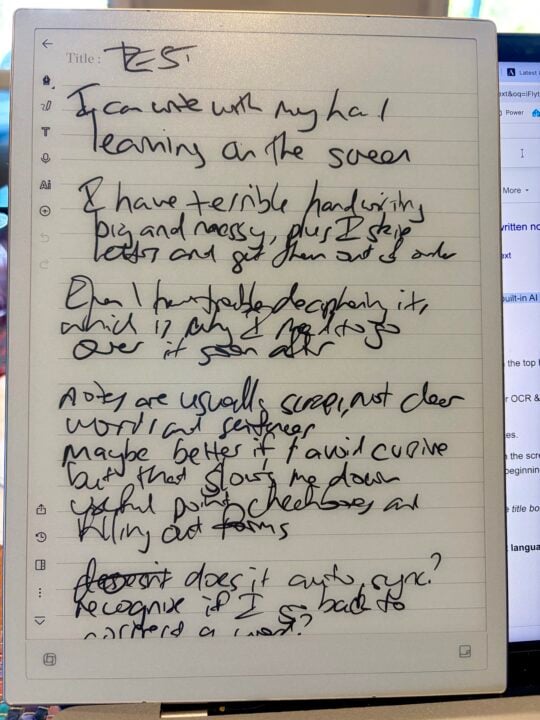
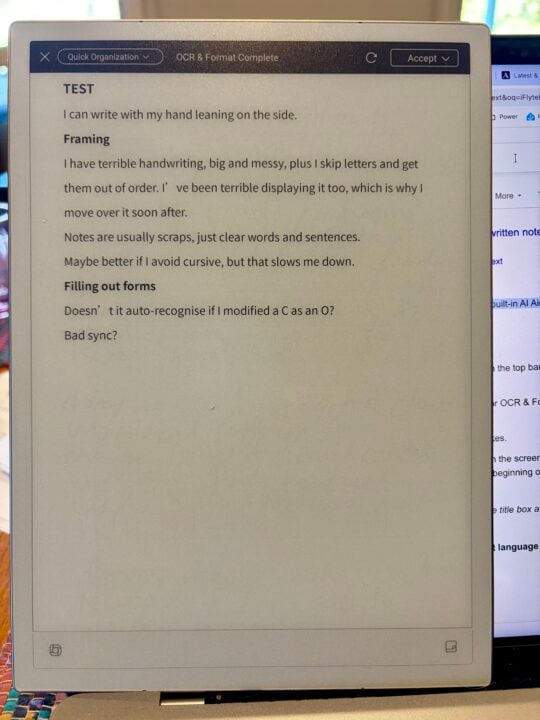
The iFlytek Ainote 2 understandably struggles with my scrawl, which gets worse when I write more quickly.
Other note-taking features
If handwriting recognition alone isn’t enough to seal the deal, the iFlytek Ainote 2 has a few other impressive tricks that might win you over. The downside is that the wider software support is quite clunky in places, not helped by the lack of grunt.
The Ainote 2 has a built-in web browser, plus you can access your email, calendar and to-do list. Realistically, it’s easier to perform these tasks on other devices.
Where the slate is especially useful is that you can dictate text rather than write with the stylus, with support for 17 spoken languages. Even better, it can record and transcribe audio as you take handwritten notes while someone else speaks.
The microphone quality is surprisingly good, and you still get a decent transcription if someone is across the room or speaking on a PA system. As with all speech-to-text tools, it works best when listening to one clear speaker after another, rather than a robust panel discussion full of interruptions.
If someone speaks slowly and clearly, it produces a very good transcription. It understandably struggles if they speed up and start to run their words together, but still copes surprisingly well. You can re-run the transcript afterwards to get more accurate results.
The slate lacks a built-in speaker, but if you connect Bluetooth headphones, you can listen back to a recording to check what was actually said. You can also click on your handwritten notes to hear that segment of the audio.
Along with a full transcription, you can generate a summary and list of meeting action items, alluding to the fact that the iFlytek Ainote 2 also supports onboard ChatGPT and Google Gemini Flash.
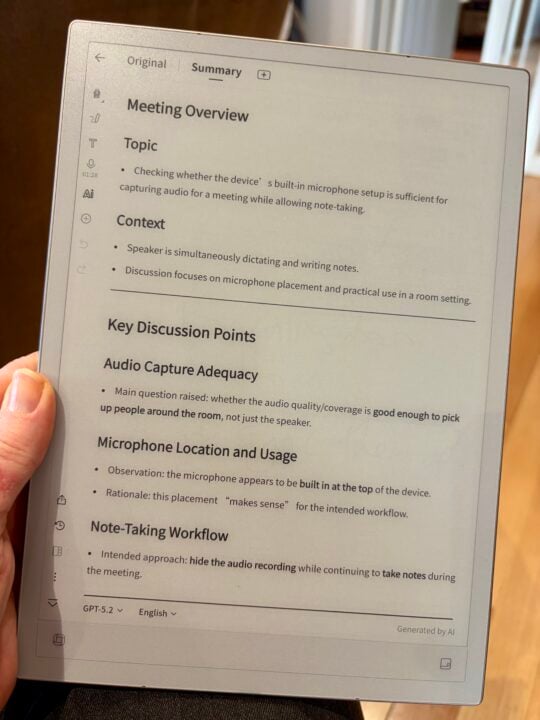
You can use ChatGPT-5.2 for free, but iFlytek’s Ainote Care+ subscription ($5.99 a month or $59.99 annually) offers more access to AI models along with offline voice transcription and unlimited notes sync.
ChatGPT is a welcome addition, considering that it has its place as a genuine productivity tool and not just a way to ask AI to write your homework. You can ask it questions about the note you’re working on and ask for summaries or new content based on the contents.
Unfortunately, interacting with ChatGPT via the Ainote 2 is clunky, not helped by the fact that its speech recognition isn’t as smooth and accurate as when it’s recording a meeting in a note. For me, it’s much easier to interact with ChatGPT on a computer, smartphone or tablet.
Another frustration is that ChatGPT can draw content from the note you’re currently using, but not from across your entire note library. It would be much more useful if it could draw on your entire body of knowledge stored in all your notes, similar to the way Gemini can draw together information from across Google Drive.
The workaround is to select multiple notes to aggregate when asking questions, but this still isn’t a true global search. Instead, you have to rely on a basic keyword search across your notes.
Who is the iFlytek Ainote 2 for?
If you’re looking for the best of both worlds – combining the ease and flexibility of handwritten notes with the productivity benefits of instant digitisation – then the iFlytek Ainote 2 is certainly tempting.
You need to consider where and how you’ll use it. Taking meeting notes and organising your thoughts are potentially great use cases, but recording lectures and jotting down a few points might be your killer app. Or perhaps reading on the move, or reviewing and annotating PDFs with handwritten notes. Alternatively, it would be great for short-form writing tasks like scheduling, to-do lists and completing forms. But certainly not for writing articles, blog posts or reports.
The limited integration with your cloud ecosystem of choice might hamper its usefulness, but might not be a deal-breaker.
Keep in mind, if you need to produce articles or reports based on your interview notes, you’ll write them on another device – so you need an easy way to get notes off the Ainote 2. It’s far too clunky for actual long-form writing work, even with the benefit of avoiding constant pop-ups and distractions like social media.
The other challenge is that the Ainote 2 takes time to master and is cumbersome in places. Combined with the potential challenge of recognising messy handwriting, $1,099 is a lot to spend (at least in my tax bracket) on something you hope will prove genuinely useful.
Keep in mind that the iPad Air starts at $1,249 and – with the right stylus, apps and ecosystem – solves a lot of these problems. Of course, in return, you miss out on the e-Ink display, extended battery life and lightweight design that make the iFlytek Ainote 2 such a tempting option for those of us who take copious notes every day.
The post iFlytek Ainote 2 review: Bringing note-taking into the 21st century appeared first on GadgetGuy.


0 comments:
Post a Comment